
Freak
Control.
Control your application state with a single line of code.
Freak is using pydantic to define the state, supports nested models, partial updates, data validation, and uses FastAPI to serve the state over HTTP.
Installation
pip install freak
Usage
Define a pydantic model and pass it to the control function.
from freak import control
from pydantic import BaseModel

class State(BaseModel):
    foo: str = "bar"

state = State()
control(state)
The state object will now be automatically served over HTTP (in a separate thread).
Freak generates /get/<field> and /set/<field> endpoints for each field in the model, as well as the following endpoints for the root state object:
/get(GET)/set(PATCH)/reset(DELETE)/get_from_path(GET) - which allows to get a value from the state using dot-notation (likemy.inner.field.)
The foo field can now be modified externally by sending a PUT request to the Freak server, which has been automatically started in the background:
curl -X PUT localhost:4444/set/foo?value=baz
"success"
At the same time, the state object cat be used in the program. Freak will always modify it in place. This can be helpful for long-running programs that need to be controlled externally, like:
- training a neural network
- running a bot
- etc.
Freak supports nested models and partial updates. Consider the following model:
from pydantic import BaseModel

class Bar(BaseModel):
    foo: str = "bar"
    baz: int = 0

class State(BaseModel):
    bar: Bar = Bar()
Freak will generate put endpoints for the foo and baz fields, and a patch endpoint for the bar field (as it's a pydantic model itself). This patch endpoint supports partial updates:
curl -X 'PATCH' \
  'http://localhost:4444/set/bar' \
  -H 'accept: application/json' \
  -H 'Content-Type: application/json' \
  -d '{"foo": "baz"}'
"success"
pydantic will guard the state from wrong types:
curl -X 'PATCH' \
  'http://localhost:4444/set/bar' \
  -H 'accept: application/json' \
  -H 'Content-Type: application/json' \
  -d '{"baz": "lol"}'

{"detail":[{"loc":["body","baz"],"msg":"value is not a valid integer","type":"type_error.integer"}]}
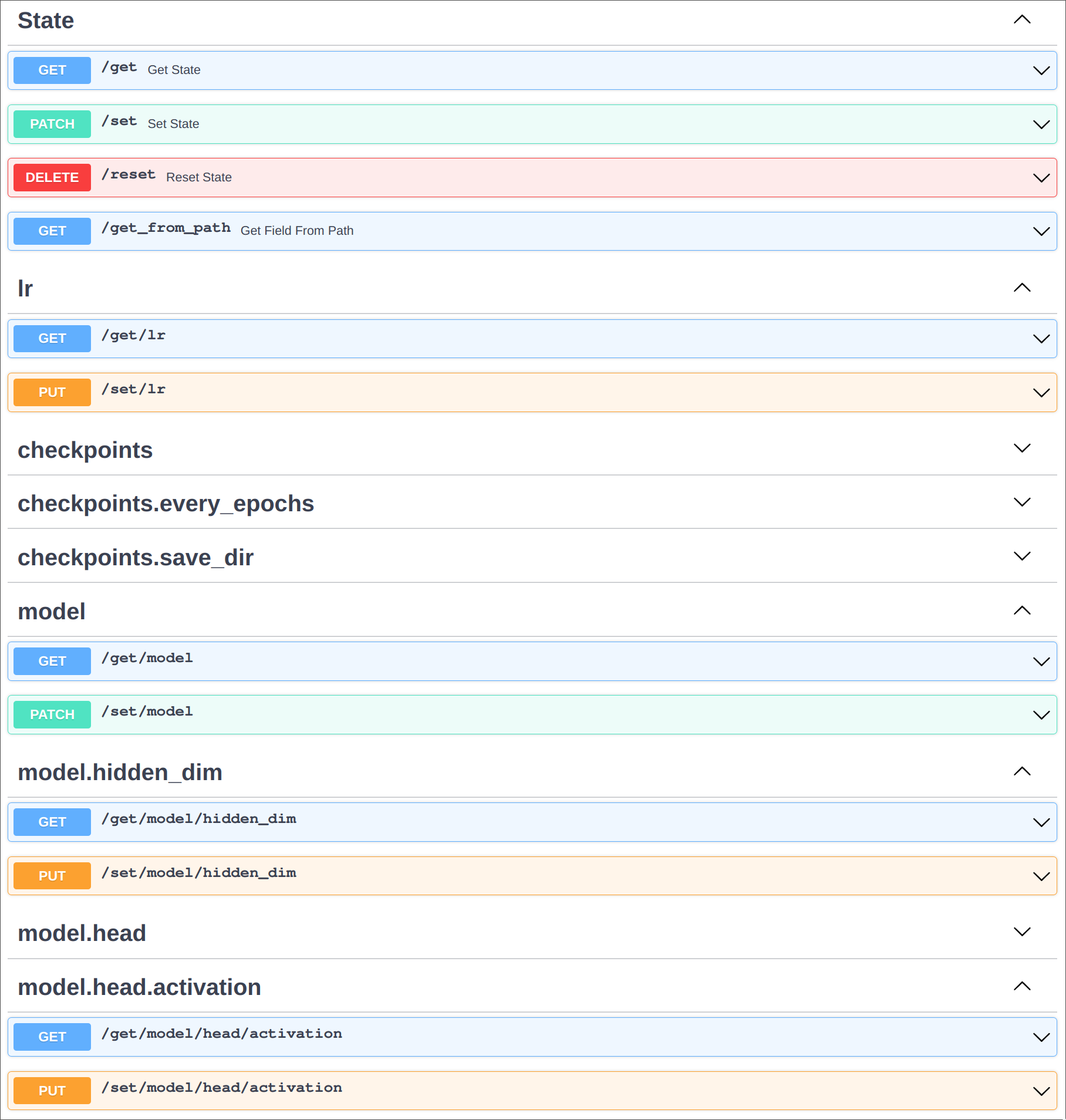
Because Freak is using FastAPI, it's possible to use auto-generated documentation to interact with the Freak server. The interactive documentation can be accessed at Freak's main endpoint, which by default is localhost:4444.
The following screenshot shows the generated endpoints for the ML example. Warning: making ML pipelines less reproducible isn't the brightest idea! But it's convenient to use Freak for stopping a training.
Passing your own FastAPI app as control(state, app=app) allows to use Freak in an existing project. The app can be also customized with other endpoints. One of the reasons for doing this might be adding more RPC-like functionality like calling a Python function from the Freak server explicitly.
Development
Installation
poetry install
poetry run pre-commit install
Testing
poetry run pytest
1 maintainer

Release files for freak 0.0.2
For a detailed explanation of source distributions (sdists) and built distributions (wheels), please see the package formats documentation.
Source distribution (sdist)
| File | Size | Uploaded | |
|---|---|---|---|
| freak-0.0.2.tar.gz | 6.6 kB | Details |
Built distribution (wheel)
| File | Interpreter | ABI | Platform | Reset |
|---|---|---|---|---|
| freak-0.0.2-py3-none-any.whl | Python 3 | none | any | Details |
Total release size: 13.7 kB
Release files / freak-0.0.2.tar.gz
| Download URL | freak-0.0.2.tar.gz |
|---|---|
| Size | 6.6 kB |
| Tags | Source |
|
SHA-256 checksum How to use checksums |
c613e4f8b20a8784db2f1aea77fcaed003f020c4d97db8854dafe0c4ce5c644f
|
|
BLAKE2b-256 checksum How to use checksums |
061f758a2df5691011fc5d889756c4c21eb41a928eee354264d877faa0f3fc3c
|
| Upload date | |
|
Uploaded using Trusted Publishing? What is trusted publishing? |
No |
| Uploaded via |
poetry/1.4.2 CPython/3.9.18 Linux/6.2.0-1015-azure
|
Release files / freak-0.0.2-py3-none-any.whl
| Download URL | freak-0.0.2-py3-none-any.whl |
|---|---|
| Size | 7.1 kB |
| Tags | Python 3 |
|
SHA-256 checksum How to use checksums |
59c6e7a36c787a3753316989df80eaec470ec1607e9ae62fe21f5f4255730075
|
|
BLAKE2b-256 checksum How to use checksums |
94c613e15ba685de2b22ac670611504261678190b6ee330f90e2e75fc05c5f77
|
| Upload date | |
|
Uploaded using Trusted Publishing? What is trusted publishing? |
No |
| Uploaded via |
poetry/1.4.2 CPython/3.9.18 Linux/6.2.0-1015-azure
|














