
Fresh, local-first benchmarks for OpenAI-compatible language models

Project description
FreshBench
Fresh, local-first benchmarks for local language models.
FreshBench evaluates OpenAI-compatible models with question sets that you create and refresh. Instead of depending only on old, widely circulated benchmarks, it is designed around private questions, deterministic code-based grading, and reproducible local runs.
The project is fully terminal-based: use the interactive TUI for day-to-day benchmarking or the CLI commands for scripts and CI.
FreshBench is currently alpha software. The result schema and question format are versioned, but may evolve before
1.0.
Why FreshBench?
Popular benchmark questions often circulate in public repositories, papers, model cards, and training corpora. A high score can therefore reflect memorization or contamination rather than the capability you intended to measure.
FreshBench takes a different approach:
- You own and regularly refresh the real benchmark questions.
- Private suites stay local and outside Git.
- Public examples document the format without exposing the real benchmark.
- Every answer is graded by deterministic Python code.
- Strict pass/fail is always the primary score.
- Results record suite fingerprints so incompatible runs cannot be compared accidentally.
- OpenAI-compatible Chat Completions makes local
llama-serverand proxy setups easy to use.
FreshBench deliberately excludes LLM-judge and human-judge evaluations for now. The current scope is machine-verifiable questions: exact values, structured output, code reasoning, constrained instructions, and tool calls.
Features
- Polished interactive terminal application built with Textual
- Multi-suite selection and first-N question limits per suite
- OpenAI-compatible Chat Completions client
- Local
llama-serverand llama-swaps compatibility - Streaming responses with automatic non-streaming fallback
- Separate reasoning/output capture when the endpoint provides
reasoning_content - Prompt, generated, reasoning, output, cache, latency, TTFT, stall, and throughput telemetry
- Deterministic graders for text, numbers, JSON, JSON Schema, and tool calls
- Strict scores plus transparent secondary partial scores
- Two transient retries with exponential backoff by default
- Configurable cooldown between requests to protect local model servers
- Incremental checkpoints and fingerprint-safe resume
- Per-question TUI drill-down for output, reasoning, tool calls, retries, and scoring details
- Local result history and compatible run comparisons
- Endpoint diagnostics for models, streaming, usage, timings, tokenization, and tool calling
- Public example questions packaged with the PyPI distribution
Requirements
- Python 3.11 or newer
- An OpenAI-compatible Chat Completions endpoint
uvfor the recommended install and development workflow
Installation
Install FreshBench as a global CLI from PyPI:
uv tool install freshbench
Upgrade an existing installation:
uv tool upgrade freshbench
Run it temporarily without installing:
uvx freshbench --help
For local development:
git clone https://github.com/DogukanUrker/FreshBench.git
cd FreshBench
uv sync
uv run freshbench --help
Quick start
Create local directories for private suites and results:
freshbench init
Configure your endpoint with environment variables or a repository-local .env file:
FRESHBENCH_BASE_URL=http://localhost:8080/v1
FRESHBENCH_MODEL=local-model
FRESHBENCH_API_KEY=
Check the endpoint before running a benchmark:
freshbench doctor
Launch the TUI:
freshbench
If no private suites exist, FreshBench loads the packaged public examples so a first run works immediately.
Local llama-server example
Start your server however you normally run it, then point FreshBench at its OpenAI-compatible base URL:
export FRESHBENCH_BASE_URL=http://localhost:8080/v1
export FRESHBENCH_MODEL=/models/my-model.gguf
freshbench doctor
freshbench
The model value is sent as-is. Use the alias, path, or model identifier expected by your server or proxy.
TUI guide
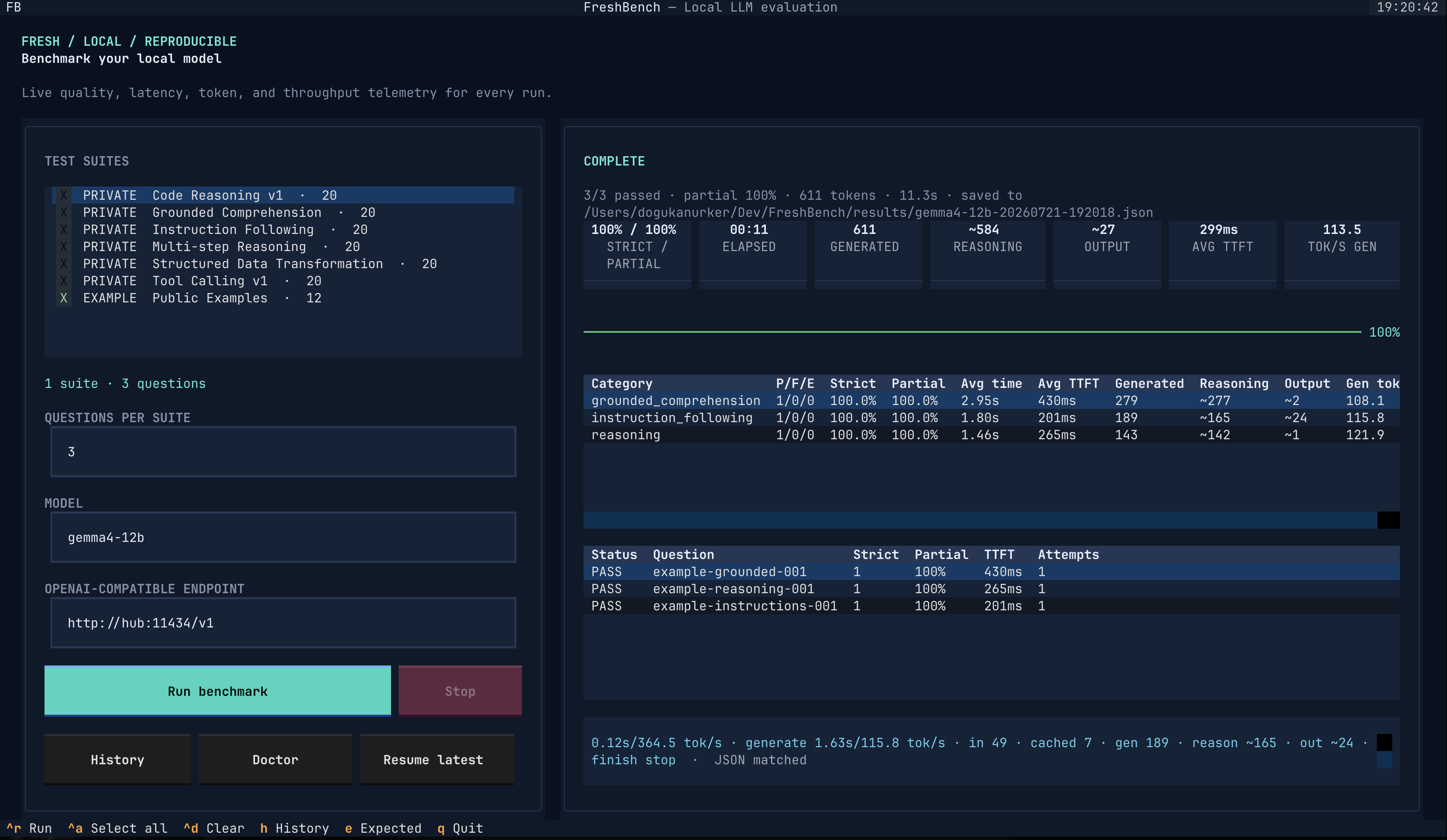
The left side controls benchmark scope:
- Select one or more public or private suites.
- Leave Questions per suite empty to run every question.
- Enter
10to run the first ten questions from every selected suite. - Configure the model and endpoint without leaving the app.
The right side reports:
- Strict and partial scores
- Elapsed time and generated tokens
- Reasoning and visible-output token estimates
- Average time to first token and generation throughput
- Per-category pass/fail/error totals
- Per-question score, TTFT, and retry attempts
- Response reasoning, visible output, tool calls, scoring components, and errors
Select a completed question to open its drill-down. Expected answers are private by default and
only appear after you explicitly press e.
The utility buttons provide:
- History: browse saved runs and compare compatible results
- Doctor: inspect endpoint capabilities
- Resume latest: continue the newest compatible incomplete checkpoint
Keyboard shortcuts
| Shortcut | Action |
|---|---|
Ctrl+R |
Run the selected benchmark |
Ctrl+A |
Select all suites |
Ctrl+D |
Clear suite selection |
h |
Open result history |
e |
Reveal or hide the selected question's expected grader |
q |
Quit |
CLI reference
| Command | Purpose |
|---|---|
freshbench |
Launch the TUI |
freshbench tui |
Launch the TUI explicitly |
freshbench init [ROOT] |
Create benchmarks/private/ and results/ |
freshbench list |
List discovered suites and fingerprints |
freshbench validate [SUITES]... |
Validate suite YAML without running it |
freshbench run [SUITES]... |
Run a benchmark from the command line |
freshbench doctor |
Probe the configured endpoint |
freshbench config show |
Show resolved environment configuration |
freshbench results list |
List local result files |
freshbench results show RESULT |
Print one saved result |
freshbench results compare LEFT RIGHT |
Compare compatible runs |
freshbench --version |
Print the installed version |
Use freshbench COMMAND --help for the complete option list.
Common run examples
Run discovered private suites:
freshbench run --private-only
Include public examples too:
freshbench run --include-examples
Run explicit suite files:
freshbench run \
  benchmarks/private/reasoning.yaml \
  benchmarks/private/tool-calling.yaml
Run the first ten questions from each selected suite:
freshbench run --private-only --questions 10
Override endpoint configuration:
freshbench run \
  benchmarks/examples/example.yaml \
  --base-url http://localhost:8080/v1 \
  --model local-model
Disable streaming or change recovery behavior:
freshbench run \
  --no-stream \
  --retries 3 \
  --retry-backoff 2 \
  --delay 4
Write the final result to a specific location:
freshbench run --output results/experiment-a.json
Configuration
FreshBench loads a local .env file automatically. Explicit CLI flags override environment
variables.
| Variable | Default | Description |
|---|---|---|
FRESHBENCH_BASE_URL |
http://localhost:8080/v1 |
OpenAI-compatible API base URL |
FRESHBENCH_MODEL |
local-model |
Model identifier sent to the endpoint |
FRESHBENCH_API_KEY |
unset | Optional bearer token |
The API key is never required for an unauthenticated local server.
Execution defaults
| Setting | Default | CLI option |
|---|---|---|
| Temperature | 0 |
--temperature |
| Concurrency | 1 |
--concurrency |
| Cooldown after a question | 2.5s |
--delay |
| Transient retries | 2 |
--retries |
| Initial retry backoff | 1s |
--retry-backoff |
| Streaming | enabled | --stream / --no-stream |
| Output-token limit | none | --max-tokens |
| Request timeout | none | --timeout |
FreshBench intentionally does not cap benchmark output length or request duration by default. The
model decides when it has finished. --max-tokens and --timeout are available when a controlled
experiment needs explicit limits. The short requests used by freshbench doctor are bounded so a
broken diagnostic cannot generate indefinitely.
Suite discovery
FreshBench looks for suites in two locations relative to the current project:
benchmarks/
├── examples/   # public, illustrative, committed to Git
└── private/    # real benchmark material, ignored by Git
Discovery follows these rules:
- When private suites do not exist, use public examples.
- When private suites exist, use them by default.
- When both exist in an interactive CLI session, ask whether to include examples.
- In a non-interactive session, require
--include-examplesor--private-onlywhen both exist. - Explicit suite paths bypass discovery.
The TUI shows both kinds of suites and selects private suites by default when they are present.
Writing benchmark questions
Suites are YAML files with a schema version, a stable name, and one or more questions:
schema_version: "1"
name: Private Reasoning v1
description: Fresh deterministic reasoning tasks.
questions:
  - id: reasoning-001
    category: reasoning
    messages:
      - role: system
        content: Return only the requested value.
      - role: user
        content: A fictional archive contains 9 trays with 7 cards each. Four cards are removed. How many remain?
    grader:
      type: numeric
      expected: 59
Question IDs must be unique across every suite selected in a single run. IDs must begin with a lowercase letter or digit and may contain lowercase letters, digits, dots, underscores, and hyphens. Categories are free-form strings, although using a stable category vocabulary makes history easier to read.
Questions support:
messages: OpenAI-stylesystem,user, andassistantmessagesgrader: one deterministic grader definitiontags: optional metadata such ashard,extreme, orconstraint_satisfactiontools: optional OpenAI function definitionstool_choice: optional OpenAI-compatible tool-choice value
The public benchmarks/examples/example.yaml suite contains
easy, hard, and extreme examples across all current categories.
Structured-output example
- id: transform-001
  category: structured_data
  messages:
    - role: user
      content: |
        Sort these records by integer id and return only a JSON array:
        beta | 8
        alpha | 3
  grader:
    type: json
    expected:
      - name: alpha
        id: 3
      - name: beta
        id: 8
JSON grading compares decoded values, not whitespace or object-key order.
Tool-calling example
- id: tool-001
  category: tool_calling
  messages:
    - role: user
      content: Find the temperature in Izmir in Celsius using the available tool.
  tools:
    - type: function
      function:
        name: get_temperature
        description: Get the current temperature for a city.
        parameters:
          type: object
          properties:
            city:
              type: string
            unit:
              type: string
              enum: [celsius, fahrenheit]
          required: [city, unit]
          additionalProperties: false
  grader:
    type: tool_calls
    expected:
      - name: get_temperature
        arguments:
          city: Izmir
          unit: celsius
    ordered: true
    allow_additional: false
FreshBench validates and grades tool calls but never executes them. This keeps benchmark runs deterministic and prevents model output from causing external side effects.
Graders
| Type | Validation | Important options |
|---|---|---|
exact |
Normalized text equality | expected, case_sensitive, strip |
one_of |
Equality with any accepted answer | expected, case_sensitive, strip |
contains_all |
Every required substring is present | expected, case_sensitive |
regex |
Python regular-expression match | pattern, flags |
numeric |
Numeric equality within tolerance | expected, tolerance |
json |
Decoded JSON value equality | expected |
json_schema |
JSON Schema validation | schema |
tool_calls |
Function names and decoded arguments | expected, ordered, allow_additional |
Supported regex flags are IGNORECASE, MULTILINE, and DOTALL. Suite loading validates regular
expressions, JSON Schemas, tool parameter schemas, and all question fields before a run begins.
Scoring
Strict pass/fail is the benchmark score. A response either satisfies its grader or it does not. Request and response errors are reported separately.
Some graders also expose deterministic partial credit as a secondary diagnostic:
contains_all: fraction of required values foundjson: recursive comparison of object keys and list positionstool_calls: 40% function-name match and 60% argument-structure match
Exact, accepted-answer, regex, numeric, and JSON Schema graders remain binary. Partial credit never changes a strict failure into a pass.
FreshBench does not use semantic similarity, an LLM judge, or hidden heuristic prompts.
Streaming and telemetry
FreshBench requests streaming Chat Completions by default and reconstructs:
- Visible
content - Separate
reasoning_contentorreasoningfields - Fragmented tool-call names and JSON arguments
- Finish reason
- Final usage and llama.cpp timing blocks
If streaming is rejected or interrupted, FreshBench automatically attempts the same question as a regular non-streaming request. When both requests fail with a transient transport or server error, the benchmark retry policy takes over.
Depending on endpoint support, results can include:
- Prompt and generated token counts
- Cached prompt tokens
- Reasoning and visible-output token split
- Prompt-processing and generation time
- Prompt and generation throughput
- Time to first generated token
- Maximum gap between meaningful stream chunks
- Stream chunk count
- End-to-end request latency
- Finish reason and system fingerprint
GENERATED is the server's total completion-token count. For reasoning models, that total may
include both hidden/separate reasoning and visible output.
When the endpoint exposes a native reasoning-token count, FreshBench uses it. Otherwise it tries
the llama.cpp /tokenize endpoint for the visible output. If no tokenizer route is available, it
estimates the split and marks reasoning/output values with ~. The total generated count remains
the server-provided value.
Retries, checkpoints, and resume
FreshBench treats connection failures, timeouts, HTTP 408, 409, 429, and 5xx responses as
transient. By default it retries twice with delays of one and two seconds. Other 4xx responses are
recorded without retrying.
After every completed question, the runner saves an incremental file beside the final output:
results/local-model-20260721-190000.partial.json
Resume it explicitly from the CLI:
freshbench run --resume results/local-model-20260721-190000.partial.json
Or choose Resume latest in the TUI. Completed questions are not sent again.
A resume is accepted only when the checkpoint configuration, suite names, suite fingerprints, and question counts match. This prevents an interrupted run from being silently combined with changed questions or different generation settings. The partial file is removed after the final result is saved successfully.
Results and comparisons
Completed runs are saved under results/ by default:
results/<model>-<timestamp>.json
Each result contains:
- FreshBench and result-schema versions
- Start/completion timestamps and completion status
- Endpoint and generation configuration
- Suite names, question counts, and content fingerprints
- Per-question grades, responses, telemetry, retry errors, and attempt counts
Results deliberately exclude question prompts and expected answers. They do retain model output, tool calls, and any separate reasoning content returned by the endpoint.
Inspect and compare them with:
freshbench results list
freshbench results show results/model-a.json
freshbench results compare results/model-a.json results/model-b.json
Comparisons require matching suite fingerprints and question counts. They report category and overall strict/partial scores plus average wall time, TTFT, and generation throughput.
Endpoint diagnostics
Run:
freshbench doctor
The diagnostic checks:
GET /v1/models- Optional llama.cpp tokenization support
- Chat Completions connectivity
- Streaming and time to first token
- Final token usage
- Separate reasoning fields
- Native server timing data
- Structured tool-call output
Model discovery, tokenization, reasoning fields, and native timings are optional capabilities and may appear as warnings. A failed Chat Completions request makes the diagnostic fail.
Benchmark categories
The current suites focus on:
- Grounded comprehension: apply rules using only supplied fictional context
- Multi-step reasoning: arithmetic, scheduling, constraints, paths, and state changes
- Instruction following: formatting, ordering, filtering, and negative constraints
- Structured data transformation: parse, normalize, group, aggregate, and serialize
- Code reasoning: predict program behavior without executing generated code
- Tool calling: choose functions, construct arguments, preserve order, and avoid extra calls
A useful suite should contain a difficulty range. Easy questions verify basic compliance, hard questions expose common mistakes, and extreme questions separate stronger models without making the whole benchmark inaccessible to small local models.
Keeping benchmark questions private
In this repository, these paths are excluded through .gitignore:
/.env
/benchmarks/private/
/results/
If you use the installed FreshBench package from a different repository, add the same rules to
that repository's .gitignore; freshbench init creates directories but does not modify an
existing ignore file.
Recommended precautions:
- Never force-add
benchmarks/private/orresults/. - Do not paste real questions into public issues, pull requests, screenshots, or CI logs.
- Treat result files as sensitive because outputs and reasoning can reveal question details.
- Commit only synthetic examples created specifically to explain the format.
- Rotate and replace questions regularly rather than growing one permanent static set forever.
- Review Git history before publishing a repository that previously contained private suites.
Suite fingerprints are comparison identifiers, not encryption or access control.
Project architecture
FreshBench/
├── benchmarks/
│   ├── examples/          # public format examples
│   └── private/           # ignored real benchmark suites
├── docs/assets/           # README media
├── results/               # ignored run artifacts and checkpoints
├── src/freshbench/
│   ├── cli.py             # Typer CLI and command orchestration
│   ├── client.py          # OpenAI-compatible HTTP and SSE client
│   ├── diagnostics.py     # endpoint capability probes
│   ├── graders.py         # deterministic scoring
│   ├── models.py          # versioned Pydantic data models
│   ├── reporting.py       # Rich result and comparison output
│   ├── results.py         # result persistence and summaries
│   ├── runner.py          # execution, retry, checkpoint, and resume logic
│   ├── suites.py          # discovery, validation, limits, and fingerprints
│   ├── tui.py             # Textual application
│   └── freshbench.tcss    # terminal UI styling
├── tests/
├── pyproject.toml
└── uv.lock
The architecture intentionally keeps transport, execution, grading, persistence, and presentation separate. Adding another API provider later should not require rewriting suite parsing or graders.
Development
Install all development dependencies:
uv sync
Run the application from the repository:
uv run freshbench
Run validation:
uv run ruff check src tests
uv run mypy src
uv run pytest
Build PyPI artifacts:
uv build
The wheel packages the public example suite as freshbench/examples/example.yaml. Private suites
and local results are not included.
Contributing
Contributions should keep FreshBench small, deterministic, and understandable.
Good contributions include:
- OpenAI-compatible endpoint fixes
- New deterministic graders with clearly documented behavior
- TUI usability and accessibility improvements
- Resilience and telemetry improvements
- Synthetic public examples that teach the suite format
- Tests and documentation
Before opening a pull request:
uv run ruff check src tests
uv run mypy src
uv run pytest
uv build
Do not submit real private benchmark questions. Public examples should be newly written, illustrative, and safe to expose permanently.
License
FreshBench is available under the Apache License 2.0.
Release history Release notifications | RSS feed

Download files
Download the file for your platform. If you're not sure which to choose, learn more about installing packages.
Source Distribution
Built Distribution
Filter files by name, interpreter, ABI, and platform.
If you're not sure about the file name format, learn more about wheel file names.
Copy a direct link to the current filters
File details
Details for the file freshbench-0.1.0.tar.gz.
File metadata
- Download URL: freshbench-0.1.0.tar.gz
- Upload date:
- Size: 512.8 kB
- Tags: Source
- Uploaded using Trusted Publishing? No
- Uploaded via: uv/0.11.19 {"installer":{"name":"uv","version":"0.11.19","subcommand":["publish"]},"python":null,"implementation":{"name":null,"version":null},"distro":{"name":"macOS","version":null,"id":null,"libc":null},"system":{"name":null,"release":null},"cpu":null,"openssl_version":null,"setuptools_version":null,"rustc_version":null,"ci":null}
File hashes
| Algorithm | Hash digest | |
|---|---|---|
| SHA256 |
174d56104c6bb21eabe0b7985c510e61ea5547cc3695048f681a14ccefd75569
|
|
| MD5 |
fe9abdc1e61e00111915098f502c7d3e
|
|
| BLAKE2b-256 |
a6f07eaa73ddeca99bfb7139feb3da80452450124d525f0f131bce1f283ffa59
|
File details
Details for the file freshbench-0.1.0-py3-none-any.whl.
File metadata
- Download URL: freshbench-0.1.0-py3-none-any.whl
- Upload date:
- Size: 47.4 kB
- Tags: Python 3
- Uploaded using Trusted Publishing? No
- Uploaded via: uv/0.11.19 {"installer":{"name":"uv","version":"0.11.19","subcommand":["publish"]},"python":null,"implementation":{"name":null,"version":null},"distro":{"name":"macOS","version":null,"id":null,"libc":null},"system":{"name":null,"release":null},"cpu":null,"openssl_version":null,"setuptools_version":null,"rustc_version":null,"ci":null}
File hashes
| Algorithm | Hash digest | |
|---|---|---|
| SHA256 |
d6f33c0e6057423a5f595919f6e72956bb1866e38ef2e9a9bc670f6ef4b3b592
|
|
| MD5 |
ed4de0186d14f01828cfccd249de79d8
|
|
| BLAKE2b-256 |
0c5beef2794f4edcc8532fbc66fa4697dcc3f84ca88debd27618708ef9d50c65
|






