
fretty-book can replace inline fretty markup within documents with the generated images

Project description
fretty-book
fretty-book can replace inline fretty markup within documents with the generated images.
Installation
pip install fretty-book
Usage
fretty-book example/simple.html -o simple.html
Supported formats
fretty-book can process HTML, XHTML, Markdown, and Org-mode documents. The format is detected automatically from the file extension (.html, .htm, .xhtml, .md, .org) or can be set explicitly with the -p option.
Markup
All fretty blocks support the following attributes:
| Attribute | Description | Default |
|---|---|---|
width |
Image width in pixels | auto |
height |
Image height in pixels | auto |
drawing_color |
Color of strings, frets, and dots | black |
label_color |
Color of finger-position labels | white |
HTML
<!DOCTYPE html>
<html>
    <body>
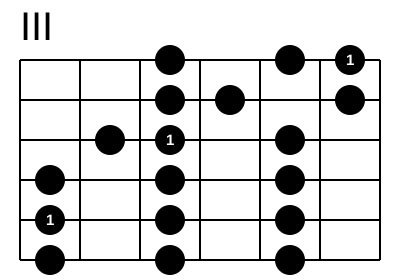
        <h3>C major scale</h3>
        <fretty width="400" drawing_color="blue" label_color="red">
            III
            --o-o1
            --oo-o
            -o1-o-
            o-o-o-
            1-o-o-
            o-o-o-
        </fretty>
    </body>
</html>
XHTML
Same as HTML but using a .xhtml file extension. The document must be well-formed XML.
Markdown
Use a fenced code block with the fretty language tag. Attributes are written as key=value pairs on the opening fence line:
## C major scale

```fretty width=400 drawing_color=blue label_color=red
III
--o-o1
--oo-o
-o1-o-
o-o-o-
1-o-o-
o-o-o-
```
Org-mode
Use a #+begin_src fretty source block. Attributes follow standard Org header-arg syntax (:key value):
* C major scale

#+begin_src fretty :width 400 :drawing_color blue :label_color red
III
--o-o1
--oo-o
-o1-o-
o-o-o-
1-o-o-
o-o-o-
#+end_src
Options
fretty-book [options] input_file
| Option | Description |
|---|---|
-o FILE |
Write output to FILE instead of stdout |
--png |
Save images as PNG files instead of SVG |
-e, --embed-svg |
Embed SVG directly into the document (HTML and XHTML only) |
-p TYPE |
Force processor: html, xhtml, markdown, org, or auto (default) |
-V |
Verbose output |
Result
For each fretty block, fretty-book produces:
- An external image file (
fretty-0.svg,fretty-1.svg, …) written next to the output file, with the block replaced by an image reference - Or, with
--embed-svg(HTML/XHTML only), the SVG is inlined directly into the document
The generated image for the C major scale example above:
Release history Release notifications | RSS feed


Download files
Download the file for your platform. If you're not sure which to choose, learn more about installing packages.
Source Distributions
Built Distribution
Filter files by name, interpreter, ABI, and platform.
If you're not sure about the file name format, learn more about wheel file names.
Copy a direct link to the current filters
File details
Details for the file fretty_book-0.3-py3-none-any.whl.
File metadata
- Download URL: fretty_book-0.3-py3-none-any.whl
- Upload date:
- Size: 9.4 kB
- Tags: Python 3
- Uploaded using Trusted Publishing? No
- Uploaded via: twine/6.2.0 CPython/3.12.13
File hashes
| Algorithm | Hash digest | |
|---|---|---|
| SHA256 |
15be82565a89a7ab1423f33b20f9fdd363589b5b262816adfb5d7e0f1e4a3ae1
|
|
| MD5 |
299a4a69f784f0d70c695bd11feb2ea7
|
|
| BLAKE2b-256 |
68ab9aa23bde83b3e9e455ab4ef013a7f3c19b5e9e3750e22637f9f918f7e763
|






