
Interact with Frida devices, processes, and scripts directly from your browser.

Project description
frida-ui
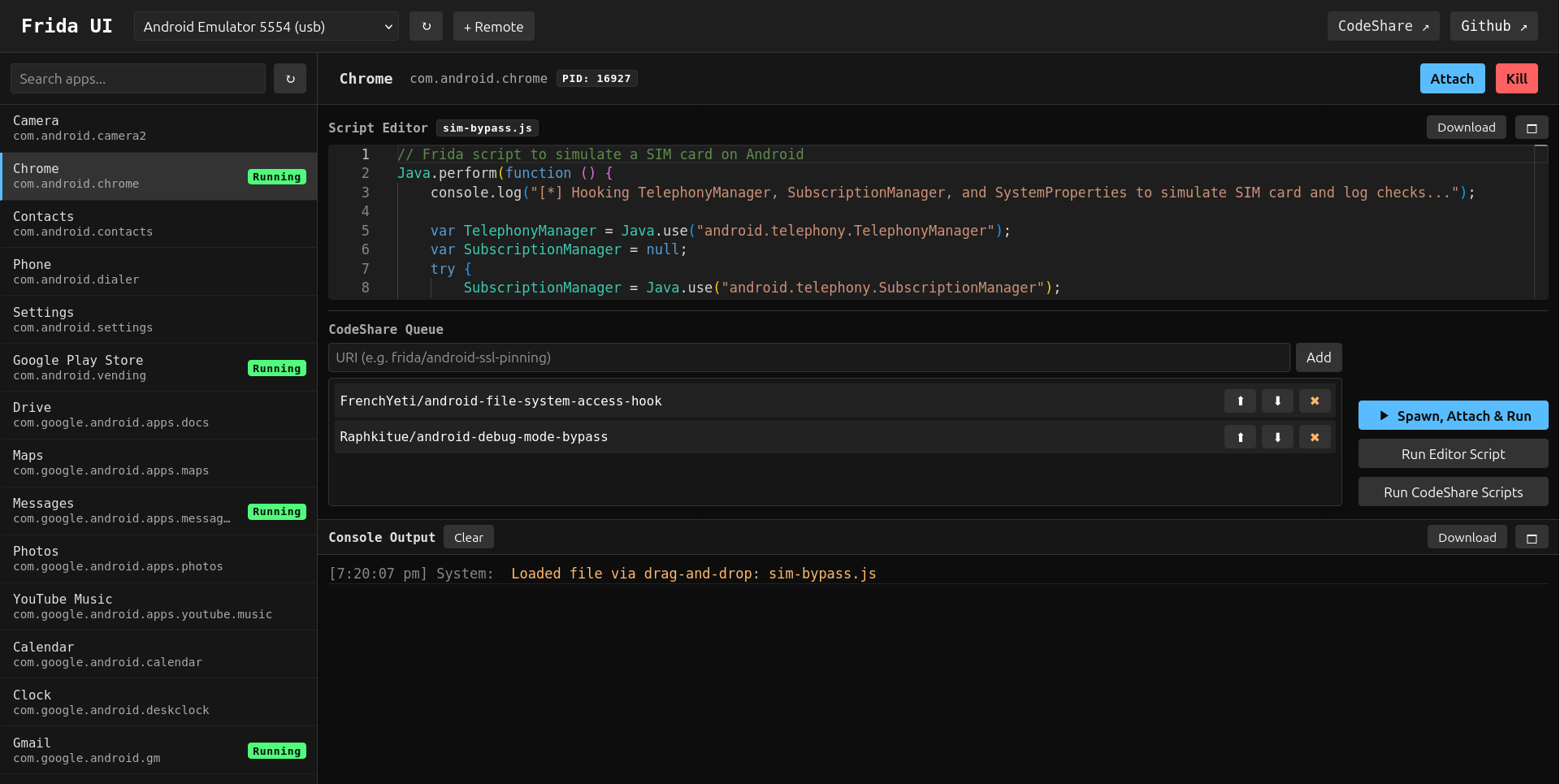
A modern, web-based user interface for Frida, allowing you to interact with devices, processes, and scripts directly from your browser.
Features
📱 Device Management
- Auto-discovery: Automatically detects connected USB and local devices.
- Remote Devices: Easily add and manage remote Frida servers (e.g.,
192.168.1.x:27042). - Device Info: View detailed system parameters (OS, Arch, API Level) for selected devices.
🚀 Process & App Control
- Application List: View installed applications and running processes.
- Search: Real-time filtering of applications by name or identifier.
- Session Management:
- Attach: Connect to running processes.
- Spawn: Launch installed applications.
- Spawn & Run: Launch an app and immediately inject a script (early instrumentation).
- Kill/Detach: Terminate processes or gracefully disconnect.
💻 Scripting & Instrumentation
- Script Editor: Built-in editor for writing Frida scripts.
- File Loading: Load scripts from local files or drag-and-drop
.jsfiles into the editor. - CodeShare Integration:
- Import scripts directly from Frida CodeShare.
- Create a "Queue" of CodeShare scripts to inject sequentially.
📊 Console & Logging
- Real-time Output: View
console.log,send(), and error messages from your scripts. - Log History: Persistent logs per application session.
- Export: Download console logs as
.txtfiles for analysis.
🎨 UI/UX
- Dark Theme: Clean, consistent dark mode interface.
- Persistence: Remembers your selected device, application, and window sizes.
- Responsive: Adjustable panes for sidebar, editor, and console.
Quick Start
Prerequisites
- Python 3.7+
- uv (recommended)
Installation
- Clone the repository:
git clone https://github.com/adityatelange/frida-ui.git
cd frida-ui
- Install frida-ui using uv:
uv tool install .
To customize the Frida version used by frida-ui, pass the desired version to uv when installing. For example:
uv tool install . --with frida==16.7.19
Running
Start the server:
frida-ui
Or with custom options:
frida-ui --host 127.0.0.1 --port 8000 --reload
--host: Specify the host (default: 127.0.0.1)--port: Specify the port (default: 8000)--reload: Enable auto-reload for development
Open http://localhost:8000 in your browser.
Usage Guide
- Select a Device: Choose a device from the dropdown in the top header.
- Select an App: Click on an application in the sidebar.
- Write/Load Script:
- Type JS in the editor.
- Or drag & drop a file.
- Or add scripts URL from CodeShare.
- Action:
- Click Attach to inject into a running process.
- Click Spawn to start the app.
- Click Spawn & Run to start the app with your script injected immediately.
- Monitor: Watch the console for output.
Security Warning
[!NOTE] This tool allows executing arbitrary JavaScript in target processes. Only expose frida-ui to trusted networks and users. Executing untrusted scripts can compromise your system and data. The web server runs locally by default but exposes powerful instrumentation capabilities.
Release history Release notifications | RSS feed


Download files
Download the file for your platform. If you're not sure which to choose, learn more about installing packages.
Source Distribution
Built Distribution
Filter files by name, interpreter, ABI, and platform.
If you're not sure about the file name format, learn more about wheel file names.
Copy a direct link to the current filters
File details
Details for the file frida_ui-1.0.0.tar.gz.
File metadata
- Download URL: frida_ui-1.0.0.tar.gz
- Upload date:
- Size: 26.2 kB
- Tags: Source
- Uploaded using Trusted Publishing? No
- Uploaded via: twine/6.2.0 CPython/3.9.22
File hashes
| Algorithm | Hash digest | |
|---|---|---|
| SHA256 |
f2ecf7ebcce0ef2996d98adbe1cc91b6651972033022915318f3daa285a08fa3
|
|
| MD5 |
cb309b61b43bf154f86e0d2263928fa3
|
|
| BLAKE2b-256 |
37fbe01aba439036c922f54d71a32e823ff26be51b8d5de7b2de50e1b8b5f1a5
|
File details
Details for the file frida_ui-1.0.0-py3-none-any.whl.
File metadata
- Download URL: frida_ui-1.0.0-py3-none-any.whl
- Upload date:
- Size: 26.5 kB
- Tags: Python 3
- Uploaded using Trusted Publishing? No
- Uploaded via: twine/6.2.0 CPython/3.9.22
File hashes
| Algorithm | Hash digest | |
|---|---|---|
| SHA256 |
fe6b7aa42ed44ac8f54f4476986df0d48de75e2bb3b08aa11a1cad2e2b4db577
|
|
| MD5 |
38a9cfa6ff9a97dea1162ccdd90ab34b
|
|
| BLAKE2b-256 |
e4cb40a7ce8b7e205790b6e33cb3739619a4e368dc6a3b4a84b256cc73bc8f75
|






