
Generate Frida scripts directly from IDA Pro, Binary Ninja, and Ghidra. ⚡










📸 Examples
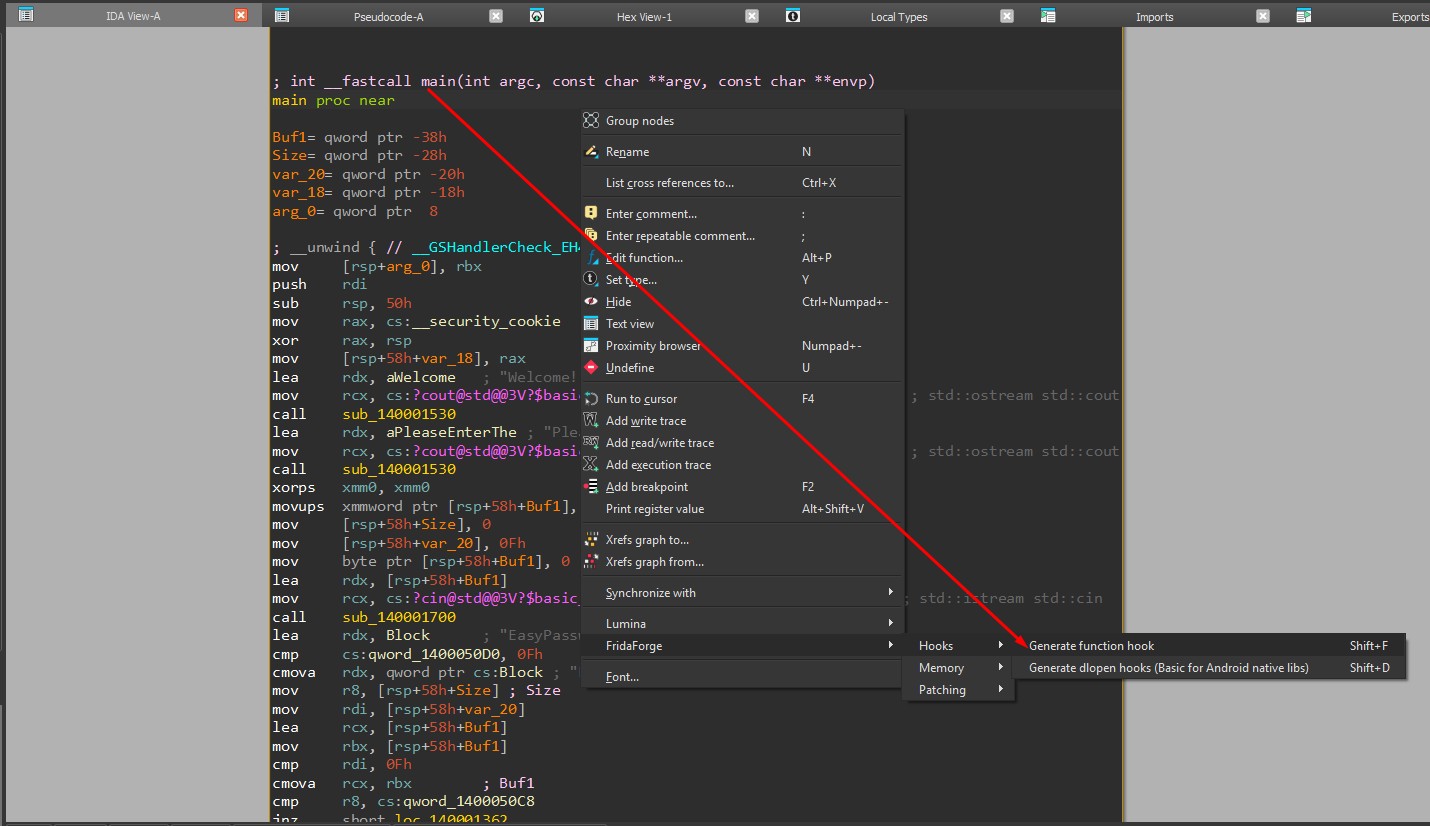
Generate a function hook — right-click in the disassembly/pseudocode view and pick an action:
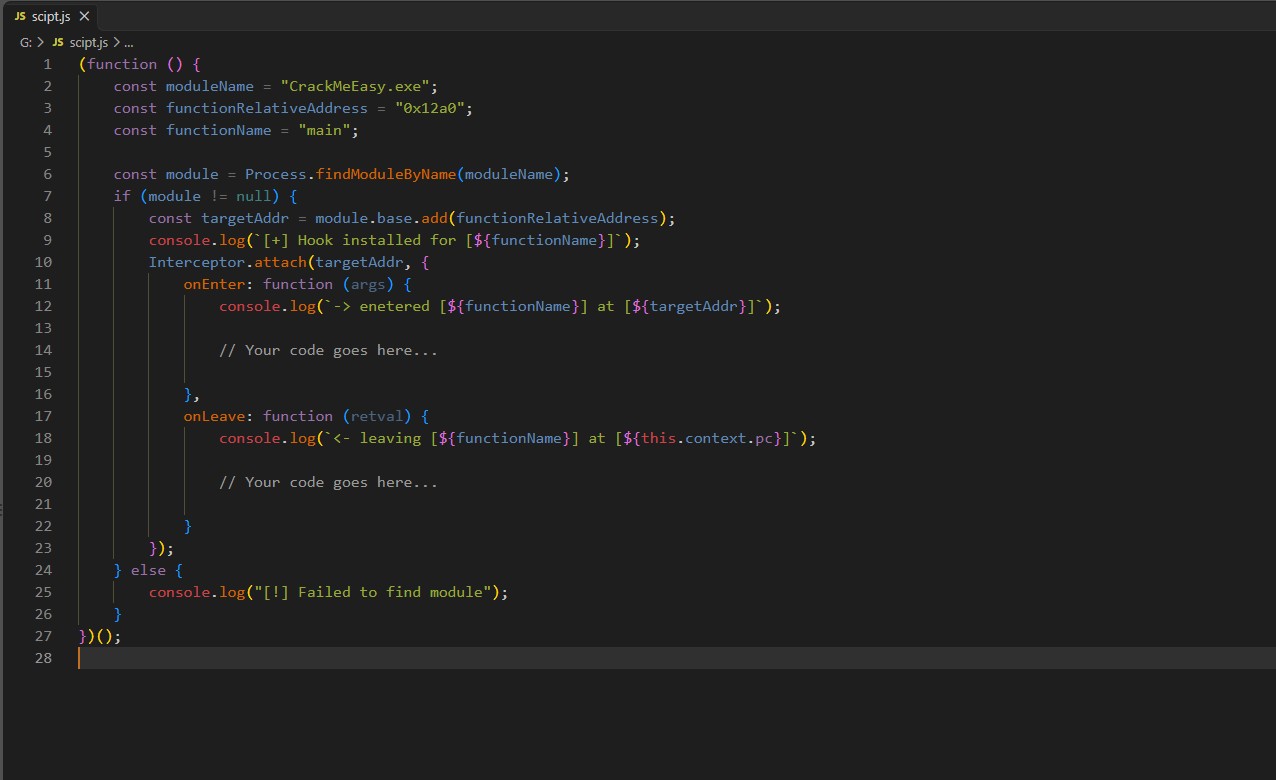
Get a ready-to-use Frida script — copied straight to your clipboard:
✨ Features
Right-click (or hit a hotkey) in your disassembler to generate ready-to-use Frida snippets — the result is instantly copied to your clipboard.
- 🧩 Composable scripts — snippets are independent but can be nested to build complex instrumentation with a few clicks
- 🎯 Context-aware — scripts auto-fill module name, function address, section, and any other detail available from your current context
- 🧰 Three hosts, one experience — identical features, hotkeys, and menus in IDA Pro, Binary Ninja, and Ghidra
- 📋 Clipboard integration — generated scripts are copied the moment you run an action
Supported Actions
🪝 Hooks
| Action | Description | Hotkey |
|---|---|---|
| Generate function hook | Intercept calls to the selected function, log entry/exit | Shift+F |
| Generate dlopen hooks | Monitor dlopen (including Android variants) to detect module loading |
Shift+D |
🧠 Memory
| Action | Description | Hotkey |
|---|---|---|
| Modify section protection | Change memory protection of the section at the current address | Shift+M |
🩹 Patching
| Action | Description | Hotkey |
|---|---|---|
| Negate cond branch (ARM64) | Flip the condition of an ARM64 conditional branch | Shift+A |
| Negate cond branch (x86/x64) | Flip the condition of an x86/x64 conditional branch | Shift+X |
🔧 How it Works
Each feature follows a simple pipeline: a Frida template (fridaforge/templates/) provides the JavaScript skeleton with placeholders, a command (fridaforge/commands/) gathers context through a host-agnostic Backend, and a generator (fridaforge/core/) fills the template to produce the final script.
The shared core knows nothing about IDA, Binary Ninja, or Ghidra. Each host lives in hosts/ and provides a thin adapter that implements the Backend interface (data extraction, clipboard, menu + hotkey registration). Add a feature once and it works in all three.
📦 Installation
Binary Ninja users can install straight from the Extension Manager. For everything else, grab the archive for your tool from the latest release. There's one per host — fridaforge-binja-<version>.zip, fridaforge-ida-<version>.zip, and fridaforge-ghidra-<version>.zip.
🟠 Binary Ninja
Extension Manager (recommended): open the Extension Manager (Plugins → Manage Plugins), search for FridaForge, and click Install. The shared core (fridaforge on PyPI) is installed automatically. Restart Binary Ninja if prompted.
Manual install:
- Find your user plugins directory by running this in Binary Ninja's Python console:
binaryninja.user_plugin_path()
- Extract
fridaforge-binja-<version>.zipinto that directory so that<binja user plugins>/fridaforge/exists. - Restart Binary Ninja.
Switching from a manual install to the Extension Manager? Delete
<binja user plugins>/fridaforge/first. Otherwise both copies load and every command appears twice.
🔵 IDA Pro
- Prerequisites:
- IDA Pro (tested with 9.0, but any version with Python 3 and
idaapishould work). - PyQt5 for clipboard functionality (usually bundled with IDA's Python).
- IDA Pro (tested with 9.0, but any version with Python 3 and
- Locate your IDA Pro user directory by running this in IDA's Python console:
import ida_diskio; print(ida_diskio.get_user_idadir())
If not already there, create apluginsdirectory in the user directory. This is where the plugin will be installed. - Extract
fridaforge-ida-<version>.zipinto thepluginsdirectory. - Restart IDA Pro. The plugin loads automatically. You should see FridaForge as an option after right-clicking in the disassembly view.
🐉 Ghidra
- Prerequisites: Ghidra 11.3 or later (PyGhidra ships bundled; no extra install needed).
- Unzip
fridaforge-ghidra-<version>.zipinto a folder of your choice. - In Ghidra's CodeBrowser, open Window → Script Manager, click Manage Script Directories (the toolbar icon), and add the unzipped folder.
- The five actions appear under Tools → FridaForge (categorized into Hooks / Memory / Patching) and respond to the hotkeys
Shift+F/D/M/A/X. The generated Frida script is copied to your clipboard;[FridaForge]messages print to the Ghidra console.
Ghidra actions are delivered as menu items + hotkeys (not a nested right-click popup), which is the supported integration path for PyGhidra scripts.
🧱 Script Composition
Snippets are designed to be independent building blocks. You can nest scripts inside each other — for example, hook a function, negate a conditional branch on entry, and restore it on exit. Complex instrumentation from a few clicks.
🛠️ Building from Source
pip install pytest build
pytest -v                     # run the host-agnostic test suite
python build/build.py         # writes dist/fridaforge-binja-*.zip, dist/fridaforge-ida-*.zip and dist/fridaforge-ghidra-*.zip
python -m build               # builds the fridaforge core package (sdist + wheel) published to PyPI
Builds are deterministic — the same source produces byte-identical archives.
To release, run python build/bump_version.py X.Y.Z, commit, and push tag vX.Y.Z. CI publishes the core to PyPI, then attaches the three archives to a GitHub release.
🤝 Contributing
Contributions welcome! Got a useful Frida snippet? Turn it into a template so everyone can use it.
- Fork the repository.
- Create a new branch for your feature or fix.
- Make your changes (and add a test — the core is fully unit-tested without needing a host).
- Submit a pull request.
| Adding... | Where |
|---|---|
| New Frida snippet | fridaforge/templates/ (JS template) + fridaforge/core/ (generator) + fridaforge/commands/ (command) |
| Host-specific behavior | hosts/binja/ or hosts/ida/ |
Each command and generator lives in its own file — easy to contribute without merge conflicts.
🗺️ Roadmap
See open issues for planned features and known bugs.
📄 License
1 maintainer

Metadata
1 maintainer
Release files for fridaforge 0.3.0
For a detailed explanation of source distributions (sdists) and built distributions (wheels), please see the package formats documentation.
Source distribution (sdist)
| File | Size | Uploaded | Provenance | Actions |
|---|---|---|---|---|
| fridaforge-0.3.0.tar.gz | 20.8 kB | With provenance | Details for fridaforge-0.3.0.tar.gz |
Built distribution (wheel)
| File | Interpreter | ABI | Platform | Actions Reset |
|---|---|---|---|---|
| fridaforge-0.3.0-py3-none-any.whl | Python 3 | none | any | Details for fridaforge-0.3.0-py3-none-any.whl |
Total release size: 39.6 kB
Release files / fridaforge-0.3.0.tar.gz
| Download URL | fridaforge-0.3.0.tar.gz |
|---|---|
| Size | 20.8 kB |
| Tags | Source |
|
SHA-256 checksum How to use checksums |
9d2f8a740cb3fef30d6e6286c87e7e4d85959a8b280433ba34c305cad77c8b13
|
|
BLAKE2b-256 checksum How to use checksums |
e4ad031da3fc0e1eb0e0c98425f3a828ae098fd4d396c4052546662638dc5a16
|
| Upload date | |
|
Uploaded using Trusted Publishing? What is trusted publishing? |
Yes |
| Uploaded via |
twine/7.0.0 CPython/3.13.16
|
Provenance
Provenance describes where a file came from. On PyPI, provenance is shared via attestations, which provide a verifiable record of the build or publishing details. View details, limitations and caveats.


PyPI Publish Attestation
PyPI verified that this artifact, at this checksum, originated from the publisher listed below.
Signed by GitHub Actions, verified by PyPI on Oct 22, 2026.
Transparency logRelease files / fridaforge-0.3.0-py3-none-any.whl
| Download URL | fridaforge-0.3.0-py3-none-any.whl |
|---|---|
| Size | 18.7 kB |
| Tags | Python 3 |
|
SHA-256 checksum How to use checksums |
632390a39e6d06975da98738b776502561fa7d107a9a599b0440bedff598fd24
|
|
BLAKE2b-256 checksum How to use checksums |
07634ce759e2bd49b753849231ab310d1b0fd2e708334171809e15113a4eb0e5
|
| Upload date | |
|
Uploaded using Trusted Publishing? What is trusted publishing? |
Yes |
| Uploaded via |
twine/7.0.0 CPython/3.13.16
|
Provenance
Provenance describes where a file came from. On PyPI, provenance is shared via attestations, which provide a verifiable record of the build or publishing details. View details, limitations and caveats.
PyPI Publish Attestation
PyPI verified that this artifact, at this checksum, originated from the publisher listed below.
Signed by GitHub Actions, verified by PyPI on Oct 22, 2026.
Transparency logSecurity for fridaforge 0.3.0
Provenance
Provenance describes where a file came from. On PyPI, provenance is shared via attestations, which provide a verifiable record of the build or publishing details. View details, limitations and caveats.
Full provenance
Both files in this release have been uploaded with provenance metadata.
Attestation for fridaforge-0.3.0.tar.gz
PyPI Publish Attestation
PyPI verified that this artifact, at this checksum, originated from the publisher listed below.
Signed by GitHub Actions, verified by PyPI on Oct 22, 2026.
Transparency logA note on package security
PyPI is a repository for distributing packages, not a service for auditing them. While third-party security researchers and our staff do their best to detect and remove malicious packages, PyPI cannot guarantee the quality, security or suitability of any given package.
To learn more about protecting yourself from malicious actors, visit our package security documentation.














