
frigate-tier
Move old Frigate NVR recording segments off a fast disk onto a slow, large one, and keep every one of them playable in the Frigate UI.
Frigate writes everything to a single /media/frigate volume and has no notion of storage tiers.
Issue #3673 has asked for them since 2022
(68 reactions, 93 comments) and the answer has consistently been that this belongs outside Frigate:
"We don't want frigate managing the native filesystems, we want one volume mount for recordings
without caring what the actual file system is behind that." The usual workaround is a mergerfs setup
plus a nightly cp/sqlite3 script, written up in
discussion #18343, where a user
answers the "it is quite achievable outside of Frigate" line with "it isn't for most people. This is
pretty complex."
frigate-tier is that job done properly: one command, per-segment verification, a transaction per file, and refusals for the layouts that quietly destroy footage.
Why moving a segment works at all
Frigate resolves recordings through the database, not through a fixed directory:
frigate/models.pystores the full path on the row:path = CharField(unique=True)on bothRecordingsandPreviews.frigate/api/media.pybuilds playback and exports by writing that stored value straight into an ffmpeg concat playlist:file.write(f"file '{clip.path}'\n"). Whatever path the row holds is the path ffmpeg opens.frigate/record/cleanup.pyexpires footage withPath(recording.path).unlink(missing_ok=True), so retention keeps working after a move and cannot crash on a file that is mid-flight.
So a segment plays from any path the Frigate container can see, as long as the row is updated to
match. That is the whole trick, and it is why --db-path-prefix below matters so much.
The test suite proves it rather than asserting it. tests/test_playback.py builds the same concat
playlist Frigate builds, from the paths in the database after a move, and hands it to ffmpeg. The
end to end run does it at scale: after archiving 252 of 315 segments, each camera's playlist spans
both tiers and still concatenates to exactly what it did before.
driveway:   100 clips concat to 1000.00s (sum of parts 1000.00s) ok
front_door: 100 clips concat to 1000.00s (sum of parts 1000.00s) ok
side_gate:  100 clips concat to 1000.00s (sum of parts 1000.00s) ok
Install
pip install frigate-tier
# or, without installing:
uvx frigate-tier --help
Python 3.11 or newer. The only runtime dependencies are peewee (Frigate's own ORM) and click.
Quick start
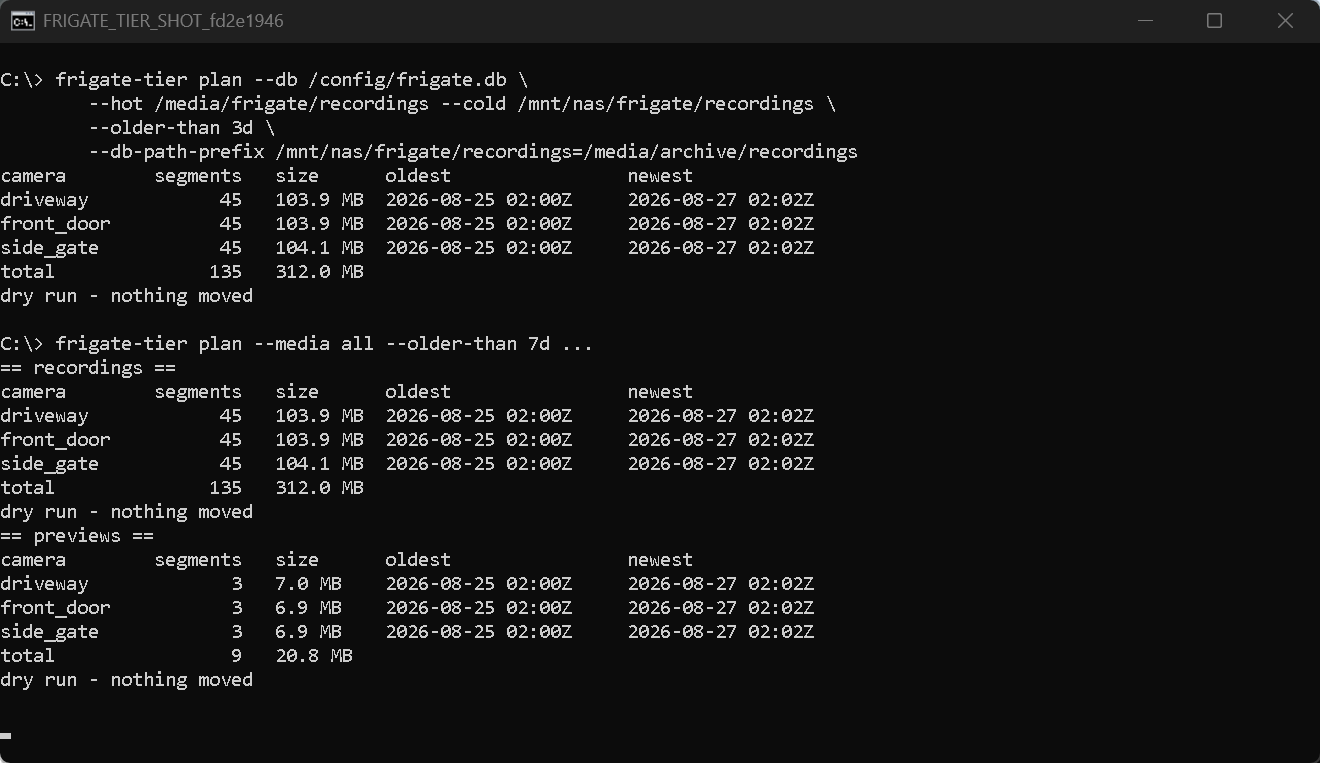
Look before you leap. plan never writes anything:
$ frigate-tier plan --db /config/frigate.db \
      --hot /media/frigate/recordings \
      --cold /mnt/nas/frigate/recordings \
      --older-than 3d \
      --db-path-prefix /mnt/nas/frigate/recordings=/media/archive/recordings
camera        segments   size      oldest                newest
driveway            45   103.9 MB  2026-08-25 02:00Z     2026-08-27 02:02Z
front_door          45   103.9 MB  2026-08-25 02:00Z     2026-08-27 02:02Z
side_gate           45   104.1 MB  2026-08-25 02:00Z     2026-08-27 02:02Z
total              135   312.0 MB
dry run - nothing moved
Add --commit to do it, then check the result:
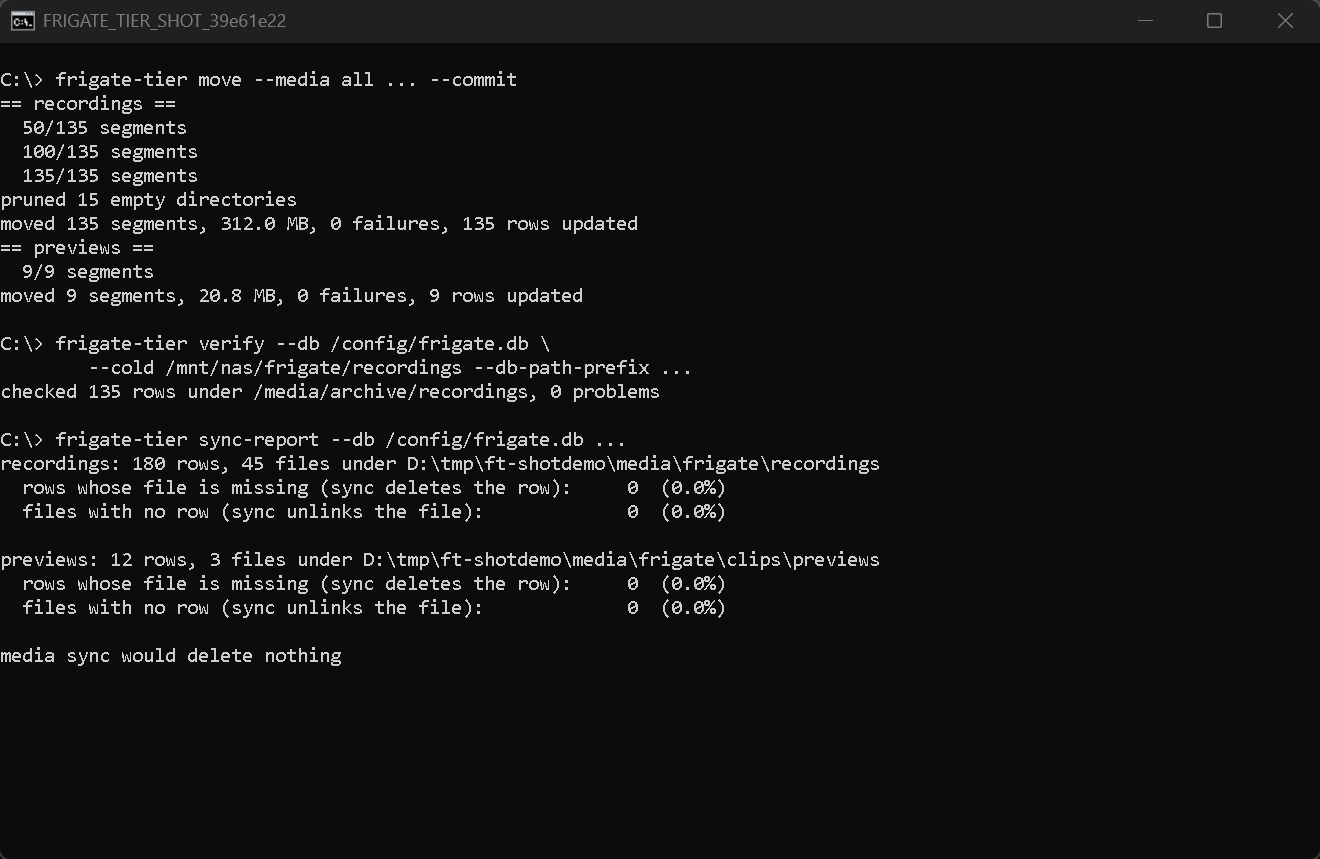
verify exits non-zero on any mismatch, so it works as a cron health check. sync-report is the
one to run before you touch Frigate's Maintenance pane; see the hazard section below.
restore reverses a move, file for file and row for row:
$ frigate-tier restore --db /config/frigate.db \
      --hot /media/frigate/recordings --cold /mnt/nas/frigate/recordings \
      --db-path-prefix /mnt/nas/frigate/recordings=/media/archive/recordings --commit
Every command takes --json for a machine-readable report.
Container path mapping
This is the part people get wrong.
frigate-tier normally runs on the host, where the NAS is mounted at something like
/mnt/nas/frigate/recordings. Frigate runs in a container, where that same storage is passed
through as, say, /media/archive/recordings. The database has to hold the path Frigate sees,
not the path the tool sees:
--db-path-prefix /mnt/nas/frigate/recordings=/media/archive/recordings
The left side is where frigate-tier finds the files. The right side is what gets written into
Recordings.path. The flag is repeatable if the hot tier also needs remapping.
You also need the matching bind mount on the Frigate container, or Frigate cannot open the files:
services:
  frigate:
    volumes:
      - /mnt/nas/frigate/recordings:/media/archive/recordings
If you leave --db-path-prefix off, frigate-tier writes its own paths into the database. That is
correct only when the tool and the container see the cold tier at exactly the same path, which is
true if you run the tool inside the Frigate container itself. Because the tool cannot prove that
from outside, plan warns and move refuses until you pass either the mapping or --i-know.
The Media Sync hazard
Frigate 0.18 added POST /api/media/sync and a Maintenance pane button that reconcile the database
against the disk. From frigate/util/media.py, sync_recordings does two destructive things:
- It walks
/media/frigate/recordingsandos.unlinks every file with no matchingRecordings.pathrow. - It deletes every
Recordingsrow whosepathdoes not exist as seen from inside the Frigate container.
Both abort at a 50% threshold, and force: true removes even that.
Consequences, all enforced in frigate_tier/safety.py:
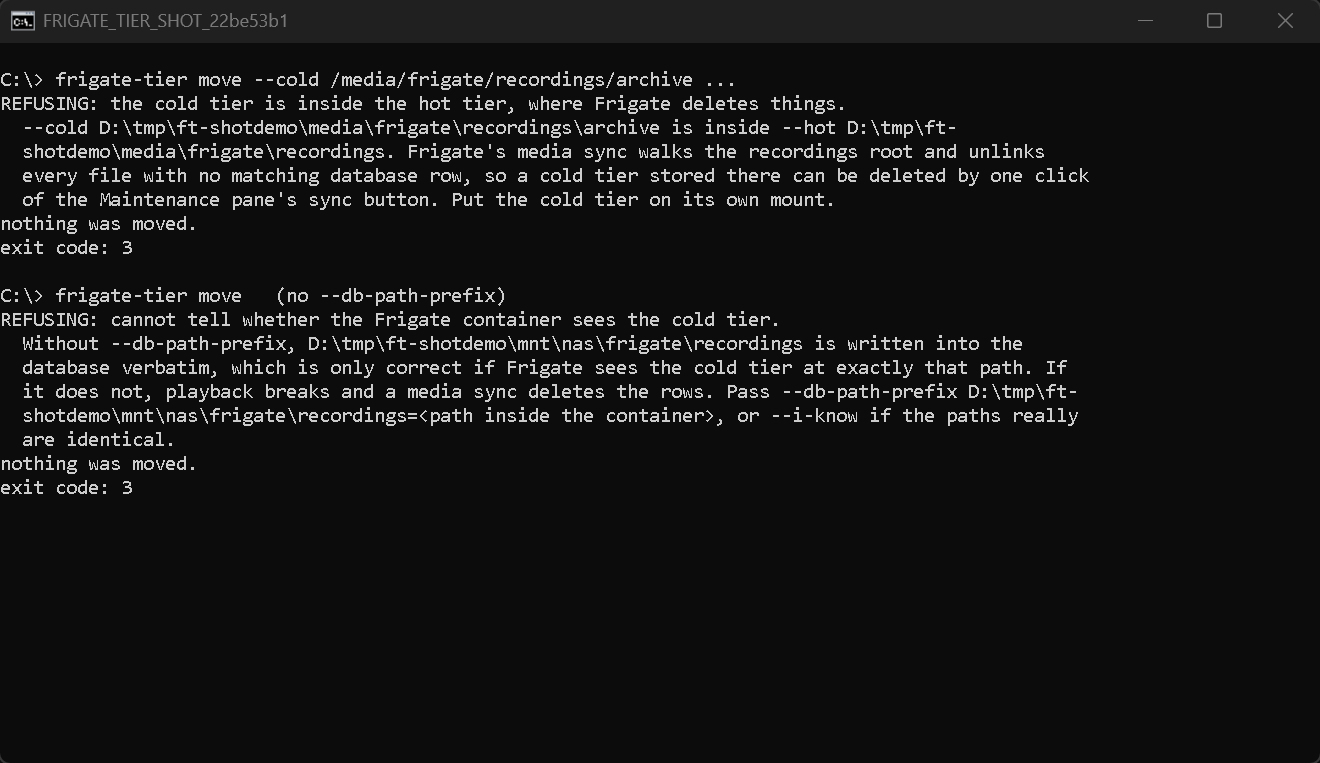
- A cold tier under the hot recordings root will be eaten. frigate-tier refuses that layout
outright, with no override. A cold tier elsewhere under the Frigate media root is refused unless
you pass
--i-know. - A cold tier Frigate cannot see means the rows get deleted, not just unplayable. This is why
the container mapping is a refusal and not a note in the docs. Get the bind mount right, then run
frigate-tier verifyfrom the host and confirm playback in the UI before you run a large move. - The source file is never unlinked before its UPDATE has committed, so a sync can never catch a segment in a state where neither the row nor a file refers to it.
- A failed byte check leaves the source in place and skips the row.
You do not have to take that on trust. sync-report runs the same comparison Frigate's sync runs,
read only, and tells you exactly what the button would delete. A healthy tiered setup reports
nothing on both sides. Point it at the wrong paths and it shows you the damage you avoided:
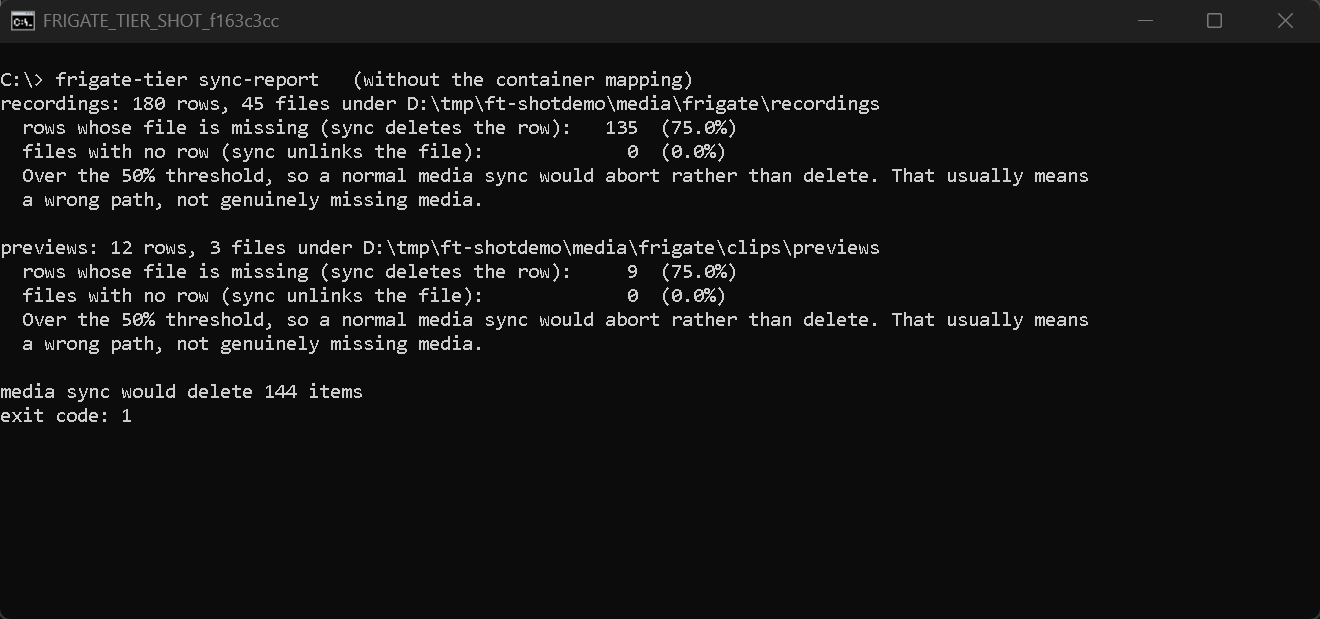
frigate-tier sync-report --db /config/frigate.db \
    --recordings-root /media/frigate/recordings \
    --previews-root /media/frigate/clips/previews \
    --db-path-prefix /mnt/nas/frigate/recordings=/media/archive/recordings
It exits non-zero if anything would be deleted, so it belongs in the same cron entry as verify.
And this is what the refusals look like when you get the layout wrong:
Commands
Every command takes --db, --camera (repeatable), --limit, --db-path-prefix (repeatable)
and --json.
| Command | Roots | What it does |
|---|---|---|
plan |
--hot --cold |
Prints the table above. Reads only. |
move |
--hot --cold |
Hot to cold. A dry run without --commit. |
restore |
--hot --cold |
Cold back to hot. A dry run without --commit. |
verify |
--cold |
Every archived row still has its file, at its size. |
sync-report |
--recordings-root |
What Frigate's media sync would delete. Reads only. |
Choosing what moves
--older-than takes s, m, h, d or w suffixes and filters on end_time, so a segment
Frigate is still writing is never a candidate. It is required on plan and move, and it is the
floor under everything else here.
--until-free stops as soon as the hot filesystem has that much space, oldest segments first. It
takes a size or a percentage of the filesystem:
frigate-tier move ... --older-than 3d --until-free 500G --commit
frigate-tier move ... --older-than 3d --until-free 20%  --commit
--min-free-on-cold refuses the move unless the cold tier still has that much free afterwards.
Even without it, a move that plainly would not fit is refused. Both are overridable with --i-know.
--bandwidth-limit 50M caps the write rate to the cold tier. A first run is usually hundreds of
gigabytes across the same link the cameras write over, and this is the knob that keeps it out of
the way.
--limit N stops after N segments, which is the easy way to try a real move on ten files first.
Choosing which media
--media picks the table and tree: recordings (default), previews, or all. Preview clips live
under /media/frigate/clips/previews/<camera>/, a different tree from recordings, so all needs
its own pair of roots:
frigate-tier move --media all \
    --db /config/frigate.db \
    --hot /media/frigate/recordings --cold /mnt/nas/frigate/recordings \
    --preview-hot /media/frigate/clips/previews \
    --preview-cold /mnt/nas/frigate/previews \
    --older-than 3d \
    --db-path-prefix /mnt/nas/frigate/recordings=/media/archive/recordings \
    --db-path-prefix /mnt/nas/frigate/previews=/media/archive/previews \
    --commit
Every root is audited before anything moves, so a bad previews layout stops the recordings pass too.
verify has no --media: it checks both tables for rows under --cold, so one call covers both if
they share a root.
With --json, a single media type gives one report object. --media all gives
{"media": "all", "passes": [<recordings report>, <previews report>]}.
Exit codes: 0 success, 1 an operational failure (unreadable database, failed segments, a verify
mismatch, a sync-report that found something), 2 a bad command line, 3 a safety refusal.
Docker
The image loops on an interval. It is meant to sit beside Frigate in the same compose file.
services:
  frigate:
    # ... your existing frigate service, plus one extra mount so it can open
    # what frigate-tier archives:
    volumes:
      - /mnt/nas/frigate/recordings:/media/archive/recordings

  frigate-tier:
    image: ghcr.io/booyaka101/frigate-tier:1.1.0
    restart: unless-stopped
    environment:
      FRIGATE_TIER_COLD: /mnt/archive/recordings
      FRIGATE_TIER_OLDER_THAN: 3d
      FRIGATE_TIER_INTERVAL: 3600
      FRIGATE_TIER_DB_PATH_PREFIX: /mnt/archive/recordings=/media/archive/recordings
      FRIGATE_TIER_BANDWIDTH_LIMIT: 50M
      FRIGATE_TIER_VERIFY: "1"
      FRIGATE_TIER_SYNC_REPORT: "1"
    volumes:
      - /path/to/frigate/config:/config
      - /path/to/fast/media:/media/frigate
      - /mnt/nas/frigate/recordings:/mnt/archive/recordings
The same NAS directory is mounted into both containers, at /mnt/archive/recordings for
frigate-tier and /media/archive/recordings for Frigate. That difference is exactly what
FRIGATE_TIER_DB_PATH_PREFIX exists to bridge. Mount it at the same path in both and you can drop
the prefix and set FRIGATE_TIER_I_KNOW=1 instead.
| Variable | Default |
|---|---|
FRIGATE_TIER_DB |
/config/frigate.db |
FRIGATE_TIER_HOT |
/media/frigate/recordings |
FRIGATE_TIER_COLD |
required |
FRIGATE_TIER_OLDER_THAN |
3d |
FRIGATE_TIER_INTERVAL |
3600 seconds, 0 runs once and exits |
FRIGATE_TIER_DB_PATH_PREFIX |
unset, space separated |
FRIGATE_TIER_PREVIEW_HOT |
unset, both preview vars switch on --media all |
FRIGATE_TIER_PREVIEW_COLD |
unset |
FRIGATE_TIER_UNTIL_FREE |
unset |
FRIGATE_TIER_MIN_FREE_ON_COLD |
unset |
FRIGATE_TIER_BANDWIDTH_LIMIT |
unset |
FRIGATE_TIER_VERIFY |
0 |
FRIGATE_TIER_SYNC_REPORT |
0 |
FRIGATE_TIER_DRY_RUN |
0 |
FRIGATE_TIER_I_KNOW |
0 |
FRIGATE_TIER_ARGS |
unset, appended verbatim |
With FRIGATE_TIER_INTERVAL=0 the container runs one pass and exits with the worst exit code of
that pass, which is what you want from a cron or a systemd timer. On the interval loop it stops
promptly on SIGTERM, between segments, never mid-copy.
Passing arguments to the container skips the loop and runs the CLI once:
docker run --rm -v /path/to/config:/config ghcr.io/booyaka101/frigate-tier:1.1.0 --help
What one segment actually does
statthe file the row points at. Gone already? Report it and skip. Nothing is ever deleted because the file is missing.- Copy to
<destination>.frigate-tier.part,fsync, then read the written file back off the disk and compare its size and sha256 against the source. A mismatch removes the part file and leaves the source alone. os.replacethe part file into place,fsyncthe directory.UPDATE ... SET path = ? WHERE id = ? AND path = ?insidedb.atomic(). A unique-constraint collision aborts that one segment, logs it, removes the copy and moves on to the next.- Only then unlink the source.
- After the run, prune source directories that are now empty, walking up but never past
--hot.
Because step 4 is the commit point and each segment is its own transaction, an interrupted run leaves zero rows pointing at a missing file, and re-running picks up where it stopped.
The database is opened with PRAGMA journal_mode=WAL and busy_timeout=15000, matching Frigate.
A database that stays locked past that fails loudly rather than silently skipping rows. frigate-tier
never creates, alters or migrates a table.
Not in scope
Exports, snapshots, event thumbnails, S3 or any cloud target, a web UI, changes to your Frigate
config, and Home Assistant. frigate-tier also never deletes a recording. Retention stays Frigate's
job, and it keeps working across the move because cleanup.py unlinks by stored path.
Limitations
- Sizes are compared against
segment_size, which Frigate stores asround(bytes / 2**20, 2). A byte-identical file reproduces that exactly. If your storage does something exotic, loosen it withverify --tolerance-mb. verifyonly looks at rows under--cold. Rows still on the hot tier are Frigate's business.sync-reportis the one that looks at everything.sync-reportanswers from where it is standing. If it runs on the host and Frigate is in a container, get the--db-path-prefixright or the answer is about the host, not about Frigate.- Nothing here detects that you have pointed Frigate at the wrong mount. It can only refuse the layouts it can see are wrong, which is why the container mapping is a refusal and why you should confirm playback in the UI after the first move.
--until-freereads the free space on the hot filesystem before it starts and does not re-check as it goes, so on a live Frigate it can undershoot slightly. Run it on an interval.- Moving across filesystems is a full copy. A large first run is bounded by your NAS write speed,
not by the tool.
--bandwidth-limitmakes that deliberate rather than accidental. - A
SIGKILLin the middle of a copy leaves one<segment>.frigate-tier.parton the cold tier. The next run over that segment overwrites it, and part files older than an hour are swept from the directories a move is about to write into. That is deliberately not a walk of the whole cold tier, so a part orphaned somewhere the tool no longer visits needsfind <cold> -name '*.frigate-tier.part' -delete. Nothing ever reads one.
Development
pip install -e ".[dev]"
pytest
ruff check frigate_tier tests
The suite is 106 tests against real media, no mocks anywhere. frigate_tier/fixture.py renders real
mp4 segments with ffmpeg -f lavfi -i testsrc2, laid out as YYYY-MM-DD/HH/<camera>/MM.SS.mp4,
plus preview clips, then writes a SQLite database with the mirrored models pointing at them. Every
segment gets its own hue and marker box, so a mixed-up file shows up as a changed sha256. The tests
move real files and read the real database back with plain sqlite3. ffmpeg has to be on PATH or
the suite skips.
CI runs the suite on Python 3.11, 3.12 and 3.13, against both peewee 3.17 (Frigate's own pin) and the current release.
The end to end run
tests/e2e/ is the part that answers "did it lose any video". It runs in a Linux container against
a realistic tree: three cameras, five days, 10 second 720p segments, about 640 MB.
docker build -f tests/e2e/Dockerfile -t frigate-tier:e2e .
docker run --rm -v "$PWD:/src" -v /tmp/ft-e2e:/work frigate-tier:e2e sh /src/tests/e2e/run.sh
docker run --rm -v "$PWD:/src" -v /tmp/ft-e2e:/work frigate-tier:e2e sh /src/tests/e2e/crash.sh
run.sh fingerprints every segment by sha256, frame count and decoded duration, moves both media
types, then compares content-keyed so a move between roots is not counted as a difference. It also
decodes every file with ffmpeg -f null at each step, which is what catches a truncated moov atom
that a self-consistent hash would miss. Then it restores and compares again.
crash.sh is the one worth reading. It starts a move, SIGKILLs it four seconds in, and checks the
wreckage: no row pointing at a missing file, no segment lost, everything still decoding, playback
still concatenating. Then it resumes and finishes the job. A real run from this machine:
=== 3. state right after the kill ===
recordings   hot=107   cold=13
part files left   : 1
=== 4. no row points at a missing file, and no segment was lost ===
driveway: 60 clips concat to 600.00s (sum of parts 600.00s) ok
front_door: 60 clips concat to 600.00s (sum of parts 600.00s) ok
126 segments before, 126 after, 0 problems
decoded 126 segments, 0 corrupt
=== 5. resume, and finish the job ===
moved 67 segments, 154.8 MB, 0 failures, 67 rows updated
checked 80 rows under /media/archive/recordings, 0 problems
To poke at it by hand:
python -m frigate_tier.fixture /tmp/frigate-demo --profile realistic
frigate-tier plan --db /tmp/frigate-demo/config/frigate.db \
    --hot /tmp/frigate-demo/media/frigate/recordings \
    --cold /tmp/frigate-demo/mnt/nas/frigate/recordings \
    --older-than 3d
Where to tell people about it
One place, first: a comment on frigate#3673. It is the open request this tool answers, it has been collecting subscribers since 2022, and the people in it have already said what they need. A short comment saying what the tool does, that it refuses the two layouts media sync will eat, and linking here will reach them without a separate announcement. The mergerfs write-up in discussion #18343 is the obvious second stop, since everyone there is already running a hand-rolled version of this.
License
MIT.
1 maintainer

Release files for frigate-tier 1.1.0
For a detailed explanation of source distributions (sdists) and built distributions (wheels), please see the package formats documentation.
Source distribution (sdist)
| File | Size | Uploaded | |
|---|---|---|---|
| frigate_tier-1.1.0.tar.gz | 49.3 kB | Details |
Built distribution (wheel)
| File | Interpreter | ABI | Platform | Reset |
|---|---|---|---|---|
| frigate_tier-1.1.0-py3-none-any.whl | Python 3 | none | any | Details |
Total release size: 84.9 kB
Release files / frigate_tier-1.1.0.tar.gz
| Download URL | frigate_tier-1.1.0.tar.gz |
|---|---|
| Size | 49.3 kB |
| Tags | Source |
|
SHA-256 checksum How to use checksums |
9c5a564911e0ae0aea94a9078f59940630255df3f0523a4e4249faef22172025
|
|
BLAKE2b-256 checksum How to use checksums |
13e5d29cffe1ef4add7c851d4a60989b8f2b76d111d1798a1740f85b04cb3f39
|
| Upload date | |
|
Uploaded using Trusted Publishing? What is trusted publishing? |
No |
| Uploaded via |
twine/7.0.0 CPython/3.11.9
|
Release files / frigate_tier-1.1.0-py3-none-any.whl
| Download URL | frigate_tier-1.1.0-py3-none-any.whl |
|---|---|
| Size | 35.6 kB |
| Tags | Python 3 |
|
SHA-256 checksum How to use checksums |
7d8bd52e6df5da4890e95e9f6afc1356d41c40a58fe881ed524ccc33157930ab
|
|
BLAKE2b-256 checksum How to use checksums |
25150ed64a6848c95b4fecb1e872d8bcaf429f916de173dbc412dcf66d5ed347
|
| Upload date | |
|
Uploaded using Trusted Publishing? What is trusted publishing? |
No |
| Uploaded via |
twine/7.0.0 CPython/3.11.9
|













