
A Python tester for the 42 push_swap project with controlled disorder generation and performance grading.

Project description
ft_ps_tester
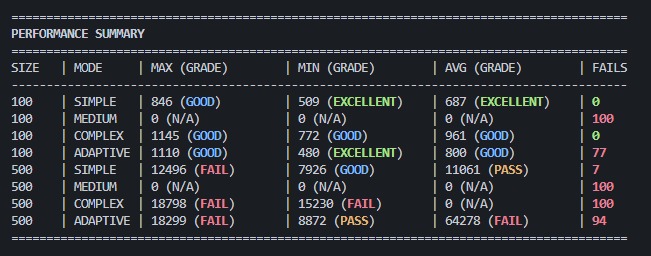
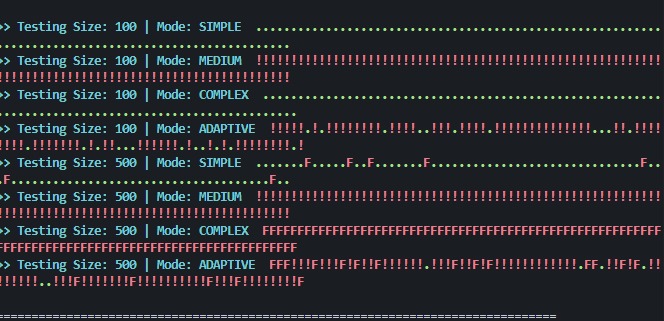
A Python-based tester for the 42 push_swap project. It generates controlled random sequences with specific disorder levels, runs your push_swap executable, validates the output, and grades performance against 42 thresholds.
Features
- Controlled disorder generation — creates sequences with precise inversion percentages.
- Four test modes — simple, medium, complex, and adaptive.
- Output validation — simulates operations to verify sorting correctness.
- Performance grading — compares operation counts against 42 thresholds (excellent / good / pass / fail).
- Failure report — concise summary of timeouts, invalid operations, and limit exceedances.
- Big-O complexity analysis (
--big-o) — measures algorithmic scaling across progressively larger inputs with per-mode expectations. - Basic & edge-case tests (
--basic) — small-N operation counts, reversed/sorted inputs, error handling, split-argument support, and per-mode specialization checks.
Requirements
- Python 3
- A compiled
push_swapexecutable that accepts arguments and prints operations tostdout
Installation
Tip: If you run into installation errors, try updating
pipfirst:pip install --upgrade pip # or pip3 install --upgrade pip
Option 1: Install from PyPI (recommended)
Using pip:
pip install ft_ps_tester
Using pip3:
pip3 install ft_ps_tester
User-local install (no sudo required — pip):
pip install --user ft_ps_tester
User-local install (no sudo required — pip3):
pip3 install --user ft_ps_tester
Using python3 -m pip:
python3 -m pip install ft_ps_tester
Note: When using
--user, theft_ps_testerbinary is installed to a user-localbin/directory (e.g.~/.local/binon Linux/macOS, or%APPDATA%\Python\Python3x\Scriptson Windows). Make sure this directory is on yourPATH, or use thepython3 -mexecution methods shown below.
Option 2: Install from source
Clone this repository:
git clone https://github.com/italoalmeida0/ft_ps_tester.git
cd ft_ps_tester
Editable / development mode (pip):
pip install -e .
Editable / development mode (pip3):
pip3 install -e .
Editable / development mode (python3 -m pip):
python3 -m pip install -e .
Normal install (pip):
pip install .
Normal install (pip3):
pip3 install .
Normal install (python3 -m pip):
python3 -m pip install .
User-local install from source (pip --user):
pip install --user -e .
User-local install from source (pip3 --user):
pip3 install --user -e .
Option 3: Run with pipx (isolated, no install required)
If you have pipx installed, you can run the tester directly without permanently installing it:
pipx run ft_ps_tester ./push_swap
Single test run:
pipx run ft_ps_tester ./push_swap 500 complex
Or install it into an isolated environment:
pipx install ft_ps_tester
Then run normally:
ft_ps_tester ./push_swap
Make sure your push_swap binary is compiled and executable:
make
chmod +x push_swap
Usage
Full test suite (recommended)
Tests 100 and 500 elements across all four modes (100 tests each).
If the ft_ps_tester command is on your PATH:
ft_ps_tester ./push_swap
If the command is not found (common with --user installs), run via the module:
python3 -m ft_ps_tester ./push_swap
Or using the .cli submodule directly:
python3 -m ft_ps_tester.cli ./push_swap
Or using python directly:
python -m ft_ps_tester ./push_swap
From the cloned source directory (no install required):
python3 ft_ps_tester/cli.py ./push_swap
Single test run
Test a specific size and mode:
ft_ps_tester ./push_swap <size> <mode>
If ft_ps_tester is not on your PATH:
python3 -m ft_ps_tester ./push_swap <size> <mode>
Or via the .cli submodule:
python3 -m ft_ps_tester.cli ./push_swap <size> <mode>
Example:
ft_ps_tester ./push_swap 500 complex
Or:
python3 -m ft_ps_tester ./push_swap 500 complex
Failure reports (--reports)
Enable automatic report generation when a test fails (invalid sort, operation limit exceeded, or timeout). Reports are saved in the same directory as the push_swap executable.
Two files are generated per failure:
| File suffix | Content |
|---|---|
_ops_N.txt |
Raw output (operations) from push_swap |
_nums_N.txt |
Input numbers passed to push_swap |
The numbering (_1, _2, …) is shared between both files: if either an _ops_N or _nums_N file already exists, the next number is used so both files always share the same suffix.
Example:
ft_ps_tester --reports ./push_swap
If a failure occurs in the 100_simple test, the following files are created next to ./push_swap:
report_100_simple_ops_1.txt
report_100_simple_nums_1.txt
If another failure occurs later (or if one of those files already existed), the next pair becomes:
report_100_simple_ops_2.txt
report_100_simple_nums_2.txt
You can also use --reports with single test runs:
ft_ps_tester --reports ./push_swap 500 complex
Basic & edge-case tests (--basic)
Run a fast suite of correctness and edge-case checks. These also run first, automatically, at the start of every full test suite.
ft_ps_tester --basic ./push_swap
The suite covers six areas:
| # | Test | What it checks |
|---|---|---|
| 1 | Small-N op counts | Every permutation of 3 and 5 numbers across all modes (N=3 ≤3 GOOD / ≤5 PASS; N=5 ≤12 GOOD / ≤15 PASS). |
| 2 | Reversed input | Fully reversed (100% disorder) sequences of 3, 5, 10, 50, 100, 500 must sort correctly. |
| 3 | Sorted → 0 ops | Already-sorted 1, 2, 3, 5, 10, 50, 100, 500 must output 0 operations (and no error). |
| 4 | Nearly-sorted (1 swap) | 10 elements with a single adjacent swap — last↔penultimate and first↔second — must sort correctly. |
| 5 | Error handling | Invalid input (1a, 1.0, 6-1, lone -/+, +0/-0 duplicate, empty arg in the middle 3 2 "" 1 4 5, > INT_MAX, LONG overflow, duplicates…) → exactly Error\n on fd2; valid edges (INT_MIN, +0) accepted; no args → no output. |
| 6 | Split / multi-number args | Whether 1 2 "3 4" 5 and "1 2 3 4 5" are accepted (a warning, not a failure, if not). |
| 7 | Mode specialization | The matching --<mode> should use the fewest ops per number type (10% margin); identical counts across all modes → invalid (flags not differentiated). |
| 8 | Default flag (adaptive) | Running with no flag must sort and match --adaptive behavior. |
| 9 | Benchmark mode (--bench) |
fd1 still sorts; the fd2 report names the strategy and reports the disorder % accurately for random sequences (0–100%, checked against the inversion count). |
| 10 | Memory & crashes | Runs valgrind (Linux) / leaks (macOS) on valid, sorted, error and no-arg inputs; flags leaks, memory errors and segfaults. Skipped if the tool is unavailable. |
File descriptors:
fd1(stdout) carries the operations.fd2(stderr) carries exactlyError\non invalid input, and the--benchreport when benchmark mode is used. An error is detected only whenfd2is exactlyError\nandfd1is empty.
Big-O Complexity Analysis (--big-o)
Run a dedicated complexity analysis that measures how your algorithm scales with input size. This mode runs 100 tests per size per mode across progressively larger sequences:
Sizes tested: 50, 100, 200, 400, 800
For each size, the tester:
- Generates sequences with disorder appropriate to the mode
- Runs 3 warm-up executions (not measured) to stabilize system caches
- Runs 100 measured executions and tracks:
- Average number of operations
- Average execution time
- Growth ratio between consecutive sizes
- Validates that the output is correctly sorted
If any test fails to sort or times out, the failure is reported and that size/mode combination is marked.
Classification criteria:
Both operations and time are classified independently using dynamic formulas based on input size n:
Operations:
| Complexity | Formula (max ops) | Avg growth ratio |
|---|---|---|
O(n) |
1.0 * n |
≤ 2.2x |
O(n log n) |
1.14 * n * log₂(n) |
≤ 3.0x |
O(n sqrt(n)) |
1.09 * n * sqrt(n) |
≤ 3.5x |
O(n²) |
0.152 * n² |
≤ 4.0x |
O(n³) |
0.00095 * n³ |
≤ 8.0x |
O(>n³) |
> 0.00095 * n³ |
> 8.0x |
Time (ms):
| Complexity | Formula (max ms) | Avg growth ratio |
|---|---|---|
O(n) |
0.05 * n |
≤ 2.2x |
O(n log n) |
0.08 * n * log₂(n) |
≤ 3.0x |
O(n sqrt(n)) |
0.12 * n * sqrt(n) |
≤ 3.5x |
O(n²) |
0.25 * n² |
≤ 4.0x |
O(n³) |
1.0 * n³ |
≤ 8.0x |
Example: At n=800,
O(n²)max ops =0.152 * 800² ≈ 97,280. The coefficients are calibrated for push_swap output patterns.
Expected complexity per mode:
| Mode | Expected complexity | Description |
|---|---|---|
simple |
≤ O(n²) |
Nearly sorted — should stay within n² |
medium |
≤ O(n sqrt(n)) |
Moderate disorder — better than n² |
complex |
O(n log n) |
Heavily shuffled — optimal sort expected |
adaptive |
O(n²) down to O(n log n) |
Should adapt based on disorder level |
Usage:
ft_ps_tester --big-o ./push_swap
Or via module:
python3 -m ft_ps_tester --big-o ./push_swap
Example output:
================================================================================
  BIG-O COMPLEXITY ANALYSIS
================================================================================

>> Big-O Analysis | Mode: SIMPLE
  Size |  Tests |    Avg Ops |  Ops Ratio | Avg Time(ms) | Time Ratio | Status
----------------------------------------------------------------------------------
    50 |    100 |        450 |        N/A |         2.10 |        N/A | PASS
   100 |    100 |        980 |      2.18x |         4.50 |      2.14x | PASS
   ...
----------------------------------------------------------------------------------
Ops Complexity:  O(n^2) (Avg ratio: 3.29x, Max ops at n=800: 75000)
Time Complexity: O(n log n) (Avg ratio: 2.15x, Max time(ms) at n=800: 35.20)

================================================================================
  BIG-O SUMMARY
================================================================================

Mode       | Ops Big-O    | Ops Status | Time Big-O   | Time Status | Overall | Expected
-------------------------------------------------------------------------------------------------------------------
SIMPLE     | O(n log n)   | OK         | O(n^2)       | OK          | PASS    | <= O(n^2)
MEDIUM     | O(n log n)   | OK         | O(n^2)       | FAIL        | FAIL    | <= O(n sqrt(n))
COMPLEX    | O(n log n)   | OK         | O(n^2)       | FAIL        | FAIL    | O(n log n)
ADAPTIVE   | O(n log n)   | OK         | O(n^2)       | OK          | PASS    | O(n^2) down to O(n log n)

Details by mode:
  SIMPLE   | Ops:  Avg ratio: 2.40x, Max ops at n=800: 7732
           | Time: Avg ratio: 3.90x, Max time(ms) at n=800: 206.76
  MEDIUM   | Ops:  Avg ratio: 2.40x, Max ops at n=800: 7732
           | Time: Avg ratio: 3.90x, Max time(ms) at n=800: 206.76
  COMPLEX  | Ops:  Avg ratio: 2.40x, Max ops at n=800: 7732
           | Time: Avg ratio: 3.90x, Max time(ms) at n=800: 206.76
  ADAPTIVE | Ops:  Avg ratio: 2.40x, Max ops at n=800: 7732
           | Time: Avg ratio: 3.90x, Max time(ms) at n=800: 206.76

Reference (Operations & Time):
  Simple  : Expected <= O(n^2)  (nearly sorted)
  Medium  : Expected <= O(n sqrt(n))
  Complex : Expected O(n log n) (optimal comparison sort)
  Adaptive: Expected O(n^2) down to O(n log n) (should adapt to disorder)

Note: Overall PASS requires both Ops and Time to meet expectations.
Modes / Flags
Your push_swap must support the following flags (passed as --<mode> before the numbers):
| Mode | Disorder range | Description |
|---|---|---|
simple |
15.0% – 19.9% | Nearly sorted sequences |
medium |
20.0% – 49.9% | Moderately shuffled sequences |
complex |
50.0% – 55.0% | Heavily shuffled sequences |
adaptive |
15.0% – 55.0% | Random disorder across the full spectrum |
Note: If your
push_swapdoes not implement these flags, the tester will still work if your program ignores unknown flags and simply sorts the provided numbers. However, for accurate mode-based testing, yourpush_swapshould parse and use the flag to adjust its algorithm.
Grading Thresholds
| Size | Excellent | Good | Pass |
|---|---|---|---|
| 3 | — | ≤ 3 | ≤ 5 |
| 5 | — | ≤ 12 | ≤ 15 |
| 100 | < 700 | < 1500 | ≤ 2000 |
| 500 | < 5500 | < 8000 | ≤ 12000 |
Sizes 3 and 5 are graded by the
--basicsuite (GOOD/PASSonly); sizes 100 and 500 by the full performance suite.
Results are shown with color-coded grades:
- EXCELLENT — green
- GOOD — blue
- PASS — yellow
- FAIL — red
Example Output
Running FULL TEST SUITE for ./push_swap

>> Testing Size: 100 | Mode: SIMPLE  ..................................................
>> Testing Size: 100 | Mode: MEDIUM  ..................................................
>> Testing Size: 100 | Mode: COMPLEX ..................................................
>> Testing Size: 100 | Mode: ADAPTIVE..................................................
>> Testing Size: 500 | Mode: SIMPLE  ..................................................
>> Testing Size: 500 | Mode: MEDIUM  ..................................................
>> Testing Size: 500 | Mode: COMPLEX ..................................................
>> Testing Size: 500 | Mode: ADAPTIVE..................................................

========================================================================================
PERFORMANCE SUMMARY
========================================================================================
SIZE   | MODE     | MAX (GRADE)        | MIN (GRADE)        | AVG (GRADE)        | FAILS
----------------------------------------------------------------------------------------
100    | SIMPLE   | 450 (EXCELLENT)    | 320 (EXCELLENT)    | 380 (EXCELLENT)    | 0
100    | MEDIUM   | 1200 (GOOD)        | 900 (EXCELLENT)    | 1050 (GOOD)        | 0
...
License
This project is licensed under the MIT License.
Release history Release notifications | RSS feed


Download files
Download the file for your platform. If you're not sure which to choose, learn more about installing packages.
Source Distribution
Built Distribution
Filter files by name, interpreter, ABI, and platform.
If you're not sure about the file name format, learn more about wheel file names.
Copy a direct link to the current filters
File details
Details for the file ft_ps_tester-1.0.7.tar.gz.
File metadata
- Download URL: ft_ps_tester-1.0.7.tar.gz
- Upload date:
- Size: 27.9 kB
- Tags: Source
- Uploaded using Trusted Publishing? No
- Uploaded via: twine/6.2.0 CPython/3.14.5
File hashes
| Algorithm | Hash digest | |
|---|---|---|
| SHA256 |
1bb2b5f84419a5491c0fa963343418f5ecb6aca6014c44cd31d13ed71187b97c
|
|
| MD5 |
a7a37f892bc23a5249dae17f2ca873ac
|
|
| BLAKE2b-256 |
0d9125aae3b5f28f49ab3486e98374a696d9a439298ffc1f466255f72044ff84
|
File details
Details for the file ft_ps_tester-1.0.7-py3-none-any.whl.
File metadata
- Download URL: ft_ps_tester-1.0.7-py3-none-any.whl
- Upload date:
- Size: 23.5 kB
- Tags: Python 3
- Uploaded using Trusted Publishing? No
- Uploaded via: twine/6.2.0 CPython/3.14.5
File hashes
| Algorithm | Hash digest | |
|---|---|---|
| SHA256 |
9ce0a1fc010c60930c5bc22063bc89b36518d32575213e3a4b7b6af2ffcf03cc
|
|
| MD5 |
201104b5e924c03f631e2efb51d9e62a
|
|
| BLAKE2b-256 |
d02ae43387335493fb77d99a2ba37831db8898083a668d73ce13919d8f1ca8ba
|






