
ftw.datepicker
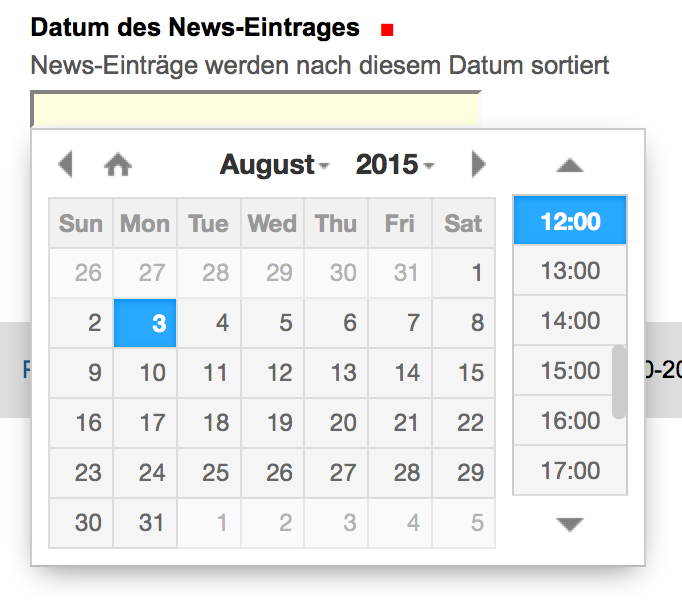
ftw.datepicker provides a date/time picker widget for your z3c.form fields using the jQuery based DateTimePicker widget from XDSoft (http://xdsoft.net/jqplugins/datetimepicker/). It is compatible with Plone 4.3 and 5.1.
Screenshot
Installation
Add ftw.datepicker to your buildout configuration:
[instance]
eggs +=
    ...
    ftw.datepicker
Import the generic setup profile for ftw.datepicker.
Usage
You can apply the widget to your field with the help of plone.directives.form:
from plone.directives import form
from plone.supermodel import model
from ftw.datepicker.widget import DateTimePickerWidgetFactory

class MySchema(model.Schema):
    form.widget(due_date=DateTimePickerWidgetFactory)
    due_date = schema.Datetime()
This renders a widget which allows to select the date and time.
You can pass a custom configuration of the widget like this:
from plone.directives import form
from plone.supermodel import model
from ftw.datepicker.widget import DateTimePickerWidgetFactory

class MySchema(model.Schema):
    form.widget('due_date', DateTimePickerWidgetFactory, config=my_config)
    due_date = schema.Datetime()
config can either be a dict or a callable which produces a dict. The value is then converted to a JSON object and passed to the template for the widget to be picked up. Example: {‘format’: ‘d.m.Y’, ‘timepicker’: False}.
See http://xdsoft.net/jqplugins/datetimepicker/ for a full list of options.
You could apply the widget even to a TextLine field if you need to.
If you wish to use the Widget for a date field that needs a timezone, you can tell it so by setting default_timezone to an Olson DB/pytz timezone identifier or a callback (taking the context as an argument) returning such an identifier:
from plone.directives import form
from plone.supermodel import model
from ftw.datepicker.widget import DateTimePickerWidgetFactory

class MySchema(model.Schema):
    form.widget('due_date',
                DateTimePickerWidgetFactory,
                default_timezone='Europe/Berlin') # or in
    due_date = schema.Datetime()
In case you want to use this widget for an already defined field you can do that too. In case of IEventBasic you must set the default_timezone due to how plone.appe.event works.
from plone.autoform.interfaces import WIDGETS_KEY

WIDGETS = {
    MySchema: {'start_date': DatePickerFieldWidget,
               'end_date': DatePickerFieldWidget},
}

for schema, widget_config in WIDGETS.items():
    values = schema.queryTaggedValue(WIDGETS_KEY, {})
    values.update(widget_config)
    schema.setTaggedValue(WIDGETS_KEY, values)

# Or with the default_timezone and/or config set:

from plone.app.event.base import default_timezone
from plone.app.event.dx.behaviors import IEventBasic
from plone.autoform.interfaces import WIDGETS_KEY
from plone.autoform.widgets import ParameterizedWidget

WIDGETS = {
    IEventBasic: {'start': ParameterizedWidget(DatePickerFieldWidget,
                                               default_timezone=default_timezone,
                                               config=my_config),
                  'end': ParameterizedWidget(DatePickerFieldWidget,
                                             default_timezone=default_timezone,
                                             config=my_config)},
}

for schema, widget_config in WIDGETS.items():
    values = schema.queryTaggedValue(WIDGETS_KEY, {})
    values.update(widget_config)
    schema.setTaggedValue(WIDGETS_KEY, values)
Development
The jQuery plugin can be downloaded and extracted into its own folder inside ftw/datepicker/resources/js. Only the files defined in the profile’s CSS and JS registry will be used.
Links
Continuous integration: https://jenkins.4teamwork.ch/search?q=ftw.datepicker
Copyright
This package is copyright by 4teamwork.
ftw.datepicker is licensed under GNU General Public License, version 2.
Changelog
1.6.2 (2020-07-30)
Fix reinstallation of the package if it was initially installed on 1.1.0 and 1.1.1 (see #30 for more details) [Nachtalb, maethu]
1.6.1 (2020-07-29)
Fix fail on reinstallation on Plone 5 when upgrading from Plone 4 due to weird behaviour of its IDatetimeRegistry.formats field declaration in registry.xml [Nachtalb]
1.6.0 (2020-02-27)
Add timezone support to the widget [Nachtalb]
1.5.1 (2020-02-05)
IResourceRegistry does not exist in plone4. Add condition to “Fix resource bundles” upgrade step. [2e12]
Check AMD support and load module accordingly [tinagerber]
Correct wrong references in plone 4 jsregistry [tinagerber]
1.5.0 (2019-12-16)
Add new way of building and loading resources. [busykoala]
1.4.0 (2019-03-20)
Move ressources to plone bundle. [busykoala]
1.3.4 (2018-07-23)
Disable autocompleting and autofilling of datepicker fields. [tarnap]
1.3.3 (2018-05-24)
Fix issue with language format selection for deployments with mutliple languages AND non-combined language codes. [lgraf]
1.3.2 (2018-04-13)
Fix insert-after reference in the JS registry. [phgross]
1.3.1 (2018-04-12)
Use minified version of the jquery.datetimepicker JS. [phgross]
1.3.0 (2018-03-19)
Add support for combined (country specific) language codes. [mathias.leimgruber]
Update DateTimePicker to version 2.5.18. [mathias.leimgruber]
Add Plone 5.1 support [njohner]
1.2.1 (2017-06-22)
Support overlays by triggering a load and reloaded event. [mathias.leimgruber]
1.2.0 (2017-02-22)
Update translations aka make them work. [mathias.leimgruber]
Do not allow a year before 1900. strftime in python 2.7 does not support years before 1900. [mathias.leimgruber]
Implement additional config options. [tschanzt]
Drop compatibility with Plone 4.1 and Plone 4.2. [mbaechtold]
1.1.2 (2016-07-25)
Fix import/export of registry.xml. [mbaechtold]
1.1.1 (2015-12-04)
Minify js resources. [mathias.leimgruber]
1.1.0 (2015-09-30)
Make it possible to use different dateformats depending on the current language. [tschanzt]
Use DateTimePicker widget from XDSoft which also supports time picking (http://xdsoft.net/jqplugins/datetimepicker/). Attention: Support for Plone 4.0.x has been dropped. [mbaechtold]
1.0.5 (2015-08-03)
Fixed calendar icon for Plone 4.3 sites. [phgross]
1.0.4 (2014-02-12)
Moved package to GitHub. [lknoepfel]
1.0.3 (2012-11-28)
Adjust javscripts: Use $ instead of deprecated jq. [phgross]
1.0.2 (2012-09-11)
Converter: Added additional date form patterns for swiss-french format. Issue #223 Kalender in der franz. Version https://extranet.4teamwork.ch/support/ph-vs/tracker/223 [philippegross]
1.0.1 (2012-02-24)
Added some French translations [ttschanz]
Fix date parsing for french language (support lowercase month names). [jone]
1.0 (2011-11-17)
Final release. [phgross]
1.0a10 (2011-09-29)
Fixed changelog, and make it zest.releaser friendly. [phgross]
1.0a9 (2011-09-29)
Issue #1176 alle translatinos mit from zope.i18n import translate https://extranet.4teamwork.ch/projects/opengever-kanton-zug/sprint-backlog/1176 [eschmutz]
added test-buildout for plone 4.1 [eschmutz]
1.0a8
fixed test: added zope.schema.Field() to text.form [7.7.2011, elio.schmutz]
1.0a7
added Translation for DateTimeParseError [ttschanz]
1.0a6
fixed bug that ftw.datepicker fails when a date is lowercase [ttschanz]
1.0a5
Removed inline import of jquery.ui.all.css and installing collective.js.jqueryui on installation instead [01.12.2010, fsprenger]
1.0a4
1.0a3
When installing the profile, the datepicker is configured as default widget. [jbaumann]
1.0a2
1.0
Initial release


Release files for ftw.datepicker 1.6.2
For a detailed explanation of source distributions (sdists) and built distributions (wheels), please see the package formats documentation.
Source distribution (sdist)
| File | Size | Uploaded | |
|---|---|---|---|
| ftw.datepicker-1.6.2.tar.gz | 177.4 kB | Details |
Release files / ftw.datepicker-1.6.2.tar.gz
| Download URL | ftw.datepicker-1.6.2.tar.gz |
|---|---|
| Size | 177.4 kB |
| Tags | Source |
|
SHA-256 checksum How to use checksums |
a12f1382862d200087660103c37e249af1cbea06d24ab1b8a266d2c99e68b33c
|
|
BLAKE2b-256 checksum How to use checksums |
2c9a671e603384fdf1c170c4b0ff3928e65d44c5bb645ddc72ec348c348161f6
|
| Upload date | |
|
Uploaded using Trusted Publishing? What is trusted publishing? |
No |
| Uploaded via |
twine/2.0.0 pkginfo/1.5.0.1 requests/2.22.0 setuptools/45.2.0 requests-toolbelt/0.9.1 tqdm/4.38.0 CPython/3.7.2
|














