
Fullmark Alchemist
English | Tiếng Việt
fullmark: Markdown in, a self-grading offline quiz out.
Try the example quizzes in your browser: nothing to install.
To obtain full marks, something of equal value must be studied. That is the law of Equivalent Exchange.
How this was made
Fullmark was vibe-coded: written almost entirely by AI coding agents (Claude) from my prompts, plans and reviews, with me steering and testing it on my own coursework. The test suite (about 700 tests, including real-browser and accessibility checks) is what keeps it honest. Read the code before trusting it with anything important.
Install
uv tool install fullmark      # or: pipx install fullmark
quiz --help
The command is quiz. Where another program already owns quiz (Debian and Ubuntu's bsdgames ships an old trivia game by that name), use fullmark, which runs the same program.
From source, in a clone of this repository:
uv tool install --editable .
This project was called quizmd before 0.10.0. Version 0.10.0 does not read quizmd results or libraries (the data formats, the config folder and the environment variables were all renamed); rebuild them from your Markdown sources.
After pulling a version that adds a dependency (0.9.0 added tomli-w and rich), reinstall the tool, or the installed quiz fails with ModuleNotFoundError:
uv tool install --editable . --reinstall
For development: uv sync, then uv run pytest (the browser tests need Chromium: uv run playwright install chromium).
How a release is made: docs/RELEASING.md.
What it is
Turn a Markdown file into one self-contained HTML quiz that opens by double-click, grades itself
offline, and exports the learner's answers as JSON so an AI can review them. The page follows the
muted pastel palette: soft paper in light mode, soft slate in dark mode. A quiz can lock its theme (theme: light), as the IELTS example does to resemble the real exam screen.
Docs: agent guide (Tiếng Việt), user guide (web), design spec, and a quiz about this project.
Screenshots
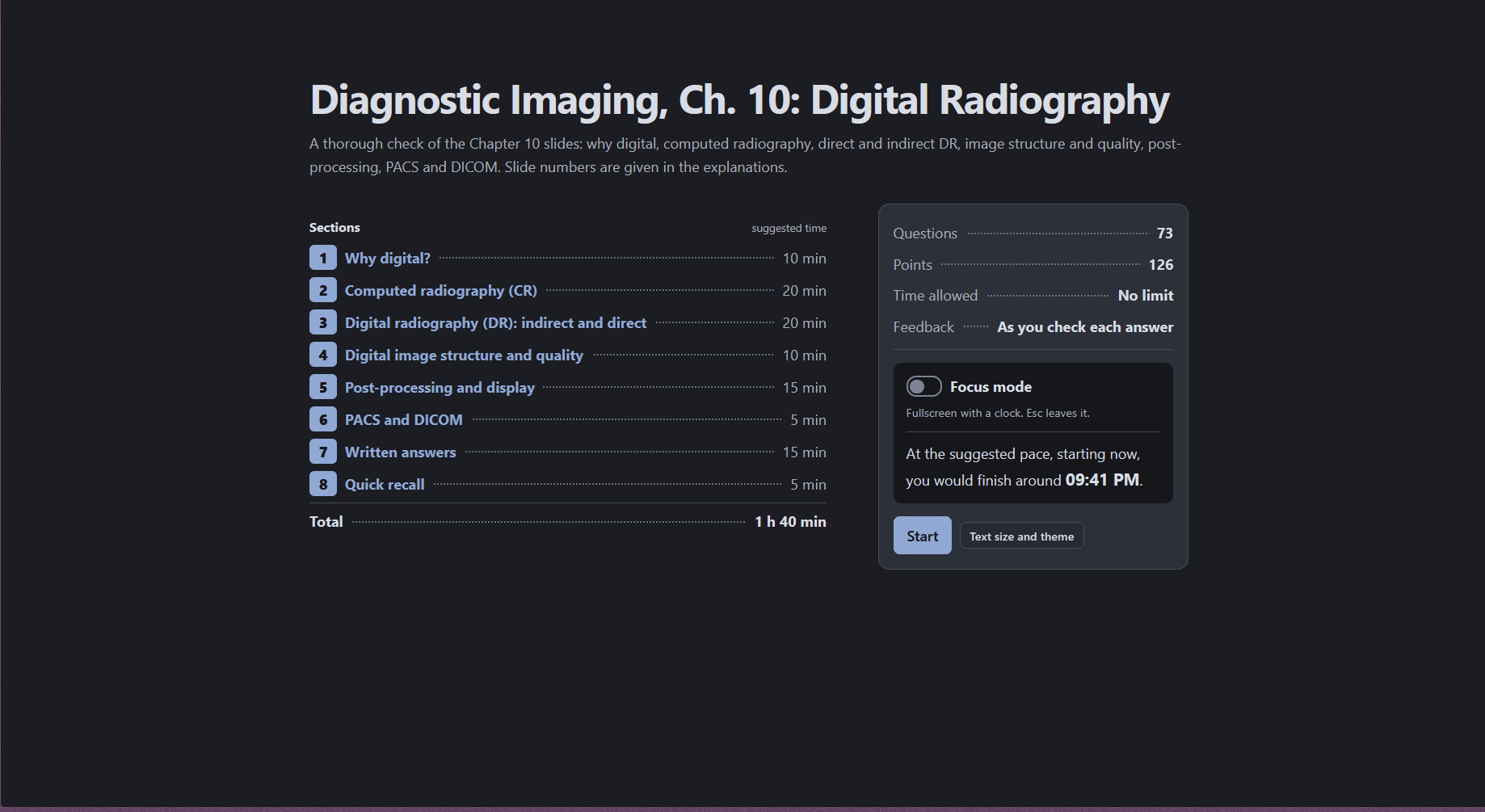
The start screen: what the quiz holds, the suggested time per section, Focus mode, and when you would finish if you start now.
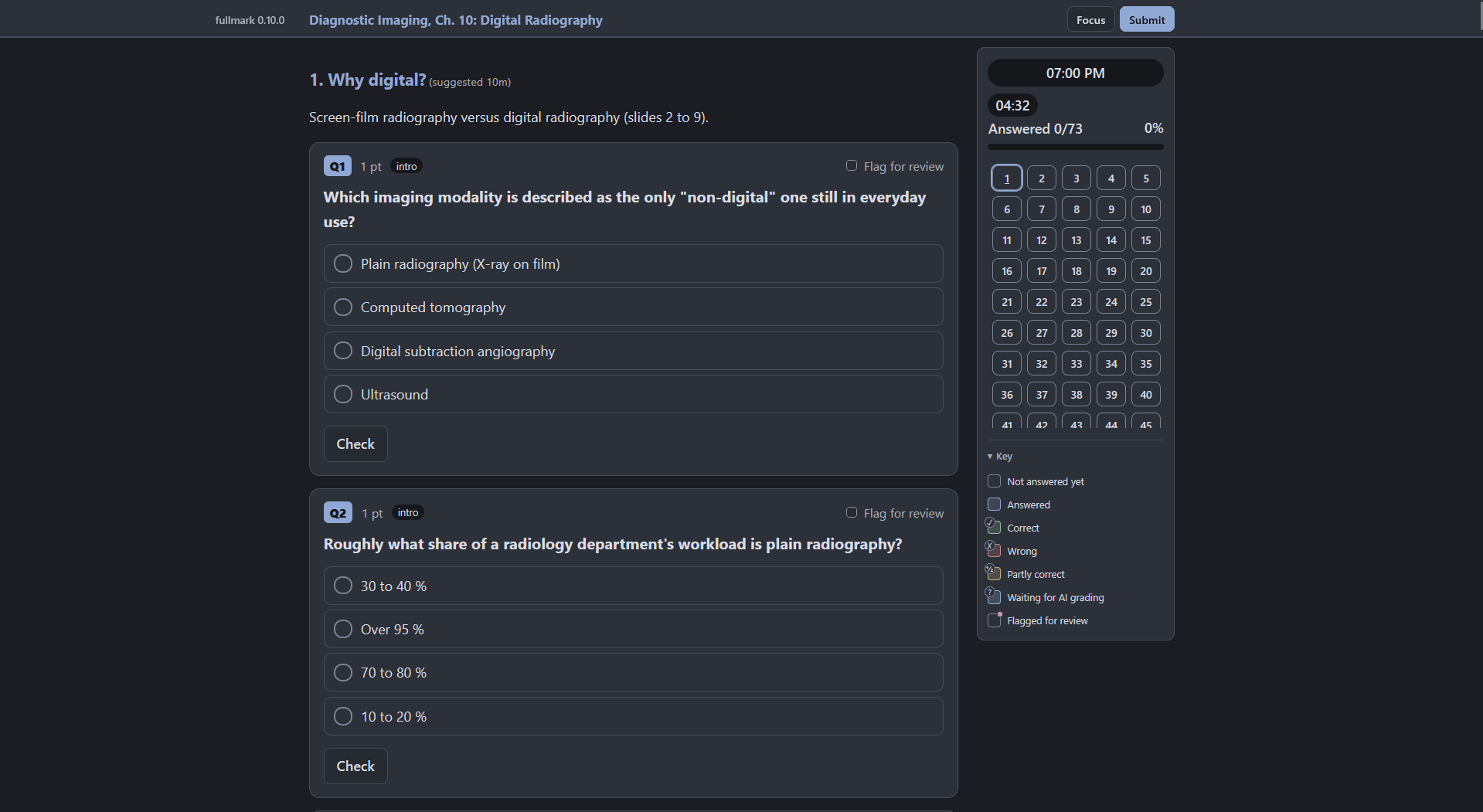
Questions, with the timer, progress and question map beside them:
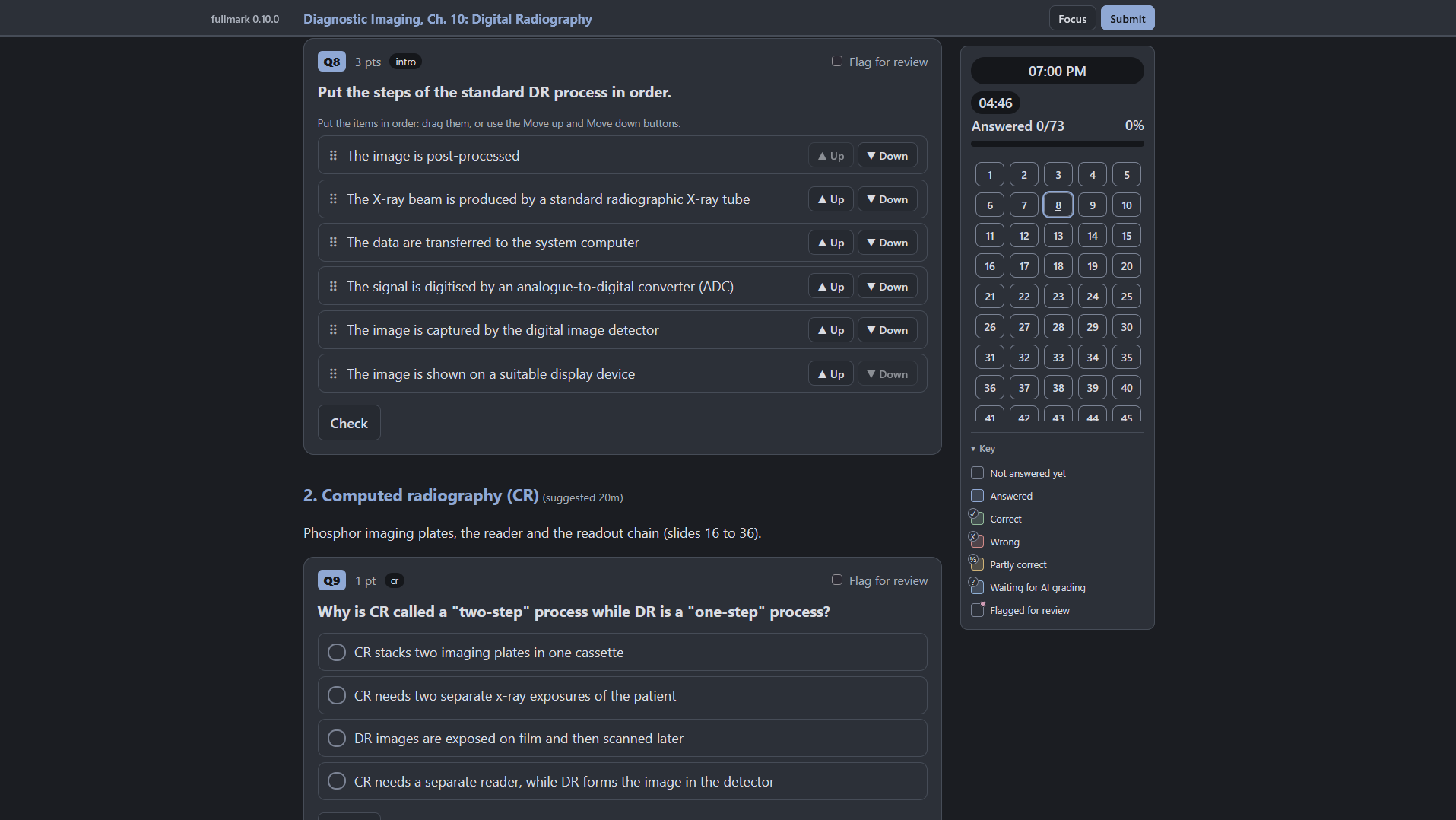
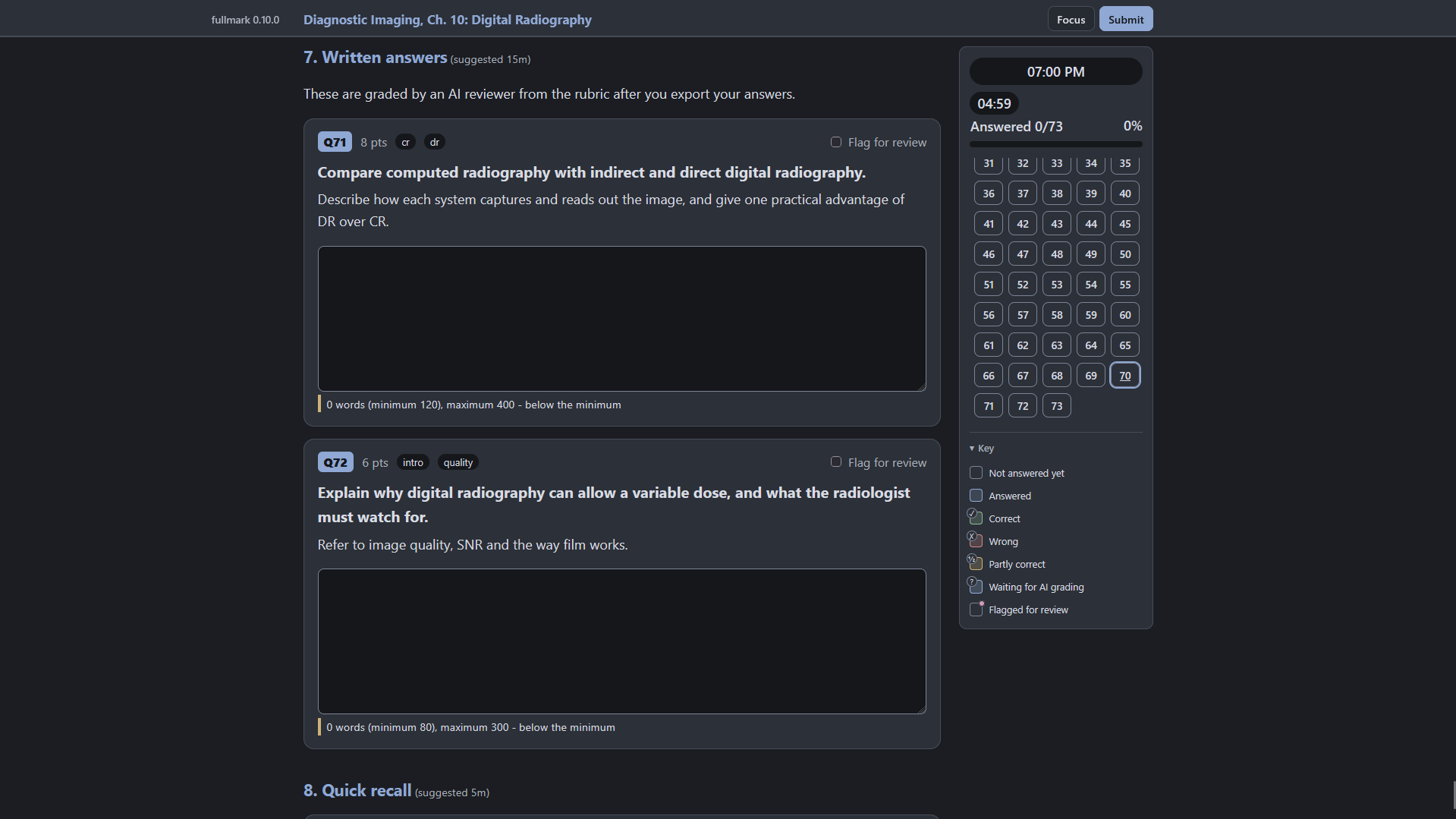
An ordering question (drag, or the Up and Down buttons) and written answers that an AI grades from a rubric:
Fullmark and Anki
They do different jobs.
| Anki | Fullmark | |
|---|---|---|
| Best for | Remembering facts: definitions, formulas, anatomy | Exam practice: worked problems, mixed question types, full mock tests |
| Unit | One card | One quiz, with sections and points |
| Scheduling | Spaced repetition | None. You decide when to retake; the library keeps your scores and weak topics |
| Questions | Front and back, cloze | Choice, numeric with tolerance, blanks, matching, ordering, essays and code graded by an AI |
| Where | Apps on every device, with sync | One HTML file that opens anywhere, no account |
Use both: Anki for what you must recall, Fullmark to check you can use it under exam conditions.
The loop
- An AI reads study material and writes a quiz in fullmark Markdown (
quiz guideprints the format). quiz check quiz.mdvalidates it with line-numbered errors; fix until it passes.quiz build quiz.md --openproducesquiz.html.- The learner answers, presses Submit, then Export answers (
results.json). quiz grade results.json --quiz quiz.mdwrites a Markdown report; an AI grades essays and code from it.
Two layers: core and library
- Core (
quiz check,build,serve,grade, ...) works on files: Markdown in, one HTML page or a JSON file out. It needs no setup and no config, and it is all you need to make a quiz and share it. - Library (
quiz library ..., new in 0.9.0, design in docs/plans/LIBRARY_PLAN.md) owns your own quizzes in one folder under git: register a quiz once (the source can be a throwaway file), take it withquiz library take NAME, and every result is filed next to the version you answered. Pages are built on the spot, so they always use the installed fullmark. It calls core and adds nothing to the pages, so a shared page stays the normal offline file. Core never depends on it.
Core commands
| Command | What it does |
|---|---|
quiz check FILE [--json] [--strict] [--review REVIEW] |
Validate. Exit 0 = no errors (warnings allowed), 1 = errors, 2 = usage or I/O problem |
quiz build FILE [-o OUT] [--open] [--strict] |
Check, then write the single-file HTML; --strict fails on warnings and writes nothing |
quiz watch FILE [-o OUT] [--open] [--serve] |
Rebuild whenever the quiz or its assets/ change; keeps the last good build when a save has errors. Reload the page after each rebuild, or add --serve to serve it on 127.0.0.1 and reload the browser automatically (only the served copy gets the reload code; the file you hand out is unchanged) |
quiz serve FILE [--out RESULTS] [--once] [--timeout SECONDS] [--open] [--focus] [--port N] [--autosave PROGRESS] [--json] |
Serve the page on 127.0.0.1; Finish or Submit sends the results back and the server writes the JSON file, then exits (--once is the default when stdout is not a terminal; exit 2 on timeout). For questionnaires that a tool or an agent is waiting on. --autosave keeps an attempt in progress so it resumes after the server or browser closes |
quiz review FILE [--out REVIEW] [--since REVIEW] [--once] [--open] [--timeout SECONDS] [--port N] [--json] |
The learner checks each question (keep, fix or drop) in a form; Finish writes review.json. Then quiz check FILE --review review.json fails until the flagged questions are fixed |
quiz brief DIR [--purpose P] [--scope S] [--count N] [--web] [--accept-defaults] [--json] ... |
Write brief.yaml and content/ for a quiz an agent will write. A missing purpose or scope exits 3; --web asks in a form. quiz check then warns when the quiz does not match the brief |
quiz grade RESULTS [--quiz FILE] [-o OUT] [--grades GRADES] [--json] |
Re-grade in Python (the authority) and write the report; --json writes *-report.json instead and an empty *-grades.json template; --grades folds a filled-in file into the report |
quiz stats RESULTS... [--quiz FILE] [--json] |
Progress across several attempts at one quiz: scores by date, percent per topic, the weakest topics |
quiz inspect FILE [--json] [--review REVIEW] |
Summarize a quiz: types, points, sections, tags, answer positions; with --review, counts of kept, to fix and to drop |
quiz new TEMPLATE [PATH] |
Copy calculus, rust, ielts, medical, exam, survey or blank plus its assets; never overwrites |
quiz templates |
List the templates |
quiz guide |
Print the authoring reference |
quiz agent-guide |
Print the instructions for AI agents (AGENTS.md) |
Library commands
Eleven commands, all under quiz library. Exit codes: 0 done, 1 problems found (or a refused quiz), 2 usage error or nothing to work on, 3 needs input from the user (register with no library). The design is in docs/plans/LIBRARY_PLAN.md.
| Command | What it does |
|---|---|
quiz library init [PATH] [--force] [--no-git] [--json] |
Make PATH (default: the current folder) this machine's library, git init it, and record it in the config (%APPDATA%\fullmark\config.toml on Windows, ~/.config/fullmark/config.toml on Linux). A new, missing or empty folder is set up; an existing library is adopted; a folder with other files is refused (exit 2, nothing written; use a new folder such as PATH/fullmark-library). Switching from another library needs --force |
quiz library status [--json] [--plain] |
Diagnostics: config, library path, git (repo, uncommitted changes, remote), counts, snapshots whose content no longer matches their hash, orphan files. Colored in a terminal; --plain or NO_COLOR gives plain text. Exit 0 healthy, 1 problems, 2 no library |
quiz library register FILE.md [-n NAME | --update NAME] [--strict] [--review REVIEW] [--json] |
Check the quiz, then copy its source, assets and brief into the library (no HTML is stored) and commit. The source can then be deleted. --update adds a version to an existing quiz. The last step when an agent writes a quiz; exits 3 if no library is set up |
quiz library list [--json] [--plain] |
Every quiz with versions, attempts, last score, and a note when its original source still exists and has changed |
quiz library take NAME [--no-open] [--focus] [--timeout SECONDS] [--port N] [--json] |
Build the page on the spot with the installed fullmark, serve it, save the result into the library and commit; resume survives closing the tab |
quiz library share NAME [-o DIR] [--version H] [--source] |
Build the clean offline page to share (with quiz build, the only way to get a standalone HTML file); --source writes the editable source folder instead, with the original file name, its assets and the brief |
quiz library grade NAME [--attempt STAMP] [--grades FILE] [--json] |
Grade an attempt (the newest by default) against the version it was taken on and write the report into quizzes/<id>/reports/ (never results/); --json also writes the grades template there. Commits the report |
quiz library stats NAME [--json] |
Progress over every attempt: scores by date, percent per topic, weakest topics. Uses the grades each attempt was made with when the attempts span several versions. Writes nothing |
quiz library rename OLD NEW [--json] |
Change a quiz's name (its id and folder stay) and commit |
quiz library rm NAME [--yes] [--force] [--json] |
Delete a quiz with its versions and results, and commit, so git -C LIBRARY revert HEAD brings it back. Refused when the library is not its own git repository or the quiz folder has uncommitted changes (--force skips both); asks for confirmation unless --yes. Images stay in assets/ |
quiz library path [NAME] |
Print the library folder or a quiz's folder; results and snapshots are plain files there |
Later, when needed: sync, replay, --web (see docs/PLANNED.md). The work order for grade, stats, rename and rm is docs/plans/LIBRARY_HOUSEKEEPING_PLAN.md.
Backups
The library is a plain folder under local git history, which protects against mistakes (a hand-edited snapshot, a broken file) but not against losing the drive. fullmark commits after each init, register, take, grade, rename and rm, and it never pushes. Results hold your answers and the snapshots hold the answer keys, so push only to a private remote. To back up automatically, add a post-commit hook in the library's .git/hooks that runs git push; that is your hook, not fullmark's.
Question types
Single choice, multiple answer, true/false, numeric (tolerances, fractions), short answer (accepted
strings and regexes), fill-in-the-blank (also inside code blocks), labeled fields, matching, ordering,
essay and code (both exported for AI grading). Questionnaires add ungraded questions and rating
scales (mode: survey). LaTeX math (KaTeX, embedded only when used), highlighted code, images and
audio are embedded as data URIs. Timers, instant or end-of-quiz feedback, question banks with a
random draw, resume after reload, Focus mode, and a versioned JSON export are built in. A choice can
ask for a few words when picked (- [ ] Something else {input="What is it?"}); the text is exported
and reported but never graded.
A minimal quiz:
---
title: Capitals
---

## What is the capital of France?

- [ ] Lyon
- [x] Paris

> [!explanation]
> Paris has been the capital since 987.
Notes
- The answer key ships inside the HTML, lightly obfuscated (XOR with a key derived from the quiz hash). This stops casual peeking only. It is not an exam-security feature.
- The page makes no network requests; a Content Security Policy blocks them, and the browser tests assert it.
- Project config:
.markdownlint-cli2.jsonc(the user's rules, minus MD025 and MD028, which the format needs),biome.jsonfor the runtime JavaScript. - Regenerate fixtures and example images:
uv run python tests/fixtures/make_fixtures.py,uv run python tests/make_grading_cases.py,uv run python src/fullmark/examples/make_assets.py,uv run python docs/build_docs.py(rebuildsdocs/GUIDE.html,docs/fullmark-project.htmlanddocs/index.html, the GitHub Pages front page). - KaTeX 0.16.47 is vendored in
src/fullmark/vendor/katex/(MIT, see itsLICENSE).
1 maintainer

Metadata
1 maintainer
Release files for fullmark 0.10.2
For a detailed explanation of source distributions (sdists) and built distributions (wheels), please see the package formats documentation.
Source distribution (sdist)
| File | Size | Uploaded | Provenance | |
|---|---|---|---|---|
| fullmark-0.10.2.tar.gz | 2.4 MB | With provenance | Details |
Built distribution (wheel)
| File | Interpreter | ABI | Platform | Reset |
|---|---|---|---|---|
| fullmark-0.10.2-py3-none-any.whl | Python 3 | none | any | Details |
Total release size: 3.0 MB
Release files / fullmark-0.10.2.tar.gz
| Download URL | fullmark-0.10.2.tar.gz |
|---|---|
| Size | 2.4 MB |
| Tags | Source |
|
SHA-256 checksum How to use checksums |
34208437730bc9cc8d5e8d98d21fff9d52ac62aa9667bb2a771e6a4597f70967
|
|
BLAKE2b-256 checksum How to use checksums |
6fb90d05e9cafbf4ae2d341b7395cf03144c6d3eae05ea205c6237bca28614ef
|
| Upload date | |
|
Uploaded using Trusted Publishing? What is trusted publishing? |
Yes |
| Uploaded via |
twine/7.0.0 CPython/3.13.16
|
Provenance
Provenance describes where a file came from. On PyPI, provenance is shared via attestations, which provide a verifiable record of the build or publishing details. View details, limitations and caveats.


PyPI Publish Attestation
PyPI verified that this artifact, at this checksum, originated from the publisher listed below.
Signed by GitHub Actions, verified by PyPI on Oct 22, 2026.
Transparency logRelease files / fullmark-0.10.2-py3-none-any.whl
| Download URL | fullmark-0.10.2-py3-none-any.whl |
|---|---|
| Size | 596.5 kB |
| Tags | Python 3 |
|
SHA-256 checksum How to use checksums |
d4d4c5a9ba6e7b2dd3b37ce8044c1d7ebe6aaee93abd6de8fffbd0fb654e355c
|
|
BLAKE2b-256 checksum How to use checksums |
f0e1316bc76748ebb0f03c630e5c5159c651aa126a98da4a94f714b16559bfaf
|
| Upload date | |
|
Uploaded using Trusted Publishing? What is trusted publishing? |
Yes |
| Uploaded via |
twine/7.0.0 CPython/3.13.16
|
Provenance
Provenance describes where a file came from. On PyPI, provenance is shared via attestations, which provide a verifiable record of the build or publishing details. View details, limitations and caveats.
PyPI Publish Attestation
PyPI verified that this artifact, at this checksum, originated from the publisher listed below.
Signed by GitHub Actions, verified by PyPI on Oct 22, 2026.
Transparency logSecurity for fullmark 0.10.2
Provenance
Provenance describes where a file came from. On PyPI, provenance is shared via attestations, which provide a verifiable record of the build or publishing details. View details, limitations and caveats.
Full provenance
All 2 files in this release have been uploaded with provenance metadata.
Attestation for fullmark-0.10.2.tar.gz
PyPI Publish Attestation
PyPI verified that this artifact, at this checksum, originated from the publisher listed below.
Signed by GitHub Actions, verified by PyPI on Oct 22, 2026.
Transparency logA note on package security
PyPI is a repository for distributing packages, not a service for auditing them. While third-party security researchers and our staff do their best to detect and remove malicious packages, PyPI cannot guarantee the quality, security or suitability of any given package.














