
Industrial-grade speech recognition: 170x realtime, 50+ languages, speaker diarization, emotion detection.

Project description

Industrial speech recognition. 170x faster than Whisper. 50+ languages.
Speaker diarization · Emotion detection · Streaming · One API call





Quick Start · Colab · Benchmark · Model selection · Migration guide · Use cases · Deployment matrix · Models · Agent Integration · Docs · Contribute
Quick Start

No local setup? Open the Colab quickstart to transcribe a public sample or upload your own audio in a browser.
pip install torch torchaudio
pip install funasr
from funasr import AutoModel
from funasr.utils.postprocess_utils import rich_transcription_postprocess

model = AutoModel(model="iic/SenseVoiceSmall", vad_model="fsmn-vad", spk_model="cam++", device="cuda")  # use device="cpu" if you don't have a GPU
result = model.generate(input="https://isv-data.oss-cn-hangzhou.aliyuncs.com/ics/MaaS/ASR/test_audio/asr_example_zh.wav")

result = model.generate(
    input="https://isv-data.oss-cn-hangzhou.aliyuncs.com/ics/MaaS/ASR/test_audio/asr_example_zh.wav",
    batch_size_s=300,
)

# One call returns VAD segments with speaker id + timestamps — render them however you like:
for seg in result[0]["sentence_info"]:
    print(f"[{seg['start']/1000:.1f}s] Speaker {seg['spk']}: {rich_transcription_postprocess(seg['sentence'])}")
Output — structured text with speaker labels, timestamps, and punctuation:
[0.6s] Speaker 0: 欢迎大家来体验达摩院推出的语音识别模型
That's it. One model, one call — VAD segmentation, speech recognition, punctuation, speaker diarization all happen automatically.
LLM-powered ASR: Fun-ASR-Nano
For highest accuracy across 31 languages (including Chinese dialects), use Fun-ASR-Nano — an LLM-based ASR combining SenseVoice encoder with Qwen3-0.6B decoder:
from funasr import AutoModel

model = AutoModel(model="FunAudioLLM/Fun-ASR-Nano-2512", vad_model="fsmn-vad", device="cuda")
result = model.generate(input="https://isv-data.oss-cn-hangzhou.aliyuncs.com/ics/MaaS/ASR/test_audio/asr_example_zh.wav")
With vLLM acceleration (16x faster, batch processing):
from funasr.auto.auto_model_vllm import AutoModelVLLM

model = AutoModelVLLM(model="FunAudioLLM/Fun-ASR-Nano-2512", tensor_parallel_size=1)
results = model.generate(["audio1.wav", "audio2.wav"], language="auto")
Deploy as API server:
funasr-server --device cuda→ OpenAI-compatible endpoint at localhost:8000Use with AI agents: MCP Server for Claude/Cursor · OpenAI API for LangChain/Dify/AutoGen
Why FunASR?
| FunASR | Whisper | Cloud APIs | |
|---|---|---|---|
| Speed | 170x realtime | 13x realtime | ~1x realtime |
| Speaker ID | ✅ Built-in | ❌ Needs pyannote | ✅ Extra cost |
| Emotion | ✅ Happy/Sad/Angry | ❌ | ❌ |
| Languages | 50+ | 57 | Varies |
| Streaming | ✅ WebSocket | ❌ | ✅ |
| vLLM Acceleration | ✅ 2-3x faster | ❌ | N/A |
| Self-hosted | ✅ MIT license | ✅ MIT license | ❌ Cloud only |
| Cost | Free | Free | $0.006/min+ |
| CPU viable | ✅ 17x realtime | ❌ Too slow | N/A |
Trying FunASR for the first time? Use the Colab quickstart before setting up a local environment. Choosing a first model? Start with the model selection guide. Planning a switch from Whisper or a cloud ASR provider? Use the migration guide and benchmark example to test representative audio, map features, and roll out safely.
Benchmark
184 long-form audio files (192 min). Full report →
| Model | GPU Speed | CPU Speed | vs Whisper-large-v3 |
|---|---|---|---|
| SenseVoice-Small | 170x realtime | 17x realtime | 🚀 13x faster |
| Paraformer-Large | 120x realtime | 15x realtime | 🚀 9x faster |
| Whisper-large-v3-turbo | 46x realtime | ❌ | 3.4x faster |
| Fun-ASR-Nano | 17x realtime | 3.6x realtime | 1.3x faster |
| Whisper-large-v3 | 13x realtime | ❌ | baseline |
Key takeaway: FunASR models run on CPU faster than Whisper runs on GPU.
What's new
- 2026/05/24: vLLM Inference Engine — 2-3x faster LLM decoding for Fun-ASR-Nano. Streaming WebSocket service with VAD + Speaker Diarization. Guide →
- 2026/05/24: Dynamic VAD — adaptive silence threshold (default on). Short sentences stay intact, long segments get auto-split. Details →
- 2026/05/24: v1.3.3 —
funasr-serverCLI, OpenAI-compatible API, MCP Server for AI agents.pip install --upgrade funasr - 2026/05/20: Added Qwen3-ASR (0.6B/1.7B) — 52 languages, auto detection. usage
- 2026/05/20: Added GLM-ASR-Nano (1.5B) — 17 languages, dialect support. usage
- 2026/05/19: Fun-ASR-Nano and SenseVoice now support speaker diarization.
- 2025/12/15: Fun-ASR-Nano-2512 — 31 languages, tens of millions of hours training.
Older
- 2024/10/10: Whisper-large-v3-turbo support added.
- 2024/07/04: SenseVoice — ASR + emotion + audio events.
- 2024/01/30: FunASR 1.0 released.
Installation
pip install funasr
From source / Requirements
git clone https://github.com/modelscope/FunASR.git && cd FunASR
pip install -e ./
Requirements: Python ≥ 3.8. Install PyTorch + torchaudio first (pytorch.org), then pip install funasr.
Model Zoo
| Model | Task | Languages | Params | Links |
|---|---|---|---|---|
| Fun-ASR-Nano | ASR + timestamps | 31 languages | 800M | ⭐ 🤗 |
| SenseVoiceSmall | ASR + emotion + events | zh/en/ja/ko/yue | 234M | ⭐ 🤗 |
| Paraformer-zh | ASR + timestamps | zh/en | 220M | ⭐ 🤗 |
| Paraformer-zh-streaming | Streaming ASR | zh/en | 220M | ⭐ 🤗 |
| Qwen3-ASR | ASR, 52 languages | multilingual | 1.7B | usage |
| GLM-ASR-Nano | ASR, 17 languages | multilingual | 1.5B | usage |
| Whisper-large-v3 | ASR + translation | multilingual | 1550M | usage |
| Whisper-large-v3-turbo | ASR + translation | multilingual | 809M | usage |
| ct-punc | Punctuation | zh/en | 290M | ⭐ 🤗 |
| fsmn-vad | VAD | zh/en | 0.4M | ⭐ 🤗 |
| cam++ | Speaker diarization | — | 7.2M | ⭐ 🤗 |
| emotion2vec+large | Emotion recognition | — | 300M | ⭐ 🤗 |
Usage
Full examples with parameter docs: Tutorial →
from funasr import AutoModel

# Chinese production (VAD + ASR + punctuation + speaker)
model = AutoModel(model="paraformer-zh", vad_model="fsmn-vad", punc_model="ct-punc", spk_model="cam++", device="cuda")
result = model.generate(input="https://isv-data.oss-cn-hangzhou.aliyuncs.com/ics/MaaS/ASR/test_audio/asr_example_zh.wav", hotword="关键词 20")

# 31 languages with timestamps
model = AutoModel(model="FunAudioLLM/Fun-ASR-Nano-2512", hub="hf", trust_remote_code=True,
                  vad_model="fsmn-vad", vad_kwargs={"max_single_segment_time": 30000}, device="cuda")
result = model.generate(input="audio.wav", batch_size=1)

# Streaming real-time (feed audio chunk by chunk)
import soundfile as sf
model = AutoModel(model="paraformer-zh-streaming", device="cuda")
audio, sr = sf.read("speech.wav", dtype="float32")   # 16 kHz mono
chunk_size = [0, 10, 5]                               # 600 ms chunks
chunk_stride = chunk_size[1] * 960
cache = {}
n_chunks = (len(audio) - 1) // chunk_stride + 1
for i in range(n_chunks):
    chunk = audio[i * chunk_stride : (i + 1) * chunk_stride]
    res = model.generate(input=chunk, cache=cache, is_final=(i == n_chunks - 1),
                         chunk_size=chunk_size, encoder_chunk_look_back=4, decoder_chunk_look_back=1)
    if res[0]["text"]:
        print(res[0]["text"], end="", flush=True)

# Emotion recognition
model = AutoModel(model="emotion2vec_plus_large", device="cuda")
result = model.generate(input="audio.wav", granularity="utterance")
CLI (Agent-Friendly)
# Transcribe audio (simplest)
funasr audio.wav

# JSON output (for AI agents)
funasr audio.wav --output-format json

# SRT subtitles
funasr audio.wav --output-format srt --output-dir ./subs

# Speaker diarization + timestamps
funasr audio.wav --spk --timestamps -f json

# Choose model and language
funasr audio.wav --model paraformer --language zh

# Batch transcribe
funasr *.wav --output-format srt --output-dir ./output
Available models: sensevoice (default), paraformer, paraformer-en, fun-asr-nano
Deploy
# OpenAI-compatible API (recommended)
pip install torch torchaudio
pip install funasr vllm fastapi uvicorn python-multipart
funasr-server --device cuda
# → POST /v1/audio/transcriptions at localhost:8000
Verify it with a public sample:
curl -L https://isv-data.oss-cn-hangzhou.aliyuncs.com/ics/MaaS/ASR/test_audio/BAC009S0764W0121.wav -o sample.wav
curl http://localhost:8000/v1/audio/transcriptions \
  -F file=@sample.wav \
  -F model=sensevoice \
  -F response_format=verbose_json
# Docker streaming service
docker pull registry.cn-hangzhou.aliyuncs.com/funasr_repo/funasr:funasr-runtime-sdk-online-cpu-0.1.12
CPU / edge (no GPU, no Python): run Fun-ASR-Nano / SenseVoice / Paraformer via llama.cpp / GGUF — a single self-contained binary, like whisper.cpp. See runtime/llama.cpp/.
OpenAI API example → · Gradio demo → · Client recipes → · JavaScript/TypeScript recipes → · Kubernetes template → · Workflow recipes → · Postman collection → · OpenAPI spec → · Security guide → · Deployment matrix → · Deployment docs → · Agent integration →
Community
| 📖 Documentation | 🐛 Issues |
| 💬 Discussions | 🤗 HuggingFace |
| 🤝 Contributing | 📈 20k growth plan |
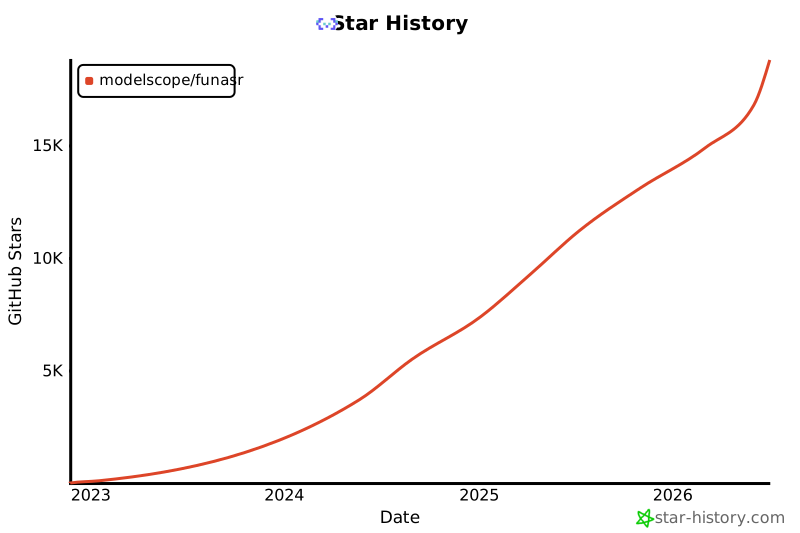
Star History
License
Citations
@inproceedings{gao2023funasr,
  author={Zhifu Gao and others},
  title={FunASR: A Fundamental End-to-End Speech Recognition Toolkit},
  booktitle={INTERSPEECH},
  year={2023}
}
Release history Release notifications | RSS feed


Download files
Download the file for your platform. If you're not sure which to choose, learn more about installing packages.
Source Distributions
Built Distribution
Filter files by name, interpreter, ABI, and platform.
If you're not sure about the file name format, learn more about wheel file names.
Copy a direct link to the current filters
File details
Details for the file funasr-1.3.12-py3-none-any.whl.
File metadata
- Download URL: funasr-1.3.12-py3-none-any.whl
- Upload date:
- Size: 924.7 kB
- Tags: Python 3
- Uploaded using Trusted Publishing? No
- Uploaded via: twine/6.2.0 CPython/3.12.3
File hashes
| Algorithm | Hash digest | |
|---|---|---|
| SHA256 |
02850c2ed4952c25567438047d1e5fc8a1217bb18db3df5c4ca042020370904d
|
|
| MD5 |
d30e5f98ef2ceb5510061048c3c9affa
|
|
| BLAKE2b-256 |
4f5fb9157a3b40025d0dfae6b586e5c393663085c7ea809a589c0c9462e930d6
|






