
This release is a pre-release and may not be stable for production use.
FuncLoom






The Python functionizer. Turn Python snippets, scripts and Jupyter notebooks into reviewable functions and modular packages; every transformation is verified or refused with a reason and source location.
Website: samtherocket.github.io/funcloom
Part of a family of standalone Python tools: FuncLoom (functionizer), RefacTrail (refactorizer) and FlowBlueprint (architect: script or notebook to architecture diagram). Each installs and works on its own.
Use FuncLoom to:
- generate functions automatically from long scripts, pasted snippets and notebook cells (an auto function generator that shows its evidence);
- turn a Jupyter notebook into a clean Python package with a pipeline
class and
main.py(notebook to module, notebook to script); - auto-structure and modularize messy prototype, data-science or coursework code so it can be reused, tested and presented;
- split functions that are too long and add certain type hints and docstrings, with every change verified or refused with a reason.
Built for developers, data scientists, data analysts and students; pair it with RefacTrail to check and refactor the result and FlowBlueprint to draw its architecture for managers and product owners.
Status: alpha, version 0.10.5a0 on PyPI. Free and open source (MIT). Works offline: no AI model, account or internet connection needed.
Start in one minute
-
Install (needs Python 3.12 or newer; older Python? see below):
pip install funcloom
-
Point it at your script or notebook:
funcloom check my_script.py                                # what to improve
funcloom modularize my_notebook.ipynb --output my_package  # notebook to package
funcloom refine my_script.py --output my_script_refined.py # split long functions
-
Use the result. Your original file is never changed.
modularizewrites a new folder: go into it and runpython main.py. Anything FuncLoom cannot do safely is skipped, with the reason and line number.
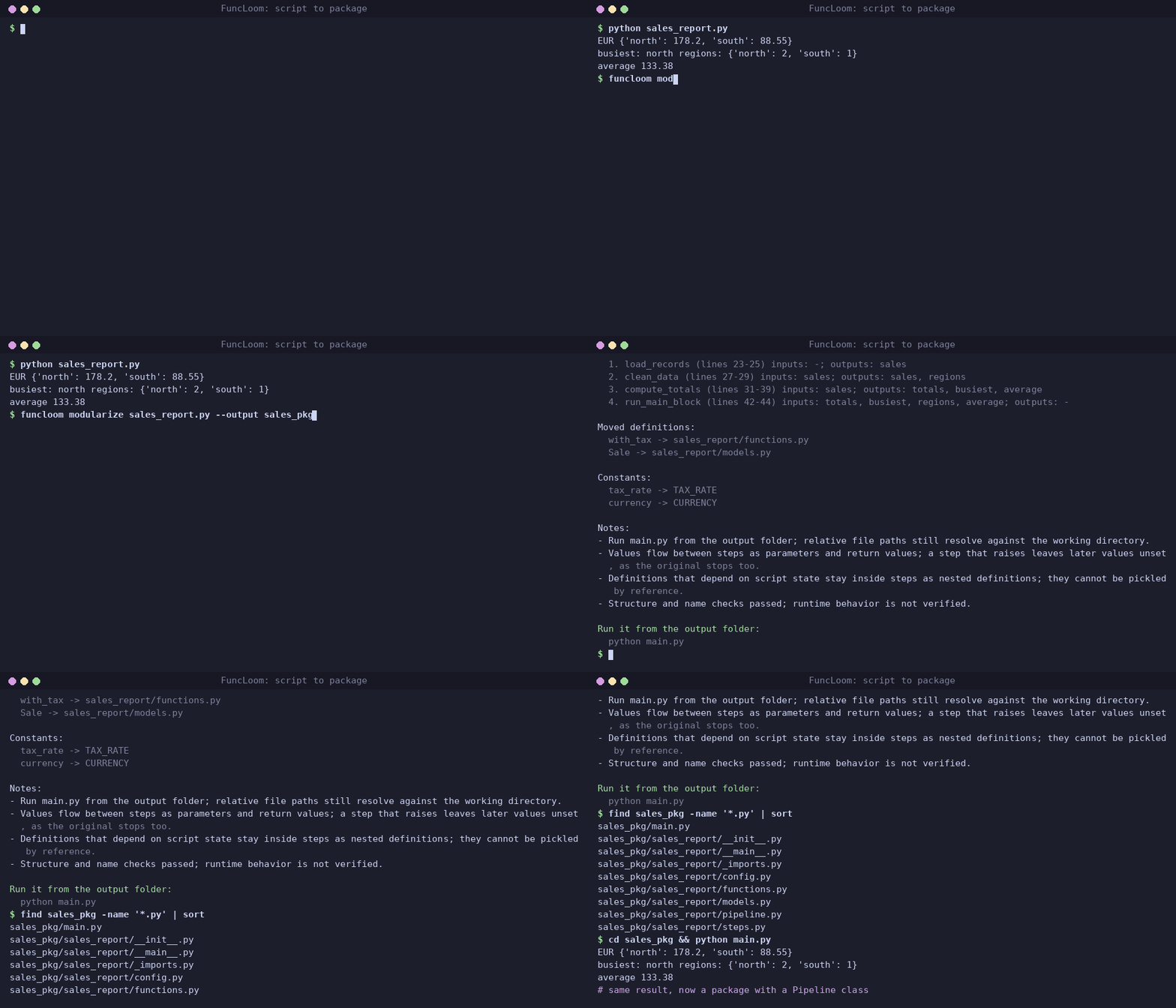
Typing just funcloom shows the most useful commands. If your computer
blocks the funcloom command, type python -m funcloom instead.
In VS Code
- Install FuncLoom from the Extensions view (search FuncLoom).
- Open a Python file or notebook, press Ctrl+Shift+P (Cmd+Shift+P on a Mac) and type FuncLoom.
- The first time, click Install when asked; the extension sets FuncLoom up in your Python for you.
Commands: Check active file (findings in the Problems panel), Draft function from selection or cell, Modularize to new folder and Refine to new file.
Check on every commit (optional)
Add this to .pre-commit-config.yaml:
repos:
  - repo: https://github.com/SAMtheROCKET/funcloom
    rev: v0.10.5a0
    hooks:
      - id: funcloom-check
What's new in 0.10.5a0
- VS Code extension on the Marketplace, now with an icon: search FuncLoom in the Extensions view.
- Older-Python projects: a step-by-step guide, tested with code for Python 3.8, 3.9 and 3.10.
- A simpler README. The engine is unchanged; 0.10.4a0's faster
refineand clearer refusals are in the changelog.
Your project uses an older Python?
No problem. FuncLoom only reads your code, so it runs on its own Python 3.12 or newer while your project stays on Python 3.8, 3.9, 3.10 or 3.11. Do this once:
-
Make a separate Python for the tools (no admin rights needed):
# Windows (Command Prompt)
py -3.12 -m venv %USERPROFILE%\py-tools
%USERPROFILE%\py-tools\Scripts\python -m pip install funcloom

# macOS / Linux
python3.12 -m venv ~/py-tools
~/py-tools/bin/python -m pip install funcloom
No Python 3.12 on the machine? Run
pip install uv, thenuvx --python 3.12 funcloom check my_script.py: uv downloads Python 3.12 for you. -
Run FuncLoom with that Python:
%USERPROFILE%\py-tools\Scripts\python -m funcloom check my_script.py     # Windows
~/py-tools/bin/python -m funcloom check my_script.py                       # macOS / Linux
-
In VS Code, open Settings, search for
funcloom.pythonPathand paste the path of that Python (for exampleC:\Users\YOU\py-tools\Scripts\python.exe).
Your project keeps using its own Python to run. More detail, limits and fixes for common errors: the older-Python guide.
If pip install funcloom says from versions: none, your Python is older
than 3.12 (use the steps above) or your company's package mirror does not
carry it yet (ask IT to allow it).
From source (for contributors)
python -m venv .venv
.venv/bin/python -m pip install -e .      # Windows: .venv\Scripts\python.exe
.venv/bin/python -m funcloom doctor
Capabilities
| Command | Input | Output |
|---|---|---|
snippet |
Python text or one notebook cell | Function/caller drafts with optional context, naming proposals, type evidence and questions |
plan |
An explicit module-level line selection | Extraction contract, draft function/caller, source hashes, effects and refusal reasons |
modularize |
Script, stdin, notebook or project folder | New modules, step functions, a Pipeline class and entry scripts |
refine |
Python file or project folder | New copies with supported long functions/blocks split, lines wrapped and optional docstring skeletons |
scan / check |
Python file or project folder | Inventory and configured line, size, annotation, documentation and naming findings |
doctor |
Installed environment | Runtime version, interpreter, package location and capabilities |
The tools parse and compile source without importing or executing target projects. Generated files require review and the target project's tests. Structural checks and regression results do not prove that arbitrary programs retain their behavior. Unknown types and meanings remain explicit; domain context is supplied by the user, not guessed from names.
Try the workflows
Use your environment's Python in place of python below.
python -m funcloom snippet examples/snippet_tax.py --no-context
python -m funcloom snippet examples/snippet_tax.py --context profiles/snippet_tax.toml
python -m funcloom snippet examples/snippet_generic.py --interactive
python -m funcloom snippet examples/snippet_generic.py --naming mathematical
python -m funcloom snippet examples/snippet_tax.ipynb --cell 2 --no-context
python -m funcloom modularize examples/modular_sales_report.py --output demo_sales
python demo_sales/main.py
python -m funcloom refine examples/long_functions.py --output demo_refined.py --document
python demo_refined.py
python -m funcloom check examples/clean_module.py --fail-on warning
snippet --interactive offers no context or a small project description,
then optional naming/type/meaning information. It does not translate
pseudocode or natural-language instructions into executable Python.
Noninteractive commands work without domain context.
For whole repositories:
python -m funcloom modularize path/to/project --output path/to/project_modular
python -m funcloom refine path/to/project --output path/to/project_refined
Outputs must be new; modularization also accepts an empty destination
folder. Folder outputs must be outside the input tree. Input files are
preserved. Run a generated package from its output folder. modularize
without --output only plans; --show-files includes the generated text.
--format json exposes the corresponding report contract.
Generated package and limits
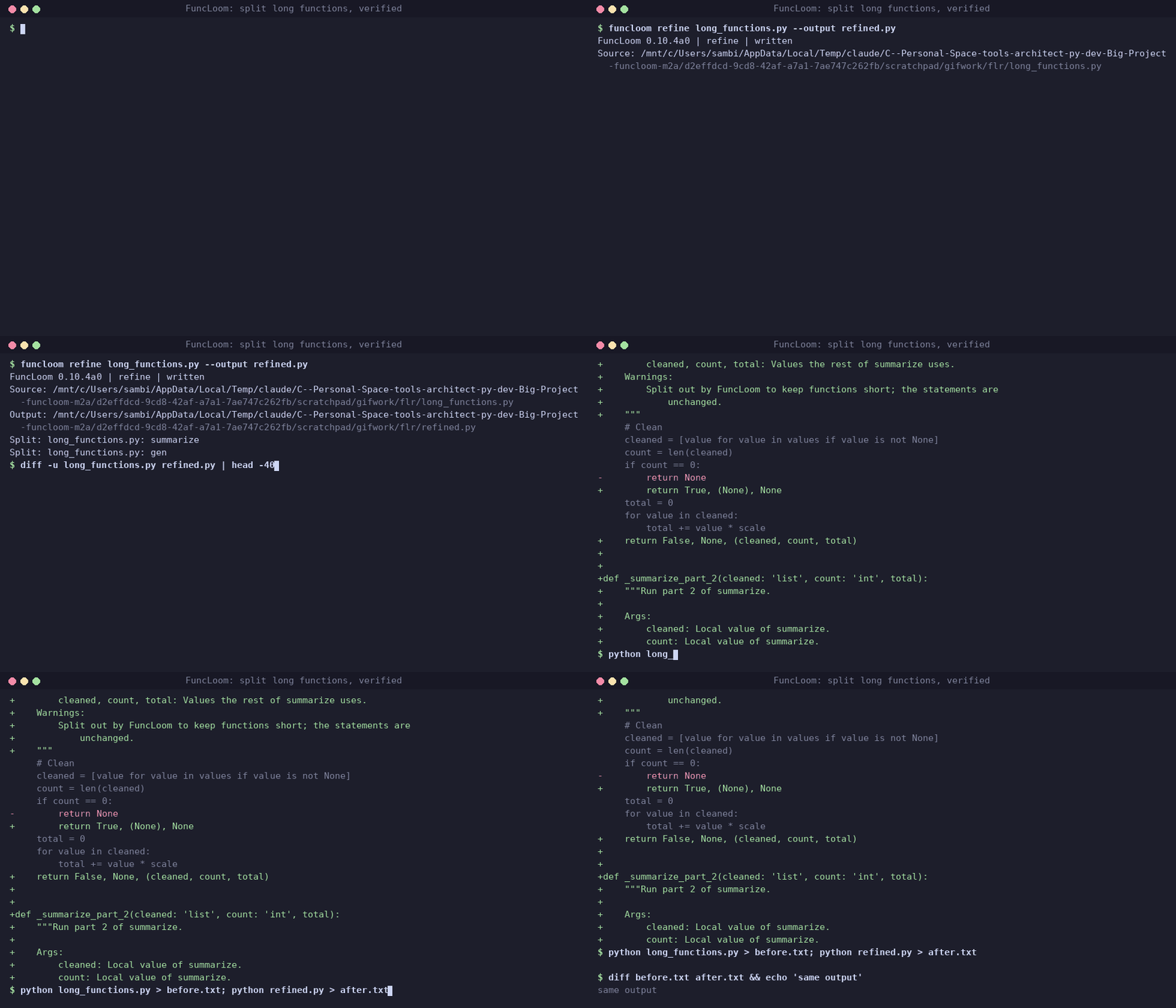
A typical package has config.py, functions.py/models.py, steps.py,
pipeline.py and main.py. Its initial imports are retained once, in source
order, in _imports.py; later imports stay where they occurred. Folder
mode retains library paths and data and adds entry-script shims.
planandsnippetproduce review drafts with no apply operation.modularizeandrefinewrite new copies. Known unsupported cases are refused or left unchanged with a reason; not every behavior difference can be detected statically.- Wildcard imports are refused for modularization; use explicit imports. Dynamic namespaces, serialization, module identity, reflection and file paths need particular review.
- Notebook cells run in document order without kernel state. Magics and shell escapes may be omitted, with notes; outputs do not establish types or hidden dependencies.
- Unsupported functions/blocks stay whole, even over the size target. Type hints are narrow static proposals and documentation is a skeleton.
- Line length defaults to 79, configurable from 40 to 200. Existing tool directives are retained or refused. Wrapping that would create a new directive is refused too.
- No performance comparison with Ruff or Black has been established. Natural-language code generation and architecture diagrams remain future work. The VS Code extension supplies explicit check, snippet, modularize and refine commands; see editor setup.
See snippet context, generic variable names, extraction planning, modularization, refinement, rule coverage, local/editor setup, and the stable interfaces kept through the beta.
Development and release checks
.\.venv\Scripts\python.exe scripts/verify.py
.\.venv\Scripts\python.exe -m pip install -e ".[release]"
.\.venv\Scripts\python.exe scripts/release_check.py --output dist/0.10.2a0-final
The release check requires a new output directory. It builds a wheel and
source archive, checks metadata and contents, installs into fresh
environments, runs full verification against installed packages, and checks
uninstallation. It writes logs, checksums and verification.json, with no
upload step. See release preparation.
Python APIs and report schemas may change during the alpha. FuncLoom, RefacTrail and FlowBlueprint remain separately releasable projects.
License
MIT, copyright 2026 Sambit Supriya Dash.
1 maintainer

Metadata
1 maintainer
Release files for funcloom 0.10.5a0
For a detailed explanation of source distributions (sdists) and built distributions (wheels), please see the package formats documentation.
Source distribution (sdist)
| File | Size | Uploaded | Provenance | Actions |
|---|---|---|---|---|
| funcloom-0.10.5a0.tar.gz | 267.8 kB | With provenance | Details for funcloom-0.10.5a0.tar.gz |
Built distribution (wheel)
| File | Interpreter | ABI | Platform | Actions Reset |
|---|---|---|---|---|
| funcloom-0.10.5a0-py3-none-any.whl | Python 3 | none | any | Details for funcloom-0.10.5a0-py3-none-any.whl |
Total release size: 431.9 kB
Release files / funcloom-0.10.5a0.tar.gz
| Download URL | funcloom-0.10.5a0.tar.gz |
|---|---|
| Size | 267.8 kB |
| Tags | Source |
|
SHA-256 checksum How to use checksums |
3a53e424fa6a95700331311874f70d906798ba189bf6c941781b34105281d074
|
|
BLAKE2b-256 checksum How to use checksums |
38147bc190d385729bb27d20cb4dcb1ae7a850056e18eb0137ae112009e0ddf1
|
| Upload date | |
|
Uploaded using Trusted Publishing? What is trusted publishing? |
Yes |
| Uploaded via |
twine/7.0.0 CPython/3.13.14
|
Provenance
Provenance describes where a file came from. On PyPI, provenance is shared via attestations, which provide a verifiable record of the build or publishing details. View details, limitations and caveats.


PyPI Publish Attestation
PyPI verified that this artifact, at this checksum, originated from the publisher listed below.
Signed by GitHub Actions, verified by PyPI on Oct 6, 2026.
Transparency logRelease files / funcloom-0.10.5a0-py3-none-any.whl
| Download URL | funcloom-0.10.5a0-py3-none-any.whl |
|---|---|
| Size | 164.1 kB |
| Tags | Python 3 |
|
SHA-256 checksum How to use checksums |
4db595c43e7e6141360b1be880dc266338444865b6f1088c34fa716e6230e20d
|
|
BLAKE2b-256 checksum How to use checksums |
7b1421648f781f36b8de1c6a9389e497d5a80c8a1e02f528ee1ce93caeafb2ee
|
| Upload date | |
|
Uploaded using Trusted Publishing? What is trusted publishing? |
Yes |
| Uploaded via |
twine/7.0.0 CPython/3.13.14
|
Provenance
Provenance describes where a file came from. On PyPI, provenance is shared via attestations, which provide a verifiable record of the build or publishing details. View details, limitations and caveats.
PyPI Publish Attestation
PyPI verified that this artifact, at this checksum, originated from the publisher listed below.
Signed by GitHub Actions, verified by PyPI on Oct 6, 2026.
Transparency logSecurity for funcloom 0.10.5a0
Provenance
Provenance describes where a file came from. On PyPI, provenance is shared via attestations, which provide a verifiable record of the build or publishing details. View details, limitations and caveats.
Full provenance
Both files in this release have been uploaded with provenance metadata.
Attestation for funcloom-0.10.5a0.tar.gz
PyPI Publish Attestation
PyPI verified that this artifact, at this checksum, originated from the publisher listed below.
Signed by GitHub Actions, verified by PyPI on Oct 6, 2026.
Transparency logA note on package security
PyPI is a repository for distributing packages, not a service for auditing them. While third-party security researchers and our staff do their best to detect and remove malicious packages, PyPI cannot guarantee the quality, security or suitability of any given package.
To learn more about protecting yourself from malicious actors, visit our package security documentation.














