
Manage an ESPuino kids' audio player: library mirroring, printable RFID cards, and a local web dashboard

Project description
Funkuino
Manage an ESPuino kids' audio player from your Mac — library mirroring, printable RFID cards, and a web dashboard with an embedded Claude agent.
The ESPuino is a wonderful DIY, RFID-controlled audio player for children: put a card on the box, the story plays. What it doesn't come with is comfortable tooling for the grown-up side of the workflow — getting audio onto the device, keeping a library organised, and producing the physical cards. Funkuino is that missing half: a Mac app you can double-click, and the same tools as small, sharp command-line programs underneath.
Download Funkuino for macOS — a signed, notarised app for Apple Silicon (macOS 14+). It brings its own Python and ffmpeg, so there is nothing to install first.
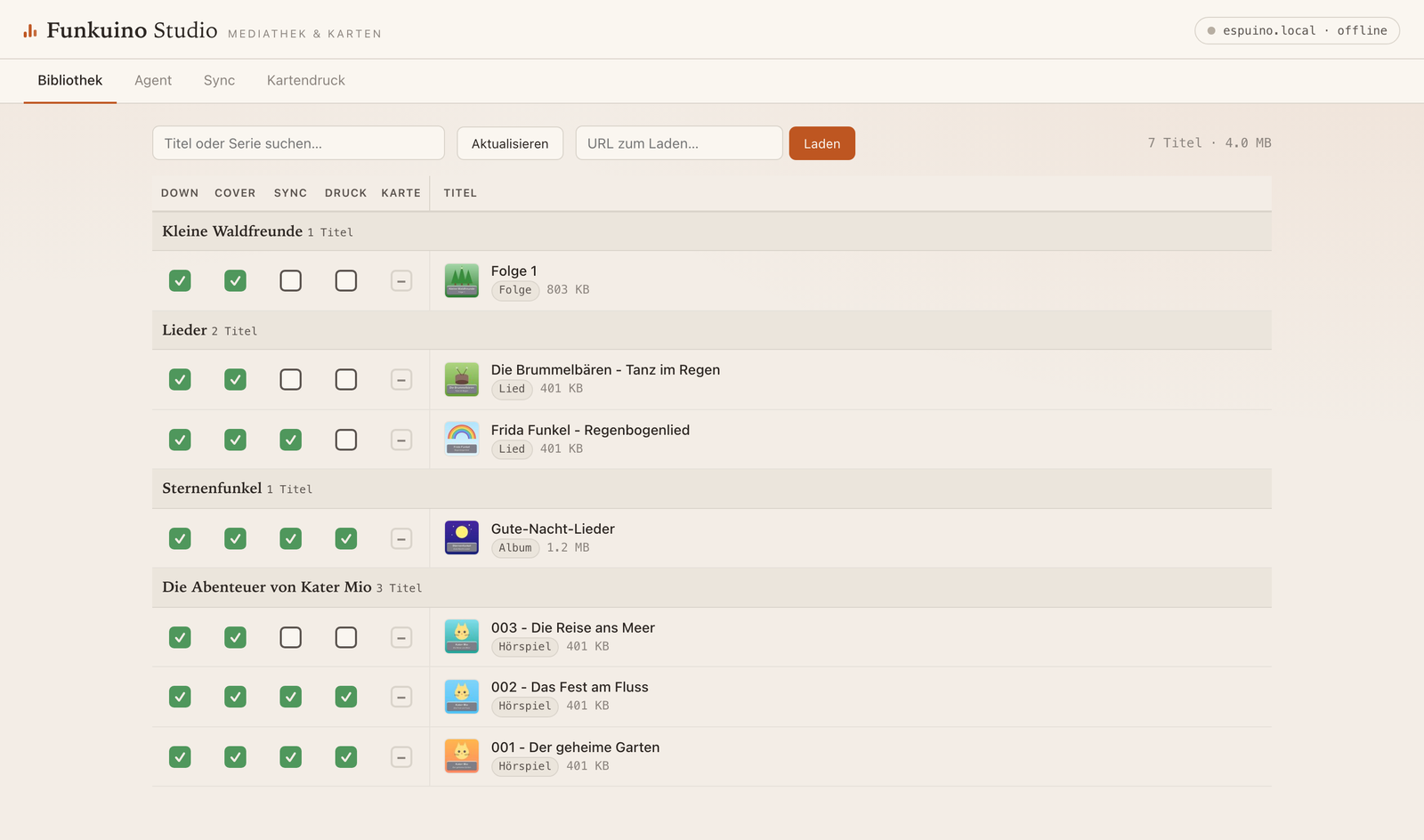
Screenshots show a fictional demo library.
Funkuino Studio
Studio is a dashboard covering the entire pipeline per card — Download · Cover · Sync · Print · RFID — where the status boxes are also the actions: click a unit's sync box to upload it, select covers for printing via a floating print bar, assign RFID cards straight from the library view.
- Live RFID assignment: Studio keeps a passive websocket to the device and hears every card placement. Put an unknown card on the box, click the row it should belong to — assigned (with sensible play-mode defaults per content type).
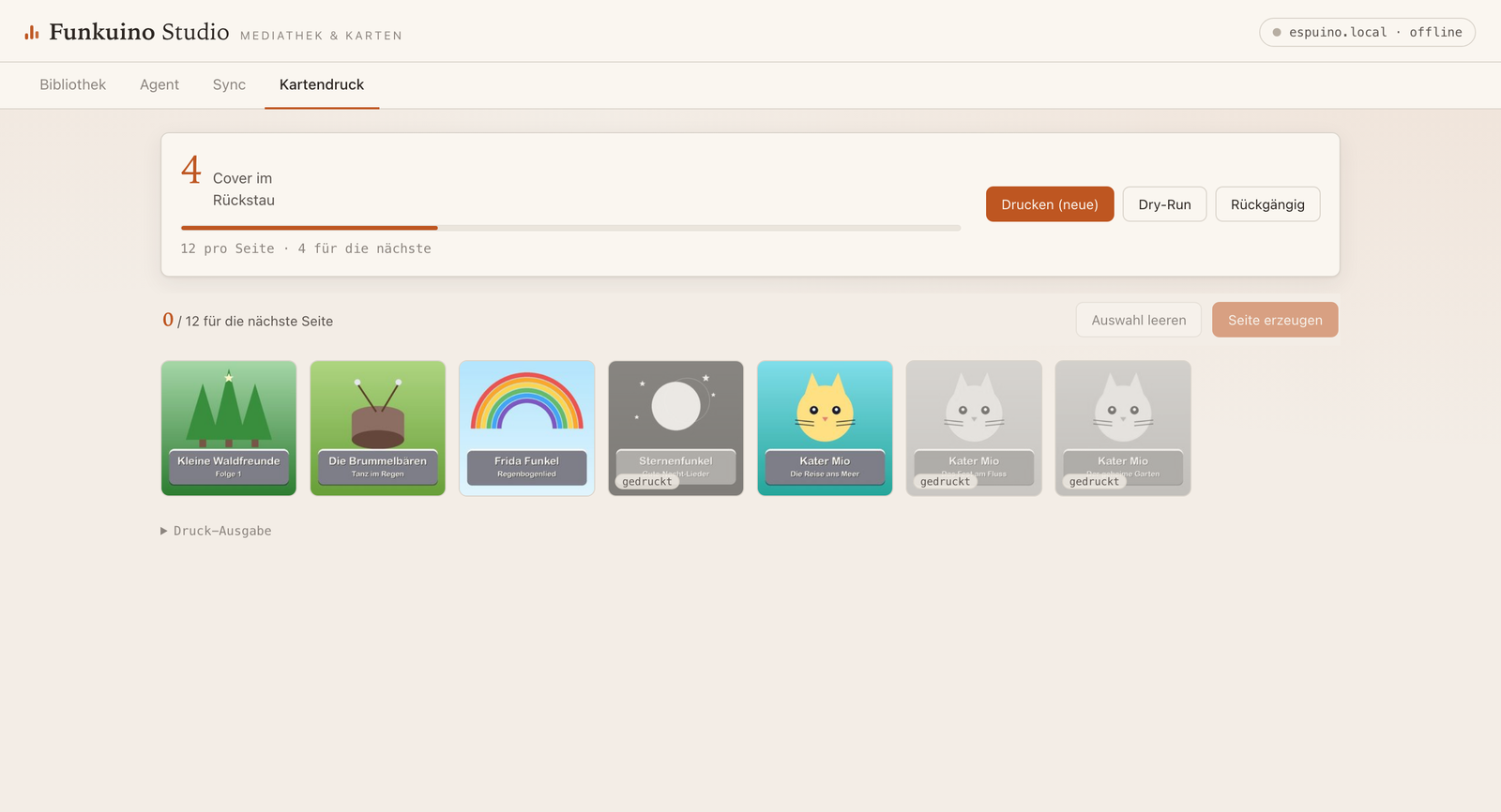
- Integrated card printing with the same manifest and
--undosemantics as the command line — every cover as a thumbnail (newest first, printed ones greyed out), hand-pick covers onto a sheet or one-click the oldest full page:
- Embedded Claude agent (optional, Claude Agent SDK): paste a URL into the library tab and an agent session handles the intake — probe, classify (song/album/audiobook), download with the right flags, verify naming and covers, report back — asking you whenever a judgment call is needed (episode numbering, attribution, intro wording), via question cards in the browser. Permission model: read-only tools and the project's own commands are auto-allowed, risky ones always raise an approval card. Needs your own Claude Code installation and a subscription token — the Agent tab walks you through both.
The tools underneath
Studio is a front end for these; each is also a command of its own, and the
app puts them on your PATH as funkuino <command>.
funkuino sync— rsync-style mirror to the device. One-way mirror of a localfiles/folder to the ESPuino over its HTTP API. Fast recursive listing, change detection via a local manifest (the device can't report file sizes cheaply), crash-safe incremental state (an interrupted upload is never trusted), size-scaled timeouts for big audiobook files,--deletewith guard rails, automatic NFC/NFD Unicode normalisation (macOS vs. device), and per-device manifests keyed by MAC address — mirror the same library to two ESPuinos without confusion.funkuino download— audio intake in the library's conventions. A yt-dlp wrapper that lands audio as your library expects it: songs, albums with ordered track numbers, or audiobooks (Hörspiele) — multi-part episodes merged into a single MP3 with a spoken title intro (macOSsay), correct tags, and the full-resolution title image saved separately for card printing (covers are deliberately not embedded in the audio: the device has no display and a large leading ID3 tag makes playback start-stutter).funkuino prepare/funkuino covers— the audiobook merge as a standalone tool, and batch extraction of embedded cover art from an existing library.funkuino cards— printable RFID card sheets. Lays title images out as edge-to-edge 6×6 cm squares on A4 PDFs (12 per page) with cut tick marks in the margins. Print, stick an RFID tag on each card's back, laminate, cut. A print manifest makes a barefunkuino cardsmean "everything new since last time", with stackable--undo.
Extensions — your own commands and your own agent
Some sources need handling the shipped download does not have, and everyone's
library has conventions of its own. Both are extendable without touching this
repository, because both live in your library folder:
extensions/<name>.pybecomesfunkuino <name>. A script dropped there is run with the project's own modules importable, so it can reuse the download pipeline, the naming rules and the device client. The one that grew this mechanism reconstructs complete audiobook series from a YouTube Music "Topic" channel, where the shipped downloader only sees a jumble of chapter tracks. An optional<name>.permissions.json({"allow": [...], "ask": [...]}) declares how the embedded agent may call it — an extension that declares nothing simply needs your approval every time.CLAUDE.mdin your library folder teaches the agent your conventions. It is loaded into every agent session on top of the project's own instructions: how you want a particular series named, that a certain source needs cookies, which play mode a kind of content should get. This is how the intake flow learns your habits instead of you repeating them per download.
Install
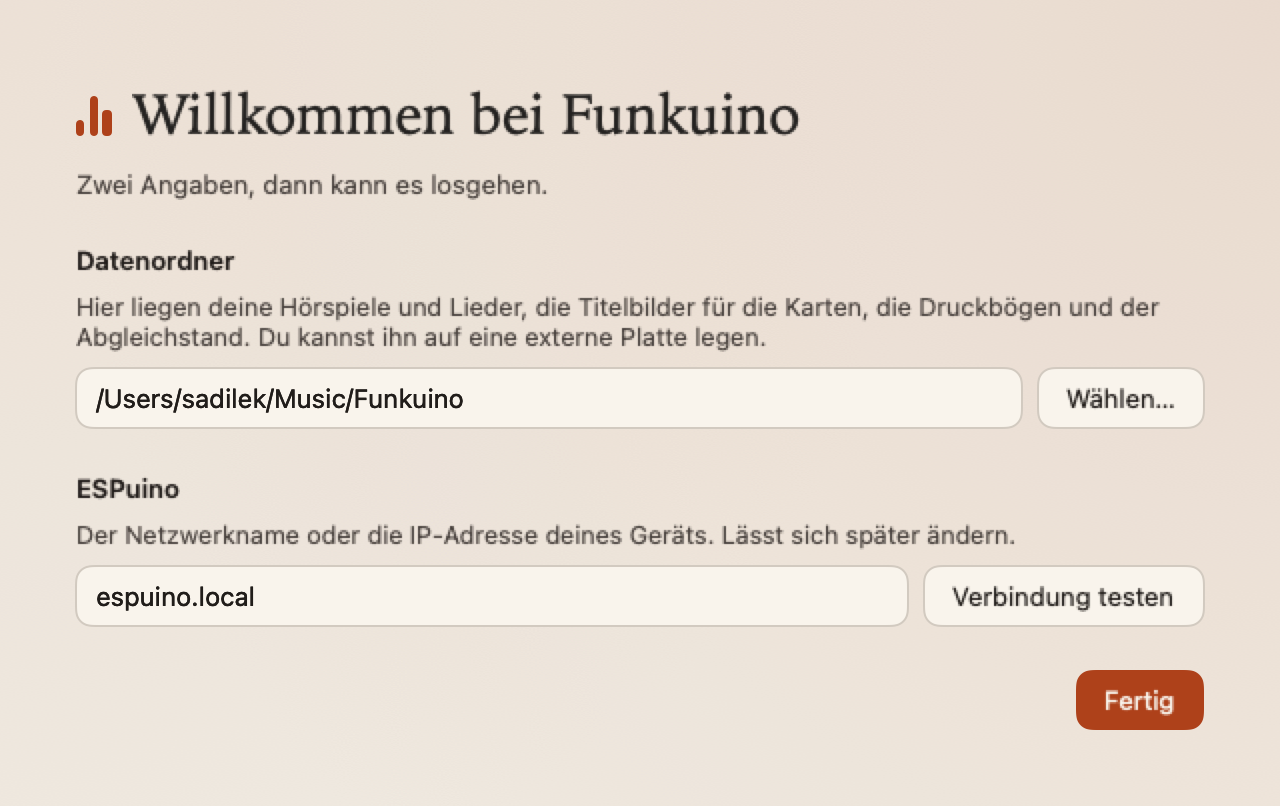
Download the DMG from Releases, drag the app to Applications, start it. On first launch it asks for two things: where your library should live (a normal folder — put it on an external disk if you like) and your ESPuino's name or IP. Nothing else to install: the app carries its own Python runtime and a purpose-built ffmpeg.
Two limitations to know before you download:
- The interface is German only. The tools, the code and this documentation are English, but every label and message a user sees is German. Translations would be welcome.
- The app is Apple Silicon only (macOS 14+). The bundled Python is
single-architecture, so an Intel build has to be built on an Intel Mac —
possible (
make releaseinmac/), just not something I can produce here. On Linux, install it with pipx instead (below); there the same Studio runs in your browser.
Linux (and Windows via WSL)
There is no app bundle outside macOS, but Studio and every command are plain Python and run anywhere:
pipx install funkuino
sudo apt install ffmpeg        # or dnf/pacman/zypper — funkuino tells you which

funkuino studio                # dashboard at http://127.0.0.1:8800
funkuino sync --dry-run        # see what would be uploaded
funkuino cards                 # printable PDF of the new covers
The library then defaults to ~/Funkuino/ (change it with funkuino --data-dir
or a data_dir entry in ~/.config/funkuino/config.json), and configuration
follows the platform: $XDG_CONFIG_HOME/funkuino on Linux,
%APPDATA%\Funkuino on Windows.
Two things differ from macOS: the spoken intro in front of merged audiobooks
uses macOS' say and is skipped elsewhere (the merge itself runs normally), and
a finished print sheet is not opened for you — it is written to
print-sheets/. Windows currently needs WSL, since the ./sync-style wrappers
are shell scripts; the funkuino … commands themselves do not depend on a
shell.
From source
The same tools work without any installation, and that is how they are developed:
git clone https://github.com/sadilek/Funkuino.git
cd Funkuino
python3 -m venv .venv && .venv/bin/pip install -r requirements.txt

./sync --dry-run        # see what would be uploaded (files/ -> device)
./cards                 # lay out new cover images as a printable PDF
./studio                # open the dashboard at http://127.0.0.1:8800
bin/funkuino <command> is the same entry point the app uses; the ./sync,
./download, … wrappers in the root are one-liners onto it. A checkout keeps
its library in the checkout, so cloning and running changes nothing outside it.
Requirements for the source route: Python ≥ 3.10 and ffmpeg on PATH.
Configuration: CLI flags > ESPUINO_* env vars > defaults (ESPUINO_HOST,
ESPUINO_LOCAL_DIR, ESPUINO_REMOTE_ROOT, ESPUINO_HTTP_USER/_PASSWORD).
FUNKUINO_DATA_DIR (or funkuino --data-dir) points the whole installation at
a different library folder — that is what the app configures for you.
Library conventions
One RFID card = one unit of content, derived from file layout alone — no database:
| Unit | Layout |
|---|---|
| Song | files/Lieder/<Artist> - <Title>.mp3 |
| Album | files/<Artist> - <Album>/<NN> <Title>.mp3 |
| Audiobook episode | files/<Series>/<NNN> - <Title>.mp3 (one merged file) |
| Multi-story episode | files/<Series>/Folge <N>/<NN> <Story>.mp3 (folder = card, stories navigable with prev/next) |
Cover images mirror the same paths under card-covers/ (one image per card).
A library folder holds files/, card-covers/, print-sheets/ and a visible
status/ with the sync and print manifests — nothing hidden, so moving the
library by hand cannot silently leave its state behind. Your Claude token is
deliberately not in there: it lives with the installation, in
~/Library/Application Support/Funkuino/ (or ~/.config/funkuino/ on Linux).
Hard-won device knowledge
CLAUDE.md documents the ESPuino's HTTP API and a collection of quirks that
took real debugging to learn — mDNS resolution cost, SD-writer wedging, why
FTP is useless for diffing, NFC/NFD filename mismatches, and a full root-cause
analysis of the PN5180 "resting card briefly lost during playback" problem
(fixed upstream in ESPuino PR #444). If you script against an ESPuino, read it
before relearning any of this the hard way.
A note on content
./download is a thin convenience wrapper around
yt-dlp that organises audio into the
library conventions above. Only download content you are entitled to download.
Credits & license
Built around the excellent ESPuino by biologist79 and contributors. Funkuino itself is MIT-licensed.
Release history Release notifications | RSS feed

Download files
Download the file for your platform. If you're not sure which to choose, learn more about installing packages.
Source Distribution
Built Distribution
Filter files by name, interpreter, ABI, and platform.
If you're not sure about the file name format, learn more about wheel file names.
Copy a direct link to the current filters
File details
Details for the file funkuino-0.1.0.tar.gz.
File metadata
- Download URL: funkuino-0.1.0.tar.gz
- Upload date:
- Size: 124.9 kB
- Tags: Source
- Uploaded using Trusted Publishing? No
- Uploaded via: twine/7.0.0 CPython/3.14.4
File hashes
| Algorithm | Hash digest | |
|---|---|---|
| SHA256 |
9987eb2df375eeabe9bab042e3fe98891cc724ac4fcbb09885b3ab76545117e3
|
|
| MD5 |
68cf90d165a9ee85c0ed28aed322d6a2
|
|
| BLAKE2b-256 |
9553dc503f5895b0a18309cc16049e9ddb760f2949e6293f369504b4d18afca5
|
File details
Details for the file funkuino-0.1.0-py3-none-any.whl.
File metadata
- Download URL: funkuino-0.1.0-py3-none-any.whl
- Upload date:
- Size: 133.9 kB
- Tags: Python 3
- Uploaded using Trusted Publishing? No
- Uploaded via: twine/7.0.0 CPython/3.14.4
File hashes
| Algorithm | Hash digest | |
|---|---|---|
| SHA256 |
809456f7ceffd8b2efc9d1ac713f465279b7c5d5047a76391abcada73a90a10d
|
|
| MD5 |
ba0d9027997dd382694d067a52ebe237
|
|
| BLAKE2b-256 |
3e9affb41b2130c7372f457f6c506784fd847f1aec399a8f236d92b058540f5c
|






