
Multi-source search aggregation tool with AI-powered retrieval and response synthesis
Verified details
These details have been verified by PyPIProject links
GitHub Statistics
Maintainers

Project description
FuseSearch

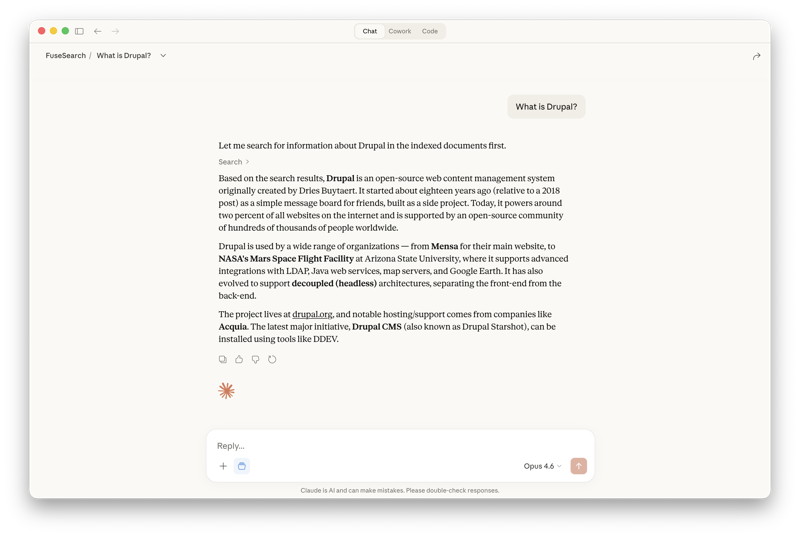
Multi-source search aggregation tool that unifies retrieval across diverse data sources — Confluence, MCP servers, local files, and more — using AI-powered search and response synthesis through a single query interface.
Installation
pip install fusesearch
With all optional dependencies (MCP server, local embeddings, OpenAI):
pip install fusesearch[all]
Quick Start
make build
make start
make index    # index docs from data/docs
make search "your query"
How It Works
Query → Embed → Vector Search  ─┐
                                ├→ RRF Fusion → Rerank (optional) → Results
                Keyword Search ─┘
Embedding Providers
FuseSearch supports three embedding providers. Each uses a separate Qdrant collection due to different vector dimensions.
| Local (default) | OpenAI | Ollama | |
|---|---|---|---|
| Model | all-MiniLM-L6-v2 (384 dims) | text-embedding-3-small (1536 dims) | nomic-embed-text (768 dims) |
| Quality | Good for general English | Better for nuanced/complex queries | Good, varies by model |
| Cost | Free | ~$0.02 per 1M tokens | Free |
| Privacy | Data stays local | Data sent to OpenAI | Data stays local |
| Offline | Yes | No | Yes |
Local (default)
Uses sentence-transformers. Runs entirely on your machine, no API key needed.
OpenAI
Uses OpenAI's API. Higher quality embeddings but requires an API key.
To use OpenAI embeddings, add to your .env:
FUSESEARCH_EMBEDDER=openai
OPENAI_API_KEY=sk-...
Or pass via CLI:
fusesearch --embedder openai index data/docs
fusesearch --embedder openai search "your query"
Rate limits: OpenAI Tier 1 accounts have a 40k tokens-per-minute limit on embeddings. FuseSearch retries automatically on rate limit errors, but initial indexing of large document sets will be slow. Higher tiers (auto-upgrade as you spend) increase this significantly. See OpenAI rate limits.
Ollama
Uses Ollama to run embedding models locally. No API key needed.
- Install from ollama.com
- Pull an embedding model:
ollama pull nomic-embed-text
FUSESEARCH_EMBEDDER=ollama
Or pass via CLI:
fusesearch --embedder ollama index data/docs
fusesearch --embedder ollama search "your query"
Docker: When running FuseSearch in Docker with Ollama on the host, set OLLAMA_HOST so the container can reach it:
OLLAMA_HOST=http://host.docker.internal:11434
Other Ollama embedding models: bge-m3, mxbai-embed-large, snowflake-arctic-embed. Configure with:
OLLAMA_EMBED_MODEL=bge-m3
Reranking
Reranking uses a cross-encoder model to rescore search results after retrieval. The cross-encoder evaluates each (query, document) pair directly, producing more accurate relevance scores than initial retrieval alone.
When enabled, FuseSearch overfetches 3x candidates from hybrid search, then reranks down to the requested limit.
Usage
Per-request via CLI flag or API parameter:
fusesearch search "your query" --rerank
curl -X POST http://localhost:8000/search \
  -H "Content-Type: application/json" \
  -d '{"query": "your query", "rerank": true}'
Or enable globally via environment variable:
FUSESEARCH_RERANK=true
Configuration
| Variable | Default | Description |
|---|---|---|
FUSESEARCH_RERANK |
false |
Enable reranking globally |
FUSESEARCH_RERANKER |
local |
Reranker provider |
FUSESEARCH_RERANK_MODEL |
cross-encoder/ms-marco-MiniLM-L-6-v2 |
Cross-encoder model |
The reranker is independent of the embedding provider — it works on raw text, not vectors. You can use FUSESEARCH_EMBEDDER=openai with FUSESEARCH_RERANK=true. The local reranker requires the [local] extra (sentence-transformers).
Ask (LLM Synthesis)
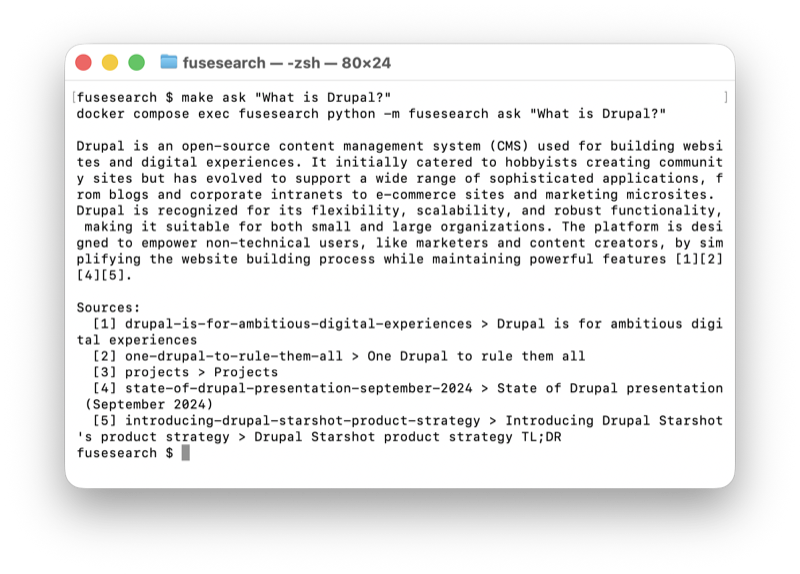
The ask command searches your indexed documents and uses an LLM to synthesize an answer with citations. This is optional — search works without any LLM provider installed.
Usage
fusesearch ask "What is Drupal?"
curl -X POST http://localhost:8000/ask \
  -H "Content-Type: application/json" \
  -d '{"query": "What is Drupal?"}'
LLM Providers
| Provider | Model | Extra | Cost |
|---|---|---|---|
| Anthropic | claude-sonnet-4-20250514 | [anthropic] |
Pay-as-you-go API |
| OpenAI | gpt-4o-mini | [openai] |
Pay-as-you-go API |
| Ollama | llama3.2 | [ollama] |
Free (runs locally) |
Anthropic
Requires a separate API key (a Claude Pro/Team subscription does not include API access).
- Create an account at console.anthropic.com
- Add billing under Settings > Billing (pay-as-you-go)
- Create a key under Settings > API Keys
FUSESEARCH_LLM=anthropic
ANTHROPIC_API_KEY=sk-ant-...
OpenAI
If you already have an API key for OpenAI embeddings, the same key works here.
- Go to platform.openai.com/api-keys
- Create a new secret key
FUSESEARCH_LLM=openai
OPENAI_API_KEY=sk-...
Ollama
No API key needed. Runs entirely on your machine.
- Install from ollama.com
- Pull a model:
ollama pull llama3.2
FUSESEARCH_LLM=ollama
If FUSESEARCH_LLM is not set, FuseSearch auto-detects the first installed provider. If none are installed, ask returns a clear error — search continues to work normally.
MCP Server
The fusesearch-mcp Docker service exposes a streamable HTTP endpoint on port 8001. Tools: search (hybrid search), count (indexed chunks).
Claude Code
claude mcp add fusesearch http://localhost:8001/mcp --transport http
Claude Desktop
Option 1: Connectors UI (recommended)
In Claude Desktop, go to Settings > Connectors > Add custom connector and enter https://localhost:8001/mcp.
Option 2: Config file with mcp-remote bridge (local dev)
Add to ~/Library/Application Support/Claude/claude_desktop_config.json:
{
  "mcpServers": {
    "fusesearch": {
      "command": "npx",
      "args": ["-y", "mcp-remote", "http://localhost:8001/mcp", "--allow-http"]
    }
  }
}
Requires Node.js >= 18. --allow-http is required for plain HTTP (not needed for HTTPS).
Project details
Verified details
These details have been verified by PyPIProject links
GitHub Statistics
Maintainers


Download files
Download the file for your platform. If you're not sure which to choose, learn more about installing packages.
Source Distribution
Built Distribution
Filter files by name, interpreter, ABI, and platform.
If you're not sure about the file name format, learn more about wheel file names.
Copy a direct link to the current filters
File details
Details for the file fusesearch-0.2.3.tar.gz.
File metadata
- Download URL: fusesearch-0.2.3.tar.gz
- Upload date:
- Size: 24.6 kB
- Tags: Source
- Uploaded using Trusted Publishing? Yes
- Uploaded via: twine/6.1.0 CPython/3.13.7
File hashes
| Algorithm | Hash digest | |
|---|---|---|
| SHA256 |
5c0993713c7f3d45ab74833055ed27d8bde67de2e5da6d6708a203a1f35c459c
|
|
| MD5 |
e592623e164313aea3953313ee68b1a6
|
|
| BLAKE2b-256 |
d4966ba02e9a3fbaa23bfbc55bbc8b059228a88b0914ea393dd0ec5fcc5f68cf
|
Provenance
The following attestation bundles were made for fusesearch-0.2.3.tar.gz:
Publisher:
publish.yml on thelebster/fusesearch
-
Statement:
-
Statement type:
https://in-toto.io/Statement/v1 -
Predicate type:
https://docs.pypi.org/attestations/publish/v1 -
Subject name:
fusesearch-0.2.3.tar.gz -
Subject digest:
5c0993713c7f3d45ab74833055ed27d8bde67de2e5da6d6708a203a1f35c459c - Sigstore transparency entry: 959074665
- Sigstore integration time:
-
Permalink:
thelebster/fusesearch@f9dc2ac0c6256394a7f387d2d2b835581aa9e617 -
Branch / Tag:
refs/tags/v0.2.3 - Owner: https://github.com/thelebster
-
Access:
public
-
Token Issuer:
https://token.actions.githubusercontent.com -
Runner Environment:
github-hosted -
Publication workflow:
publish.yml@f9dc2ac0c6256394a7f387d2d2b835581aa9e617 -
Trigger Event:
release
-
Statement type:
File details
Details for the file fusesearch-0.2.3-py3-none-any.whl.
File metadata
- Download URL: fusesearch-0.2.3-py3-none-any.whl
- Upload date:
- Size: 23.8 kB
- Tags: Python 3
- Uploaded using Trusted Publishing? Yes
- Uploaded via: twine/6.1.0 CPython/3.13.7
File hashes
| Algorithm | Hash digest | |
|---|---|---|
| SHA256 |
c0c6a9904d3a64cc3bb87c25f0cd49da13481630e33ec7886329331a789492b3
|
|
| MD5 |
5741646c7a83d3d737bb0ff440af9487
|
|
| BLAKE2b-256 |
534657dc277cfce68ff6176a4392540338ba27a708abdf88e3649fdd0e7984d3
|
Provenance
The following attestation bundles were made for fusesearch-0.2.3-py3-none-any.whl:
Publisher:
publish.yml on thelebster/fusesearch
-
Statement:
-
Statement type:
https://in-toto.io/Statement/v1 -
Predicate type:
https://docs.pypi.org/attestations/publish/v1 -
Subject name:
fusesearch-0.2.3-py3-none-any.whl -
Subject digest:
c0c6a9904d3a64cc3bb87c25f0cd49da13481630e33ec7886329331a789492b3 - Sigstore transparency entry: 959074786
- Sigstore integration time:
-
Permalink:
thelebster/fusesearch@f9dc2ac0c6256394a7f387d2d2b835581aa9e617 -
Branch / Tag:
refs/tags/v0.2.3 - Owner: https://github.com/thelebster
-
Access:
public
-
Token Issuer:
https://token.actions.githubusercontent.com -
Runner Environment:
github-hosted -
Publication workflow:
publish.yml@f9dc2ac0c6256394a7f387d2d2b835581aa9e617 -
Trigger Event:
release
-
Statement type:






