



FutureOS 🚀
My take on how Operating Systems will be built in the future.
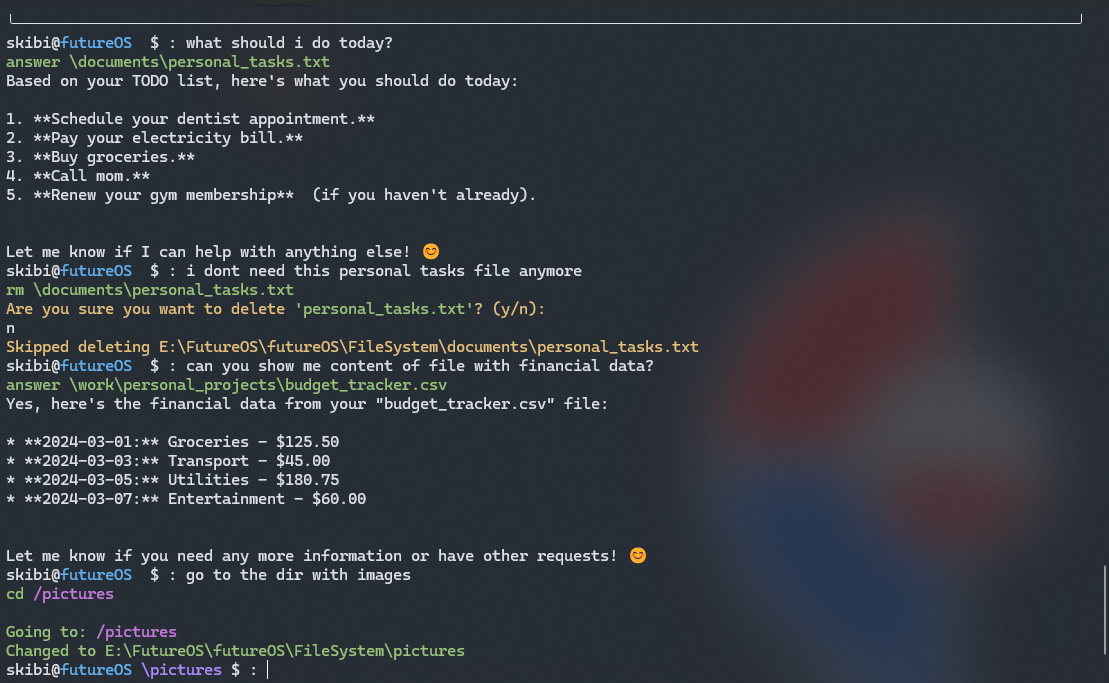
🚀 Getting Started
# Install
pip install futureos

# Launch
python -m futureos
[!IMPORTANT]
To use FutureOS, ensure you have Ollama installed with thegemma2:2bmodel. For optimal performance, CUDA should be enabled on your system.
🌟 The Challenge
Currently, there are several powerful AI tools for both Windows and macOS:
- 🤖 Claude computer use
- 👨💻 GitHub Copilot
- 🗣️ New Siri on Mac
However, these tools implement their own methods of indexing and searching files, and they're not integrated with the OS.
💡 The Vision
What if:
- Every utility in the OS had access to
vector searchfor collections of allfiles,directories,pictures, and more? - All content was automatically indexed by the OS whenever a file is created or modified?
- Every utility had access to an
AI chain(like LangChain) deeply integrated into the OS? - Every command could leverage these AI capabilities?
Let's go further... 🚀
Why force users to remember specific commands with their parameters and arguments? By creating descriptive docstrings for commands, we can build a vector store of all commands and automatically choose the best one for user input. Users don't even need to know exact command names!
✅ Quality Assurance
"But without proper testing, users wouldn't like it."
I know! That's why there are multiple tests for every command with output that's easy to parse by LLM.
🏗️ Architecture
Command System
Every command inherits from a base Command class that provides:
def get_file(self, question: str, max_distance: float) -> str:
    """Find relevant files using vector similarity search"""

def get_directory(self, question: str, max_distance: float) -> str:
    """Find relevant directories using vector similarity search"""

def run_chain(self, chain: RunnablePassthrough, input: dict) -> Any:
    """Execute LangChain operations for content processing"""
🔍 How Commands Work
Let's break down how a typical command (cd) is constructed:
class cd(Command):
    """
    NAME
        cd - change the current working directory

    SYNOPSIS
        cd [directory]

    DESCRIPTION
        Change the current working directory to the specified directory.

    NATURAL LANGUAGE COMMANDS
        - Change directory to X
        - Go to folder X
        - Navigate to directory X
    """
The docstring serves multiple purposes:
- Vector Embedding Source: Used to create embeddings for command matching
- Natural Language Patterns: Defines common ways users might express the command
- Documentation: Serves as built-in help text
Command Implementation
def execute(self, args: Any) -> None:
    try:
        # Handle both traditional and natural language input
        directory = self.get_directory(args.query) if args.query else args.directory

        # Resolve and validate path
        target_path = resolve_path(directory)

        # Execute directory change
        if target_path.is_dir():
            constants.CURRENT_DIRECTORY = target_path
            self.print(f"Changed to {target_path}", style="green")
    except Exception as e:
        self.print(f"Error: {str(e)}", style="red")
🤝 Contributing
All contributors are welcome!
📄 License
MIT License - See LICENSE file for details.
1 maintainer

Release files for futureos 0.3.0
For a detailed explanation of source distributions (sdists) and built distributions (wheels), please see the package formats documentation.
Source distribution (sdist)
| File | Size | Uploaded | |
|---|---|---|---|
| futureos-0.3.0.tar.gz | 22.6 kB | Details |
Built distribution (wheel)
| File | Interpreter | ABI | Platform | Reset |
|---|---|---|---|---|
| futureos-0.3.0-py3-none-any.whl | Python 3 | none | any | Details |
Total release size: 45.6 kB
Release files / futureos-0.3.0.tar.gz
| Download URL | futureos-0.3.0.tar.gz |
|---|---|
| Size | 22.6 kB |
| Tags | Source |
|
SHA-256 checksum How to use checksums |
205b1fbf5587461e89ec0fa0695ee89e1fe2a3397f569c2ea2185ead4168a470
|
|
BLAKE2b-256 checksum How to use checksums |
684a1be21cbc19e4f1e4cee169a0ea795bafd0469e3d73e4762408041aed4cf6
|
| Upload date | |
|
Uploaded using Trusted Publishing? What is trusted publishing? |
No |
| Uploaded via |
uv/0.5.1
|
Release files / futureos-0.3.0-py3-none-any.whl
| Download URL | futureos-0.3.0-py3-none-any.whl |
|---|---|
| Size | 23.0 kB |
| Tags | Python 3 |
|
SHA-256 checksum How to use checksums |
5ea9d0be2a682e1f35468543e9abffe3ff986e580520582cd12809a8e6a32813
|
|
BLAKE2b-256 checksum How to use checksums |
1c28086d3ebf330b9577011a9c5d7bd933cc385f8529f5f90c255086cd828890
|
| Upload date | |
|
Uploaded using Trusted Publishing? What is trusted publishing? |
No |
| Uploaded via |
uv/0.5.1
|














