
fuzcolor
Simple and easy to use Python library for fuzzy color models: a pixel belongs to every named color to a degree. Built on fuzlog and NumPy, typed, Python 3.12+.
pip install fuzcolor
import matplotlib.pyplot as plt
import fuzcolor as fc
from fuzcolor.models import COLIBRI

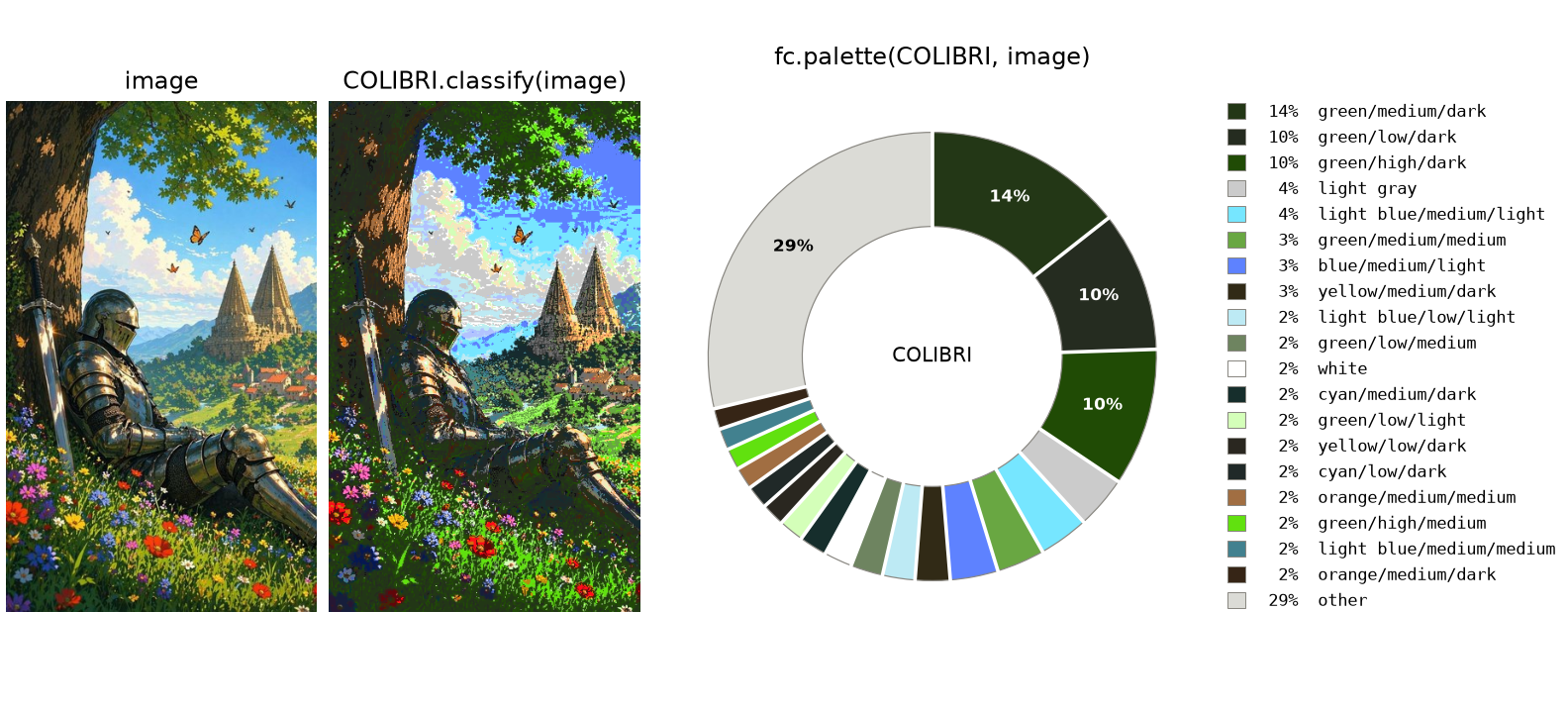
image = plt.imread("knight.jpg")  # docs/img/knight.jpg: 605 x 368 pixels, 8-bit RGB

print(COLIBRI)  # Model('COLIBRI', HSI: 81 chromatic, 5 achromatic)
print(COLIBRI.label([200, 30, 30]))  # red/high/dark
roof, cloud, grass = image[330, 320], image[150, 110], image[560, 200]
print(COLIBRI.label(roof))  # orange/medium/medium
print(COLIBRI.label(cloud))  # light blue/low/light
print(COLIBRI.label(grass))  # green/high/dark

weights = fc.palette(COLIBRI, image)  # the share of the image in each of 86 colors
fc.pie(COLIBRI, weights)
Inside
| Models | Model names colors as combinations of the terms of fuzlog variables |
| Spaces | Space describes the channels of a color space; HSI comes with the library |
| Features | palette describes an image, tabulate works a model out for every 8-bit color, plot, swatches and pie draw |
fuzcolor.models |
the models that come with the library: COLIBRI |
fuzcolor.math |
the color conversions as plain NumPy functions |
Documentation
- Guide: how to use a model and how to build one
- COLIBRI: the model, its colors and its parameters
- Reference: every public name on one page
Development
uv sync                 # environment with the dev tools
uv run pytest           # tests, including every example in the documentation
uv run ruff check       # lint; `uv run ruff format` formats
uv run ty check         # types
MIT license.
1 maintainer

Metadata
1 maintainer
Release files for fuzcolor 0.1.1
For a detailed explanation of source distributions (sdists) and built distributions (wheels), please see the package formats documentation.
Source distribution (sdist)
| File | Size | Uploaded | Provenance | Actions |
|---|---|---|---|---|
| fuzcolor-0.1.1.tar.gz | 14.2 kB | Without provenance | Details for fuzcolor-0.1.1.tar.gz |
Built distribution (wheel)
| File | Interpreter | ABI | Platform | Actions Reset |
|---|---|---|---|---|
| fuzcolor-0.1.1-py3-none-any.whl | Python 3 | none | any | Details for fuzcolor-0.1.1-py3-none-any.whl |
Total release size: 31.4 kB
Release files / fuzcolor-0.1.1.tar.gz
| Download URL | fuzcolor-0.1.1.tar.gz |
|---|---|
| Size | 14.2 kB |
| Tags | Source |
|
SHA-256 checksum How to use checksums |
198e297b68942b9e7224210e26b281fcbec75255195da11983c540000076d4be
|
|
BLAKE2b-256 checksum How to use checksums |
cbc05526607d5587d523070bbc8650c99f8c84d7da133071c1ef65765304334a
|
| Upload date | |
|
Uploaded using Trusted Publishing? What is trusted publishing? |
Yes |
| Uploaded via |
uv/0.13.8 {"installer":{"name":"uv","version":"0.13.8","subcommand":["publish"]},"python":null,"implementation":{"name":null,"version":null},"distro":{"name":"Ubuntu","version":"26.04","id":"resolute","libc":null},"system":{"name":null,"release":null},"cpu":null,"openssl_version":null,"setuptools_version":null,"rustc_version":null,"ci":true}
|
Release files / fuzcolor-0.1.1-py3-none-any.whl
| Download URL | fuzcolor-0.1.1-py3-none-any.whl |
|---|---|
| Size | 17.2 kB |
| Tags | Python 3 |
|
SHA-256 checksum How to use checksums |
fa4fa52611a5df99d30cb64e3ee7c02037f5ce7ce120ef4ae44f1c90a8b284fe
|
|
BLAKE2b-256 checksum How to use checksums |
afd0d5d012eb12b6700a7a2ee49918fd8fda6953ddc63217ade261a682754489
|
| Upload date | |
|
Uploaded using Trusted Publishing? What is trusted publishing? |
Yes |
| Uploaded via |
uv/0.13.8 {"installer":{"name":"uv","version":"0.13.8","subcommand":["publish"]},"python":null,"implementation":{"name":null,"version":null},"distro":{"name":"Ubuntu","version":"26.04","id":"resolute","libc":null},"system":{"name":null,"release":null},"cpu":null,"openssl_version":null,"setuptools_version":null,"rustc_version":null,"ci":true}
|
Security for fuzcolor 0.1.1
Provenance
Provenance describes where a file came from. On PyPI, provenance is shared via attestations, which provide a verifiable record of the build or publishing details. View details, limitations and caveats.
No provenance found
None of the files in this release were uploaded with provenance metadata.
A note on package security
PyPI is a repository for distributing packages, not a service for auditing them. While third-party security researchers and our staff do their best to detect and remove malicious packages, PyPI cannot guarantee the quality, security or suitability of any given package.
To learn more about protecting yourself from malicious actors, visit our package security documentation.














