
A tool to extract tables from documents using fuzzy matching

Project description
Fuzzy table extractor
Introduction
This project aims to help data extraction from unstructured sources, like Word and pdf files, web documents, and so on.
The library has 2 main components: the file handler, which is responsible for identifying tables in the document and returning these in a more standarlized way; the extractor, which searches in document's tables and returns the one with the highest proximity, using for this a fuzzy string comparison algorithm.
Currently, there is only a handler for Docx files, but in the future, this will be expanded to other sources.
Installation
The library is available on PyPI:
pip install fuzzy-table-extractor
Using the library
Extracting tables
The usage of the library is very simple: first, a handler for the file must be created, then this object is used to create an instance of Extractor, which will contain methods for data extraction.
Here is an example of table extraction for a very simple document:
from pathlib import Path

from fuzzy_table_extractor.doc_handlers import DocxHandler
from fuzzy_table_extractor.extractor import Extractor

file_path = Path(r"path_to_document.docx")

handler = DocxHandler(file_path)
extractor = Extractor(handler)

df = extractor.extract_closest_table(search_headers=["id", "name", "age"])
print(df)
For a document that looks like this:
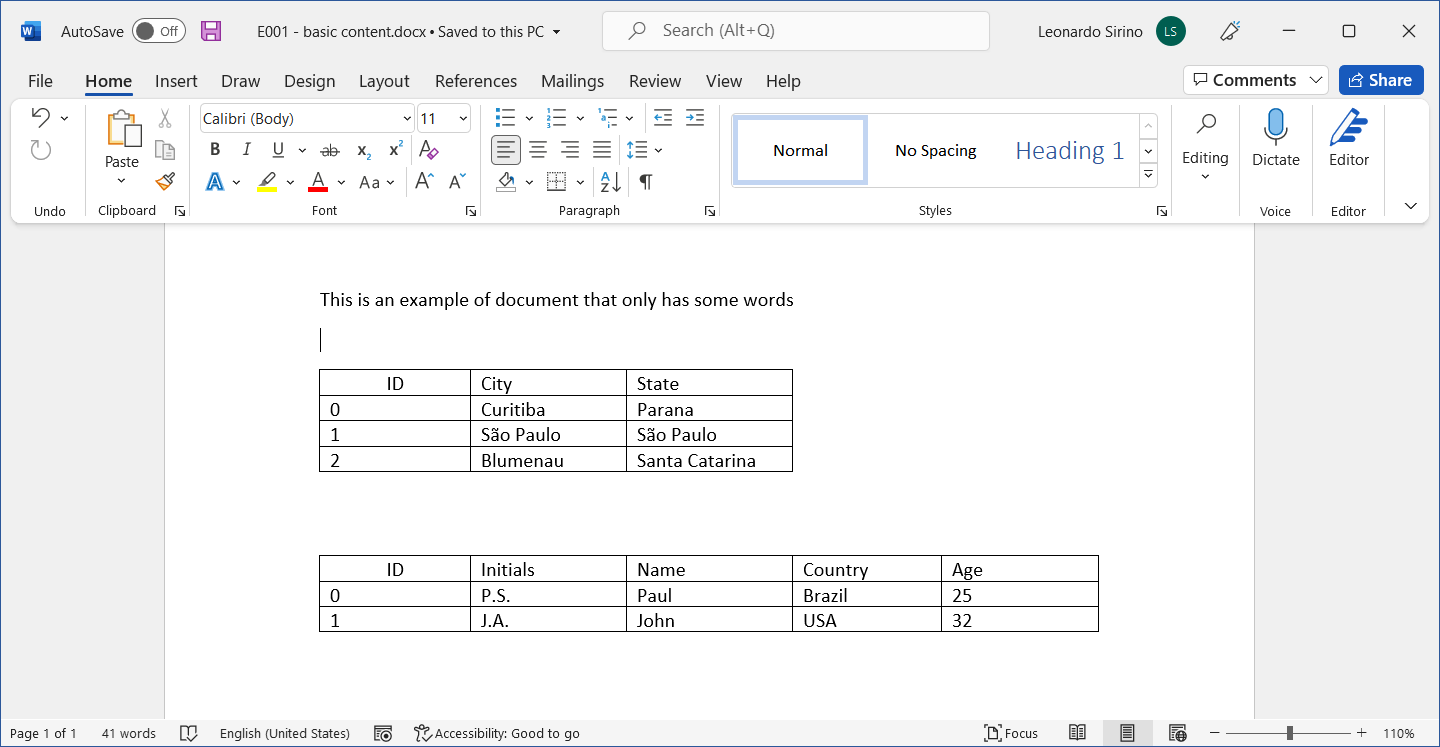
The output is:
  id  name age
0  0  Paul  25
1  1  John  32
Due to the fuzzy match used to select the closest table, even though the search headers do not exactly match a table header in the document, the extraction will return the right table if this is the closest to the search, which also makes the extraction resilient to typos. As an example, using the same code above, but now for a document like this:
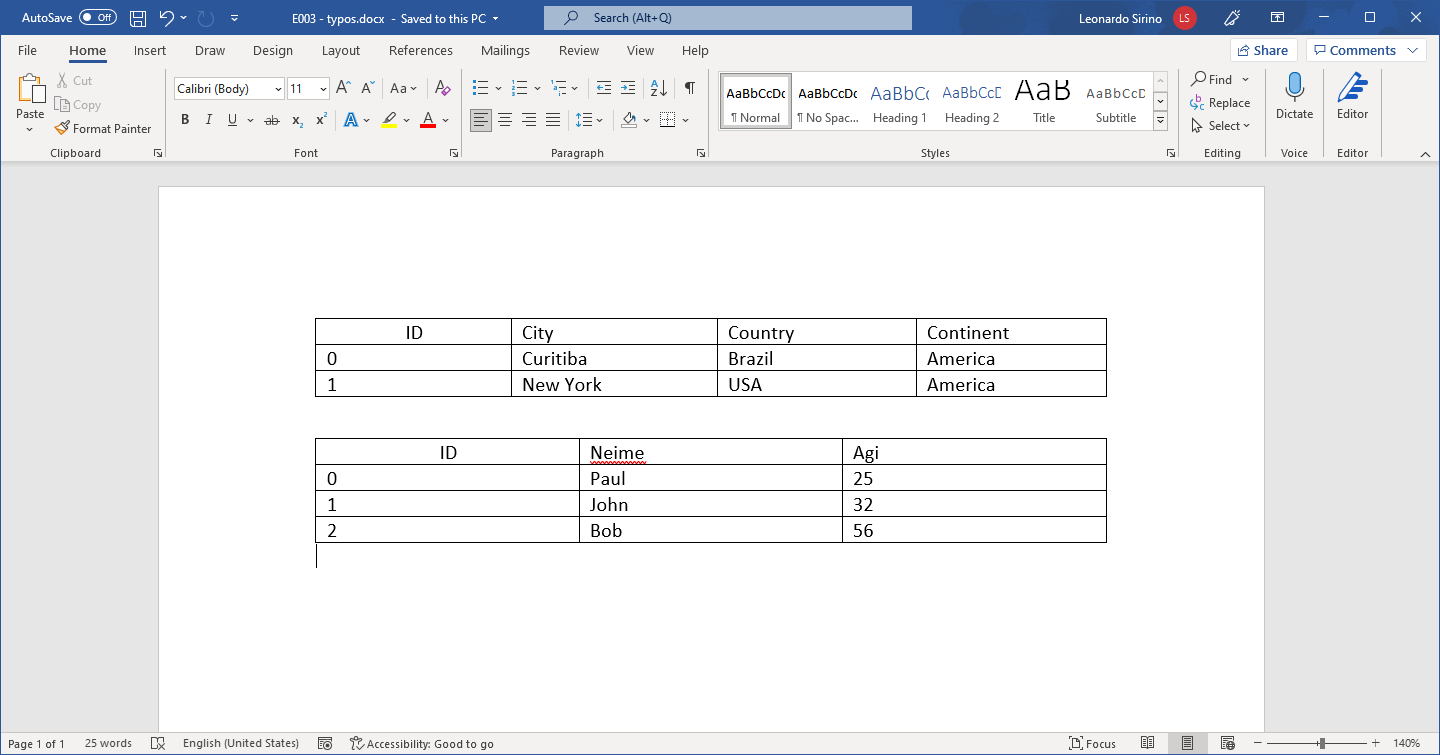
  id  name age
0  0  Paul  25
1  1  John  32
2  2   Bob  56
Extracting single field
There is also the possibility to extract only a single field (cell) from a document. Here is an example of how to do this with the library:
from pathlib import Path

from fuzzy_table_extractor.doc_handlers import DocxHandler
from fuzzy_table_extractor.extractor import Extractor, FieldOrientation

file_path = Path(r"path_to_document.docx")

handler = DocxHandler(file_path)
extractor = Extractor(handler)

area = extractor.extract_single_field(field="area",
                                      orientation=FieldOrientation.ROW)
print(area)
For a document like this:
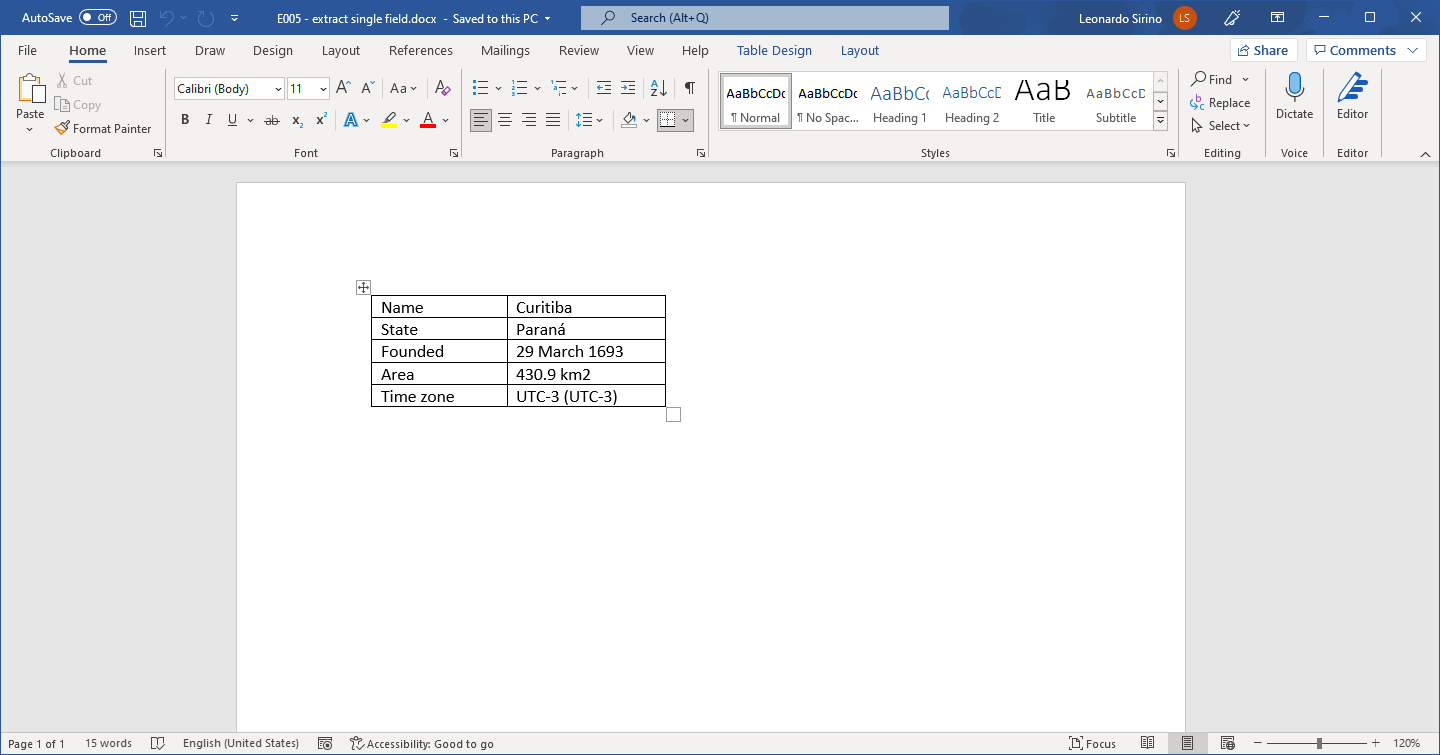
The output is:
430.9 km2
The file examples.py contains other examples of how to use the library
TODO
- Add to README a guide on how to contribute to project
- Expand test coverage
- Create a handler for pdf files


Download files
Download the file for your platform. If you're not sure which to choose, learn more about installing packages.
Source Distribution
Built Distribution
Filter files by name, interpreter, ABI, and platform.
If you're not sure about the file name format, learn more about wheel file names.
Copy a direct link to the current filters
File details
Details for the file fuzzy-table-extractor-0.1.1.tar.gz.
File metadata
- Download URL: fuzzy-table-extractor-0.1.1.tar.gz
- Upload date:
- Size: 8.5 kB
- Tags: Source
- Uploaded using Trusted Publishing? No
- Uploaded via: poetry/1.1.12 CPython/3.9.5 Windows/10
File hashes
| Algorithm | Hash digest | |
|---|---|---|
| SHA256 |
2dc820301ff795a91bbfa981e15acfe893efc69ce1a05d0b031442fe5514321e
|
|
| MD5 |
9e939c277c9af17f55d6c332aae2f16c
|
|
| BLAKE2b-256 |
2ab98c10504bbe3bebdaa273b58103762393277b24f2e9e397fc316c1c02fce8
|
File details
Details for the file fuzzy_table_extractor-0.1.1-py3-none-any.whl.
File metadata
- Download URL: fuzzy_table_extractor-0.1.1-py3-none-any.whl
- Upload date:
- Size: 9.9 kB
- Tags: Python 3
- Uploaded using Trusted Publishing? No
- Uploaded via: poetry/1.1.12 CPython/3.9.5 Windows/10
File hashes
| Algorithm | Hash digest | |
|---|---|---|
| SHA256 |
e56bdfd0d694f02d9d8c54f01ed160cf9d9d583770fc5aeacbe599cc4b0570f3
|
|
| MD5 |
e4072b952d1bcdaa6bf0e3bbd2abfac6
|
|
| BLAKE2b-256 |
08913abe7ef2910e990385d72a78f545a86ffd37caac456a91381aa277b37e9d
|






