



fuzzyfinder is a fuzzy finder implemented in Python. It matches partial string entries from a list of strings, and works similar to the fuzzy finder in SublimeText and Vim’s Ctrl-P plugin.
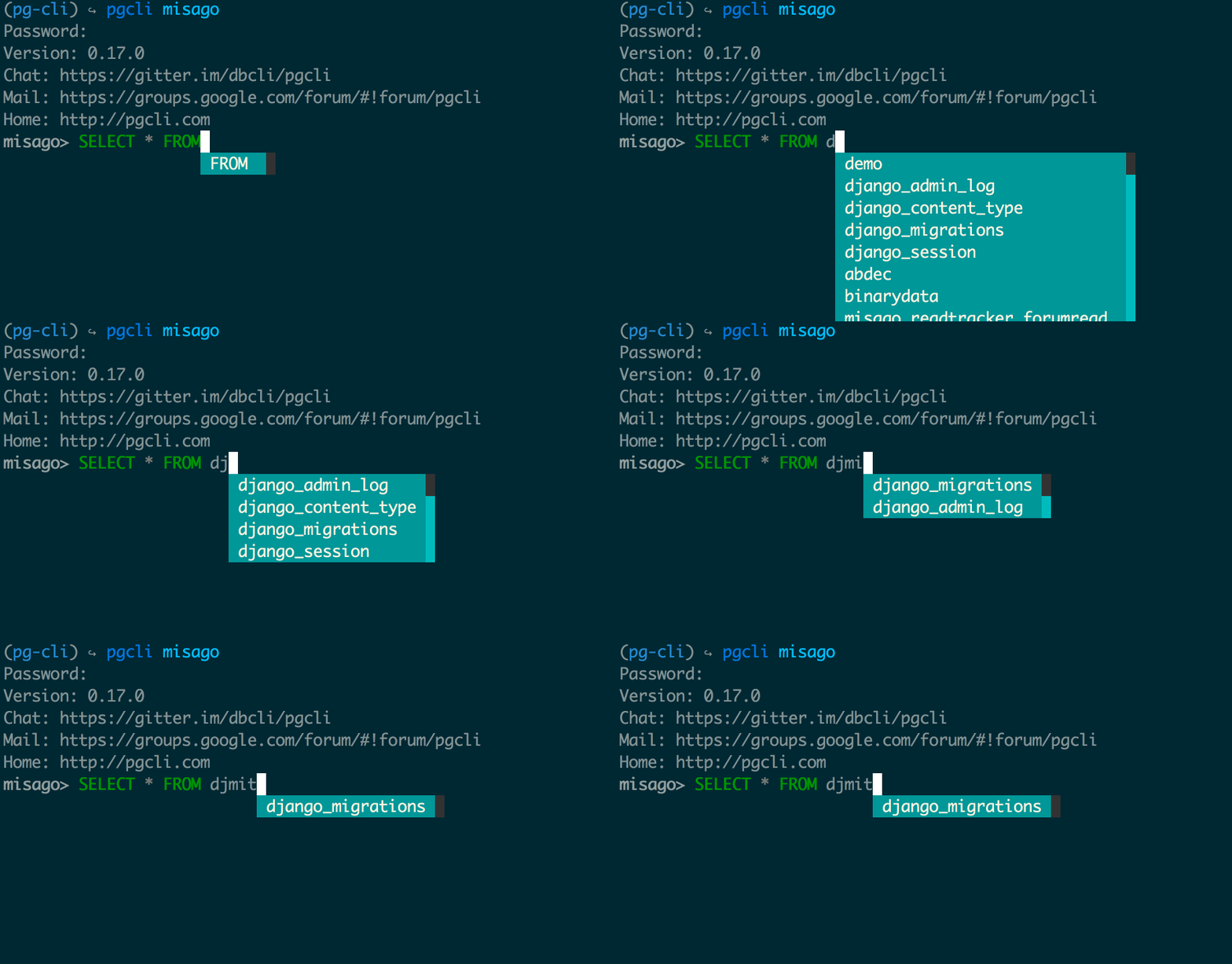
Some notable features of fuzzyfinder are:
Simple, easy to understand code.
No external dependencies, just the Python standard library.
An in-depth overview of the algorithm behind fuzzyfinder is available in this blog post.
Quick Start
Installation
$ pip install fuzzyfinder
Usage
>>> from fuzzyfinder import fuzzyfinder

>>> suggestions = fuzzyfinder('abc', ['acb', 'defabca', 'abcd', 'aagbec', 'xyz', 'qux'])
>>> list(suggestions)
['abcd', 'defabca', 'aagbec']

>>> # Use a user-defined function to obtain the string against which fuzzy matching is done
>>> collection = ['aa bbb', 'aca xyz', 'qx ala', 'xza az', 'bc aa', 'xy abca']
>>> suggestions = fuzzyfinder('aa', collection, accessor=lambda x: x.split()[1])
>>> list(suggestions)
['bc aa', 'qx ala', 'xy abca']

>>> # With the appropriate accessor you can pass non-string collections, too
>>> collection = [1234, 5678, 7537, 888, 57, 77]
>>> suggestions = fuzzyfinder('57', collection, accessor=str)
>>> list(suggestions)
[57, 5678, 7537]

>>> # Make filtering case-sensitive
>>> collection = ['bAB', 'aaB', 'Aab', 'xyz', 'adb', 'aAb']
>>> suggestions = fuzzyfinder('Ab', collection, ignore_case=False)
>>> list(suggestions)
['aAb', 'Aab']

>>> # By default, elements with matches of same rank are sorted alpha-numerically
>>> suggestions = fuzzyfinder('aa', ['aac', 'aaa', 'aab', 'xyz', 'ada'])
>>> list(suggestions)
['aaa', 'aab', 'aac', 'ada']

>>> # Preserve original order of elements if matches have same rank
>>> suggestions = fuzzyfinder('aa', ['aac', 'aaa', 'aab', 'xyz', 'ada'], sort_results=False)
>>> list(suggestions)
['aac', 'aaa', 'aab', 'ada']

>>> # Highlight matching substrings when printing to the terminal
>>> collection = ['apple', 'banana', 'grape', 'orange', 'pineapple']
>>> suggestions = fuzzyfinder('ape', collection, highlight=True)
>>> list(suggestions)
['gr\x1b[42mape\x1b[0m', '\x1b[42map\x1b[0mpl\x1b[42me\x1b[0m', 'pine\x1b[42map\x1b[0mpl\x1b[42me\x1b[0m']

>>> # Custom highlighting (use with ANSI, HTML, etc.)
>>> parentheses = '(', ')'
>>> suggestions = fuzzyfinder('ape', collection, highlight=parentheses)
>>> list(suggestions)
['gr(ape)', '(ap)pl(e)', 'pine(ap)pl(e)']
Similar Projects
https://github.com/seatgeek/thefuzz - Fuzzy matching and auto-correction using levenshtein distance.
1 maintainer

Metadata
1 maintainer
Release files for fuzzyfinder 2.3.0
For a detailed explanation of source distributions (sdists) and built distributions (wheels), please see the package formats documentation.
Source distribution (sdist)
| File | Size | Uploaded | |
|---|---|---|---|
| fuzzyfinder-2.3.0.tar.gz | 78.6 kB | Details |
Built distribution (wheel)
| File | Interpreter | ABI | Platform | Reset |
|---|---|---|---|---|
| fuzzyfinder-2.3.0-py3-none-any.whl | Python 3 | none | any | Details |
Total release size: 97.9 kB
Release files / fuzzyfinder-2.3.0.tar.gz
| Download URL | fuzzyfinder-2.3.0.tar.gz |
|---|---|
| Size | 78.6 kB |
| Tags | Source |
|
SHA-256 checksum How to use checksums |
3d2de6650852fdf3da896917b2fe88550d854dda590de5f239c2899f7eaf20df
|
|
BLAKE2b-256 checksum How to use checksums |
3c1627e312d2b4bdb9f5101b68031048d790edd348a31ee80c3f77066c04d311
|
| Upload date | |
|
Uploaded using Trusted Publishing? What is trusted publishing? |
Yes |
| Uploaded via |
twine/6.1.0 CPython/3.12.9
|
Provenance
Provenance describes where a file came from. On PyPI, provenance is shared via attestations, which provide a verifiable record of the build or publishing details. View details, limitations and caveats.


PyPI Publish Attestation
PyPI verified that this artifact, at this checksum, originated from the publisher listed below.
Signed by GitHub Actions, verified by PyPI on Apr 20, 2025.
Transparency logRelease files / fuzzyfinder-2.3.0-py3-none-any.whl
| Download URL | fuzzyfinder-2.3.0-py3-none-any.whl |
|---|---|
| Size | 19.3 kB |
| Tags | Python 3 |
|
SHA-256 checksum How to use checksums |
4ee35618ca6e1562a235d0f40f594b36ae374e55650a251d52add353b7e3f215
|
|
BLAKE2b-256 checksum How to use checksums |
8cc3e64d5e277373e93b75d9711e46dd7903887e8efa8ecc033e2c5df760e309
|
| Upload date | |
|
Uploaded using Trusted Publishing? What is trusted publishing? |
Yes |
| Uploaded via |
twine/6.1.0 CPython/3.12.9
|
Provenance
Provenance describes where a file came from. On PyPI, provenance is shared via attestations, which provide a verifiable record of the build or publishing details. View details, limitations and caveats.
PyPI Publish Attestation
PyPI verified that this artifact, at this checksum, originated from the publisher listed below.
Signed by GitHub Actions, verified by PyPI on Apr 20, 2025.
Transparency log













