
FXTensor
FXTensor is a Python library for tensor-based computations, particularly suited for modeling probabilistic systems and processes inspired by category theory. It leverages NumPy for efficient numerical computations. The library primarily supports labeled indices for enhanced readability while maintaining compatibility with unlabeled numeric indices.
Documentation
Core Concepts
An FXTensor is defined by its profile and data, with optional string labels to make tensors more intuitive and meaningful.
- Profile: A pair
[domain, codomain]specifying the dimensions of input (domain) and output (codomain) indices. For labeled tensors, e.g.,[[['a', 'b']], [['x', 'y', 'z']]]represents a 2x3 matrix with labeled rows and columns. For unlabeled tensors,[[2], [3]]specifies dimensions numerically. - Labels (Optional): String labels can be assigned to each dimension, enhancing interpretability. For example, input axis labeled
['a', 'b']and output axis labeled['x', 'y', 'z']. Unlabeled tensors havelabelsset toNone. - Data: A NumPy array holding the tensor’s values. Its shape must match the total number of dimensions in the profile (
len(domain) + len(codomain)).
Usage Examples
Basic Example: Labeled Tensor
import numpy as np
from fxtensor_salmon import FXTensor

# Create a 2x3 matrix with string labels
profile = [[['a', 'b']], [['x', 'y', 'z']]]
data = np.array([
    [0.1, 0.2, 0.7],  # a -> x, y, z
    [0.3, 0.3, 0.4]   # b -> x, y, z
])
tensor = FXTensor(profile, data=data)

# Access elements using labels
assert tensor.get_label_index(0, 'a') == 0  # Index of label 'a' on input axis
assert tensor.get_index_label(1, 2) == 'z'  # Label at index 2 on output axis
Unlabeled Tensor
# Create a 2x3 matrix with numeric indices
profile = [[2], [3]]
data = np.array([
    [0.1, 0.2, 0.7],
    [0.3, 0.3, 0.4]
])
tensor = FXTensor(profile, data=data)
assert tensor.labels == (None, None)  # No labels
Creating Tensor from Strands
# Create a tensor from labeled strands
profile = [[['a', 'b']], [['x', 'y', 'z']]]
strands = {
    "[[['a']], [['x']]]": 0.1,
    "[[['a']], [['y']]]": 0.2,
    "[[['a']], [['z']]]": 0.7,
    "[[['b']], [['x']]]": 0.3,
    "[[['b']], [['y']]]": 0.3,
    "[[['b']], [['z']]]": 0.4
}
tensor = FXTensor.from_strands(profile, strands)
assert tensor.labels == ([['a', 'b']], [['x', 'y', 'z']])
Labeled Tensor Composition
# P(Y|X) where X={a,b}, Y={x,y}
tensor1 = FXTensor(
    [[['a', 'b']], [['x', 'y']]],
    data=np.array([
        [0.2, 0.8],  # a -> x, y
        [0.6, 0.4]   # b -> x, y
    ])
)

# P(Z|Y) where Y={x,y}, Z={p,q}
tensor2 = FXTensor(
    [[['x', 'y']], [['p', 'q']]],
    data=np.array([
        [0.3, 0.7],  # x -> p, q
        [0.9, 0.1]   # y -> p, q
    ])
)

# Composition: P(Z|X) = P(Y|X) ; P(Z|Y)
result = tensor1.composition(tensor2)
assert result.labels == ([['a', 'b']], [['p', 'q']])
assert np.allclose(result.data, [
    [0.2*0.3 + 0.8*0.9, 0.2*0.7 + 0.8*0.1],  # a -> p, q
    [0.6*0.3 + 0.4*0.9, 0.6*0.7 + 0.4*0.1],  # b -> p, q
])
Labeled Tensor Product
# P(X) where X={a,b}
tensor1 = FXTensor(
    [[], [['a', 'b']]],
    data=np.array([0.3, 0.7])
)

# P(Y) where Y={x,y,z}
tensor2 = FXTensor(
    [[], [['x', 'y', 'z']]],
    data=np.array([0.2, 0.3, 0.5])
)

# Tensor product: P(X,Y) = P(X) ⊗ P(Y)
result = tensor1.tensor_product(tensor2)
assert result.labels == (None, [['a', 'b'], ['x', 'y', 'z']])
assert np.allclose(result.data, np.outer(
    np.array([0.3, 0.7]),
    np.array([0.2, 0.3, 0.5]),
))
Simple Example: Weather Forecast (Labeled)
Model a weather system with states “Sunny” or “Rainy.”
-
State Tensor: Represents today’s weather probability with labels. If today is certainly sunny, the state is
[1, 0].weather_states = ['Sunny', 'Rainy'] sunny_today = FXTensor([[], [weather_states]], data=np.array([1, 0]))
-
Process Tensor: Represents a weather forecast as a labeled Markov kernel.
forecast_matrix = np.array([
    [0.8, 0.2],  # Sunny -> Sunny: 0.8, Rainy: 0.2
    [0.4, 0.6]   # Rainy -> Sunny: 0.4, Rainy: 0.6
])
forecast_tensor = FXTensor([[weather_states], [weather_states]], data=forecast_matrix)
-
Composition: Predict tomorrow’s weather by composing today’s state with the forecast.
sunny_tomorrow = sunny_today.composition(forecast_tensor)
sunny_idx = sunny_tomorrow.get_label_index(0, 'Sunny')
p_sunny = sunny_tomorrow.data[sunny_idx]  # 0.8
Conditional independence: weather, umbrella, and the forecast
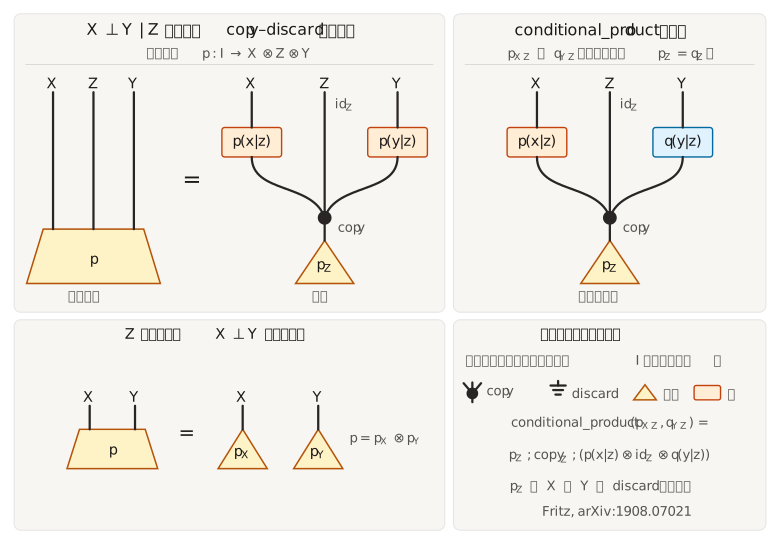
The forecast drives both the weather you meet and whether you carry an umbrella. Given the forecast they are conditionally independent. The marginal on weather and umbrella still couples them.
The API orders the joint as weather ⊗ umbrella ⊗ forecast (X ⊗ Y ⊗ Z, with Z last). The figure draws the same variables as X ⊗ Z ⊗ Y and is read bottom to top. Left: X ⊥ Y | Z is the copy–discard equation. Right: conditional_product is p_Z ; copy_Z ; (p(x|z) ⊗ id_Z ⊗ q(y|z)). Bottom: when Z is trivial, the joint is the product of the marginals.
forecast = ['Sunny', 'Rainy']
weather = ['Dry', 'Wet']
umbrella = ['Leave', 'Take']
p_wf = FXTensor([[], [weather, forecast]], data=np.array([
    [0.45, 0.05],  # Dry
    [0.05, 0.45],  # Wet
]))
p_uf = FXTensor([[], [umbrella, forecast]], data=np.array([
    [0.40, 0.10],  # Leave
    [0.10, 0.40],  # Take
]))
joint = FXTensor.conditional_product(p_wf, p_uf, 2)
assert joint.labels == (None, [weather, umbrella, forecast])
assert joint.is_conditionally_independent(2, 3)
weather_umbrella = joint.marginalization(3)
assert not weather_umbrella.is_independent(2)
Advanced Example: Multidimensional System (Labeled)
Model Season (Spring, Summer, Other) and Weather (Sunny, Rainy) given Location (Urban, Rural).
conditionalization and jointification require a state (empty domain). marginalization also works on a kernel.
Kernel: P(Season, Weather | Location)
Profile [[['Urban', 'Rural']], [['Spring', 'Summer', 'Other'], ['Sunny', 'Rainy']]], data shape (2, 3, 2). Each location’s block sums to 1.
location_labels = ['Urban', 'Rural']
season_labels = ['Spring', 'Summer', 'Other']
weather_labels = ['Sunny', 'Rainy']
process_data = np.array([
    [[0.2, 0.1], [0.3, 0.1], [0.2, 0.1]],  # Urban
    [[0.1, 0.2], [0.2, 0.2], [0.1, 0.2]],  # Rural
])
process_tensor = FXTensor(
    [[location_labels], [season_labels, weather_labels]],
    data=process_data,
)

# P(Season | Location) by summing out Weather
season_tensor = process_tensor.marginalization(start_B=2)
assert season_tensor.labels == ([['Urban', 'Rural']], [['Spring', 'Summer', 'Other']])
assert np.allclose(season_tensor.data, [
    [0.3, 0.4, 0.3],
    [0.3, 0.4, 0.3],
])
Joint state: P(Location, Season, Weather)
A state has an empty domain. Split the last axis with conditionalization(3) to get P(Weather | Location, Season).
joint_data = np.array([
    [[0.08, 0.04], [0.12, 0.04], [0.08, 0.04]],  # Urban, total 0.4
    [[0.06, 0.12], [0.12, 0.12], [0.06, 0.12]],  # Rural, total 0.6
])
joint = FXTensor(
    [[], [location_labels, season_labels, weather_labels]],
    data=joint_data,
)

cond_tensor = joint.conditionalization(concat_start_index=3)
assert cond_tensor.labels == (
    [['Urban', 'Rural'], ['Spring', 'Summer', 'Other']],
    [['Sunny', 'Rainy']],
)
assert cond_tensor.is_markov()
assert np.allclose(cond_tensor.data, [
    [[2/3, 1/3], [0.75, 0.25], [2/3, 1/3]],
    [[1/3, 2/3], [0.50, 0.50], [1/3, 2/3]],
])
Jointification of two states
Both arguments must be states. Empty-domain labels appear as None.
location_state = FXTensor([[], [location_labels]], data=np.array([0.6, 0.4]))
traffic_labels = ['Low', 'High']
traffic_state = FXTensor([[], [traffic_labels]], data=np.array([0.7, 0.3]))
joint_state = location_state.jointification(traffic_state)
assert joint_state.labels == (None, [['Urban', 'Rural'], ['Low', 'High']])
assert np.allclose(joint_state.data, [
    [0.42, 0.18],
    [0.28, 0.12],
])
Key Method Applications
from_json(json_data)
Creates a tensor from JSON data, loading profile and data to instantiate an FXTensor.
json_data = {
    "profile": [[['a', 'b']], [['x', 'y']]],
    "data": [[0.2, 0.8], [0.6, 0.4]]
}
tensor = FXTensor.from_json(json_data)
assert tensor.labels == ([['a', 'b']], [['x', 'y']])
from_strands(profile, strands)
Creates a tensor from strands (sparse string representations of non-zero elements).
profile = [[['a', 'b']], [['x', 'y', 'z']]]
strands = {
    "[[['a']], [['x']]]": 0.1,
    "[[['a']], [['y']]]": 0.2,
    "[[['a']], [['z']]]": 0.7,
    "[[['b']], [['x']]]": 0.3,
    "[[['b']], [['y']]]": 0.3,
    "[[['b']], [['z']]]": 0.4
}
tensor = FXTensor.from_strands(profile, strands)
assert tensor.labels == ([['a', 'b']], [['x', 'y', 'z']])
identity_tensor(list_x)
Creates an identity tensor for the given dimensions, supporting labeled or numeric inputs.
labels = [['a', 'b']]
id_tensor = FXTensor.identity_tensor(labels)
assert id_tensor.labels == ([['a', 'b']], [['a', 'b']])
copy_tensor(list_x, n=2)
Creates a diagonal copy morphism X → X^{⊗ n}. n=0 is discard, n=1 is identity.
copy = FXTensor.copy_tensor([2])
assert copy.profile == [[2], [2, 2]]
assert np.array_equal(copy.data, [
    [[1, 0],
     [0, 0]],
    [[0, 0],
     [0, 1]],
])

labeled_copy = FXTensor.copy_tensor([['a', 'b']])
assert labeled_copy.labels == ([['a', 'b']], [['a', 'b'], ['a', 'b']])
unit_tensor(dims)
Creates a unit state tensor (all-ones vector) for the given dimensions.
dims = [2, 3]
unit = FXTensor.unit_tensor(dims)
assert unit.profile == [[], dims]
assert np.all(unit.data == 1)
delta_tensor(dims)
Creates a delta tensor (identity matrix) for the given dimensions, used for copying.
dims = [2]
delta = FXTensor.delta_tensor(dims)
assert delta.profile == [[dims], [dims]]
DisCoPy integration
fxtensor-salmon can convert labeled tensors to DisCoPy Tensor / Box values and interpret discopy.markov diagrams (Copy, Discard, Swap, Id) as FXTensor morphisms. This extra requires Python 3.10+ and is installed with:
pip install fxtensor-salmon[discopy]
Each profile factor is one wire. Unlabeled tensors map to Dim; labels are stored on Markov type names and restored when converting a Box back.
from discopy.markov import Copy, Discard, Id, Swap, Ty
from fxtensor_salmon import FXTensor
from fxtensor_salmon.discopy import FXTensorFunctor, from_tensor, to_box, to_tensor

kernel = FXTensor(
    [[2], [2]],
    data=np.array([[0.8, 0.2], [0.4, 0.6]]),
)
assert from_tensor(to_tensor(kernel)) == kernel

weather = ['Sunny', 'Rainy']
forecast = FXTensor([[weather], [weather]], data=np.array([[0.8, 0.2], [0.4, 0.6]]))
box = to_box(forecast, name="forecast")

x, y = Ty('x'), Ty('y')
F = FXTensorFunctor({x: 2, y: 3}, {})
assert F(Copy(x)) == FXTensor.copy_tensor([2])
assert F(Discard(x)) == FXTensor.exclamation([2])
assert F(Swap(x, y)) == FXTensor.swap([2], [3])
assert F(Id(x)) == FXTensor.identity_tensor([2])
Theoretical Background: Relation to Markov Categories
The fxtensor-salmon library is designed based on the Markov Category, a framework for categorical probability theory.
Markov Category Basics
- Objects: State spaces, represented in
FXTensorasdomainorcodomain(e.g.,[['Urban', 'Rural']]or[[2]]). - Morphisms: Markov kernels (probabilistic transitions), represented by
FXTensorinstances with profile and data.
String diagrams
Diagrams are read top to bottom (inputs at the top, outputs at the bottom). The drawing conventions are referenced from T. Fritz (arXiv:1908.07021), implemented independently in TikZ. Boxes are morphisms, triangles are states I → X, a black dot branching downwards is copy, and a wire ending in a black dot is discard !. Sources are in docs/diagrams/.
Copy is coassociative, counital and cocommutative:
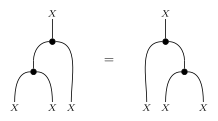
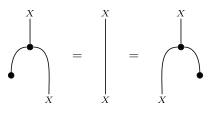
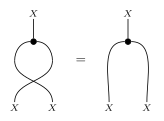
Every morphism is Markov (discard is natural), f ; ! = ! — in FXTensor, each row of a kernel sums to 1:

Markov Category Operations
| Method | Role | When to use |
|---|---|---|
composition |
Sequential composition A→B then B→C |
Wire processes in series, or apply a kernel to a state |
tensor_product |
Monoidal product | Place independent systems side by side |
marginalization |
Discard a suffix of the outputs | Sum out axes you no longer need |
conditionalization |
Joint state → kernel | Split a joint distribution into a conditional (states only) |
partial_composition |
Compose only some output wires | Keep a prefix of the outputs and feed the suffix into another kernel |
jointification |
Joint of two states | Combine two independent states (states only) |
conditional |
Kernel A → X ⊗ Y → A ⊗ X → Y |
Conditionalize a kernel (generalizes conditionalization) |
is_conditionally_independent |
X ⊥ Y given Z, codomain X ⊗ Y ⊗ Z |
Test a state or kernel against the copy–discard equation |
conditional_product |
Joint on X ⊗ Y ⊗ Z from joints on X ⊗ Z and Y ⊗ Z |
Build a conditionally independent joint (states or kernels that share a domain) |
is_independent |
X ⊥ Y when Z is empty |
Special case of conditional independence |
bayesian_inversion |
f: X → Y and prior I → X → f†: Y → X |
Bayesian update / posterior kernel |
almost_surely_equal |
f = g p-a.s. |
Compare kernels only where the prior has mass |
is_absolutely_continuous |
p ≪ q |
Check support inclusion of states / kernels |
exclamation |
Discard morphism X → I |
Build an all-ones discarding tensor |
copy_tensor |
Copy morphism X → X^{⊗ n} |
Deterministic copy / diagonal (n=0 is discard) |
delta_tensor |
Identity (alias of identity_tensor) |
Build an identity kernel |
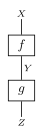
composition — sequential wiring
Use when the codomain of f matches the domain of g. Same numbers as the labeled example above: P(Z|X) = P(Y|X) ; P(Z|Y).
result = tensor1.composition(tensor2)
assert np.allclose(result.data, [[0.78, 0.22], [0.54, 0.46]])
tensor_product — independent systems in parallel

Use to put two morphisms (or two states) next to each other without coupling.
px = FXTensor([[], [['a', 'b']]], data=np.array([0.3, 0.7]))
py = FXTensor([[], [['x', 'y', 'z']]], data=np.array([0.2, 0.3, 0.5]))
pxy = px.tensor_product(py)
assert pxy.labels == (None, [['a', 'b'], ['x', 'y', 'z']])
assert np.allclose(pxy.data, [[0.06, 0.09, 0.15], [0.14, 0.21, 0.35]])
marginalization — drop a suffix of the outputs
Use start_B (1-based) as the first codomain axis to sum out. A state with profile [[], [2, 3]] and start_B=2 keeps the first axis.
state = FXTensor([[], [2, 3]], data=np.array([
    [0.1, 0.2, 0.3],
    [0.15, 0.05, 0.2],
]))
marginal = state.marginalization(2)
assert marginal.profile == [[], [2]]
assert np.allclose(marginal.data, [0.6, 0.4])
conditionalization — joint state to a kernel
Use only on a state. concat_start_index (1-based) is the first axis of the new codomain. A zero slice stays zero.
joint_state = FXTensor([[], [2, 2]], data=np.array([[0.1, 0.2], [0.0, 0.0]]))
kernel = joint_state.conditionalization(2)
assert kernel.profile == [[2], [2]]
assert kernel.is_markov()
assert np.allclose(kernel.data, [[1/3, 2/3], [0.0, 0.0]])
partial_composition — compose only the trailing outputs
For f: A → B ⊗ C and g: C → D, f.partial_composition(g, 2) keeps B and composes on C, giving A → B ⊗ D.
f = FXTensor([[2], [2, 2]], data=np.array([
    [[1.0, 0.0], [0.0, 1.0]],
    [[0.0, 1.0], [1.0, 0.0]],
]))
g = FXTensor([[2], [2]], data=np.array([
    [0.2, 0.8],
    [0.6, 0.4],
]))
partial = f.partial_composition(g, 2)
assert partial.profile == [[2], [2, 2]]
assert np.allclose(partial.data, [
    [[0.2, 0.8], [0.6, 0.4]],
    [[0.6, 0.4], [0.2, 0.8]],
])
concat_start_index=1 composes on the whole codomain (the case covered by the tests).
jointification — two states into one joint
Same numbers as the tensor product of states; both domains must be empty.
px = FXTensor([[], [['a', 'b']]], data=np.array([0.3, 0.7]))
py = FXTensor([[], [['x', 'y', 'z']]], data=np.array([0.2, 0.3, 0.5]))
joint_xy = px.jointification(py)
assert joint_xy.labels == (None, [['a', 'b'], ['x', 'y', 'z']])
assert np.allclose(joint_xy.data, [[0.06, 0.09, 0.15], [0.14, 0.21, 0.35]])
bayesian_inversion — posterior kernel
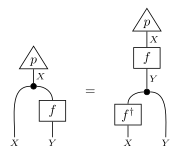
For a prior p: I → X and a kernel f: X → Y, f.bayesian_inversion(p) returns f†: Y → X with f†(x|y) = p(x) f(y|x) / Σ p(x') f(y|x') (Cho & Jacobs). It satisfies p ; copy ; (id ⊗ f) = p ; f ; copy ; (f† ⊗ id). Outputs with zero evidence stay zero.
health = ['Sick', 'Healthy']
result = ['Positive', 'Negative']
prior = FXTensor([[], [health]], data=np.array([0.01, 0.99]))
test = FXTensor([[health], [result]], data=np.array([[0.9, 0.1], [0.05, 0.95]]))
posterior = test.bayesian_inversion(prior)
assert posterior.labels == ([result], [health])
assert np.isclose(posterior.data[0, 0], 2 / 13)  # P(Sick | Positive)
conditional — conditionalize a kernel
f.conditional(k) turns f: A → X ⊗ Y into A ⊗ X → Y, where k (1-based) is the first codomain axis of Y. On a state it equals conditionalization(k).
f = FXTensor([[['a']], [['x0', 'x1'], ['y0', 'y1']]], data=np.array([[[0.1, 0.3], [0.2, 0.4]]]))
c = f.conditional(2)
assert c.labels == ([['a'], ['x0', 'x1']], [['y0', 'y1']])
assert np.allclose(c.data, [[[0.25, 0.75], [1/3, 2/3]]])
support, almost_surely_equal, is_absolutely_continuous — a.s. reasoning
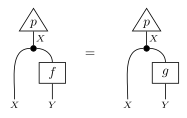
support() returns the 0/1 indicator of nonzero entries (same profile and labels). f.almost_surely_equal(g, p) checks Fritz's p ; copy ; (id ⊗ f) = p ; copy ; (id ⊗ g), i.e. f and g agree on the support of p. p.is_absolutely_continuous(q) checks p ≪ q (zero in q implies zero in p; input-wise for kernels, cf. arXiv:2308.00651). Zero is judged with _ATOL; labels are not compared.
prior = FXTensor([[], [['x0', 'x1', 'x2']]], data=np.array([0.4, 0.6, 0.0]))
f = FXTensor([[['x0', 'x1', 'x2']], [['y0', 'y1']]], data=np.array([[0.2, 0.8], [0.5, 0.5], [1.0, 0.0]]))
g = FXTensor([[['x0', 'x1', 'x2']], [['y0', 'y1']]], data=np.array([[0.2, 0.8], [0.5, 0.5], [0.3, 0.7]]))
assert np.array_equal(prior.support().data, [1.0, 1.0, 0.0])
assert f.almost_surely_equal(g, prior)   # f and g differ only on the null point x2
assert f.is_absolutely_continuous(g)     # f(·|x) ≪ g(·|x) for every x
assert not g.is_absolutely_continuous(f)
Probabilistic Properties
is_markov(): Verifies if the tensor satisfies the normalization condition (sum of outputs equals 1 or 0). States (empty domain) always returnFalse; checknp.isclose(state.data.sum(), 1)for a normalized state.is_deterministic(): True if every codomain slice is a point mass (one-hot), i.e.f ; copy = copy ; (f ⊗ f). Zero slices are not deterministic.- Labeled tensors enable intuitive interpretation via
get_label_indexandget_index_label.
Testing
Tests are implemented in tests/test_fxtensor.py using pytest.
pytest
References
- [1] 檜山正幸のキマイラ飼育記 (はてなBlog), マルコフ圏 A First Look -- 圏論的確率論の最良の定式化
- [2] 檜山正幸のキマイラ飼育記 (はてなBlog), マルコフ圏におけるテンソル計算の手順とコツ
- [3] K. Cho and B. Jacobs, Disintegration and Bayesian Inversion via String Diagrams (arXiv:1709.00322)
- [4] T. Fritz, A synthetic approach to Markov kernels, conditional independence and theorems on sufficient statistics (arXiv:1908.07021)
- [5] T. Fritz, T. Gonda, A. Lorenzin, P. Perrone, D. Stein, Absolute continuity, supports and idempotent splitting in categorical probability (arXiv:2308.00651)
1 maintainer

Metadata
1 maintainer
Release files for fxtensor-salmon 1.3.0
For a detailed explanation of source distributions (sdists) and built distributions (wheels), please see the package formats documentation.
Source distribution (sdist)
| File | Size | Uploaded | Provenance | |
|---|---|---|---|---|
| fxtensor_salmon-1.3.0.tar.gz | 41.4 kB | Without provenance | Details |
Built distribution (wheel)
| File | Interpreter | ABI | Platform | Reset |
|---|---|---|---|---|
| fxtensor_salmon-1.3.0-py3-none-any.whl | Python 3 | none | any | Details |
Total release size: 67.0 kB
Release files / fxtensor_salmon-1.3.0.tar.gz
| Download URL | fxtensor_salmon-1.3.0.tar.gz |
|---|---|
| Size | 41.4 kB |
| Tags | Source |
|
SHA-256 checksum How to use checksums |
234b999f6ccab7bd672f178b5092902d6f18d3a5374a2ad56233f10a553ad83b
|
|
BLAKE2b-256 checksum How to use checksums |
a65818bc0fb94282eb1eb1fe4ceadbf3106f881e660bd6e73ac538edeac5ed9d
|
| Upload date | |
|
Uploaded using Trusted Publishing? What is trusted publishing? |
No |
| Uploaded via |
twine/7.0.0 CPython/3.12.15
|
Release files / fxtensor_salmon-1.3.0-py3-none-any.whl
| Download URL | fxtensor_salmon-1.3.0-py3-none-any.whl |
|---|---|
| Size | 25.6 kB |
| Tags | Python 3 |
|
SHA-256 checksum How to use checksums |
250a092424d28f6d1e4b78b3e1437a20e66bccf4bc8670c9c0343a0c074cf9d5
|
|
BLAKE2b-256 checksum How to use checksums |
12983dec969f02497f050e7fb03ae3cddac39f3d8fd4bb060b28e3a860872533
|
| Upload date | |
|
Uploaded using Trusted Publishing? What is trusted publishing? |
No |
| Uploaded via |
twine/7.0.0 CPython/3.12.15
|
Security for fxtensor-salmon 1.3.0
Provenance
Provenance describes where a file came from. On PyPI, provenance is shared via attestations, which provide a verifiable record of the build or publishing details. View details, limitations and caveats.
No provenance found
None of the files in this release were uploaded with provenance metadata.
A note on package security
PyPI is a repository for distributing packages, not a service for auditing them. While third-party security researchers and our staff do their best to detect and remove malicious packages, PyPI cannot guarantee the quality, security or suitability of any given package.
To learn more about protecting yourself from malicious actors, visit our package security documentation.














