
Gⁱ-2-Pⁱ


Grapheme-to-Phoneme transformations that preserve input and output indices!
This library is for handling arbitrary conversions between input and output segments while preserving indices.
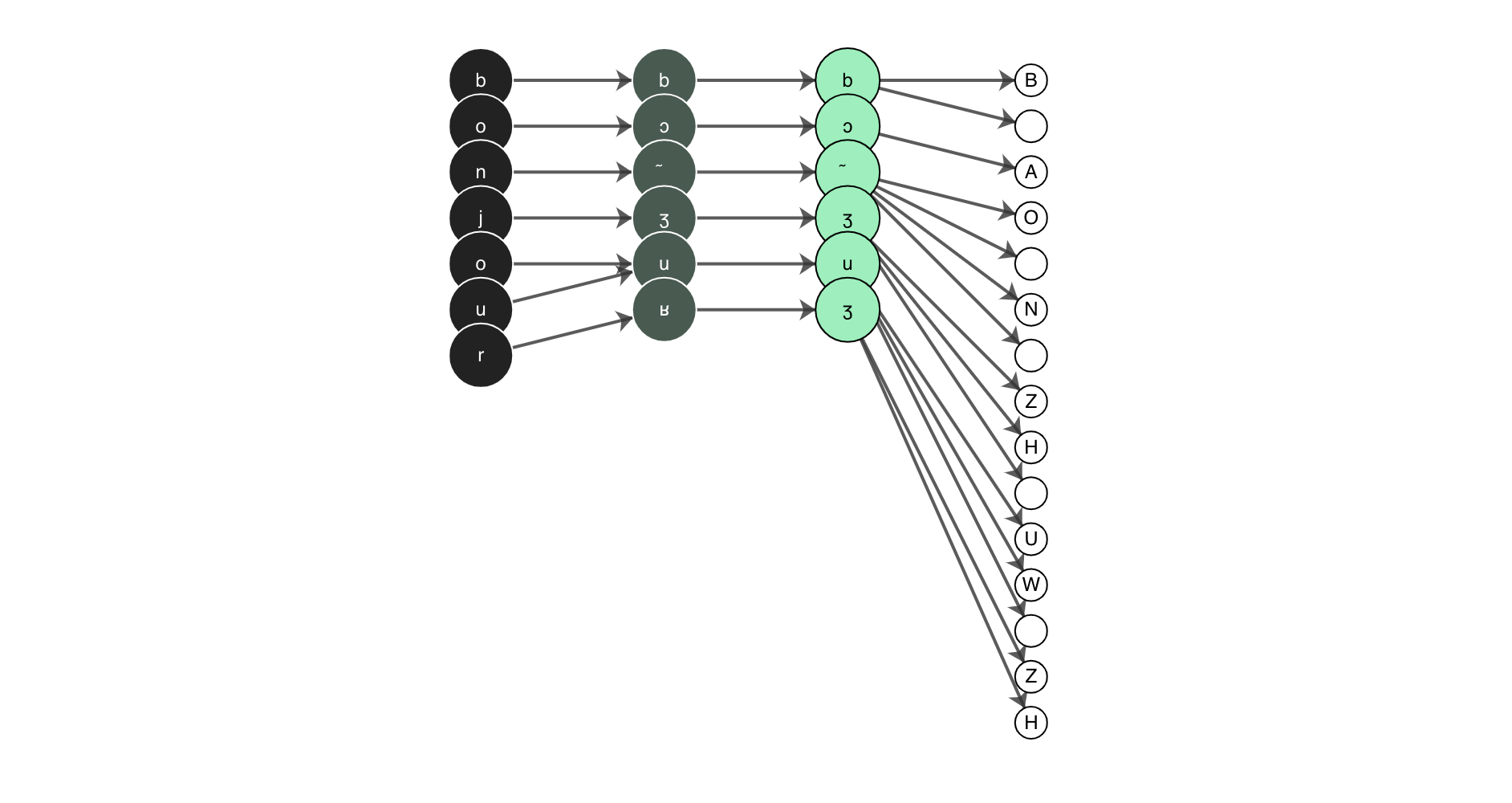
Table of Contents
Background
The initial version of this package was developed by Patrick Littell and was developed in order to allow for g2p from community orthographies to IPA and back again in ReadAlong-Studio. We decided to then pull out the g2p mechanism from Convertextract which allows transducer relations to be declared in CSV files, and turn it into its own library - here it is!
Install
The best thing to do is install with pip pip install g2p.
Otherwise, clone the repo and pip install it locally.
$ git clone https://github.com/roedoejet/g2p.git
$ cd g2p
$ pip install -e .
Usage
The easiest way to create a transducer is to use the g2p.make_g2p function.
To use it, first import the function:
from g2p import make_g2p
Then, call it with an argument for in_lang and out_lang. Both must be strings equal to the name of a particular mapping.
>>> transducer = make_g2p('dan', 'eng-arpabet')
>>> transducer('hej').output_string
'HH EH Y'
There must be a valid path between the in_lang and out_lang in order for this to work. If you've edited a mapping or added a custom mapping, you must update g2p to include it: g2p update
CLI
update
If you edit or add new mappings to the g2p.mappings.langs folder, you need to update g2p. You do this by running g2p update
convert
If you want to convert a string on the command line, you can use g2p convert <input_text> <in_lang> <out_lang>
Ex. g2p convert hej dan eng-arpabet would produce HH EH Y
generate-mapping
If your language has a mapping to IPA and you want to generate a mapping between that and the English IPA mapping, you can use g2p generate-mapping <in_lang> --ipa
Ex. g2p generate-mapping dan --ipa will produce a mapping from dan-ipa to eng-ipa. You must run g2p update afterwards to update g2p. The resulting mapping will be added to the folder in g2p.mappings.langs.generated
Studio
You can also run the g2p Studio which is a web interface for creating custom lookup tables to be used with g2p. To run the g2p Studio either visit https://g2p-studio.herokuapp.com/ or run it locally using python run_studio.py.
Alternatively, you can run the app from the command line: g2p run.
Maintainers
Contributing
Feel free to dive in! Open an issue or submit PRs.
This repo follows the Contributor Covenant Code of Conduct.
Contributors
This project exists thanks to all the people who contribute.
@littell. @finguist. @joanise. @eddieantonio. @dhdaines.
License
MIT © Patrick Littell, Aidan Pine
2 maintainers


Metadata
2 maintainers
Release files for g2p 0.5.20200421
For a detailed explanation of source distributions (sdists) and built distributions (wheels), please see the package formats documentation.
Source distribution (sdist)
| File | Size | Uploaded | Provenance | Actions |
|---|---|---|---|---|
| g2p-0.5.20200421.tar.gz | 1.6 MB | Without provenance | Details for g2p-0.5.20200421.tar.gz |
Built distribution (wheel)
| File | Interpreter | ABI | Platform | Actions Reset |
|---|---|---|---|---|
| g2p-0.5.20200421-py3-none-any.whl | Python 3 | none | any | Details for g2p-0.5.20200421-py3-none-any.whl |
Total release size: 3.1 MB
Release files / g2p-0.5.20200421.tar.gz
| Download URL | g2p-0.5.20200421.tar.gz |
|---|---|
| Size | 1.6 MB |
| Tags | Source |
|
SHA-256 checksum How to use checksums |
8d1c6485eeb83681976b997d321c74a83a020334bb6424b431322bfee59e05b9
|
|
BLAKE2b-256 checksum How to use checksums |
6cf821757464e1aba883cb1b3124572b44f546f7308cc5aacea6010d0bfbec98
|
| Upload date | |
|
Uploaded using Trusted Publishing? What is trusted publishing? |
No |
| Uploaded via |
twine/3.1.1 pkginfo/1.5.0.1 requests/2.23.0 setuptools/41.2.0 requests-toolbelt/0.9.1 tqdm/4.45.0 CPython/3.8.2
|
Release files / g2p-0.5.20200421-py3-none-any.whl
| Download URL | g2p-0.5.20200421-py3-none-any.whl |
|---|---|
| Size | 1.6 MB |
| Tags | Python 3 |
|
SHA-256 checksum How to use checksums |
aedcab1dbbd9f2554366741c1bcbfc495488b7b0b6218454ab2aa74d08de8891
|
|
BLAKE2b-256 checksum How to use checksums |
8427f2fc22c7f8c9726e1631205a620659c1a9b277613151cd0baccc5bb8965b
|
| Upload date | |
|
Uploaded using Trusted Publishing? What is trusted publishing? |
No |
| Uploaded via |
twine/3.1.1 pkginfo/1.5.0.1 requests/2.23.0 setuptools/41.2.0 requests-toolbelt/0.9.1 tqdm/4.45.0 CPython/3.8.2
|
Security for g2p 0.5.20200421
Provenance
Provenance describes where a file came from. On PyPI, provenance is shared via attestations, which provide a verifiable record of the build or publishing details. View details, limitations and caveats.
No provenance found
None of the files in this release were uploaded with provenance metadata.
A note on package security
PyPI is a repository for distributing packages, not a service for auditing them. While third-party security researchers and our staff do their best to detect and remove malicious packages, PyPI cannot guarantee the quality, security or suitability of any given package.
To learn more about protecting yourself from malicious actors, visit our package security documentation.














