
G3W-ADMIN-PANORAMAX

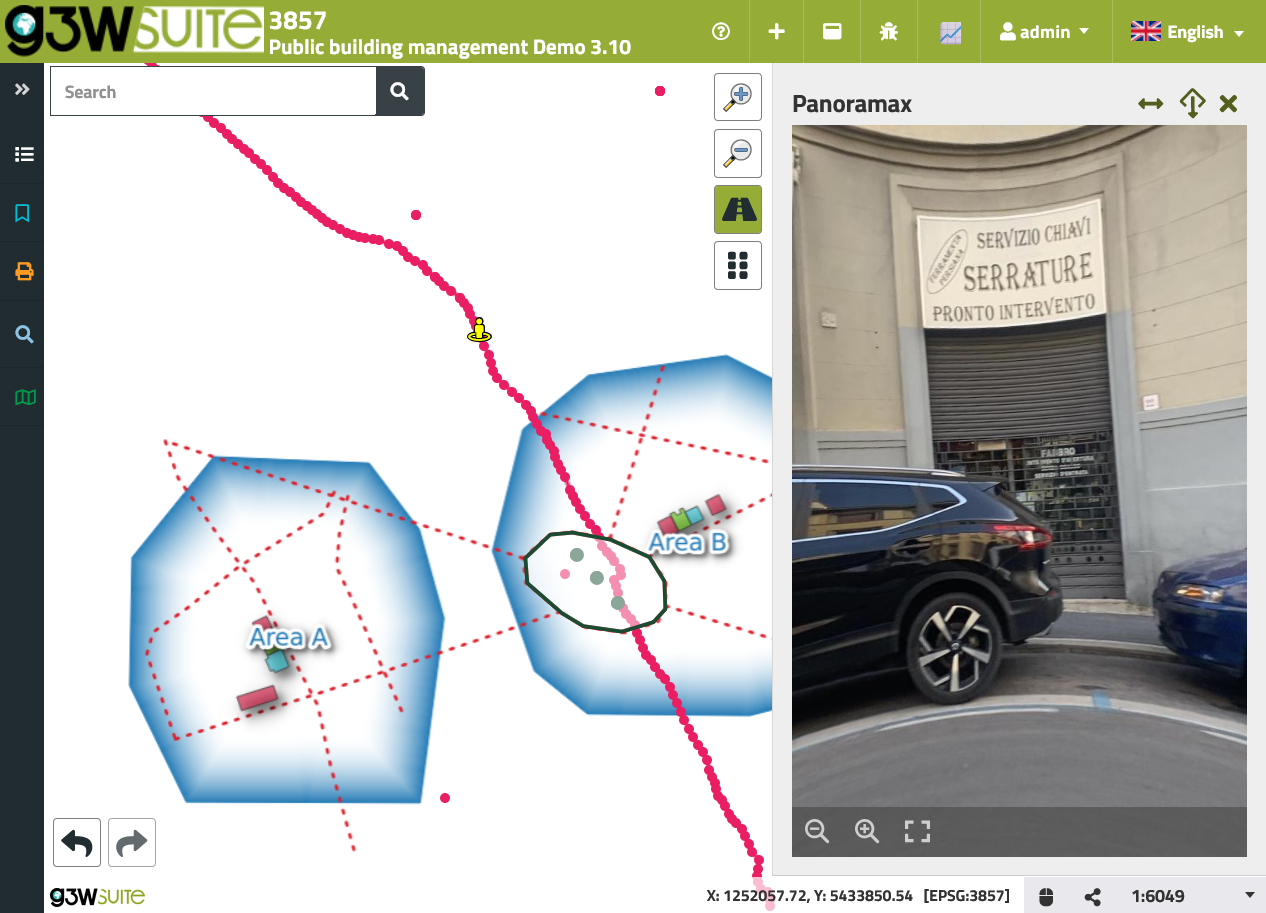
Proof of concept G3W-SUITE plugin that adds a Panoramax map control to your published maps: click on the map (or use the map context menu) to view the nearest Panoramax street-level 360° image, if any is available at that location.
How it works
- The Django app (
panoramax/) has no models, migrations or API routes: on startup it just registers a signal receiver (receivers.py) that adds apanoramaxentry (plugin version + project id) to the client init config for every project. - G3W-CLIENT reads that config and loads the client-side plugin (
static/panoramax/js/plugin.js), which registers a map control that:- queries the public Panoramax API (
https://api.panoramax.xyz/api) for the closest image to the picked coordinate; - shows a vector tile layer with the available image coverage while the control is active;
- opens the result in a 360° viewer (
@photo-sphere-viewer/core, loaded on demand from a CDN).
- queries the public Panoramax API (
No server-side settings or credentials are required: all requests to Panoramax are made directly from the browser.
Installation
Install the module into g3w-admin applications folder:
# Install module from github (v1.0.0)
pip3 install git+https://github.com/g3w-suite/g3w-admin-panoramax.git@v1.0.0

# Install module from github (master branch)
# pip3 install git+https://github.com/g3w-suite/g3w-admin-panoramax.git@master

# Install module from local folder (git development)
# pip3 install /g3w-admin/g3w-admin/panoramax
Enable 'panoramax' module adding it to G3WADMIN_LOCAL_MORE_APPS list:
# local_settings.py

G3WADMIN_LOCAL_MORE_APPS = [
    ...
    'panoramax'
    ...
]
Refer to g3w-suite-docker repository for more info about running this on a docker instance.
Configuration
No server-side settings are required. Once installed and enabled, the control is automatically shown on every project's map.
Development and tests
Version numbers are derived from git tags via setuptools_scm.
The BDD scenarios are in panoramax/tests/features
and run in the G3W-ADMIN/QGIS environment used by CI. Install test dependencies:
python3 -m pip install -r requirements_test.txt
From the configured G3W-ADMIN directory, run:
python3 manage.py behave --simple panoramax/tests
Compatibile with:


License: MPL-2
1 maintainer

Metadata
1 maintainer
Release files for g3w-admin-panoramax 0.0.1
For a detailed explanation of source distributions (sdists) and built distributions (wheels), please see the package formats documentation.
Source distribution (sdist)
| File | Size | Uploaded | Provenance | Actions |
|---|---|---|---|---|
| g3w_admin_panoramax-0.0.1.tar.gz | 13.3 kB | With provenance | Details for g3w_admin_panoramax-0.0.1.tar.gz |
Built distribution (wheel)
| File | Interpreter | ABI | Platform | Actions Reset |
|---|---|---|---|---|
| g3w_admin_panoramax-0.0.1-py3-none-any.whl | Python 3 | none | any | Details for g3w_admin_panoramax-0.0.1-py3-none-any.whl |
Total release size: 26.2 kB
Release files / g3w_admin_panoramax-0.0.1.tar.gz
| Download URL | g3w_admin_panoramax-0.0.1.tar.gz |
|---|---|
| Size | 13.3 kB |
| Tags | Source |
|
SHA-256 checksum How to use checksums |
98cae6819a8b2508df7cb277a24be30f74168c41739cd4b762bf017fbf742ea9
|
|
BLAKE2b-256 checksum How to use checksums |
89c91510fa86a61fc3a0bb351f25b2930d144a07191d7c21a3ef8910fb6cad38
|
| Upload date | |
|
Uploaded using Trusted Publishing? What is trusted publishing? |
Yes |
| Uploaded via |
twine/7.0.0 CPython/3.13.16
|
Provenance
Provenance describes where a file came from. On PyPI, provenance is shared via attestations, which provide a verifiable record of the build or publishing details. View details, limitations and caveats.


PyPI Publish Attestation
PyPI verified that this artifact, at this checksum, originated from the publisher listed below.
Signed by GitHub Actions, verified by PyPI on Nov 20, 2026.
Transparency logRelease files / g3w_admin_panoramax-0.0.1-py3-none-any.whl
| Download URL | g3w_admin_panoramax-0.0.1-py3-none-any.whl |
|---|---|
| Size | 12.9 kB |
| Tags | Python 3 |
|
SHA-256 checksum How to use checksums |
f4f054a0649e7ff8c7891df65580a2bfbba94a3805543d4b5f7fd32e17b6db77
|
|
BLAKE2b-256 checksum How to use checksums |
b442f10aadee01959813fd04b4d7798cc27bd36a7bfbe8b595ed2e564799bd26
|
| Upload date | |
|
Uploaded using Trusted Publishing? What is trusted publishing? |
Yes |
| Uploaded via |
twine/7.0.0 CPython/3.13.16
|
Provenance
Provenance describes where a file came from. On PyPI, provenance is shared via attestations, which provide a verifiable record of the build or publishing details. View details, limitations and caveats.
PyPI Publish Attestation
PyPI verified that this artifact, at this checksum, originated from the publisher listed below.
Signed by GitHub Actions, verified by PyPI on Nov 20, 2026.
Transparency logSecurity for g3w-admin-panoramax 0.0.1
Provenance
Provenance describes where a file came from. On PyPI, provenance is shared via attestations, which provide a verifiable record of the build or publishing details. View details, limitations and caveats.
Full provenance
Both files in this release have been uploaded with provenance metadata.
Attestation for g3w_admin_panoramax-0.0.1.tar.gz
PyPI Publish Attestation
PyPI verified that this artifact, at this checksum, originated from the publisher listed below.
Signed by GitHub Actions, verified by PyPI on Nov 20, 2026.
Transparency logA note on package security
PyPI is a repository for distributing packages, not a service for auditing them. While third-party security researchers and our staff do their best to detect and remove malicious packages, PyPI cannot guarantee the quality, security or suitability of any given package.
To learn more about protecting yourself from malicious actors, visit our package security documentation.













