
G3W-ADMIN-PORTAL


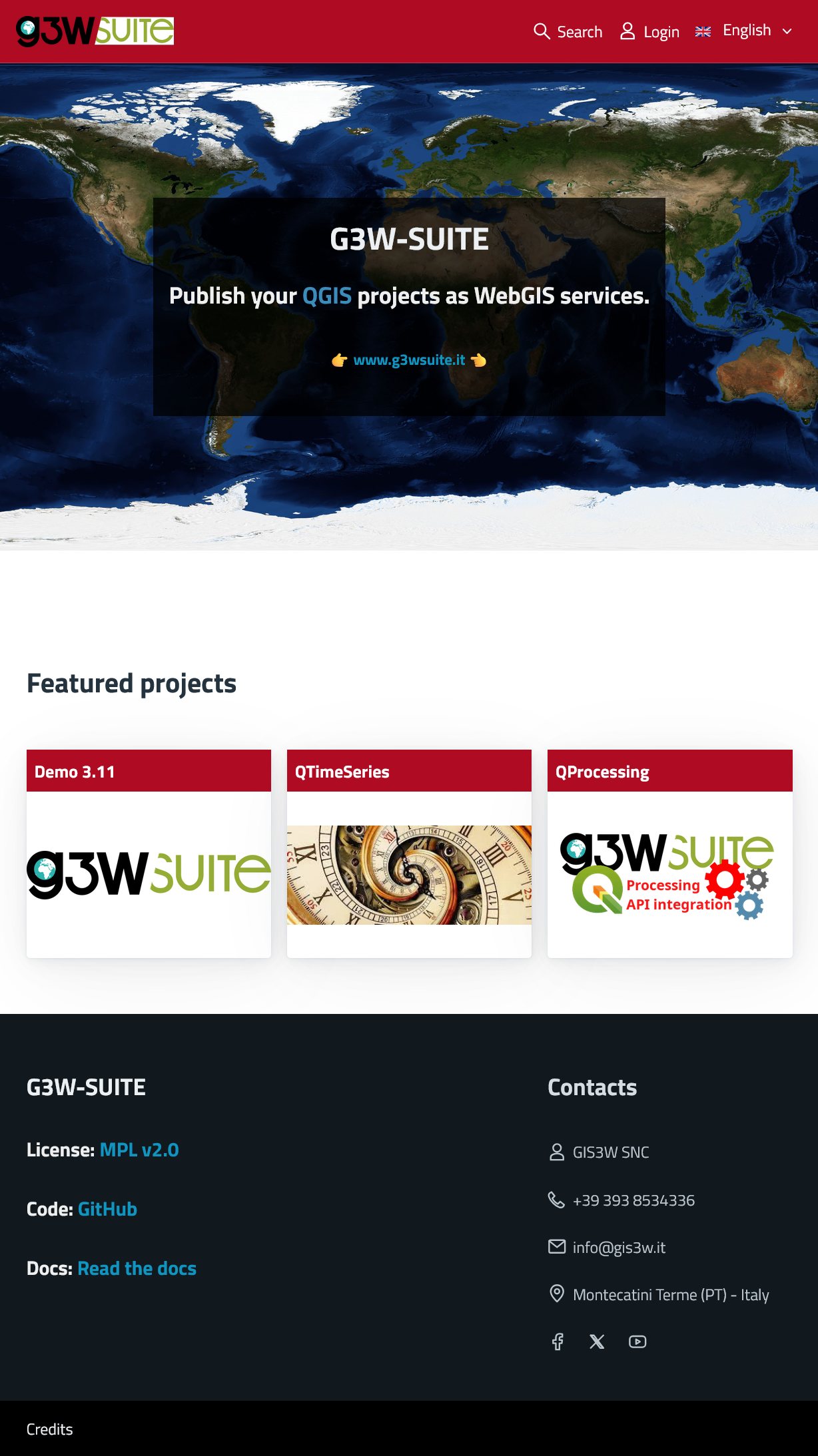
A public home page (portal) for G3W-SUITE: it lists the maps, groups and macrogroups published with G3W-ADMIN.
Contents
Preview 👉 dev.g3wsuite.it
1. Quick start
Step 1 — Install the module
pip3 install git+https://github.com/g3w-suite/g3w-admin-portal.git@v5.0.0
Other install options
# Latest development version
pip3 install git+https://github.com/g3w-suite/g3w-admin-portal.git@dev

# Local folder (editable, for development)
pip3 install -e /shared-volume/plugins/g3w-admin-portal
Step 2 — Enable it in G3W-ADMIN's local_settings.py:
G3WADMIN_LOCAL_MORE_APPS = [
    ...
    'portal',
]

# Show the portal as the site home page
if 'portal' in G3WADMIN_LOCAL_MORE_APPS:
    FRONTEND_APP = 'portal'
    FRONTEND     = True
Step 3 — (Optional) Load the demo pictures
./manage.py loaddata_picture
Running on Docker? See g3w-suite-docker.
2. Configuration
All options are optional and go in local_settings.py.
Look & feel
| Setting | What it does | Example |
|---|---|---|
PORTAL_NAVBAR_TOP |
Show/hide the top navigation bar | False |
PORTAL_ORG_NAME |
Text of the organization link in the top bar | 'Download' |
PORTAL_ORG_URL |
Target of the organization link | 'https://github.com/g3w-suite' |
PORTAL_FAVICON |
Custom favicon URL | '/static/img/favicon.ico' |
PORTAL_THEME |
Color theme (default: 'light') |
'light' |
PORTAL_MAX_HOME_ARTICLES |
Max items shown on the home page (default: 9) |
6 |
PORTAL_CUSTOM_CSS |
Extra CSS injected in every page | see below |
PORTAL_CUSTOM_JS |
Extra JavaScript injected in every page | see Troubleshooting |
The portal is styled with Pico.css v1.5.10, so most changes are just a matter of overriding its CSS variables.
Example: PORTAL_CUSTOM_CSS with a red theme
PORTAL_CUSTOM_CSS = """
/* Navigation Menu colors */
nav#top-menu  { --nav-background-color: #c30c26; }
nav#main-menu { --nav-background-color: #af0b22; }

nav#top-menu,
nav#main-menu {
  --nav-color: #fff;
  --background-color: var(--nav-background-color, --background-color);
  --nav-border-color: rgba(255, 255, 255, 0.2);
  --primary: var(--nav-color, --secondary);
  --secondary: var(--nav-color, --secondary);
  --h1-color: var(--nav-color, --h1-color);
  --color: var(--nav-color, --color);
  --contrast-hover: var(--nav-color, --contrast-hover);
  --secondary-hover: var(--nav-color, --secondary-hover);
  --contrast: var(--nav-color, --contrast-hover);
  --icon-chevron: url("data:image/svg+xml,%3Csvg xmlns='http://www.w3.org/2000/svg' width='24' height='24' viewBox='0 0 24 24' fill='none' stroke='rgb(255, 255, 255)' stroke-width='2' stroke-linecap='round' stroke-linejoin='round'%3E%3Cpolyline points='6 9 12 15 18 9'%3E%3C/polyline%3E%3C/svg%3E");
  --primary-hover: #1ab3e6;
}

/* Card item: change default aspect ratio for images (16:9) */
main#content article figure > img {
  aspect-ratio: 16/9;
  object-fit: contain;
}

/* Card item: move figcaption before image (heading) */
main#content article figure > figcaption {
  grid-row-start: 1;
  background-color: var(--primary);
}

/* Card item: fixed header "top position" independently of other card items heights */
main#content article > a {
  display: flex;
}

/* Card item: fixed header height of 3.5rem */
main#content article > a > figure > figcaption {
  display: grid;
  grid-template-rows: 3.5rem;
  align-items: center;
}

/* Typography colors */
:root[data-theme="light"] {
  --primary: #af0b22;
  --primary-hover: #c30c26;
}
"""
Login / logout pages
By default the portal uses the G3W-ADMIN login and logout pages (LOGIN_URL / LOGOUT_URL).
To send portal users to different pages:
PORTAL_LOGIN_URL  = '/login/?next=/'
PORTAL_LOGOUT_URL = '/logout/?next=/'
Filtering what is listed ⚠️
Use with care: these settings hide content from the portal.
# Only show projects / groups belonging to a given macrogroup
PORTAL_PROJECTS_FILTER = { 'macrogroups__name': 'ALTAMURA' }
PORTAL_GROUPS_FILTER   = { 'macrogroups__name': 'ALTAMURA' }

# Hide all macrogroups (returns an empty list)
PORTAL_MACROGROUPS_FILTER = { 'pk': -9999 }
3. Using a remote G3W-ADMIN server
Use this when the portal and the G3W-ADMIN API live on different domains.
Step 1 — On the remote server, install the portal with JWT support (g3w-admin-authjwt):
pip install "g3w-admin-portal[authjwt] @ git+https://github.com/g3w-suite/g3w-admin-portal.git@v5.0.0"
For releases published on PyPI, use pip install "g3w-admin-portal[authjwt]" instead.
Step 2 — On the portal, point it to the remote server:
| Setting | What to put in it | Default (if not set) |
|---|---|---|
PORTAL_AUTH_MODE |
How the portal logs users in: 'cookie', 'Bearer' or 'JWT' (see Step 3) |
'cookie' |
PORTAL_API_BASE_URL |
Root URL of the remote G3W-ADMIN server, not the API path (the portal adds it/portal/api/... by itself) |
the portal's own site root |
PORTAL_STATIC_URL |
URL of the folder that contains frontend/ (usually the remote STATIC_URL). Must end with / |
the portal's own static files |
For example, with G3W-ADMIN running on https://g3w.example.com:
PORTAL_AUTH_MODE    = 'JWT'
PORTAL_API_BASE_URL = 'https://g3w.example.com/'
PORTAL_STATIC_URL   = 'https://g3w.example.com/static/'  # loads .../static/frontend/index.js
Tip for local development: when the portal runs on
localhost/127.0.0.1, its API calls are automatically forwarded toPORTAL_API_BASE_URL, so you don't hit browser CORS errors and don't need to change the remote server. Your machine must be able to reach the remote API. This proxy is disabled on non-local hosts.
Step 3 — On the remote server, allow requests from the portal (CORS) in local_settings.py:
## Django Rest Framework (restore default settings)
from django.conf import settings

settings.REST_FRAMEWORK.setdefault('DEFAULT_AUTHENTICATION_CLASSES', []).extend([
    'rest_framework.authentication.SessionAuthentication',
    'rest_framework.authentication.BasicAuthentication'
])

## Static URLs
STATIC_URL  = 'http://localhost:8000/static/' # CHANGE ME: 'http://yourdomain.com/static' in PRODUCTION!
STATIC_ROOT = '/shared-volume/static/'

## CORS Headers (https://pypi.org/project/django-cors-headers/)
CORS_ALLOW_ALL_ORIGINS = False                  # NB: True = DEBUGGING ONLY!
CORS_ALLOWED_ORIGINS   = [                      # NB: DIFFERENT PORT == DIFFERENT SERVER
    'http://localhost:8080',
    'http://127.0.0.1:8080',
]
Then add one of the following, depending on PORTAL_AUTH_MODE:
JWT — recommended when authentication is on a third-party domain
See: simplejwt docs
from datetime import timedelta

JWT_AUTH = {
    'JWT_ALLOW_REFRESH': True,
    'JWT_EXPIRATION_DELTA': timedelta(hours=1),
    'JWT_REFRESH_EXPIRATION_DELTA': timedelta(days=7),
    # 'AUTH_HEADER_TYPES': ('Bearer', 'JWT', )
}
Cookie — recommended when authentication is on a sub-domain
CORS_ALLOW_CREDENTIALS  = True                   # enable CORS Authentication
CORS_ORIGIN_WHITELIST   = CORS_ALLOWED_ORIGINS
CSRF_TRUSTED_ORIGINS    = CORS_ALLOWED_ORIGINS
CSRF_COOKIE_DOMAIN      = 'localhost'            # CHANGE ME: '.yourdomain.com' in PRODUCTION!
CSRF_COOKIE_SAMESITE    = None                   # TODO: uninstall "django-samesite-none" in Django >= v3.1
CSRF_COOKIE_SECURE      = False                  # CHANGE ME: True in PRODUCTION!
SESSION_COOKIE_DOMAIN   = CSRF_COOKIE_DOMAIN
SESSION_COOKIE_SAMESITE = CSRF_COOKIE_SAMESITE
SESSION_COOKIE_SECURE   = CSRF_COOKIE_SECURE
4. Troubleshooting
Package installed as UNKNOWN (Ubuntu Jammy)
Set this variable and run pip3 install ... again (details):
export DEB_PYTHON_INSTALL_LAYOUT=deb_system
Login doesn't work behind multiple proxies
Use cookie authentication with a relative API URL, and turn it into an absolute one in the browser:
PORTAL_AUTH_MODE    = 'cookie'
PORTAL_API_BASE_URL = '/'

PORTAL_CUSTOM_JS = """
// convert relative base URLs to absolute (eg. '/' → 'http://localhost:8080/')
if (window.API_BASE_URL) {
  try {
    new URL(window.API_BASE_URL);
  } catch (error) {
    window.API_BASE_URL = (new URL(window.API_BASE_URL, window.location)).toString();
  }
}
"""
See also: MultipleProxyMiddleware
5. Development and tests
Frontend
The frontend is plain JS/CSS in portal/static/frontend: no Node/npm, no build step.
Edit the files directly, then deploy them with Django's collectstatic.
Develop through G3W-ADMIN in Docker or with pip install -e ..
Tests use Behave / Gherkin: features and steps. Install the test dependencies with:
python -m pip install -r requirements_test.txt
Browser tests — self-contained (own Django test server, mocked APIs). From the repository root:
python -m pip install -r requirements_test.txt
python -m playwright install chromium
python -m behave --tags=browser
Backend tests — need a configured G3W-ADMIN/QGIS environment and create a test database. From the G3W-ADMIN directory:
DJANGO_SETTINGS_MODULE=base.settings python3 -m behave portal/tests/features --tags=backend
Compatible with:


License: MPL-2
1 maintainer

Metadata
1 maintainer
Release files for g3w-admin-portal 5.0.1
For a detailed explanation of source distributions (sdists) and built distributions (wheels), please see the package formats documentation.
Source distribution (sdist)
| File | Size | Uploaded | Provenance | Actions |
|---|---|---|---|---|
| g3w_admin_portal-5.0.1.tar.gz | 24.4 MB | With provenance | Details for g3w_admin_portal-5.0.1.tar.gz |
Built distribution (wheel)
| File | Interpreter | ABI | Platform | Actions Reset |
|---|---|---|---|---|
| g3w_admin_portal-5.0.1-py3-none-any.whl | Python 3 | none | any | Details for g3w_admin_portal-5.0.1-py3-none-any.whl |
Total release size: 48.8 MB
Release files / g3w_admin_portal-5.0.1.tar.gz
| Download URL | g3w_admin_portal-5.0.1.tar.gz |
|---|---|
| Size | 24.4 MB |
| Tags | Source |
|
SHA-256 checksum How to use checksums |
b4b0506e3e49f23bd13fe939d16b97a592aec1bc02dac19700b414a11a9e031d
|
|
BLAKE2b-256 checksum How to use checksums |
50e247174f198e3ad5384f60980a5a010b1564009a41a2f1c109815bafb671d5
|
| Upload date | |
|
Uploaded using Trusted Publishing? What is trusted publishing? |
Yes |
| Uploaded via |
twine/7.0.0 CPython/3.13.16
|
Provenance
Provenance describes where a file came from. On PyPI, provenance is shared via attestations, which provide a verifiable record of the build or publishing details. View details, limitations and caveats.


PyPI Publish Attestation
PyPI verified that this artifact, at this checksum, originated from the publisher listed below.
Signed by GitHub Actions, verified by PyPI on Nov 20, 2026.
Transparency logRelease files / g3w_admin_portal-5.0.1-py3-none-any.whl
| Download URL | g3w_admin_portal-5.0.1-py3-none-any.whl |
|---|---|
| Size | 24.4 MB |
| Tags | Python 3 |
|
SHA-256 checksum How to use checksums |
6f62560888a3c3a971e47d025b03a5900d16733dea14066fc0f49196ce3e2675
|
|
BLAKE2b-256 checksum How to use checksums |
23f4f021c091bebd146fae519988c76dd573358616655e620011a1f31f12c137
|
| Upload date | |
|
Uploaded using Trusted Publishing? What is trusted publishing? |
Yes |
| Uploaded via |
twine/7.0.0 CPython/3.13.16
|
Provenance
Provenance describes where a file came from. On PyPI, provenance is shared via attestations, which provide a verifiable record of the build or publishing details. View details, limitations and caveats.
PyPI Publish Attestation
PyPI verified that this artifact, at this checksum, originated from the publisher listed below.
Signed by GitHub Actions, verified by PyPI on Nov 20, 2026.
Transparency logSecurity for g3w-admin-portal 5.0.1
Provenance
Provenance describes where a file came from. On PyPI, provenance is shared via attestations, which provide a verifiable record of the build or publishing details. View details, limitations and caveats.
Full provenance
Both files in this release have been uploaded with provenance metadata.
Attestation for g3w_admin_portal-5.0.1.tar.gz
PyPI Publish Attestation
PyPI verified that this artifact, at this checksum, originated from the publisher listed below.
Signed by GitHub Actions, verified by PyPI on Nov 20, 2026.
Transparency logA note on package security
PyPI is a repository for distributing packages, not a service for auditing them. While third-party security researchers and our staff do their best to detect and remove malicious packages, PyPI cannot guarantee the quality, security or suitability of any given package.
To learn more about protecting yourself from malicious actors, visit our package security documentation.













