

Versions [0.9.0] - [1.0.1] - 2024-04-28
Changed
- logo is now gSOMOs instead of SOMOs
- in the projection scheme (
proj.py), there are now two criteria to identify a SOMO, namely "SOMO P2v?" (formerly SOMO?) and "SOMO dom. β MO?" (see scientific documentation)
- SOMOs identified according to the P^2_virtual criterion are highlighted in green
- SOMOs identified only on the basis of a dominant virtual beta MO are highlighted in orange (weaker criterion)
- Scientific documentation renamed
gSOMOs.pdf. And content updated- gSOMOs-v3.pdf scientific document now downloadable in
gsomos.readthedocs.io- Images in README.md now point to their
https://raw.githubusercontent.comcounterpart- Update of
DOCUMENTATION_setup.md,PUBLISHING.md- Link toward the Jupyter notebook with examples and a log zip file with two Gaussian logs in
DOCUMENTATION_setup.mdand inREADME.md- SOMOs of the iron complex shown in
gSOMOS-v3.pdfAdded
- new analyzis scheme in
proj.py: bases on the diagonalization of projection matrices- new
io.clean_logfile_name()function (made to solve a prefix issue for X.log.gz files)- Short examples in the documentation
- docstring for
projection_heatmap_from_df- docstring of
show_alpha_to_homotranslated in English- updated Installation section in
README.md- basic instructions to install miniconda, in
README.md- jMol index of beta virtual MOs in the output of
proj.summarize_somo_candidates()Fixed
- minor fixes
- wrong initialization of
visualID_Engat the beginning of the notebook, and tricky issues
gSOMOs
🔗 Available on PyPI
A Python library to identify and analyze Singly Occupied Molecular Orbitals (SOMOs) from Gaussian 09 or Gaussian 16 .log files.





🛠️ Installation
⚡ Quickstart
- Open a terminal:
-
On Linux/macOS: open a Terminal (bash)
-
On Windows: open PowerShell
-
(Recommended) Set up a local virtual environment inside your project folder using virtualenv.
# Create, if necessary, a project folder
mkdir my-project-folder

# Move to your project directory
cd my-project-folder

# Create the virtual environment
virtualenv gSOMOS-venv # or any other name that has nothing to do with gSOMOS

# Activate the environment
source gSOMOS-venv/bin/activate   # On Linux/macOS
# or
gSOMOS-venv\Scripts\activate      # On Windows
-
Install gSOMOs inside the environment:
pip install gSOMOs
📦 All necessary Python packages will be installed automatically !
📋 Requirements
- 🐍 Python ≥ 3.8 (Windows users: miniconda is recommended, see installation instructions at the end of this document)
- 📦 A working installation of virtualenv
- 🔄 An up-to-date version of
pip(python -m pip install --upgrade pip)
📝 Notes
-
Keeping the virtual environment inside the project folder makes it easier to manage and remove if needed.
-
To deactivate the environment at any time, simply type:
deactivate
🔎 Capabilities Overview
SOMOs is a Python toolkit for analyzing molecular orbitals (MOs) from Gaussian log files, with a focus on identifying SOMOs (Singly Occupied Molecular Orbitals) in open-shell systems.
🚀 Main Features
from somos import io # optional
from somos import cosim, proj
Load Gaussian Log Files
- Parses
.logand.log.gzGaussian output files - Extracts orbital energies, coefficients, overlap matrices, and spin
Cosine Similarity & SOMO Detection
- Computes cosine similarities between alpha and beta orbitals
- Identifies SOMO candidates from orbital projections
Projection-Based Analysis
- Projects occupied and virtual alpha MOs onto virtual beta MOs
- Decomposes projection matrix to extract leading contributions
📊 Visualization Tools
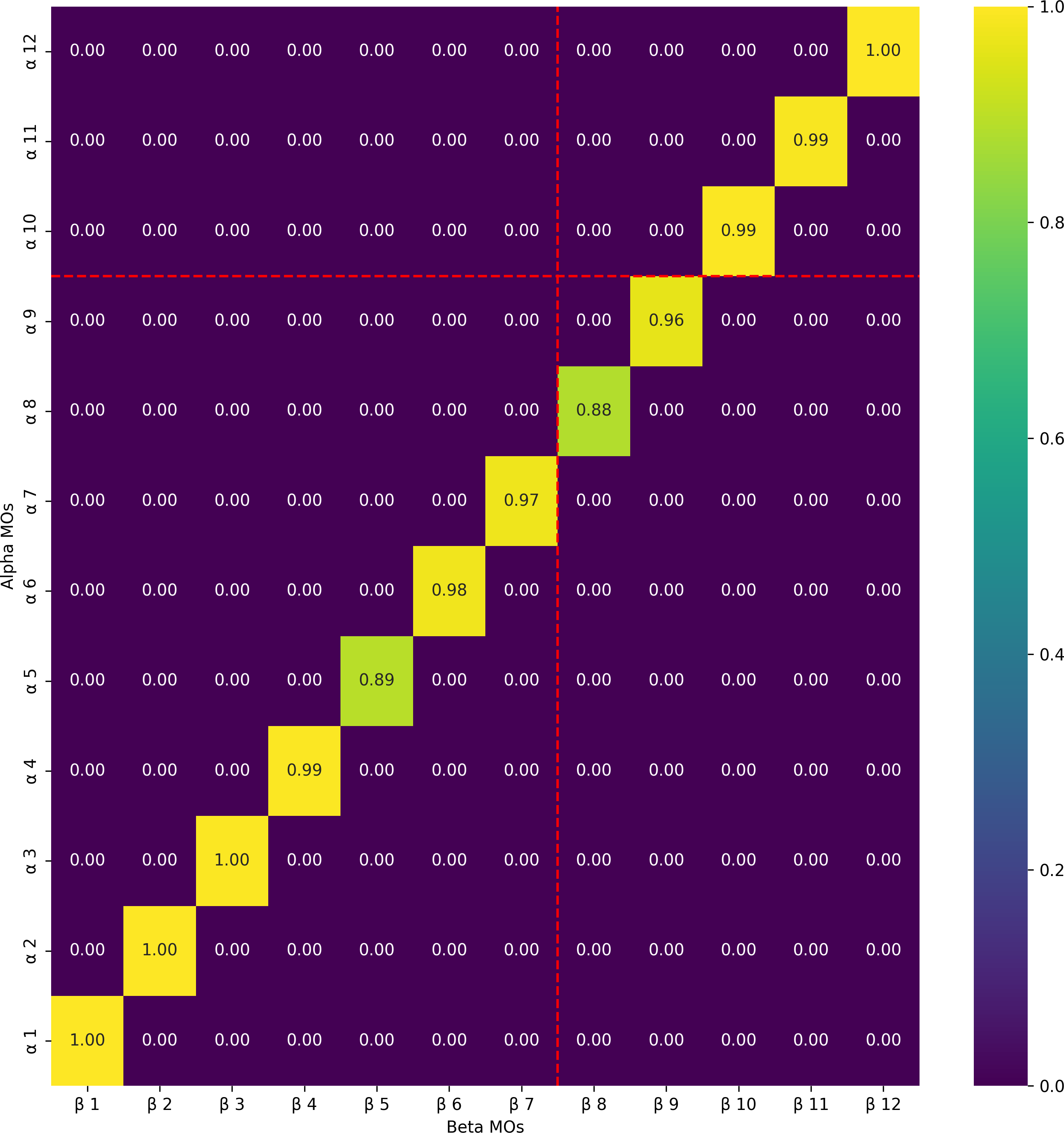
Heatmaps
- Interactive or static heatmaps of MO similarities
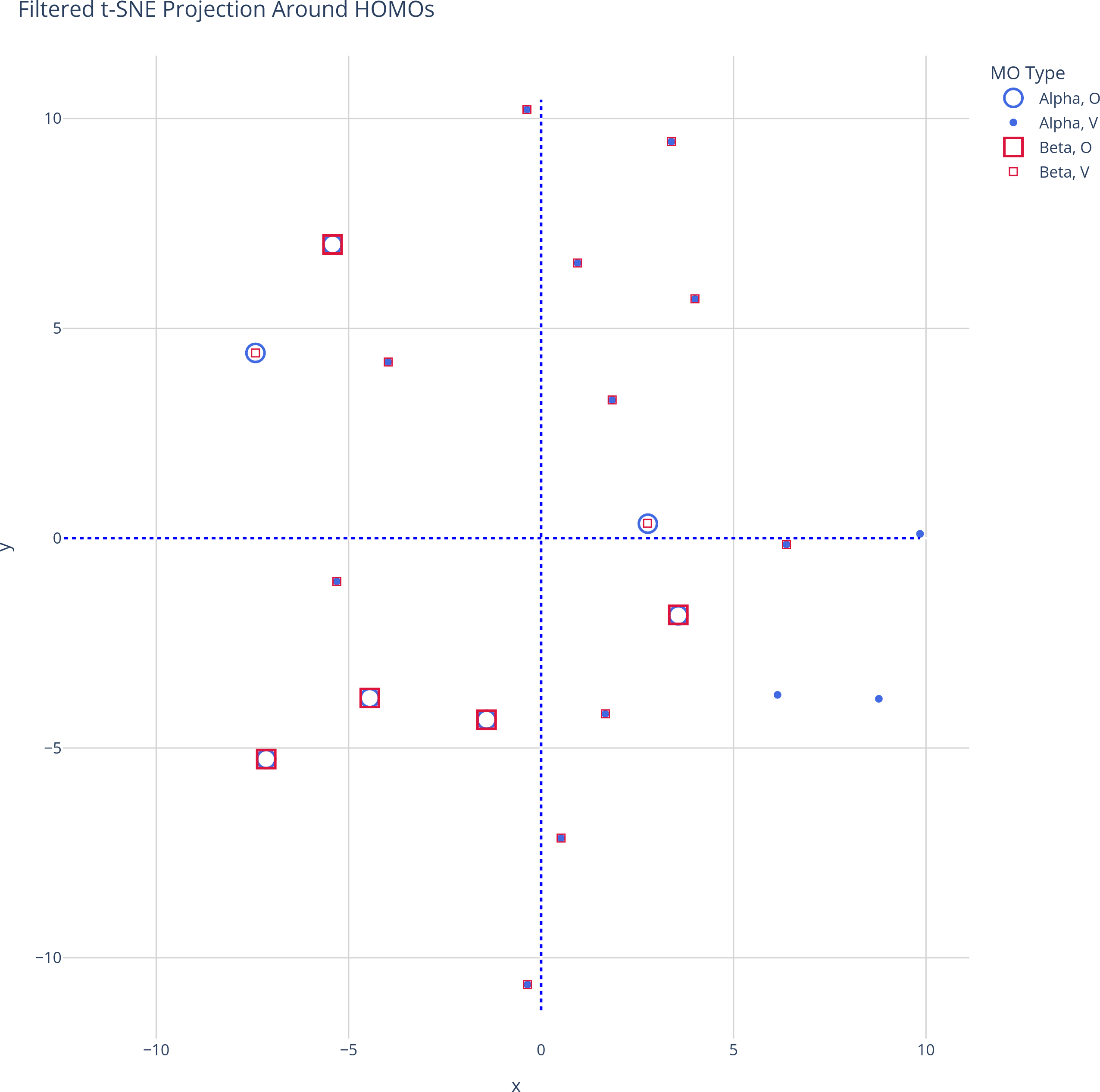
t-SNE (Dimensionality Reduction)
- Projects high-dimensional orbital space to 2D for visual exploration
- Enables inspection of orbital families and similarity patterns
📁 Output
.xlsxtables of SOMO similarity and projections.pngimages of heatmaps and projections- All results saved in the
logs/folder - well-organized dataframes and printing
=== Summary of SOMO candidates ===

──────────── SOMO Candidate #1 ────────────
  α occupied contributions:
    • α 9 (99.5%)
  β virtual projections:
    • β 9 (96.4%) [jMol: 55]

──────────── SOMO Candidate #2 ────────────
  α occupied contributions:
    • α 8 (89.4%)
  β virtual projections:
    • β 8 (98.4%) [jMol: 54]
🧠 Examples and Documentation
✅ Examples Used in Notebooks (compressed Gaussian files)
logs/H2CO_T1.log.gzlogs/FeComplex.log.gz
📓 Example Jupyter Notebook
An example notebook demonstrating gSOMOs usage is available at: gSOMOs Examples Notebook on GitHub. Save it in my-project-folder.
Also download the logs/ folder with the two examples. Store it also in my-project-folder.
📚 Technical and scientific documentation
This document describes two complementary methods to identify singly occupied molecular orbitals (SOMOs) in open-shell systems:
- Orbital projection analysis, where occupied α orbitals are projected onto the β orbital basis using the AO overlap matrix;
- Cosine similarity mapping, which computes the angular similarity between α and β orbitals and matches them using the Kuhn–Munkres (Hungarian) algorithm.
The two examples, which involve finding the SOMOs of the lowest triplet state (T1) of formaldehyde (H2CO) and the lowest quintet state of an iron complex, are discussed in this document.
🛠️ Installing miniconda
⬇️ Download the installer
-
download the installer for your OS (Windows/macOS/linux)
-
execute it:
- Windows: go to the download directory, double click on the
Miniconda3-latest-Linux-x86_64.exeicon - Linux: open a terminal,
cdto the download directory, typebash Miniconda3-latest-Linux-x86_64.sh
- Windows: go to the download directory, double click on the
-
during the installation process:
-
validate the license agreement
-
choose the installation folder - or accept the folder defined by default:
- Windows:
C:\Users\<first-letters-of-your-username>\miniconda3 - Linux :
/home/<your-username>/miniconda3)
- Windows:
-
finalize the installation
- Windows: select the Advanced Configuration Options. Do not select the "Add Miniconda3 to my PATH environment variable" checkbox if you fear a conflict with another python distribution that would you have in your local account.
- Linux: you need to answer a question about the PYTHONPATH environment variable. Answer no if you fear a conflict with another python distribution that would you have in your local account.
-
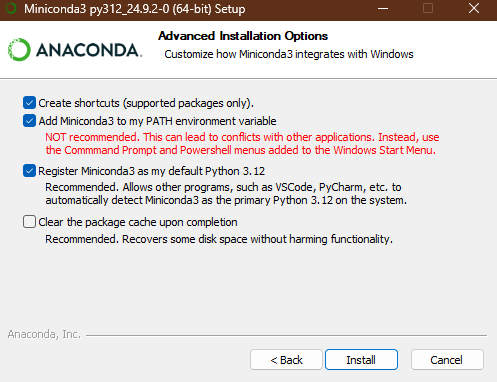
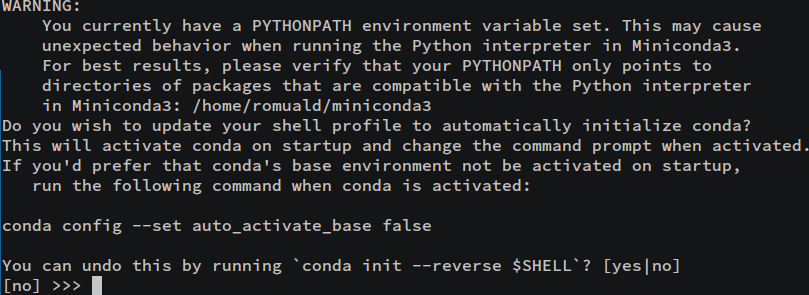
Whatever the OS of your computer is, you end up with a "base" python distribution, provided and manageable with conda. Given the PATH environment selection chosen during the installation, you might have to activate the python environment
🔄 Activation of a conda environment
Windows
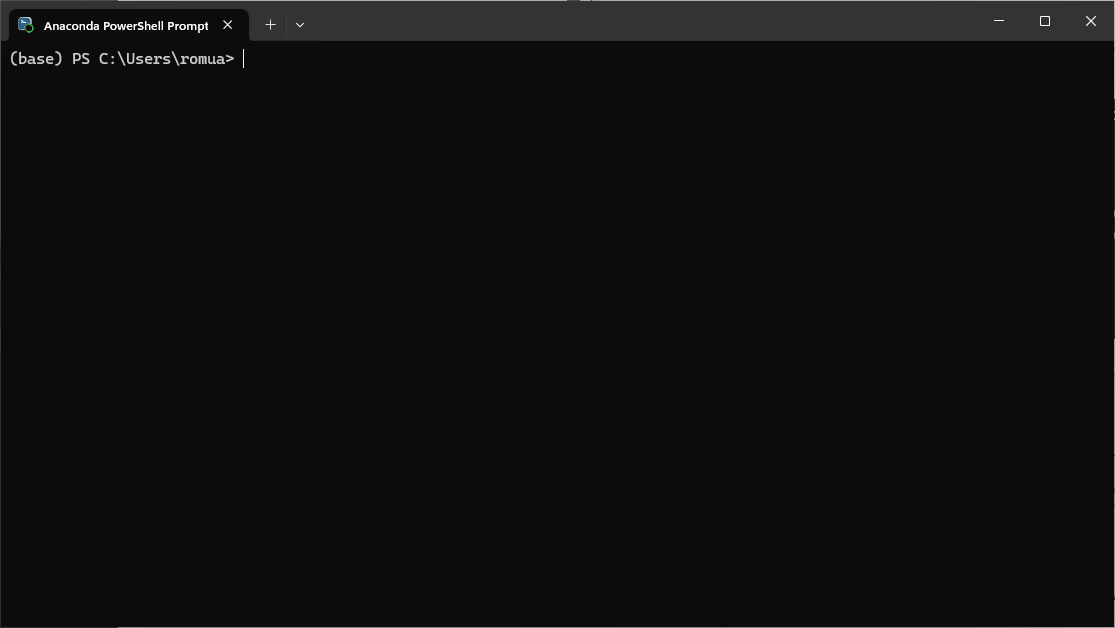
- search for the Anaconda Powershell Prompt application in the search field:
- execute it. You should see a terminal, with a
(base) PS C:\Users\<first-letters-of-your-username>>prompt:
Linux
-
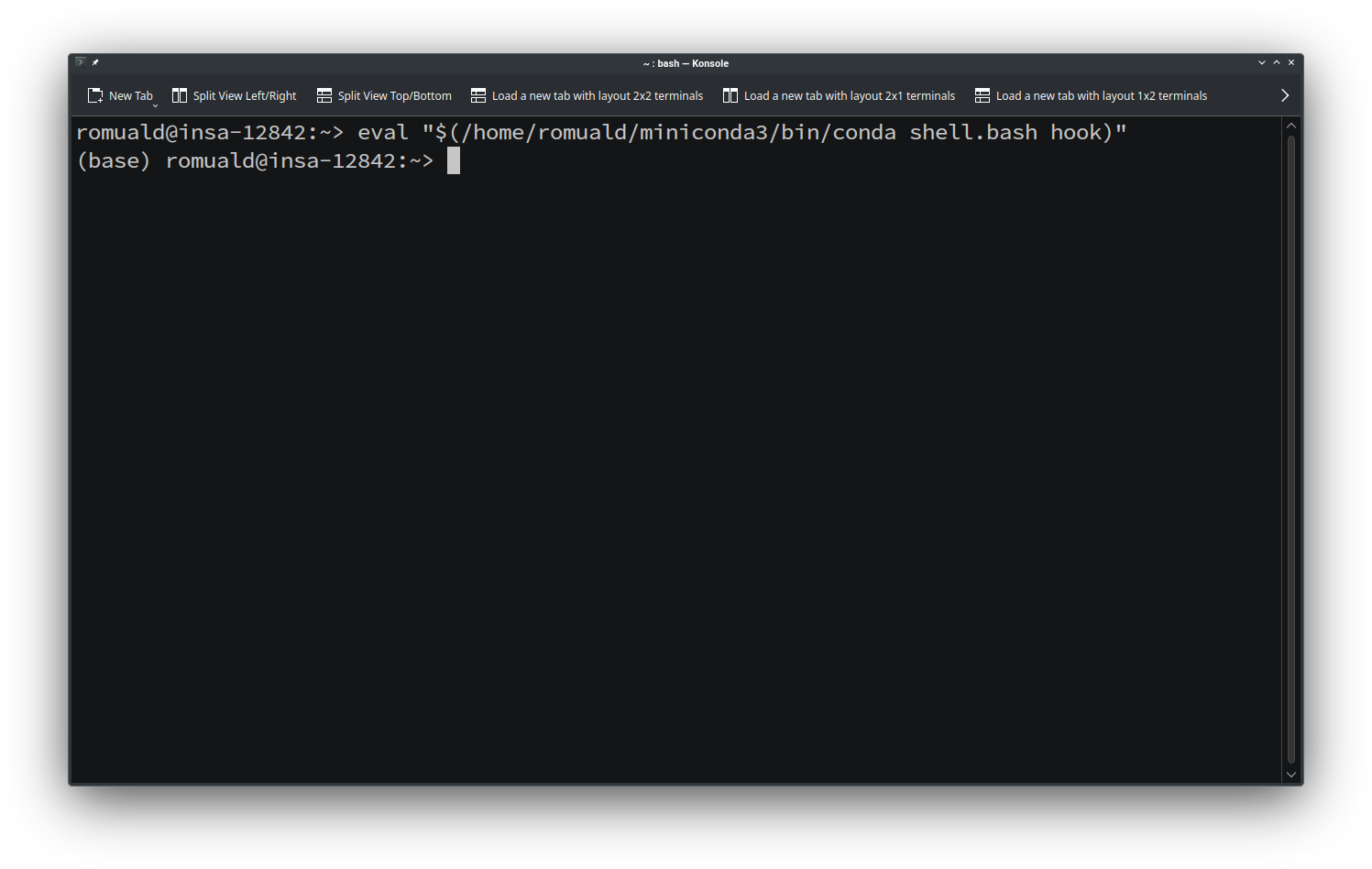
open a terminal
-
type the command:
eval "$(/home/<your-username>/miniconda3/bin/conda shell.bash hook)"
The prompt should now start with
(base): -
to deactivate the "base" python environment of conda, type:
conda deactivate
1 maintainer

Metadata
1 maintainer
Release files for gSOMOs 1.0.1
For a detailed explanation of source distributions (sdists) and built distributions (wheels), please see the package formats documentation.
Source distribution (sdist)
| File | Size | Uploaded | |
|---|---|---|---|
| gsomos-1.0.1.tar.gz | 54.2 MB | Details |
Built distribution (wheel)
| File | Interpreter | ABI | Platform | Reset |
|---|---|---|---|---|
| gsomos-1.0.1-py3-none-any.whl | Python 3 | none | any | Details |
Total release size: 59.5 MB
Release files / gsomos-1.0.1.tar.gz
| Download URL | gsomos-1.0.1.tar.gz |
|---|---|
| Size | 54.2 MB |
| Tags | Source |
|
SHA-256 checksum How to use checksums |
4c4a3d29e8c8e061c74d7b1a31ed0e36d54ba0988f7476012a73176c5fa49945
|
|
BLAKE2b-256 checksum How to use checksums |
1089f586de1eaed3f0759d807007aa5b02ca46da587f0bfbfc6a3662143c49ad
|
| Upload date | |
|
Uploaded using Trusted Publishing? What is trusted publishing? |
No |
| Uploaded via |
twine/6.1.0 CPython/3.11.12
|
Release files / gsomos-1.0.1-py3-none-any.whl
| Download URL | gsomos-1.0.1-py3-none-any.whl |
|---|---|
| Size | 5.3 MB |
| Tags | Python 3 |
|
SHA-256 checksum How to use checksums |
eac77068aaed18f4db21ca34ebc8df30c220e33d79bdbdebb6abbfab3689b9bc
|
|
BLAKE2b-256 checksum How to use checksums |
ae5b1f007cc507565c1ba5684e6725d1ac6819b7ab66c651906b73dac50d8adc
|
| Upload date | |
|
Uploaded using Trusted Publishing? What is trusted publishing? |
No |
| Uploaded via |
twine/6.1.0 CPython/3.11.12
|














