
gadgetbridge-rpi-link
Use an Android phone as a wireless companion for a Raspberry Pi: notifications, phone GPS, and simple internet access over a single battery-friendly BLE connection.
Canonical repository: https://github.com/hishizuka/gadgetbridge-rpi-link
What Is This?
Gadgetbridge is an open-source Android app that connects smartwatches and fitness trackers to a phone without vendor cloud accounts. Its BLE UART protocol for Bangle.js can forward notifications, phone GPS positions, and small HTTP requests.
This package connects a Raspberry Pi or another small Linux device to Gadgetbridge as a Bangle.js watch and exposes received messages as Python events. The host application implements the UI, data storage, and other application-specific behavior. See the Espruino Gadgetbridge documentation for protocol details.
What You Can Do
-
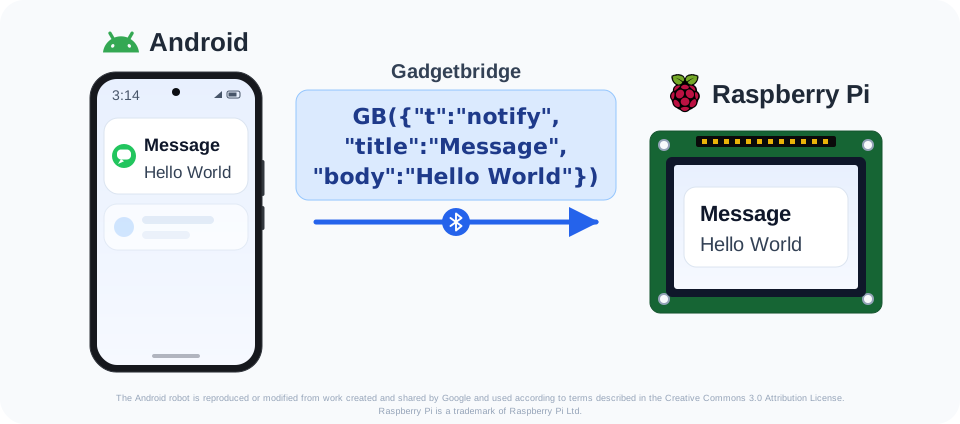
Show Android notifications on a Raspberry Pi display. Gadgetbridge forwards Android notification add/update/remove packets, and this library parses them into typed notification events that a host UI can render. For CJK or other multibyte text, a small Gadgetbridge source change is currently required; see Text Encoding.
-
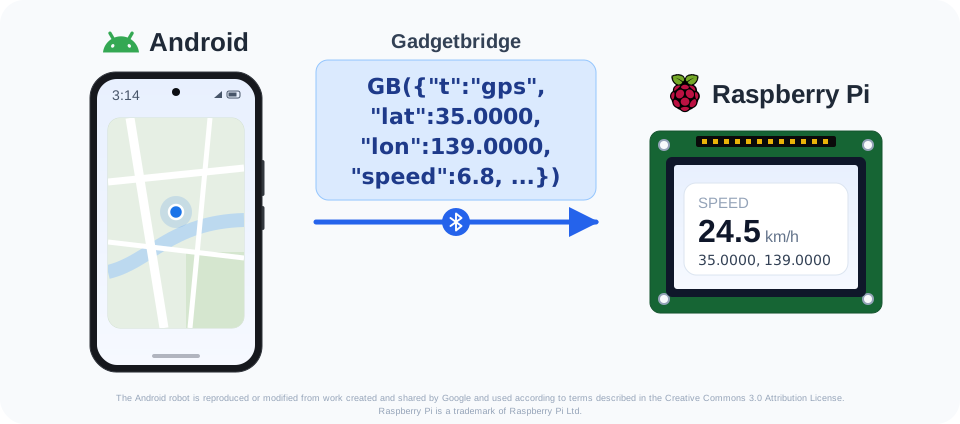
Use the Android phone as the Raspberry Pi's GPS receiver. With Gadgetbridge phone GPS enabled, Raspberry Pi applications receive location updates from the phone without a separate GPS module.
-
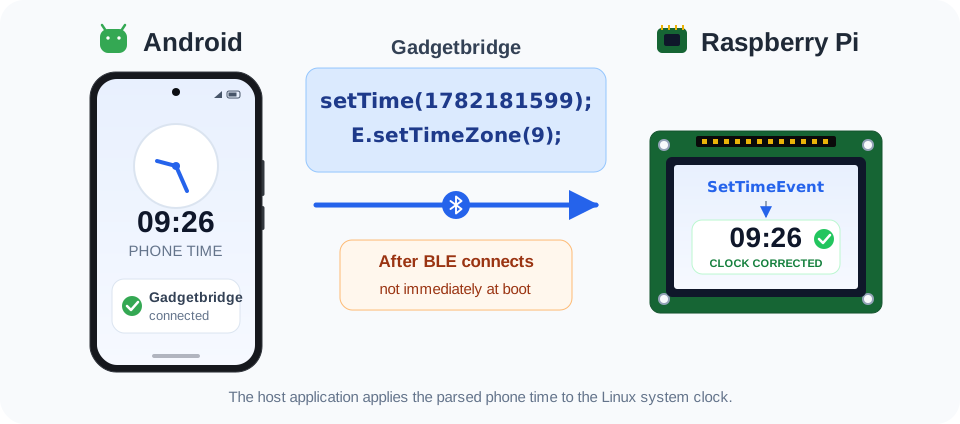
Use the phone as a time source when the Raspberry Pi has no RTC. The library parses Gadgetbridge
setTime(...)messages intoSetTimeEventobjects that a host application can apply to the system clock. The time arrives only after the BLE connection and Gadgetbridge synchronization, not immediately at boot, so timestamps created before then may be incorrect. -
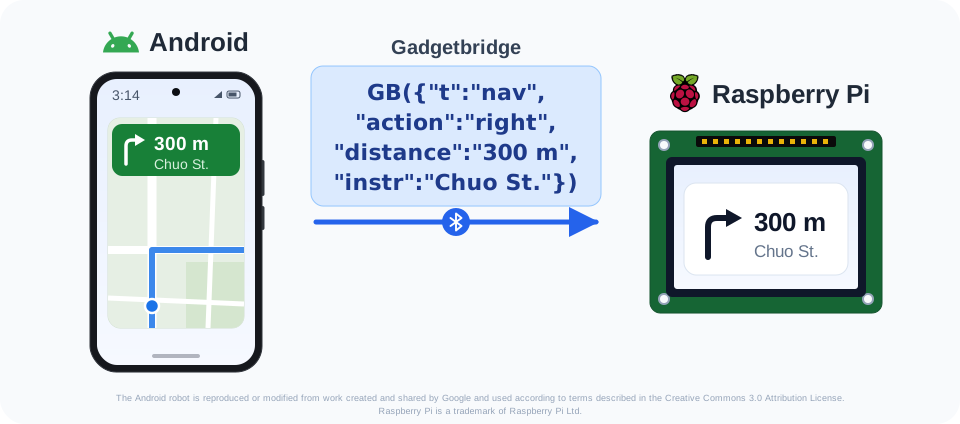
Read Google Maps turn-by-turn navigation. Gadgetbridge converts Android navigation notifications into navigation packets that this library parses into distance/action/instruction fields.
-
Make simple HTTP requests through the phone. Fetch text or JSON resources, or send data to an external API with
method="POST"and a request body, using the Android app as the network bridge. Binary payloads are not supported by the current Gadgetbridge implementation; see HTTP Download Behavior. -
Trigger Android intents from the Raspberry Pi side. This can start the phone's voice assistant or another Android action that the user intentionally allows.
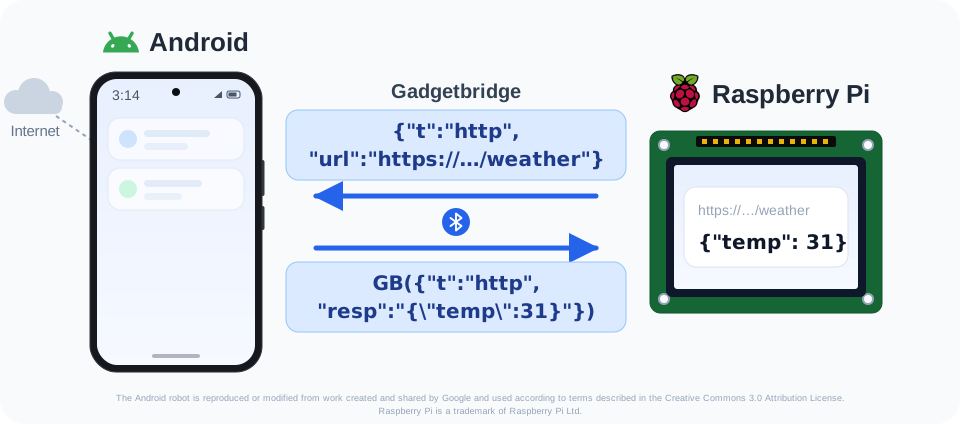
Important limitations: HTTP is a text/small-payload path and normally needs a Bangle.js-flavor Gadgetbridge build; CJK and other multibyte UART text needs a custom UTF-8 Gadgetbridge build. See Android App Setup Details.
Why BLE?
Everything above travels over one BLE connection. The Raspberry Pi does not need Wi-Fi or Bluetooth tethering, which matters for battery-powered, all-day setups such as bike computers or wearable displays.
| Link | Phone battery cost | Notes |
|---|---|---|
| BLE (this library) | Lowest | Notifications, GPS, and light HTTP over one connection. Bandwidth is small, which is fine for text/JSON. |
| Bluetooth tethering | Low | A good alternative when the Raspberry Pi needs a real IP connection. Efficient as long as traffic stays light. |
| Wi-Fi tethering | High | Full bandwidth, but keeping the phone's hotspot radio running all day is expensive. |
Quick Start
This package requires Python 3.13 or newer and Linux with BlueZ when it hosts the BLE UART service.
-
Install the package:
pip install gadgetbridge-rpi-link
-
Start the included BLE host for a manual smoke test:
gadgetbridge-rpi-bluez --product gadgetbridge-rpi-link
-
Install Gadgetbridge on Android. In its discovery screen, enable
Discover unsupported devices, scan, long-press the Raspberry Pi, and chooseAdd test device. SelectBangle.jsin the dialog and register it. -
Enable the settings required for the features you want. See Android App Setup Details.
The distribution name is gadgetbridge-rpi-link; the Python import name is
gadgetbridge_rpi_link. The parsing and session modules use only the Python
standard library, while the distribution installs bluez-peripheral for BlueZ
hosting.
Library Scope
Implemented in the package:
- UART frame decoding, TX chunk encoding, and
GB(...)JSON-ish parsing. - Typed events for notifications, find-device requests, phone time
(
setTime(...)), location, navigation, HTTP responses, parse failures, and unknown messages. - Outgoing GPS power requests, Android intents, and HTTP requests.
- Async HTTP request tracking and text-oriented download helpers.
- A BlueZ BLE UART host for Linux.
The library does not render notifications, set system time, or publish GPS locations. Host applications provide those adapters.
Protocol API Examples
Outgoing messages can be passed as dictionaries. FrameEncoder adds the
framing and trailing newlines required by the Gadgetbridge UART TX path:
from gadgetbridge_rpi_link import DEFAULT_HTTP_TEXT_URL, GadgetbridgeProtocol

protocol = GadgetbridgeProtocol()
for chunk in protocol.encode_tx({"t": "info", "msg": "OK"}):
    # Send `chunk` through the BLE UART TX characteristic.
    ...

for chunk in protocol.encode_tx({"t": "status", "bat": "23"}):
    ...

for chunk in protocol.encode_tx({"t": "http", "url": DEFAULT_HTTP_TEXT_URL}):
    ...
Parser Example
Incoming Gadgetbridge messages are parsed after the GB(...) wrapper is
received from the UART stream:
from gadgetbridge_rpi_link import GadgetbridgeProtocol

protocol = GadgetbridgeProtocol()
events = protocol.feed_rx(
    b'\x10GB({"t":"notify","title":"Chat","body":"Hello"})\n'
)
print(events[0])
System Time Example
For a Raspberry Pi without an RTC, the phone can provide a time source after
Gadgetbridge connects. The library emits a SetTimeEvent; the host application
is responsible for applying it to the system clock.
From a source checkout, stop any other BLE host and run the example in dry-run mode first:
PYTHONPATH=src python3 examples/set_system_time.py
After confirming that setTime events arrive and configuring the required
system permission, pass --apply to execute sudo -n date -u --set ...:
PYTHONPATH=src python3 examples/set_system_time.py --apply
This is not an immediate boot-time replacement for an RTC: the clock remains uncorrected until Android connects and Gadgetbridge sends the time. Hardware validation of this example is still pending, so test it in dry-run mode first.
Session HTTP Example
from gadgetbridge_rpi_link import GadgetbridgeSession

async def sender(message: str) -> None:
    # Send `message` through a BLE UART transport.
    ...

session = GadgetbridgeSession(sender=sender)
response = await session.request_http("https://example.com/data", timeout=10)
For a stable smoke check, use the official Espruino Gadgetbridge sample URL:
from gadgetbridge_rpi_link import DEFAULT_HTTP_TEXT_URL

response = await session.request_http(DEFAULT_HTTP_TEXT_URL, timeout=30)
print(response.get("resp"))
Android Intent Example
Host applications can use send_intent(...) for Android actions supported by
Gadgetbridge. For example, this starts the phone's configured voice assistant:
session.send_intent(
    "android.intent.action.VOICE_COMMAND",
    flags=["FLAG_ACTIVITY_NEW_TASK"],
)
BlueZ Host Example
The package installed in Quick Start includes
bluez-peripheral 0.2.0a3 or newer from the
dbus-fast-backed alpha series. Version 0.2.0a5 is the recommended release at
the time of writing.
Run the example on a Linux host with BlueZ access:
gadgetbridge-rpi-bluez --product gadgetbridge-rpi-link
The command is a small manual probe similar in purpose to a DBus/GATT smoke test script. It advertises the Gadgetbridge UART service until stopped and accepts simple keyboard commands:
t: prompt for one outgoing Gadgetbridge text line and send it as-is.g: request Gadgetbridge GPS ON.G: send the Android voice command intent.h: run the official text HTTP download test and save it to a local file.q: quit.
For the t command, enter one raw Gadgetbridge message without the incoming
GB(...) wrapper. Use a plain URL, not a Markdown link. JSON-ish object syntax
and strict JSON are both accepted, for example:
{t:"info", msg:"OK"}
{"t":"status","bat":"23"}
{t:"http", url:"https://pur3.co.uk/hello.txt"}
Use --auto-gps only when the host application intentionally wants to request
Gadgetbridge GPS after receiving is_gps_active.
The repository also keeps examples/callback_bluez_service.py as a thin source
checkout wrapper around the same installed command.
Library code can use the BlueZ transport directly from its submodule:
from gadgetbridge_rpi_link.bluez import BluezGadgetbridgeUartServer

server = BluezGadgetbridgeUartServer("gadgetbridge-rpi-link")
await server.start()
try:
    server.send({ "t": "info", "msg": "OK" })
finally:
    await server.stop()
Android App Setup Details
The Android app side has a few important Bangle.js-specific constraints.
| Feature | Required Android / Gadgetbridge setup |
|---|---|
| Android notifications | Allow notification access for Gadgetbridge. Check its notification filters if only some apps should be forwarded. |
| Phone location | Grant Android location permission, then enable Use phone GPS data and choose a practical update interval. See Phone Location. |
| Google Maps navigation | Allow its notifications. If nav packets are empty, see Navigation Notifications. |
| Android intents | Enable Allow Intents. See Android Intents. |
| HTTP text/JSON requests | Use a Bangle.js-flavor build, or follow the official Internet Helper setup with a regular build. See HTTP Requests. |
Getting A Gadgetbridge Build
Which Gadgetbridge build you need depends on the features you want:
- Notifications, phone GPS, navigation, and Android intents work with the regular Gadgetbridge releases. Follow the download links on the official Gadgetbridge website to install one.
- For HTTP requests (
t:"http"), the simplest route is a Bangle.js-flavor build with direct internet access. Get one in either of these ways:- Install the
Bangle.js Gadgetbridgeapp directly, following the Espruino Gadgetbridge documentation. - Build the Gadgetbridge project from source, switching the Android Studio
build variant from the default
mainlineDebugto one that starts withbanglejs, such asbanglejsDebug.
- Install the
- A regular build can instead use the official Internet Helper add-on by following the Gadgetbridge setup guide.
- CJK or other multibyte notification text needs a custom build from modified source; see Text Encoding.
Text Encoding
Gadgetbridge's Bangle.js UART implementation currently uses
StandardCharsets.ISO_8859_1 for the UART string path in
app/src/main/java/nodomain/freeyourgadget/gadgetbridge/service/devices/banglejs/BangleJSDeviceSupport.java.
In the checked source this appears in both the
phone-to-device transmit path (uartTx(...)) and the device-to-phone receive
path. If you need to exchange multibyte text directly over this UART protocol,
you need a custom Gadgetbridge build that changes those Bangle.js UART charset
uses to StandardCharsets.UTF_8. With that custom build installed in Android
developer mode, UTF-8 multibyte messages can be received by this library.
Building from source is described in
Getting A Gadgetbridge Build.
Phone Location
In the registered Bangle.js device settings, enable Use phone GPS data and
adjust GPS data update interval as needed. The host can then receive location
updates from Android even when the Raspberry Pi has no physical GPS receiver.
Navigation Notifications
Google Maps navigation is notification-based. Gadgetbridge reads turn-by-turn
instructions from Android notifications and sends them as nav packets. On
recent Android versions, Google Maps live notification categories can hide the
instruction details from Gadgetbridge. If nav packets arrive without fields
such as action and distance, disable the Google Maps Live Updates,
Live info, or similarly named notification category in Android's Google Maps
notification settings.
Android Intents
Outgoing t:"intent" packets require the registered device setting Allow Intents (device_intents). In Gadgetbridge source, handleIntent(...) rejects
intent packets when that switch is off. Gadgetbridge's Japanese UI labels this
setting インテントを許可する, and its summary says background use may require
Android's display-over-other-apps permission.
HTTP Requests
For HTTP requests, use a Bangle.js-flavor build or configure a regular
Gadgetbridge release by following the official
Internet Helper setup.
After registering the Bangle.js device, enable Allow Internet Access
(device_internet_access) in its settings.
HTTP Download Behavior
GadgetbridgeSession.download_http_file(...) writes the resp field from a
Gadgetbridge HTTP response. Current Android Gadgetbridge Bangle.js HTTP support
is text-oriented, so this helper should be treated as a text/small-payload
download path.
The binary=None|True|False option only controls how an already received
payload is written to disk:
Nonewrites string payloads as binary only when the output path has a known binary suffix such as.bin,.fit, or.zip.Truepreserves legacy Gadgetbridge binary strings as Latin-1 bytes when possible, falling back to UTF-8 for Unicode text decoded fromatob(...).Falsewrites string payloads as text using the requested encoding, even when the output path suffix would normally be treated as binary.
Byte payloads are always written as bytes. The library intentionally does not
sniff response content; hosts should define the expected download path or pass
binary=True|False when that write contract is clearer.
Arbitrary binary HTTP downloads are not supported by the current Gadgetbridge
Android-side t:"http" implementation. Large binary responses returned through
the Android text path can arrive with replacement characters already inserted
by Gadgetbridge and may not be recoverable by the host. Supporting general
binary downloads requires changing the Gadgetbridge-side HTTP handler to use a
byte-preserving response path, for example a raw byte transport or a documented
base64/atob(...) contract instead of a text reader.
Development Notes
The source tree does not require hard-coded BLE addresses, device hostnames, or
private local filesystem paths. Tests use synthetic payloads, example.com,
and the public Espruino text sample URL. Generated files such as __pycache__,
local handoff notes, and device-specific logs should not be included in
published packages.
Related Libraries
The Linux BLE host is built on these open-source libraries:
- bluez-peripheral provides the Python interface for building a BLE peripheral with the BlueZ GATT API.
- dbus-fast provides the
asynchronous D-Bus implementation used by
bluez-peripheralto communicate with BlueZ.
We thank their authors and contributors for making this project possible.
License
MIT License. See LICENSE for details.
1 maintainer

Metadata
1 maintainer
Release files for gadgetbridge-rpi-link 0.1.0
For a detailed explanation of source distributions (sdists) and built distributions (wheels), please see the package formats documentation.
Source distribution (sdist)
| File | Size | Uploaded | |
|---|---|---|---|
| gadgetbridge_rpi_link-0.1.0.tar.gz | 35.6 kB | Details |
Built distribution (wheel)
| File | Interpreter | ABI | Platform | Reset |
|---|---|---|---|---|
| gadgetbridge_rpi_link-0.1.0-py3-none-any.whl | Python 3 | none | any | Details |
Total release size: 63.5 kB
Release files / gadgetbridge_rpi_link-0.1.0.tar.gz
| Download URL | gadgetbridge_rpi_link-0.1.0.tar.gz |
|---|---|
| Size | 35.6 kB |
| Tags | Source |
|
SHA-256 checksum How to use checksums |
2f475b75529e0d2fea4a0a730a77817e27ddf66cfb5a66cd5c5d7b11a195f308
|
|
BLAKE2b-256 checksum How to use checksums |
ff6d4d8e98cc14f0ccb7c673e3a119259c5bc16b81b8e02ca0f7a72afebf8c92
|
| Upload date | |
|
Uploaded using Trusted Publishing? What is trusted publishing? |
Yes |
| Uploaded via |
twine/6.1.0 CPython/3.13.12
|
Provenance
Provenance describes where a file came from. On PyPI, provenance is shared via attestations, which provide a verifiable record of the build or publishing details. View details, limitations and caveats.


PyPI Publish Attestation
PyPI verified that this artifact, at this checksum, originated from the publisher listed below.
Signed by GitHub Actions, verified by PyPI on Jul 17, 2026.
Transparency logRelease files / gadgetbridge_rpi_link-0.1.0-py3-none-any.whl
| Download URL | gadgetbridge_rpi_link-0.1.0-py3-none-any.whl |
|---|---|
| Size | 27.9 kB |
| Tags | Python 3 |
|
SHA-256 checksum How to use checksums |
13cafc0363a639c0de58138cdd9ce9625453ca574a8b7bb86c12e6de51444e77
|
|
BLAKE2b-256 checksum How to use checksums |
18343a323077bd670836d1ea241ea3bf52ea033db923d4d2f9f05f605d116b90
|
| Upload date | |
|
Uploaded using Trusted Publishing? What is trusted publishing? |
Yes |
| Uploaded via |
twine/6.1.0 CPython/3.13.12
|
Provenance
Provenance describes where a file came from. On PyPI, provenance is shared via attestations, which provide a verifiable record of the build or publishing details. View details, limitations and caveats.
PyPI Publish Attestation
PyPI verified that this artifact, at this checksum, originated from the publisher listed below.
Signed by GitHub Actions, verified by PyPI on Jul 17, 2026.
Transparency log












