

Gaia: A Skill Tree 🌲
Share your skill. We prove that it works. Then we name it to you.
Gaia is not a marketplace of skills, or an installer of some sorts. What we do is we verify your skill, check its capability, and reward them to those who AUTHORED them. Not the model, not the AI, but the HUMAN who authored them.


Gaia Ecosystem



👉 Have an original skill? Send it to us. Run
curl -fsSL https://gaiaskilltree.com/install.sh | sh
and push your first skill in under 2 minutes.
A few have been named already. Your skill got appraised? Badge is yours forever.


Generate yours at gaiaskilltree.com/badges/.
Brand & product: PRODUCT.md · CONTEXT.md · DESIGN.md
Keywords: AI Agent Skill registry • Evidence-Backed Skill Graph • Capability Graph • Model Context Protocol • AI Agents • Attribution
Who maintains this?
Right now just me.
Truth is, Gaia will exist even without anyone sending their skills.
I built this because skills should be attributed to the people who proved them. Permanently, not just until the repo goes private.
So that means, its the developers who make skills maintaining this. I have a thorough curation process, and the dev community is evidence on why this works. As long as developers making skills exists, this registry will exist. This is open-source, so feel free to contribute!
The structure--literally a "tree" as you know it:
◆ mattpocock/skills  [5★]
  ├─ ○ mattpocock/domain-modeling  [2★]
  ├─ · mattpocock/engineering  [4★]
  │  ├─ · firecrawl/firecrawl-build-onboarding  [3★]
  │  │  ├─ ○ garrytan/document-generate  [3★]
  │  │  └─ ○ /tool-use
  │  ├─ · mattpocock/diagnose  [3★]
  │  │  ├─ ○ garrytan/design-html  [3★]
  │  │  ├─ ○ /code-execution
  │  │  └─ ○ /error-interpretation
  │  ├─ ○ ████████/zoom-out
  │  ├─ ○ mattpocock/domain-modeling  [2★]  (↑ see above)
  │  ├─ · mattpocock/grill-with-docs  [3★]
  │  │  ├─ · mattpocock/grill-me  [3★]
  │  │  │  └─ ○ /self-critique

◆ garrytan/gstack  [5★]
  ├─ ○ garrytan/office-hours  [3★]
  ├─ ○ garrytan/benchmark  [3★]
  ├─ · addy-osmani/code-review-and-quality  [3★]
  │  ├─ ○ garrytan/design-html  [3★]
  │  ├─ ○ /diff-content
  │  └─ ○ garrytan/benchmark  [3★]  (↑ see above)
  ├─ ○ nextlevelbuilder/ui-ux-pro-max  [4★]
  ├─ · mattpocock/to-tickets  [3★]
  │  ├─ ○ /plan-decompose
  │  └─ ○ ████████/functional-area-resolver  [2★]
  ├─ · leonxlnx/stitch-skill  [3★]
  │  ├─ · ████████/browse
  │  │  ├─ ○ firecrawl/firecrawl-build-search  [3★]
  │  │  └─ ○ /computer-use

Uniques — Basic Skills that reached elite mastery (4★+) through depth alone, with no fusion path forward.
  ◉ mvanhorn/last30days  [4★]
    ├─ · ████████/draft-in-voice
    │  ├─ · ████████/data-research  [2★]
    │  │  ├─ ○ firecrawl/firecrawl-build-search  [3★]
    │  │  ├─ ○ /summarize

(299 skills total — see docs/tree.md)
Skills can fuse. Here's how:
Do a gaia scan and gaia fuse render in your terminal:
  mattpocock/grill-me  ────────────┐
                                   ├──▶  mattpocock/grill-with-docs  ◇
  mattpocock/ubiquitous-language  ─┘
Then the whole tree emerges from the fusions. Here's what it looks like.
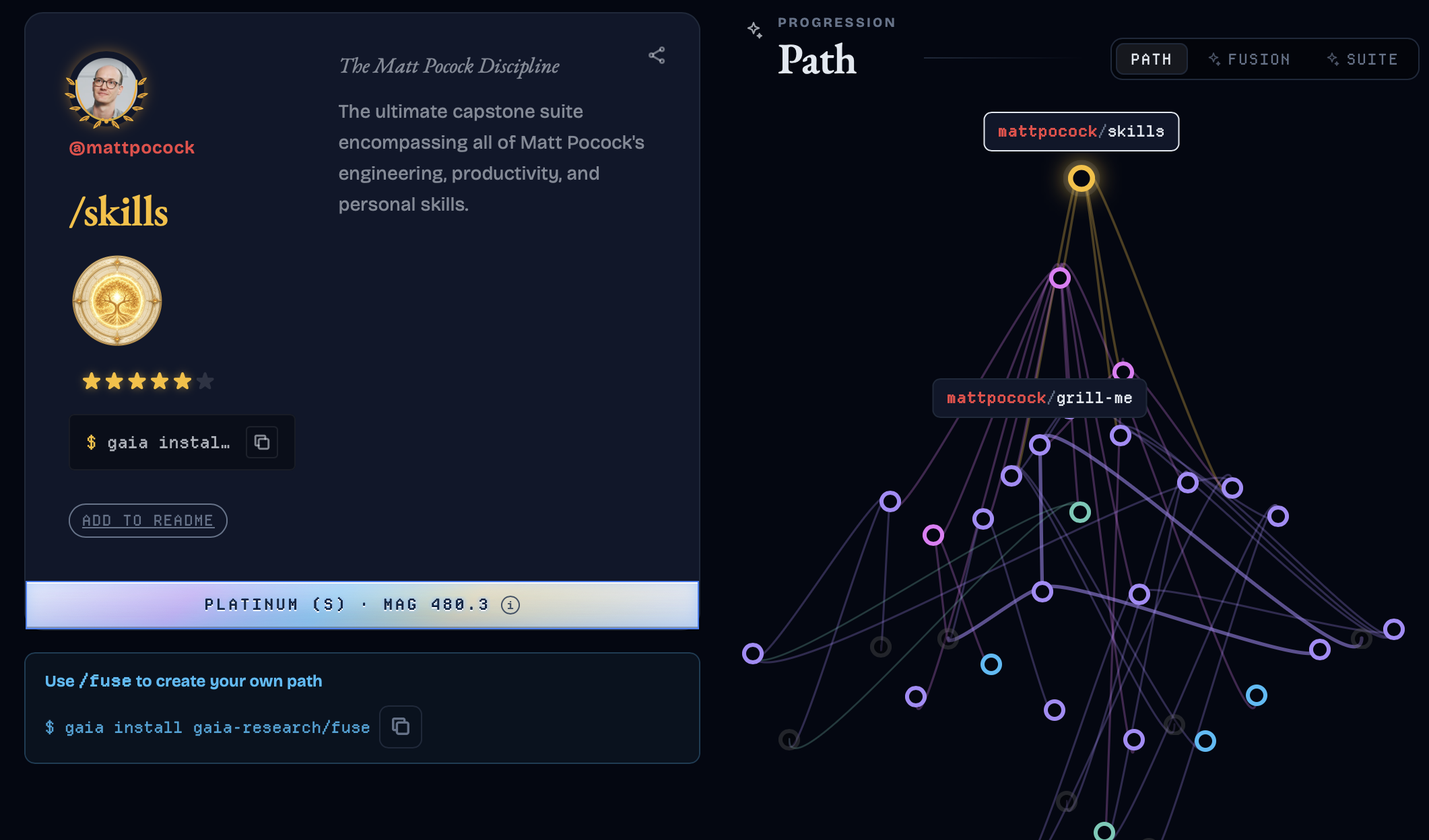
Direct link: https://gaiaskilltree.com/named/#explorer/mattpocock/skills
Stars
| Stars | Rank | Notes |
|---|---|---|
| 0★ | Starless | |
| 1★ | Awakened | Default star rank once you push |
| 2★ | Named | You get to be on the tree if you reach here |
| 3★ | Evolved | You ranked up!! |
| 4★ | Extra / Unique | Extra (skill packs/suites), Unique (standalone) |
| 5★ | Ultimate | Ultimate / Unique Ultimate |
| 6★ | Apex | Apex / Unique Impossible |
Evidence
- Evidence Type
| # | Evidence Type | Notes |
|---|---|---|
| 1 | arxiv |
scientific papers |
| 2 | repo / repo-own |
contains a repo link |
| 3 | github-stars |
how many github stars you have |
| 4 | peer-review |
someone reviewed your skill |
| 5 | social-signal |
youtube, X, or any post |
| 6 | proxy |
someone used your skill, maybe in another repo and it has a lot of stars |
| 7 | benchmark-result |
benchmark that showcases your skill |
| 8 | verifier-attestation |
our own verifiers attest to your skill |
| 9 | fusion-recipe |
gaia's own fusion structure |
- Evidence Grade
| Evidence Name | Grade |
|---|---|
| Platinum | S |
| Gold | A |
| Silver | B |
| Bronze | C |
| Grey | ungraded |
- Trust Magnitude This is the evidence grade at the Skill level.
Detailed Policy: See META.md for the full evidence methodology, ranking floors, and prestige requirements.
Public Trust Ledger: The Trust Ledger ranks every named skill by computed Trust Magnitude — see
docs/trust/ledger/(deployed at https://gaiaskilltree.com/trust/ledger/ once the site rebuilds).
Quickstart
1. CLI
Current Gaia CLI version: 8.25.0.
curl -fsSL https://gaiaskilltree.com/install.sh | sh
Python installation alternative:
pip install gaia-cli
pipx / Windows alternatives
pipx:
brew install pipx
pipx install gaia-cli
Windows (PowerShell one-liner installer):
iex (irm https://gaiaskilltree.com/install.ps1)
Manual Python/pip fallback (Windows):
py -m pip install gaia-cli
$env:PATH += ";" + (python -c "import sysconfig; print(sysconfig.get_path('scripts', 'nt_user'))")
Full Install (for devs) (editable install with all extras):
git clone https://github.com/gaia-research/gaia-skill-tree.git
cd gaia-skill-tree
pip install -e ".[embeddings,dev,docs]"
The dev extra installs packaging/test tools such as build and pytest; without it,
packaging-specific tests are skipped locally with guidance to install developer extras.
Update
gaia update
2. Init / Scan
gaia init
gaia scan
Your repo will be scanned for existing skills. Everything will be in .gaia folder.
3. Push to this repo!
gaia push
A GitHub issue opens automatically. Don't worry, we thoroughly review every intake.
4. Agent Plugin & MCP
claude plugin install skill-heaven@gaia-skill-heaven
Installs Skill Heaven for Claude Code, bundling its own summon MCP server. Summon skills on demand with /summon without permanent context debt. (Note: Standalone @gaia-research/mcp is decommissioned and deprecated on npm as of 2026-08-19).
Interactive TUI
gaia
Will open all sorts of commands in a nice way.
gaia skills
Navigate skills:
- Fuzzy search by name, description, or intent
- View tree (
^T) and run scan (^G) without leaving the TUI - Install skills with one keystroke
- Keyboard-native:
↑↓navigate ·Enterinstall ·qquit
CLI Reference
usage: gaia [-h] [--registry REGISTRY] [--global] [--version]
            {help,init,scan,steward,fetch,pull,update,install,uninstall,share,tree,push,propose,version,whoami,login,logout,reset,graph,stats,appraise,fuse,lookup,path,dev,skills,curate,trust}
            ...

Gaia CLI

options:
  -h, --help           show this help message and exit
  --registry REGISTRY  Path to a local registry checkout. Defaults to auto-resolved local or global
                       registry.
  --global, -g         Use global GAIA_HOME registry, ignoring any local .gaia/ config.
  --version, -v        Print the Gaia CLI version and exit.
  --tui                Launch the TUI (Terminal User Interface).
  --canon              Show canonical registry data instead of local-first view.

Getting started:
  gaia init [--user <name>] [--scan <path>] [--yes] [-y]
  gaia scan [--quiet]
  gaia push [--dry-run] [--no-issue]
  gaia                        Open command selector
  gaia skills                 Launch skills explorer (TUI)

Daily commands:
  gaia tree [--named] [--title]
  gaia appraise [<skillId>]
  gaia stats
  gaia steward scan [--json]
  gaia steward run [--json]
  gaia pull
  gaia fuse <skillId> [--name <name>]
  gaia path <skillId> [--owned-only] [--json]
  gaia lookup <skillId>
  gaia graph [--format html|json] [-o <path>] [--no-open]
  gaia propose [<skillId>] [--target <name>] [--no-pr]

Skills:
  gaia skills <list|search|info|install|uninstall>
  gaia skills list [--exclude-pending]
  gaia skills search <query> [--exclude-pending]
  gaia skills info <skill_id> [--exclude-pending]
  gaia skills install <skill> [--global | --local]
  gaia skills uninstall <skill_id>

Share:
  gaia share [--user <name>] [-o <path>] [--stdout]
  gaia install <bundle.json|url>   Preview & install a shared tree (guided)

Utilities:
  gaia whoami
  gaia login                    Sign in with GitHub (device flow)
  gaia logout                   Sign out of GitHub (clears the local token)
  gaia version
  gaia update
  gaia dev mcp
  gaia dev release <patch|minor|major>
  gaia dev docs [--check]

Maintainer commands:  gaia dev --help
Agent Plugin & Summon
The recommended path for Claude Code is the unified Skill Heaven plugin, which bundles its own MCP server:
claude plugin install skill-heaven@gaia-skill-heaven
The core mechanic is /summon — materializing capabilities into session context on demand with zero ambient skill debt.
(Note: The standalone @gaia-research/mcp and skill-hell npm packages have been decommissioned and deprecated on npm as of 2026-08-19 in favor of the bundled Agent Plugin in gaia-research/gaia-skill-heaven.)
Source and releases: https://github.com/gaia-research/gaia-skill-heaven. See the Skill Heaven site for full installation and door options.
API
The registry is available as a static read-only JSON API — no authentication, no rate limits.
- Base URL:
https://gaiaskilltree.com/api/v1/ - Docs: gaiaskilltree.com/api/
- OpenAPI 3.1 spec: /api/v1/openapi.json
Quick examples:
# Health check
curl https://gaiaskilltree.com/api/v1/health.json

# All skills (page 1, sorted by Trust Magnitude)
curl https://gaiaskilltree.com/api/v1/skills/index.json

# Single skill detail
curl https://gaiaskilltree.com/api/v1/skills/garrytan/gstack.json

# Trust leaderboard
curl https://gaiaskilltree.com/api/v1/leaderboard.json
Agent Discovery
To help AI agents and automated clients discover and crawl the registry programmatically:
- registry graph:
/graph/gaia.json - Named skills:
/named/ - Trust ledger:
/trust/ledger/
Ecosystem
Companion tools that build on Gaia but run independently:
- skill-fuse — a standalone skill that combines two AI agent skills into one fused skill. Powered by Gaia, works without it. Registered in the registry as
gaia-research/fuse.
Repository Structure
registry/                 curated registry data and public generated catalogs
registry-for-review/      pending skill batch intake records
skill-trees/              per-user skill-tree.json files
generated-output/         ignored local scan and render output
docs/                     docs site
src/gaia_cli/             Python CLI package
packages/cli-npm/         npm CLI wrapper
scripts/                  validation, rendering, docs, and release helpers
tests/                    Python test suite
Contributing
Gaia is a shared map of agent capabilities.
Common ways to help:
- Review draft skills for clarity, overlap, and evidence quality.
- Turn accepted reviews into concrete PRs (new skill, fusion, or reclassification).
Contribution steps: CONTRIBUTING.md. Full policy/reviewer guidance: https://gaiaskilltree.com/en.
Contributors
Thank you to everyone who has expanded the registry <3 You are the best!
Core Team
| Contributor | Role |
|---|---|
| @mbtiongson1 | Creator and maintainer: graph design, CLI, MCP server, curation pipeline |
| @rico-favor | Co-founder and twin brother: authored the Gaia Skill Bench proposal (#960) — the pillar model, task-generation pipeline, and anti-gaming spec that Gaia's benchmark methodology is built on. Ongoing pair programming across the registry. Gifted tiongson.co — the domain this project runs under. Direct engineering contributions (July 2026): CI security hardening (#1162), ReDoS fix in api-client (#1163), GitHub host validation fix (#1164), intake batch schema fix (#1165), --dir flag for nonstandard skill roots (#1166). |
| @MariTiongson | Collaborator: English localization (docs/en/) translation and layout updates |
| @Juno | Key contributor: graph browser expansion, function-calling skill, RAG pipeline evidence, and CLI DX improvements |
| @milim-gaia | Core marketing agent: SEO optimization, copywriting, and agentic discovery alignment |
| @nova-gaia | Core marketing agent: automated outreach campaigns, compliance, and ecosystem growth loops |
Named Skills
| Developers | Skills |
|---|---|
| @ruvnet | 48 — agentdb, flow-nexus, hive-mind-coordination, browser, and 44 others |
| @garrytan | 47 — gstack ecosystem: browse, qa, ship, review, benchmark, learn, and 41 others |
| @google-deepmind | 37 — alphafold, alphagenome, ensembl, clinvar, foldseek, and 32 others |
| @mattpocock | 34 — to-prd, triage, diagnose, tdd, zoom-out, grill-me, and 28 others |
| @obra | 12 — superpowers ecosystem: systematic-debugging, dispatching-parallel-agents, and 10 others |
| @addy-osmani | 9 — agent-skills, performance-optimization, test-driven-development, and 6 others |
| @intelligentcode-ai | 8 — database-engineer, devops-engineer, security-engineer, and 5 others |
| @[anonymous] | 7 — hf-cli, llm-trainer, datasets, transformers-js, and 3 others |
| @heygen-com | 19 — embedded-captions, faceless-explainer, figma, hyperframes-animation, hyperframes-audio, and 14 others |
| @leonxlnx | 13 — brandkit, brutalist-skill, gpt-tasteskill, image-to-code-skill, imagegen-frontend-mobile, and 8 others |
| @remotion-dev | 12 — remotion-best-practices, remotion-captions, remotion-create, remotion-docs, remotion-interactivity, and 7 others |
| @k-dense-ai | 10 — deepchem, pymc, pytorch-lightning, qiskit, rdkit, and 5 others |
| @favorchurch | 9 — attendees, count-checkin-by-church, export-attendees, financial-assistance, resend-conference-emails-carefully-with-smtp, and 4 others |
| @huggingface | 6 — hf-cli, huggingface-datasets, huggingface-llm-trainer, huggingface-papers, huggingface-vision-trainer, and 1 other |
| @gsd-build | 6 — discuss-phase, execute-phase, get-shit-done, plan-phase, ship, and 1 other |
| @firecrawl | 6 — firecrawl-build-interact, firecrawl-build-onboarding, firecrawl-build-scrape, firecrawl-build-search, firecrawl-research-index, and 1 other |
| @langgenius | 5 — backend-code-review, component-refactoring, e2e-cucumber-playwright, frontend-code-review, frontend-testing |
| @disler | 4 — agent-fusion, auto-review, opinion, plan-synthesis |
| @sickn33 | 3 — ai-dev-jobs-mcp, mcp-builder, n8n-mcp-tools-expert |
| @gaia-research | 3 — ci-churn, cost, fuse |
Community contributors (1–2 skills each): @karpathy, @anthropic, @openai, @[anonymous], @glincker, @spring-ai-alibaba, @pexp13, @caioribeiroclw-pixel, @0xdarkmatter, @Manavarya09, @anthropics, @aplaceforallmystuff, @ayghri, @bradautomates, @browser-use, @browserbase, @citrolabs, @dietrichgebert, @gooseworks, @juliusbrussee, @laravel, @martin-stepanoski, @mksglu, @mvanhorn, @nateherkai, @nextlevelbuilder, @nexu-io, @nousresearch, @oso95, @panniantong, @pbakaus, @safishamsi, @santifer, @spring-ai, @supabase, @trailhq, @upsonic, @vercel, @vercel-labs, @xquik-dev, @yonatangross, @yylo-dev
Evidence & Curation
| Contributor | Contribution |
|---|---|
| @balukosuri | Evidence: community reproduction of Karpathy's autoresearch as a universal skill |
| @kriptoburak | Evidence evaluator: x-twitter-automation evidence review |
| @fahimkarim01 | Curation: corrected pexp13/sentiment-analysis metadata links |
Code & Fixes
| Contributor | Contribution |
|---|---|
| @fazalpsinfo-cmyk | Bug fix: resolved UnboundLocalError in gaia scan when no custom skills are detected (#1141, PR #1188) |
Bots
| Bot | Contribution |
|---|---|
| @jules | Named skills via Google Jules AI: langgenius suite (backend-code-review, frontend-code-review, e2e-cucumber-playwright, and 2 others) |
| @gaiabot | Internal Gaia bot: repo triage and docs-sync automation |
| @gemini-cli | Curation: generative-media, mathematical-animation, and other generic skills from Hermes ecosystem |
Programmatic Management
The registry is programmatically managed. All meta shifts (adding, merging, splitting, adding evidence) must be performed via the Gaia CLI. Hand-editing JSON nodes is deprecated to ensure schema integrity and automated timeline logging.
Privacy
Gaia does not store personal information.
- Skills are summarised, not stored.
gaia scanrecords capability type, level, and evidence grade — never file contents, prompt text, or conversation history. - Only public repo links. The registry stores your public GitHub username and a public repo URL when you explicitly submit a named skill. Nothing else.
- Generalised by default. Skill descriptions capture capability categories, not personal details about you or your agent's behaviour.
- No telemetry. The CLI and the static website collect zero analytics or usage data.
Full details: PRIVACY.md · gaiaskilltree.com/privacy.html
Topics: gaia-skill-tree, ai-agent, skill-registry, capability-graph, evidence-backed, agent-skills, attribution, model-context-protocol, open-source-ai, llm-ops, agent-framework
Inspiration
Be like Rimuru. The main inspiration for this repository. Basically stole the idea of the "Great Sage" and applied it to agent skills.

License
Apache 2.0: see LICENSE.
Graph is canonical. Everything else is a shadow.

1 maintainer

Metadata
1 maintainer
Release files for gaia-cli 8.25.0
For a detailed explanation of source distributions (sdists) and built distributions (wheels), please see the package formats documentation.
Source distribution (sdist)
| File | Size | Uploaded | |
|---|---|---|---|
| gaia_cli-8.25.0.tar.gz | 1.6 MB | Details |
Built distribution (wheel)
| File | Interpreter | ABI | Platform | Reset |
|---|---|---|---|---|
| gaia_cli-8.25.0-py3-none-any.whl | Python 3 | none | any | Details |
Total release size: 3.3 MB
Release files / gaia_cli-8.25.0.tar.gz
| Download URL | gaia_cli-8.25.0.tar.gz |
|---|---|
| Size | 1.6 MB |
| Tags | Source |
|
SHA-256 checksum How to use checksums |
6bf17d04ed0b952efc17a234c5a2fc6307eeeed568746533cd3b2f69f9e8e287
|
|
BLAKE2b-256 checksum How to use checksums |
a70895a55b9fd55c9a174d7e8a69a3132ad5870588f234cfa6cc8e7eb0f61c2d
|
| Upload date | |
|
Uploaded using Trusted Publishing? What is trusted publishing? |
Yes |
| Uploaded via |
twine/7.0.0 CPython/3.13.14
|
Provenance
Provenance describes where a file came from. On PyPI, provenance is shared via attestations, which provide a verifiable record of the build or publishing details. View details, limitations and caveats.


PyPI Publish Attestation
PyPI verified that this artifact, at this checksum, originated from the publisher listed below.
Signed by GitHub Actions, verified by PyPI on Oct 16, 2026.
Transparency logRelease files / gaia_cli-8.25.0-py3-none-any.whl
| Download URL | gaia_cli-8.25.0-py3-none-any.whl |
|---|---|
| Size | 1.7 MB |
| Tags | Python 3 |
|
SHA-256 checksum How to use checksums |
1eae9f72939fee129918a27dd202f18adefb33e471682be303bc38f23034c89d
|
|
BLAKE2b-256 checksum How to use checksums |
26a9f14b42f59017553206cbe7df7a6d82d43562f429183d6382956d6e6328c3
|
| Upload date | |
|
Uploaded using Trusted Publishing? What is trusted publishing? |
Yes |
| Uploaded via |
twine/7.0.0 CPython/3.13.14
|
Provenance
Provenance describes where a file came from. On PyPI, provenance is shared via attestations, which provide a verifiable record of the build or publishing details. View details, limitations and caveats.
PyPI Publish Attestation
PyPI verified that this artifact, at this checksum, originated from the publisher listed below.
Signed by GitHub Actions, verified by PyPI on Oct 16, 2026.
Transparency log













