
This release is a pre-release and may not be stable for production use.
galahad

Machine learning model server for NLP that can predict AND train. It can be e.g. used for interactive machine learning setups or as an external recommender with INCEpTION. It provides a REST-like interface and hence is integrable with a wide range of applications and use cases.
Installation
You can install the newest version via
pip install galahad
Usage
galahad is a server-based application that uses FastApi
in the background. To get started, create a Python script like the one below.
import logging

import uvicorn

from galahad.server import GalahadServer
from galahad.server.contrib.ner.spacy_ner import SpacyNerTagger
from galahad.server.contrib.pos.spacy_pos import SpacyPosTagger
from galahad.server.contrib.sentence_classification.sklearn_sentence_classifier import SklearnSentenceClassifier

server = GalahadServer("my_data_folder")
server.add_classifier("SpacyPOS", SpacyPosTagger("en_core_web_sm"))
server.add_classifier("SpacyNER", SpacyNerTagger("en_core_web_sm"))
server.add_classifier("Sent", SklearnSentenceClassifier())


if __name__ == "__main__":
    logging.basicConfig(format='%(asctime)s - %(name)s - %(levelname)s - %(message)s', level=logging.DEBUG)

    uvicorn.run(server, host="127.0.0.1", port=8000)
This starts galahad so that you can use it e.g. together with the galahad client
or as a recommender in INCEpTION.
Alternatively, you can run it on the command line via uvicorn main:server, where main is the name of your script
(in this case, main.py) and server the name of your GalahadServer variable.
API documentation
When running a Galahad instance, you can view the REST API documentation on http://localhost:8000/redoc .
Examples
galahad can be used with a wide range of different clients. A few examples are described in the following:
INCEpTION
INCEpTION is a semantic annotation platform offering intelligent
assistance and knowledge management. It is widely used in the NLP community for annotating text.
galahad can be used to provide annotation suggestions to improve annotation speed and quality.
These can either be static or dynamic. For the latter, galahad models are trained and updated during annotation
to provide better suggestions the more data is annotated.
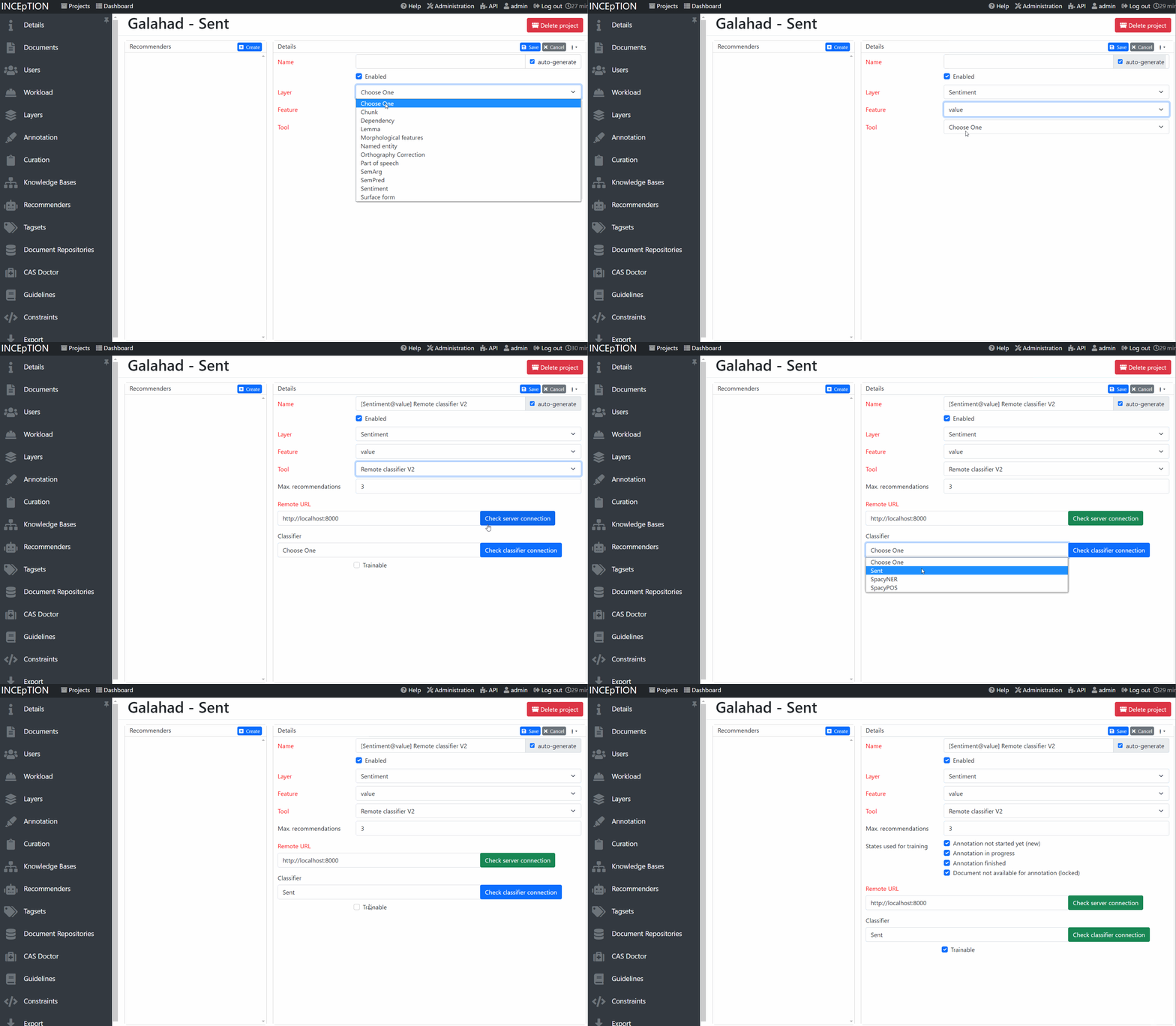
In order to connect INCEpTION and galahad, you first need to write a server Python script like above. add models to
your server and then run it. In INCEpTION, in your project, go to the recommender settings.
Add a external recommender V2 to INCEpTION, check the server connection and then select a classifer
from the list. You are now ready to annotate!
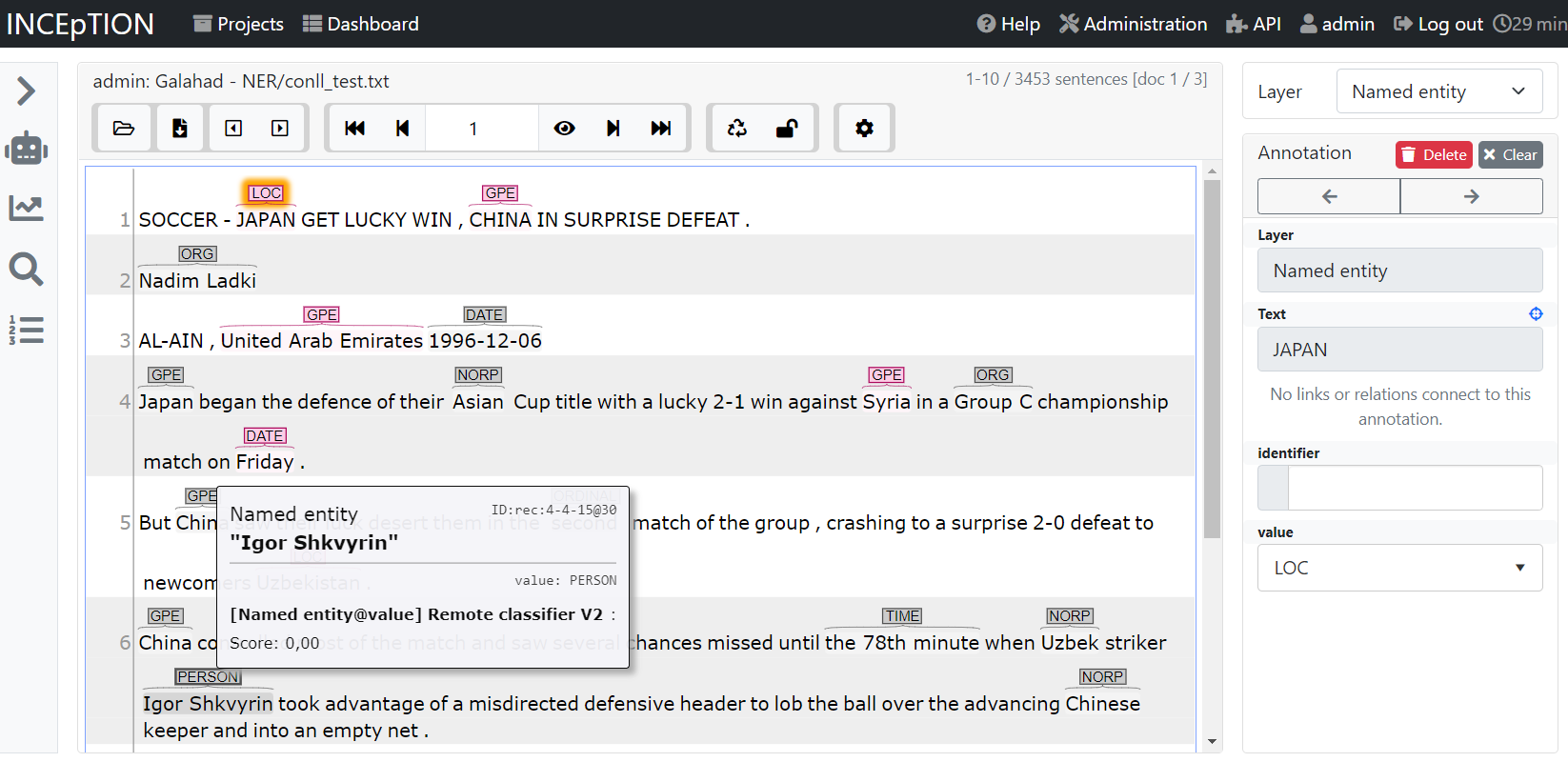
As an example, here we annotate named entities and use a pre-trained Spacy model. Gray are recommendations and red are real annotations. Annotators can accept, reject or ignore suggestions made by Galahad.
Gradio
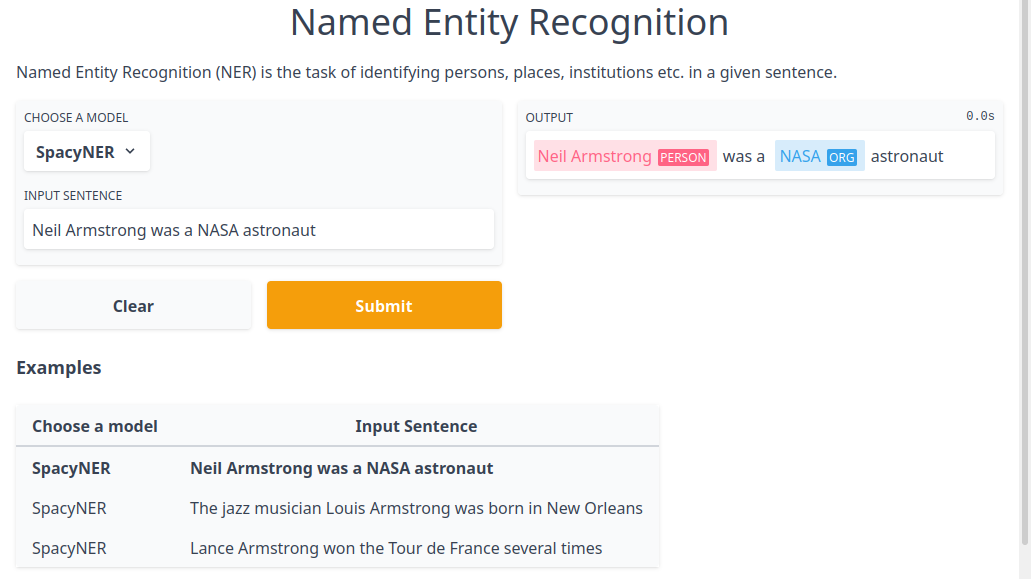
After starting a Galahad instance, you can visualize the predictions of pretrained models via Gradio. For that, just run
python examples/gradio_demo.py TASK_NAME
We currently support part-of-speech tagging (pos) and named entity recognition (ner) as tasks.
Python client
Galahad comes with a Python client that you can use to programmatically access the API without worrying about the underlying protocol. Please refer to the API documentation of Galahad that describes how to use it.
Architecture
Galahad works on the basis of datasets, documents, classifiers, models, annotations.
- Document: A document contains the text and annotations.
- Dataset: a dataset groups annotated documents together, representing e.g. an annotated corpus.
- Classifier: A classifier is a machine learning algorithm that can be used to make predictions and can be optionally be trained. The result of training is called the model. There can be multiple models for each classifier, e.g. one per user.
- Annotations: Annotations consist of a type and features. Annotations can either represent spans by having a begin and end feature that points into the text or be standalone.
Document representation
Documents are represented as JSON objects. They have a text, a version and annotations. Annotations are grouped by their type. An example document looks like the following:
{
    "text": "Joe waited for the train . The train was late .",
    "version": 23,
    "annotations": {
        "t.token": [
            {"begin": 0, "end": 3},
            {"begin": 4, "end": 10},
            {"begin": 11, "end": 14},
            {"begin": 15, "end": 18},
            {"begin": 19, "end": 24},
            {"begin": 25, "end": 26},
            {"begin": 27, "end": 30},
            {"begin": 31, "end": 36},
            {"begin": 37, "end": 40},
            {"begin": 41, "end": 45},
            {"begin": 46, "end": 47}
        ],
        "t.sentence": [
            {"begin": 0, "end": 26},
            {"begin": 27, "end": 47}
        ],
        "t.named_entity": [
            {"begin": 0, "end": 3, "features": {"f.value": "PER"}}
        ]
    }
}
Disk layout
Galahad stores datasets, documents and models on disk. The layout looks like the following:
data
├───datasets
│   └───dataset1
│       └───document1
│       └───document2
│   └───dataset2
├───locks
├───models
│   └───classifier1
│   └───classifier2
We also plan to add additional store alternatives to Galahad, for instance SQLite.
Classifier training
Classifier training is done by creating a new process that then takes over the training. This is needed because of the GIL in Python. If we did not do this, then the main thread would be blocked and the web app could not respond to new requests. Also, only one model could be trained at the time.
When the request to train a classifier arrives, it is first checked whether training is not already running. Training the same classifier twice at the same time is prevented by using file locks.
Development
The required dependencies are managed by pip. A virtual environment containing all needed packages for development and production can be created and activated by
python3 -m venv venv
source venv/bin/activate
pip install -e ".[all]"
make get_test_dependencies
1 maintainer

Metadata
1 maintainer
Release files for galahad 0.1.0.dev0
For a detailed explanation of source distributions (sdists) and built distributions (wheels), please see the package formats documentation.
Source distribution (sdist)
| File | Size | Uploaded | |
|---|---|---|---|
| galahad-0.1.0.dev0.tar.gz | 19.3 kB | Details |
Built distribution (wheel)
| File | Interpreter | ABI | Platform | Reset |
|---|---|---|---|---|
| galahad-0.1.0.dev0-py3-none-any.whl | Python 3 | none | any | Details |
Total release size: 39.6 kB
Release files / galahad-0.1.0.dev0.tar.gz
| Download URL | galahad-0.1.0.dev0.tar.gz |
|---|---|
| Size | 19.3 kB |
| Tags | Source |
|
SHA-256 checksum How to use checksums |
6127c543547f56bc9005b422385ec00845de3f07ce0716986a028b0120cf159a
|
|
BLAKE2b-256 checksum How to use checksums |
338d52a1a021464d37ea94f0330a641af7c23a40f2b6fe968b83af9b77943087
|
| Upload date | |
|
Uploaded using Trusted Publishing? What is trusted publishing? |
No |
| Uploaded via |
twine/4.0.0 CPython/3.10.4
|
Release files / galahad-0.1.0.dev0-py3-none-any.whl
| Download URL | galahad-0.1.0.dev0-py3-none-any.whl |
|---|---|
| Size | 20.2 kB |
| Tags | Python 3 |
|
SHA-256 checksum How to use checksums |
bd4279966e19c2f59a3f47e05182f79af310f9c09305426875e107fef5c03eca
|
|
BLAKE2b-256 checksum How to use checksums |
83b71ba7ac651a546f98177ea90b7e341413c771b236b1c5c37c0383fb941e09
|
| Upload date | |
|
Uploaded using Trusted Publishing? What is trusted publishing? |
No |
| Uploaded via |
twine/4.0.0 CPython/3.10.4
|













