
galcymedia
Voice agents on Asterisk. Bring your provider, the telephony is already solved.



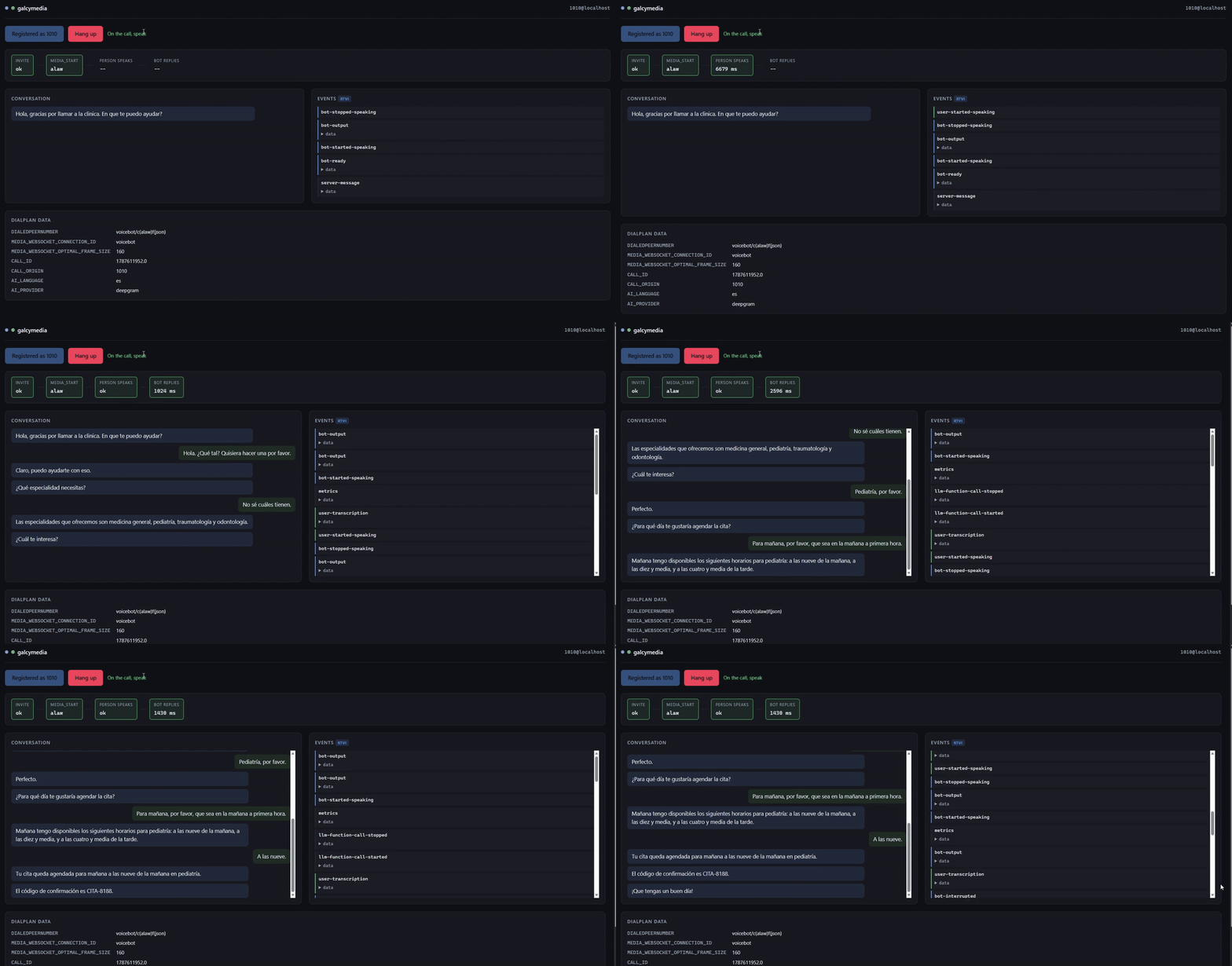
Asterisk 23 ships chan_websocket, a channel that sends and receives the
audio of a call over a WebSocket: binary frames with the raw samples and
control in JSON, no RTP, no UDP sockets and no NAT between Asterisk and your
program.
On the other side someone has to speak that protocol, honor the flow control, align the frames and publish what happens. That is galcymedia.
flowchart LR
    T[Phone / PSTN] -- "SIP + RTP" --> A[Asterisk 23]
    A -- "Dial(WebSocket/...)" --> C[chan_websocket]
    C <-- "binary audio + JSON control" --> G["galcymedia: serve() and Session"]
    G <-- "the 4 methods of the contract" --> P[your voice provider]
    G -- "RTVI events" --> O[your panel / bus / CRM]
import asyncio
from galcymedia import serve

class MyAgent:
    def __init__(self, session):
        self.session = session

    async def start(self):
        ...                                   # connect to your provider

    async def send_audio(self, chunk):
        await self.session.send_audio(chunk)  # here it echoes back

    async def on_dtmf(self, digit):
        ...

    async def close(self):
        ...

asyncio.run(serve(MyAgent))
Four methods. Nothing to inherit from and nowhere to register
(provider.py, the VoiceProvider Protocol).
Seeing it run
This repository is the library only. Everything that runs and can be seen lives in a separate repository:
https://github.com/Galcyon-Solutions/galcymedia-examples
There you find the Docker stack (Asterisk already compiled, the agent, the
panel and a webphone), the dialplan, the minimal examples (echo,
multi-provider) and the supervision panel. The provider adapters are not
there: they live in this library, in galcymedia.adapters, and install
through extras.
The library does not drag the demos' dependencies along, and the demos depend on the published package, not on a relative path.
Installing it
pip install galcymedia
That installs the core, with websockets as the only dependency
(pyproject.toml). The adapters live inside the library but install
separately, so nobody pays for the one they do not use:
pip install "galcymedia[pipecat]"     # Pipecat on your Asterisk
pip install "galcymedia[deepgram]"    # Deepgram Voice Agent
| Extra | What you get | Where it lives |
|---|---|---|
pipecat |
A first-class serializer: your Pipecat pipeline runs on chan_websocket |
galcymedia.adapters.pipecat |
deepgram |
Deepgram Voice Agent, native G.711 with nothing converted | galcymedia.adapters.deepgram |
openai |
OpenAI Realtime | galcymedia.adapters.openai |
elevenlabs |
ElevenLabs Agents, with the ulaw conversion solved | galcymedia.adapters.elevenlabs |
The last three speak the provider's WebSocket directly, so they bring no
new dependency: their extra is empty (pyproject.toml, deepgram = [],
openai = [], elevenlabs = []) and exists so the name is the same for all
of them.
There is a boundary that decides what breaks when the market moves: the
adapter carries how the audio and the turn move, which is telephony and
is maintained here; what the bot says and does is yours and comes in
through a hook. The dependency runs one way, so import galcymedia loads no
provider SDK and a test checks it
(test_importing_the_package_does_not_import_pipecat). The why is in
docs/decisions.md.
You need Asterisk 23.4.0 or later with chan_websocket:
asterisk -rx "core show channeltype WebSocket"
If that command does not recognize the channel type, your Asterisk is older than 23 or was built without the module. The examples repository ships the installer that builds it, and a Docker image with it already inside.
The two ports
galcymedia opens up to two ports, always the same ones in the library, in every example and in the reference dialplan:
| Port | What it is | Who connects | Changed with |
|---|---|---|---|
| 9000 | Media WebSocket (the audio) | Asterisk toward your application, per the uri in websocket_client.conf |
serve(port=...) or, in the examples, MEDIA_PORT |
| 4573 | FastAGI (the way back to the dialplan), only if you ask for it | Asterisk, per the AGI(agi://...) line of the dialplan |
serve(agi_port=...) or AGI_PORT (4573 is Asterisk's standard) |
If you start an agent and no call comes in, the usual suspect is a uri
pointing at another port: the WebSocket does not even arrive, so there is no
error to read on this side. The startup line of the log says which port it
listens on and that the uri in websocket_client.conf has to point there.
The interface is set separately for each one. serve(host=...) moves
the WebSocket; the FastAGI does NOT follow it, and stays on 127.0.0.1
unless you pass serve(agi_host=...). It is deliberate: neither protocol
authenticates, and opening the audio to the network is a different decision
from opening the door back into your dialplan. When Asterisk runs somewhere
else, in a container included, both of them need saying.
What it solves
Eight things the channel demands and the library carries. Each one, with
what happens if you skip it and the line of chan_websocket.c that proves
it, is in docs/protocol.md:
- Flow control, the
MEDIA_XOFFat 900 queued frames and theMEDIA_XONbelow 800. Keep sending through it and the audio comes out choppy - Frame alignment: the channel drops the tail of any message that does not complete a frame, and a voice engine emits free-sized blocks
- Hanging up without cutting the goodbye, which is still in the queue when you hang up
- Barge-in: three queues to flush, and forgetting one leaves the bot talking over the person
- The 128-byte limit on control messages, dropped with a WARNING in Asterisk's log and nothing on the socket
- Audio that arrives before
MEDIA_START, dropped and counted - A failure that spreads: one hung provider does not take the other calls with it
- Data that breaks downstream: garbage DTMF, bytes in an event, a
NaN
That list is the serve() path. Through the Pipecat serializer the
library contributes frame alignment, the codec, the flush of a barge-in and
the hang-up; flow control, the marks and QUEUE_DRAINED do NOT travel,
because they are transport mechanics and Pipecat does not model transport.
It is written in the adapter itself, next to the code that decides it. If
you need them, serve() is the way in.
Events: RTVI, not a format of our own
Each call publishes what happens in RTVI, Pipecat's open standard (protocol 2.1.0). That means any RTVI client already written understands galcymedia, with no adapters.
{"label":"rtvi-ai","type":"user-transcription","id":"a3f9",
 "data":{"text":"I want to book an appointment","final":true,
         "timestamp":"2026-08-08T18:15:36Z","user_id":"caller"}}
The events are emitted by the core, not by the provider: each adapter
fills in what its provider knows and stays quiet about the rest. Fourteen
are published, and describe_events() lists them with when they go out and
what they carry.
You choose the destination:
def where_they_go(event):
    print(event.to_json())        # or your bus, or your database, or a WebSocket

asyncio.run(serve(MyAgent, emit=where_they_go))
The data that comes in the signaling
Whoever originates the call can put custom headers in the INVITE
(X-Customer-Id, X-Campaign, whatever you need). The dialplan reads them
and passes them to the channel, and galcymedia hands them to you in the
first event of the call, before a single frame plays:
{"label":"rtvi-ai","type":"server-message",
 "data":{"variables":{"CUSTOMER_ID":"A-4471","CAMPAIGN":"collections"}}}
With that you query your CRM and paint the record while the phone is still ringing. The dialplan that produces it, runnable and commented, is in the examples repository.
The whole channel, not a part of it
chan_websocket offers eleven commands and nine events. The library exposes
all of them: the ones it needs for its own work and the ones that only
serve you.
| Method | What for |
|---|---|
answer() / hangup() |
answer and hang up |
send_audio() |
send voice, honoring the flow control. Returns True if the frame went out and False if it was dropped because Asterisk's queue is not emptying |
mark() |
wait for a specific point of the audio to play |
flush() |
discard what is queued. The barge-in piece |
start_buffering() / stop_buffering() |
let Asterisk assemble the frames for you, instead of aligning them here |
request_status() |
real queue depth, right now |
report_when_drained() |
be told when the queue runs empty |
pause() / continue_media() |
silence without losing what is queued. pause() also tells turn-taking: it stops the audio and not the clock, so how much was heard can no longer be measured |
set_media_direction() |
listen only, talk only, or both |
And the events all reach on_event: the session interprets the nine,
and the hook sees them just the same, including those a future Asterisk
release adds. What the channel publishes, you see.
Two details from the channel's source change which method to use, and both
are in docs/protocol.md with their citations: that
mark() travels inside the audio queue and a flush() destroys it, while
report_when_drained() is a channel flag and survives (which is why
finish() uses the second), and that in passthrough mode the channel
rejects 8 of the 11 commands, something it turns on by itself for seven
small-frame codecs.
Which codec to put on the WebSocket
You pick the codec in the Dial, with c(<codec>). The library reads it
from the MEDIA_START and adjusts the alignment and the silence byte on its
own; you only decide which one.
The core does not touch the audio: it moves opaque bytes between the
channel and the provider. The adapters do convert when their provider
demands it, and there are two concrete cases: ElevenLabs' transcodes alaw to
ulaw and back, because the agent speaks ulaw_8000, and Pipecat's decodes
G.711 to PCM and converts the SAMPLE RATE if the pipeline was not built at
the channel's (see decisions.md, "The Pipecat adapter converts the sample
rate and warns"). With the two rates equal not a byte is touched.
Which codec suits depends on one thing: the codec that rules is your trunk's, not the WebSocket's. The audio cannot have more quality than its weakest link. With that clear, by provider, by origin, and what not to use:
| Your case | Put in the Dial |
Why | Evidence |
|---|---|---|---|
| Deepgram | c(ulaw) or c(alaw) |
speaks native G.711; any other codec fails at startup with the notice of what to put | test_the_codec_is_translated_to_the_provider_name, test_a_codec_the_provider_does_not_speak_fails_early |
| OpenAI Realtime | c(ulaw) or c(alaw) |
native audio/pcmu and audio/pcma |
test_codec_translates_to_provider_type, test_a_codec_the_provider_does_not_speak_fails_early |
| ElevenLabs | c(ulaw); c(alaw) works, transcoded by the adapter in both directions |
the agent speaks ulaw_8000 |
test_a_ulaw_channel_does_not_transcode, test_an_alaw_channel_transcodes_in_both_directions, test_a_non_g711_codec_fails_early, test_it_warns_if_the_agent_is_not_in_ulaw |
| Pipecat, pipeline at 16 kHz | c(slin16) |
with equal rates not a byte is converted | test_no_resampling_happens_when_the_rates_match, test_it_does_not_warn_when_the_rates_match |
| Pipecat, pipeline at 8 kHz | c(ulaw) or c(alaw) |
the adapter decodes G.711 to PCM and back; no resampling | test_the_audio_is_resampled_when_the_rates_differ (the opposite case), measured: with the pipeline at 16 kHz over an 8 kHz channel, one second of voice plays as two |
| Pipecat, input and output at different rates (TTS at 24 kHz over a pipeline listening at 8) | the same as above | the output converter is picked by the frame's rate and warns once per call | test_the_output_rate_is_the_frame_rate_not_the_input_rate, test_output_at_the_channel_rate_is_not_converted_even_if_the_input_is; pending validation on a real call |
| G.711 trunk (PSTN) | c(ulaw) or c(alaw) always |
the audio is already 8 kHz; slin16 interpolates band that does not exist and doubles the bytes |
codec_builtin.c 23.4.1 (ulaw and alaw at 8000 Hz) |
g722 |
no | keeps the full API but arrives compressed and no adapter decodes it | protocol.md, "The codecs and passthrough mode" |
| codec2, lpc10, g729, speex, speex16, speex32, opus | no | passthrough: 8 of 11 commands rejected, compressed audio | protocol.md, same section |
If your trunk comes in with an odd codec, let Asterisk transcode, not your
application. That is its job, in the signaling: the c() of the Dial
already asks it to convert the trunk before the audio reaches the WebSocket.
Putting transcoding in an application outside the signaling is exactly what
this design avoids.
Do not send the channel any of the seven passthrough codecs (codec2,
lpc10, g729, speex, speex16, speex32, opus). They turn on Asterisk's
passthrough mode, which rejects 8 of the 11 commands: you lose
barge-in, the marks and the clean hangup, and the audio arrives
compressed, which no adapter decodes. If your trunk uses one of those,
transcode it in Asterisk with the c() of the Dial. The library warns in
the log when it detects passthrough
(test_passthrough_warns_instead_of_failing_silently) instead of starting
silently toward the problem.
Several providers, and your own
A single process can serve several providers, chosen per call from the
dialplan with Set(_AI_PROVIDER=...). The underscore makes the WebSocket
channel inherit the variable, and the library reads it from the
MEDIA_START. So one extension routes to Deepgram and another to OpenAI
without restarting anything.
The dispatch is done by a ProviderRegistry: you register each provider by
name and it instantiates the one the dialplan asked for.
from galcymedia import ProviderRegistry, serve

registry = ProviderRegistry()
registry.register("echo", Echo)
registry.register("deepgram", DeepgramProvider)
registry.register("my-bot", MyCustomProvider)   # yours, same as the others

asyncio.run(serve(lambda session: registry.create(session.media.provider, session)))
A custom provider is exactly the same as one of the bundled ones: a class
with the four methods of the contract. There is nothing special to inherit
from and no interface to implement beyond that. If the dialplan asks for a
name you did not register, create raises with the list of the ones that do
exist, instead of failing silently.
How it is built
src/galcymedia/       the package. Knows NO voice provider
├── protocol.py       the 11 commands and 9 events of the channel
├── framing.py        alignment to optimal_frame_size
├── session.py        one call: flow control, marks, close
├── events.py         RTVI events
├── speech.py         SpeechState: the bot's turn-taking, barge-in solved
├── observer.py       ChannelObserver: the channel trace, per call
├── provider.py       the contract: four methods
├── agi.py            FastAGI and AgiRouter: channel access from the process
├── decisions.py      Transfers and CallDecisions: what was decided crosses to the dialplan
├── pcm.py            the bridge to PCM, the alaw/ulaw transcoding and the silence byte
├── server.py         serve() and connect()
└── adapters/         one file per provider, each with its SDK inside
    ├── _shared.py    what the adapters do alike, once
    ├── openai.py     OpenAI Realtime
    ├── deepgram.py   Deepgram Voice Agent
    ├── elevenlabs.py ElevenLabs Agents
    └── pipecat.py    serializer, for a Pipecat pipeline
One rule holds it: the core imports nothing from outside but
websockets. A provider that appears or disappears costs one file, and does
not touch the core. That is why the adapters live in adapters/, each
importing its provider's SDK inside its module: pip install galcymedia
installs only websockets, and import galcymedia loads nothing
third-party (test_importing_the_package_does_not_import_pipecat).
One call, end to end
sequenceDiagram
    participant A as Asterisk
    participant G as galcymedia
    participant P as your provider

    A->>G: MEDIA_START (format, frame, dialplan variables)
    G->>P: start()
    G->>A: ANSWER
    loop conversation
        A->>G: caller audio (binary)
        G->>P: send_audio(chunk)
        P->>G: session.send_audio(bot voice)
        G->>A: aligned frames, honoring XOFF/XON
    end
    Note over G,A: barge-in: session.flush() empties the queue<br/>and releases the pending marks
    P->>G: session.finish()
    Note over G: waits for the bot to say its piece:<br/>when hangup is requested, the goodbye<br/>is not generated yet
    G->>A: REPORT_QUEUE_DRAINED
    A-->>G: QUEUE_DRAINED (the goodbye has played)
    G->>A: HANGUP
    A-->>G: WebSocket close (code 1000/1001)
    G->>P: close()
On Asterisk's side, the line that starts all of it:
same => n,Dial(WebSocket/voicebot/c(ulaw)f(json),3600,g)
c() pins the codec, f(json) the control format, and the g makes the
dialplan continue when the bot hangs up its leg, which is what allows
transferring afterwards. The rest of the dialplan, with the why of every
line and the Asterisk source behind each one, is in
docs/architecture.md; the full one, with
per-track recording and the outbound queue, in the examples repository.
Handing the call to a person
The channel cannot transfer or write variables: it is a media channel. So everyone who wants to escalate to a human trips over the same thing, and the library brings it solved:
from galcymedia import Transfers, serve

asyncio.run(serve(MyAgent, transfers=Transfers()))
# and when the model asks for it, from the adapter:
#   session.request_escalation("queue", reason="asked for it")
serve() hands the registry to each session, so the escalation is a single
call: the dialplan seeds _CALL_ID before the Dial and asks afterwards
over FastAGI, which is the only thing that writes on the channel once the
Dial is running. The two routes, the dialplan and the why against
func_curl, AMI and ARI are in
docs/architecture.md and
docs/decisions.md.
The transfer is the first use: the AGI is channel access from your
process. With AgiRouter several routes are served (seed CRM data before
the Dial, collect results after), and with CallDecisions any data
crosses from the WebSocket channel to the dialplan, not only BOT_ACTION.
The galcymedia.pcm module is the G.711 to linear PCM bridge and back,
without audioop, which no longer exists in the standard library; the
Pipecat adapter, ElevenLabs' transcoding and the fill's silence byte use it.
SpeechState or FrameAligner?
Both align frames; the difference is how much more they do, and the choice depends on whether your agent can be interrupted:
session.speech(aSpeechState) for a conversational agent: on top of the alignment it brings the whole turn-taking, with barge-in, the discard of old audio and the goodbye solved. It is already created in each session, derived from the channel's codec; you just use it:await session.speech.play(block).FrameAligneralone when there are no turns to interrupt: an echo, a recording, an announcement. It is just the alignment, with no states.
An adapter that uses session.speech does not touch FrameAligner: it
carries it inside. No adapter replaces it today; if you need another, the
assignment session.speech = SpeechState(session, frame_size, silence_byte)
is allowed.
The two connection modes
| Mode | Who connects | When |
|---|---|---|
serve() |
Asterisk toward your application | The recommended one. You open no ports toward Asterisk and it already brings reconnection |
connect() |
Your application toward Asterisk | When Asterisk cannot reach you, for example behind a NAT. Uses the special INCOMING connection |
serve() is used in two ways, like websockets.serve: await serve(...)
runs forever, and async with serve(...) as server: embeds it in a larger
application and shuts it down in order on leaving the block.
The settings are kwargs, with defaults that already work
Every policy of ours (how long to wait for an XON, how much to give the
provider to connect or close, how many caller frames to retain) is a
keyword-only kwarg of serve()/connect() with a tested default:
serve(MyAgent,
      provider_start_timeout_s=30.0,   # an engine slow to connect
      audio_in_max_frames=100)         # more cushion for an STT with spikes
The channel's limits are not exposed, and docs/decisions.md explains why.
Status
Version 0.1.0, tested against Asterisk 23.4.1 in two separate exercises.
Conversation, on 2026-08-22: real calls with each of the three providers, with barge-in and escalation to a person. One call at a time.
Load, on 2026-08-09: 200 concurrent calls with real RTP in a lab of our own, 360 frequency-based isolation checks and 0 cross-talk, with Asterisk between 246% and 311% CPU. That figure is the channel's, not this library's: what it measures is that the audio of 200 calls does not mix. The Python process serving conversations with real providers at that scale has not been measured, and when it is, the number will be here.
pip install -e ".[dev]"
pytest
The whole suite runs without Asterisk. Most tests take milliseconds; the
slow ones bring up a real serve() and feed it hostile protocol (a provider
that hangs, malformed frames, garbage DTMF) to check that one call's failure
stays contained and the server can always shut down. Those wait on real
timeouts, so the full suite takes about half a minute.
Two tests compare the events against the RTVI specification: they read the
models.py of the installed pipecat-ai package (extra pipecat, protocol
2.1.0) and skip on their own if it is missing, which is convenient and
also a trap, because they stop checking without saying so. The Pipecat
serializer tests skip the same way without the extra.
Going deeper
- docs/architecture.md is the map of the library: which piece does what, where the audio goes, who decides the turn-taking and how to read a call's log. You read it before touching the code, or when something sounds wrong and you want to know where to look.
- docs/protocol.md is the technical reference of the
chan_websocketchannel: the commands, the events, the limits and the protocol gotchas. You consult it when you need the exact fact. - docs/decisions.md is the why of the choices you
could take the other way from your adapter or your dialplan: why FastAGI
and not ARI, why real-time silence and not a
KeepAlive, why the server's PING. You read it when you want to understand or change a decision.
License
Apache-2.0. Use it, modify it, sell it. We ask for no credit in your product; when you redistribute the source, keep the license notice that section 4 requires.
Made by Galcyon, Peru.
1 maintainer

Metadata
1 maintainer
Release files for galcymedia 0.1.1
For a detailed explanation of source distributions (sdists) and built distributions (wheels), please see the package formats documentation.
Source distribution (sdist)
| File | Size | Uploaded | |
|---|---|---|---|
| galcymedia-0.1.1.tar.gz | 246.1 kB | Details |
Built distribution (wheel)
| File | Interpreter | ABI | Platform | Reset |
|---|---|---|---|---|
| galcymedia-0.1.1-py3-none-any.whl | Python 3 | none | any | Details |
Total release size: 377.4 kB
Release files / galcymedia-0.1.1.tar.gz
| Download URL | galcymedia-0.1.1.tar.gz |
|---|---|
| Size | 246.1 kB |
| Tags | Source |
|
SHA-256 checksum How to use checksums |
31a7af24f8591c1e9f50c3f14c2f0cb46d25eed6990193fcf565356e22e1a268
|
|
BLAKE2b-256 checksum How to use checksums |
3bbffa4aa1378888ccd595c0351db19c946d3341d0dcfe1d1a9ed41d68b00736
|
| Upload date | |
|
Uploaded using Trusted Publishing? What is trusted publishing? |
Yes |
| Uploaded via |
twine/7.0.0 CPython/3.13.14
|
Provenance
Provenance describes where a file came from. On PyPI, provenance is shared via attestations, which provide a verifiable record of the build or publishing details. View details, limitations and caveats.


PyPI Publish Attestation
PyPI verified that this artifact, at this checksum, originated from the publisher listed below.
Signed by GitHub Actions, verified by PyPI on Aug 25, 2026.
Transparency logRelease files / galcymedia-0.1.1-py3-none-any.whl
| Download URL | galcymedia-0.1.1-py3-none-any.whl |
|---|---|
| Size | 131.3 kB |
| Tags | Python 3 |
|
SHA-256 checksum How to use checksums |
82f992c0b3e4ad949842d0cf865c6c2618690224aee4edc110a57bf35220e418
|
|
BLAKE2b-256 checksum How to use checksums |
c20be4114cae23cee536835c5e79967fd6a2f9e585038e864f71c045a83da072
|
| Upload date | |
|
Uploaded using Trusted Publishing? What is trusted publishing? |
Yes |
| Uploaded via |
twine/7.0.0 CPython/3.13.14
|
Provenance
Provenance describes where a file came from. On PyPI, provenance is shared via attestations, which provide a verifiable record of the build or publishing details. View details, limitations and caveats.
PyPI Publish Attestation
PyPI verified that this artifact, at this checksum, originated from the publisher listed below.
Signed by GitHub Actions, verified by PyPI on Aug 25, 2026.
Transparency log













