
GAlias CLI (0.49.0)





GAlias CLI provides a command-line interface to replicate the Git aliases defined in this package.
This allows them to be run both as a Python package (installed as g or galias) and directly using uvx.
This is a companion script for the useReq/req 🤖✨.
Quick Start | Feature Highlights | Upgrading or Removing | CLI Examples
🚧 DRAFT: Proof-of-Concept (PoC) Version 📝 - Work in Progress 🏗️ 🚧
⚠️ IMPORTANT NOTICE: Created with PI-useReq/pi-usereq 🤖✨ ⚠️
Feature Highlights
-
Supports Conventional Commit Standards compatible with release-changelog-builder-action.
-
Auto-amending
wipcommand for day-to-day "work in progress" commits. -
Common aliases for repetitive tasks like
add --all(aa) and more. -
Acts like a
.gitconfig[alias] section, providing all standard Git commands with a fallback mechanism. -
Customizable three-branch workflow:
master,develop, andwork. -
Conventional commit aliases support
<module>: <description>syntax (example:g new api: add endpoint) and also accept<description>only, using.galias.conf.default_commit_module(default: empty, so messages become<type>: <description>when no module is configured). -
Standardized commits with specific commands like:
g new core: foo bar.Use these commands for common activities such as:new: Implement new features.implement: Implement features or larger changes.refactor: Refactor existing code without changing behavior.fix: Bug fixes.change: Software changes.docs: Add/modify documentation.style: Styling modifications.revert: Revert changes.rollback: Restore branch content to a previous commit/tag by creating a dedicated rollbackrevertcommit. Runs a version pre-check first and preserves the current application version by restoring it viachverbefore the rollback commit.misc: Miscellaneous tasks.cover: Add/adjust tests to improve coverage.
-
Provides
major,minor, andpatchrelease commands that auto-generate aCHANGELOG.md, create a tag on configuredmaster; the--dev/--developoption limits any release to configureddevelop.Command Branch Changelog Type patch --dev work -> develop Include patch versions patch work -> develop -> master Include patch versions minor work -> develop -> master Minor versions only major work -> develop -> master Minor versions only -
Provides
backupcommand to run release preflight checks, mergeworkintodevelop, pushdevelop, and return towork. -
Provides
getcommand to fast-forward localmasteranddevelopfromorigin(with tags), then fast-forward mergedevelopintoworkafter strict preflight checks. -
Provides
strcommand to print all remotes and rungit remote show <remote>for each. -
Provides visual diff aliases for repository comparisons:
dwc(working tree vsHEAD),dcc(HEAD~1vsHEAD),dccc(HEAD~2vsHEAD),dwcc(working tree vsHEAD~1),dw <ref>(working tree vs a specific ref),dc <ref_a> <ref_b>(between two refs), plus configured-branch comparisonsdcd(developvswork),dcm(mastervswork), andddm(mastervsdevelop). -
Provides worktree aliases:
wt(genericgit worktreesubcommands with arguments forwarded unchanged),wtl(dedicatedgit worktree listwith-v/--porcelain/-zforwarding),wtp(git worktree prune ...), andwtd(worktree delete with paired branch cleanup and optional--force). -
Provides file listing aliases:
lslists tracked files;lsalists untracked files;lsilists ignored/untracked files and applies a default directory/suffix filter unless--include-allis provided. -
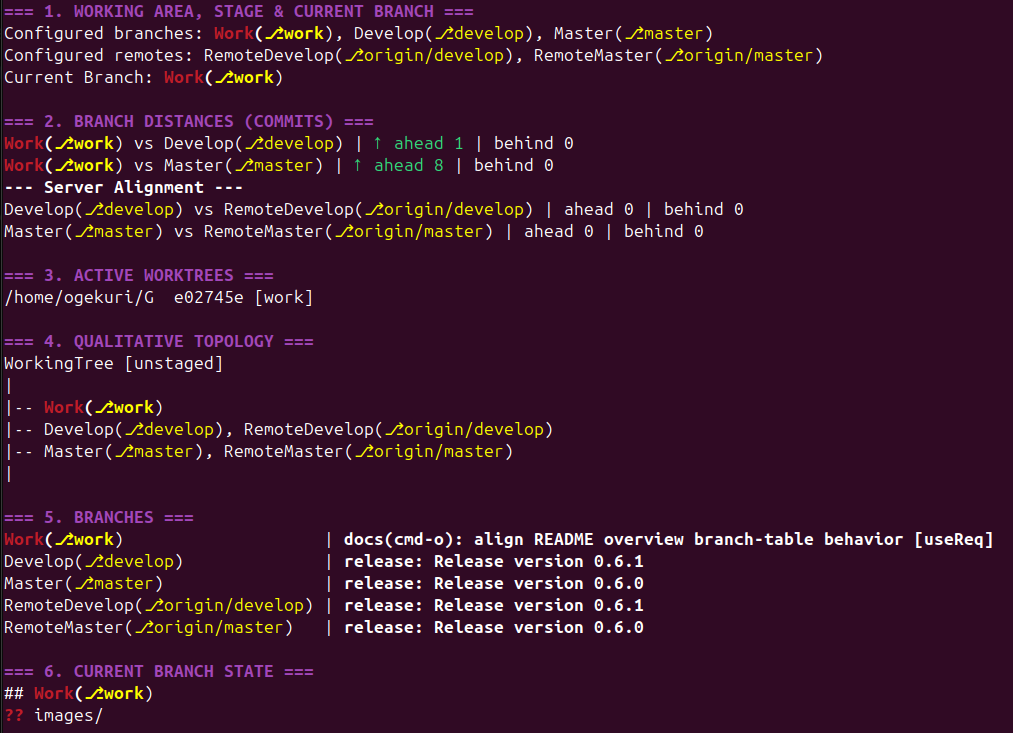
Provides an overview alias:
oprints a structured repository summary with working-tree status, branch divergence/alignment sections, and a branch table that lists configured branches first and then all other local/remote branches with latest commit subjects. -
Version management commands:
verchecks version consistency (supports--verbose/--debug),chver <major.minor.patch>updates files matched byver_rules, andchangeloggeneratesCHANGELOG.md(supports--include-patch,--force-write,--print-only,--disable-history). -
Self-upgrade and self-uninstall management commands are Linux-only for local execution (
--upgrade,--uninstall), with manual command hints on other platforms. -
Includes a quick overview command
o: -
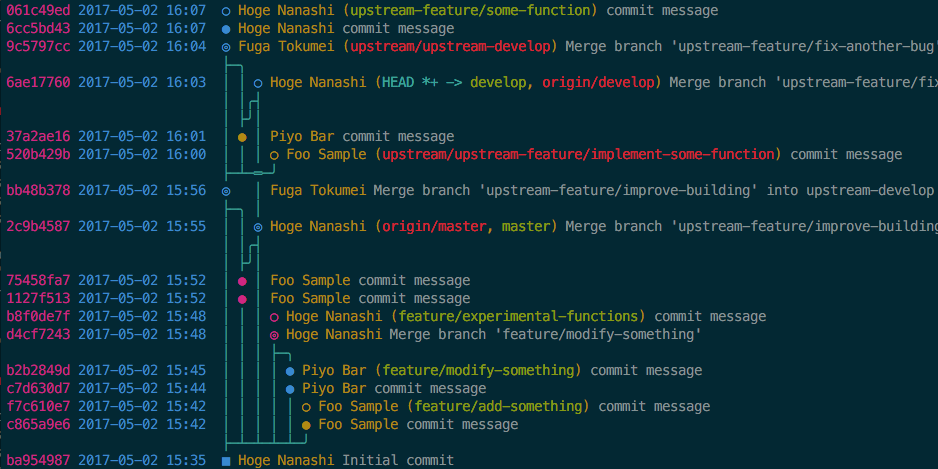
Includes git-foresta command
l:Options include
--all,--no-color,--no-status,--reverse,--wrap,--abbrev=<n>,--svdepth=<n>,--style=<n>,--graph-margin-left=<n>,--graph-margin-right=<n>, and--graph-symbol-*overrides.
Requirements
- Astral
uvtool is required for project execution (uv tool,uvx, anduv runflows). - A separate external or system-managed Python virtual environment is not required.
- When needed, you can generate a transient
requirements.txtfile with:uv export --format requirements-txt > requirements.txt
Quick Start
Prerequisites
- Supported runtime for the CLI: Linux, macOS, or Windows (with Git + Python 3.11+ available).
--upgradeinstalls from PyPI by default (--githubinstalls from GitHub) and--uninstallexecutes locally only on Linux; other platforms print the equivalent manualuv toolcommand.- Install the
uvtool from: https://docs.astral.sh/uv/getting-started/installation/
Install GAlias
- Primary Method: Astral uv (from PyPI)
uv tool install galias
- Alternative Method: uvx, run directly without installation (from PyPI)
uvx galias <command> [args...]
- Install from GitHub (intermediate and test releases)
uv tool install --force --from git+https://github.com/Ogekuri/GAlias galias
Upgrade to the latest version published on GitHub:
g --upgrade --github
- Run with the Repository-Local Launcher (no installation required)
scripts/g.sh <command> [args...]
Requires Astral uv in PATH: the launcher resolves the repository root and delegates execution to uv run --project <repo> python -m git_alias.
Create Configuration Files (.galias.conf + $HOME/.config/galias/config.json)
g --write-config
Edit Configuration Files
- Customize repository-local
.galias.confwithmaster,develop,work,default_commit_module, andver_rules. - Each
ver_rulesentry pairs apattern(file selector) with aregex(version extractor). ver_rules.patternuses the.gitignorefile syntax (gitignore(5)). Only tracked repository files (git ls-files) are candidates, and hardcoded cache/temporary paths (e.g..git,tmp,temp,.cache,.pytest_cache) are always excluded from matching. Semantics:- Patterns without
/match at any depth; patterns containing/are anchored to the repository root (a leading./is stripped). - A backslash escapes the next character and is never treated as a path separator (e.g.
\!file.txtmatches a file literally named!file.txt). - A pattern starting with
!is a negation rule: matching files are excluded from everyver_rulesmatch list; negation entries do not need aregexand are not evaluated for version detection. - A
patternthat matches zero repository files abortsverandchverwith an explicit error.
- Patterns without
Pattern examples (ver_rules.pattern, gitignore syntax):
pattern |
Matching behavior | Example matched files |
|---|---|---|
README.md |
No /: matches at any depth |
README.md, docs/README.md |
pyproject.toml |
No /: matches at any depth |
pyproject.toml, tools/pyproject.toml |
src/**/*.py |
Contains /: anchored to the repository root; ** spans any number of directories |
all .py files under src/ (e.g. src/git_alias/core.py) |
src/*.py |
Contains /: anchored to the repository root, direct children of src/ only |
src/main.py (not src/git_alias/core.py) |
docs/CHANGELOG.md |
Anchored exact repository path | docs/CHANGELOG.md only |
./pyproject.toml |
Leading ./ is stripped before matching |
equivalent to pyproject.toml (matches at any depth) |
!src/experimental/** |
Negation: excludes matched files from every rule's match list; no regex needed |
removes all files under src/experimental/ from the match lists |
\!file.txt |
Backslash escape: matches the next character literally | a file literally named !file.txt |
The default ver_rules select README.md, src/**/*.py, and pyproject.toml.
- Customize global
$HOME/.config/galias/config.jsonwithedit_command,gp_command, andgr_command. - Running
g --write-confignormalizes both files to these key sets and migrates legacy globaleditortoedit_command.
Work-in-Progress Commits
g st
g wip
g wip auto-stages tracked/untracked working-tree changes when the index is empty.
Override a wip Commit with a Final Commit
g new core: finalize release notes
Release a New Version (with all changes committed)
When your work branch is fully committed, release a new version with:
g minor
The command must run from the work branch with a clean working tree; it bumps versions per ver_rules, creates a temporary local annotated v<next> tag only for changelog generation, deletes that temporary tag after changelog generation, and creates the definitive tag immediately before push (--dev/--develop: on develop, then an atomic push of develop with the release tag only; default: on master, then an atomic push of master with the release tag after pushing develop).
Management Commands
Upgrade or uninstall the GAlias CLI:
g --upgrade/galias --upgrade: Reinstalls the tool from PyPI on Linux;g --upgrade --githubreinstalls from the GitHub repository; on non-Linux platforms it prints the equivalent manual command.g --uninstall/galias --uninstall: Uninstalls the tool on Linux; on non-Linux platforms it prints the equivalent manual command.g --write-config/galias --write-config: Inserts missing defaults into repository.galias.confand global$HOME/.config/galias/config.json.g --ver/g --version/galias --ver/galias --version: Prints the CLI version and the latest versions available on PyPI and GitHub.g --help/galias --help: Prints management commands, configuration parameters, and the alias list; useg --help <command>for a single command.
README Maintenance Policy
When a CLI command is added, modified, or removed, this README is updated to reflect user-facing usage changes. Internal logic-only refactoring that does not change command behavior does not require README updates.
CLI Examples
Some CLI examples:
g: PrintsPlease provide a command or --helpandUsage: g <command> [options].g --help/galias --help: Prints management commands, configuration parameters, and the alias list; useg --help <command>for a single command.g lg --help: Shows the help text for thelgalias.g cm "Message": Runsgit commitwith the provided message.g new api: add endpoint: Createsnew(api): Add endpoint.(first letter normalized to uppercase and a trailing period added when missing).g new add endpoint: Createsnew: Add endpoint.when.galias.conf.default_commit_moduleis empty.g wip: Auto-stages when needed and commitswip: work in progress..g backup: Merges configuredworkintodevelop, pushesdevelop, and checks out back towork.g get: Fast-forwards localmasteranddevelopfromoriginand then fast-forward mergesdevelopintowork.g str: Lists remotes and printsgit remote showdetails for each.g rollback v1.2.3: Reverts commits afterv1.2.3and createsrevert: Roll back branch to v1.2.3 (<hash>).; the application version detected before the rollback is preserved and restored viachverinside the rollback commit.g dcd: Runsgit difftool -d <develop> <work>using configured branch names.g dcm: Runsgit difftool -d <master> <work>using configured branch names.g ddm: Runsgit difftool -d <master> <develop>using configured branch names.g bd --force feature/demo: Removes the associated worktree first when present, then force-deletesfeature/demo.g wt list: Runsgit worktree list;wtforwards anygit worktreesubcommand/argument (e.g.g wt add <path> <branch>) unchanged.g wtl --porcelain: Lists worktrees viagit worktree list --porcelain;g wtprunsgit worktree prune.g wtd --force ../repo-worktree: Force-removes the target worktree; when it is associated to a local branch, the worktree is deleted before the branch.g ls -z: Lists tracked files usinggit ls-files --exclude-standard.g lsi -z: Lists ignored/untracked files usinggit ls-files --others --ignored --exclude-standardplus the default filter.g lsi --include-all -z: Lists all ignored/untracked files without the default filter.g o: Prints a verbose overview with status, branch distances, active worktrees, and a qualitative ASCII topology tree.g ver --verbose: Verifies version consistency with detailed output.g chver 1.2.3: Updates the project version to 1.2.3 usingver_rules.g changelog --print-only: Prints the generated changelog without writingCHANGELOG.md.
Acknowledgments
Special thanks to Jan Engelhardt and Takaaki Kasai, authors of the Perl git-foresta program, integrated in G.
1 maintainer

Metadata
1 maintainer
Release files for galias 0.49.0
For a detailed explanation of source distributions (sdists) and built distributions (wheels), please see the package formats documentation.
Source distribution (sdist)
| File | Size | Uploaded | Provenance | Actions |
|---|---|---|---|---|
| galias-0.49.0.tar.gz | 140.2 kB | With provenance | Details for galias-0.49.0.tar.gz |
Built distribution (wheel)
| File | Interpreter | ABI | Platform | Actions Reset |
|---|---|---|---|---|
| galias-0.49.0-py3-none-any.whl | Python 3 | none | any | Details for galias-0.49.0-py3-none-any.whl |
Total release size: 232.7 kB
Release files / galias-0.49.0.tar.gz
| Download URL | galias-0.49.0.tar.gz |
|---|---|
| Size | 140.2 kB |
| Tags | Source |
|
SHA-256 checksum How to use checksums |
08056ba07fc12b4bad3aa75644b9d7b516555d5d43700bc8cef0ef2e30c993e3
|
|
BLAKE2b-256 checksum How to use checksums |
5461c741847b6bc797de8622d5a1f94ff049c579534c1d3dae1ce7b6fe4030bf
|
| Upload date | |
|
Uploaded using Trusted Publishing? What is trusted publishing? |
Yes |
| Uploaded via |
twine/7.0.0 CPython/3.13.16
|
Provenance
Provenance describes where a file came from. On PyPI, provenance is shared via attestations, which provide a verifiable record of the build or publishing details. View details, limitations and caveats.


PyPI Publish Attestation
PyPI verified that this artifact, at this checksum, originated from the publisher listed below.
Signed by GitHub Actions, verified by PyPI on Nov 5, 2026.
Transparency logRelease files / galias-0.49.0-py3-none-any.whl
| Download URL | galias-0.49.0-py3-none-any.whl |
|---|---|
| Size | 92.4 kB |
| Tags | Python 3 |
|
SHA-256 checksum How to use checksums |
e52cbeb84311072154e56b0a8f61a1191ccca29be8b7ba4adddb9b9b8c6c311f
|
|
BLAKE2b-256 checksum How to use checksums |
29a7fba2b89caee6d1710e69bd0626509c58315d1c15aad94bd0ffa83f78a60b
|
| Upload date | |
|
Uploaded using Trusted Publishing? What is trusted publishing? |
Yes |
| Uploaded via |
twine/7.0.0 CPython/3.13.16
|
Provenance
Provenance describes where a file came from. On PyPI, provenance is shared via attestations, which provide a verifiable record of the build or publishing details. View details, limitations and caveats.
PyPI Publish Attestation
PyPI verified that this artifact, at this checksum, originated from the publisher listed below.
Signed by GitHub Actions, verified by PyPI on Nov 5, 2026.
Transparency logSecurity for galias 0.49.0
Provenance
Provenance describes where a file came from. On PyPI, provenance is shared via attestations, which provide a verifiable record of the build or publishing details. View details, limitations and caveats.
Full provenance
All 2 files in this release have been uploaded with provenance metadata.
Attestation for galias-0.49.0.tar.gz
PyPI Publish Attestation
PyPI verified that this artifact, at this checksum, originated from the publisher listed below.
Signed by GitHub Actions, verified by PyPI on Nov 5, 2026.
Transparency logA note on package security
PyPI is a repository for distributing packages, not a service for auditing them. While third-party security researchers and our staff do their best to detect and remove malicious packages, PyPI cannot guarantee the quality, security or suitability of any given package.
To learn more about protecting yourself from malicious actors, visit our package security documentation.














