
Web UI for downloading media with gallery-dl and yt-dlp.

Project description



gallery-dl-server
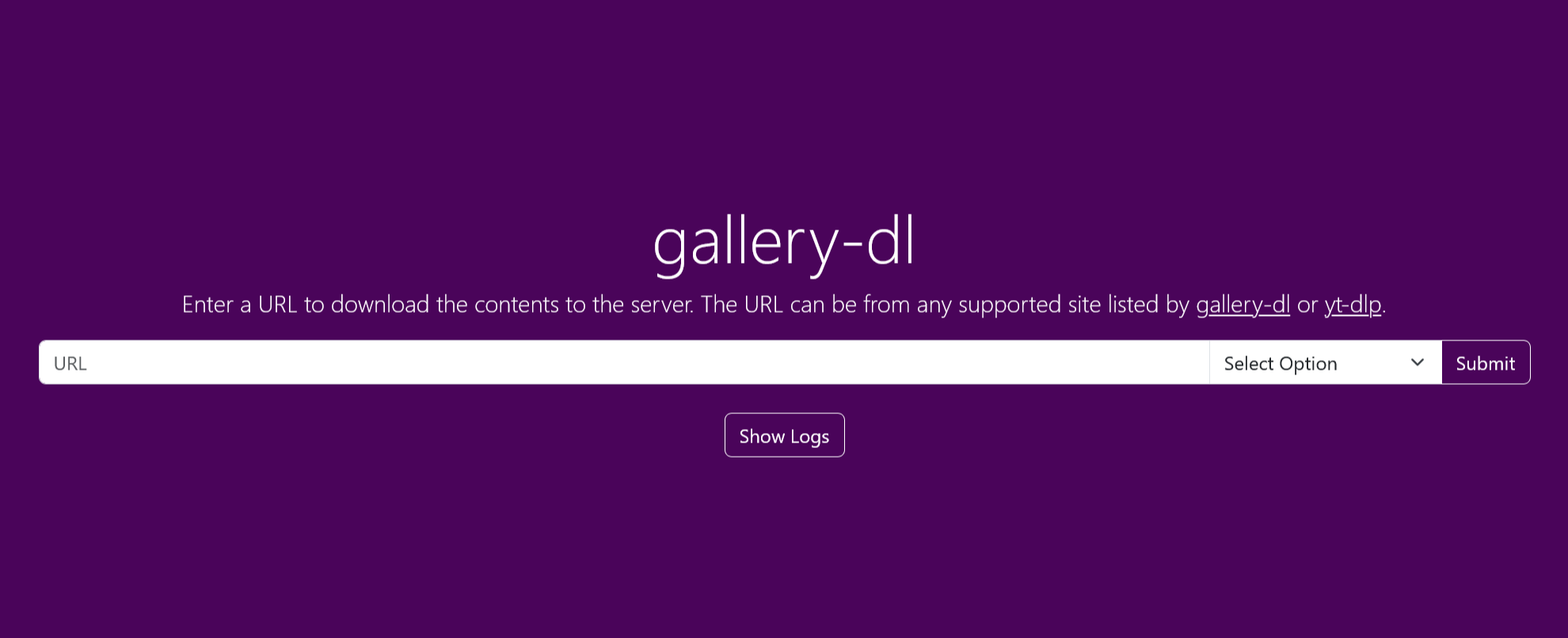
Web UI for gallery-dl with support for downloading videos via yt-dlp.
Running
Docker CLI
This example uses the docker run command to create the container to run the app.
docker run -d \
  --name gallery-dl \
  -p 9080:9080 \
  -e UID=1000 \
  -e GID=1000 \
  -v "/path/to/config:/config" \
  -v "/path/to/downloads:/gallery-dl" \
  --restart on-failure \
  qx6ghqkz/gallery-dl-server:latest
Docker Compose
This is an example service definition that could be put in docker-compose.yaml. This service uses a VPN client container for its networking.
Gluetun is recommended for VPN usage. See docs/docker-compose.yaml for a template.
services:
  gallery-dl:
    image: qx6ghqkz/gallery-dl-server:latest
    container_name: gallery-dl
    network_mode: container:vpn
    # ports:
    #   - 9080:9080
    environment:
      - UID=1000
      - GID=1000
    volumes:
      - "/path/to/config:/config"
      - "/path/to/downloads:/gallery-dl"
    restart: on-failure
Important Notes
-
Make sure you mount the directory containing the config file rather than the file itself. This ensures changes to the config file are propagated to the running Docker container and you will not need to restart the container. More information on this issue here.
-
The output download directory depends on the
base-directoryin your gallery-dl config file. Make sure it is the absolute path/gallery-dl/instead of the relative path./gallery-dl/or you will need to mount your download directory to/usr/src/app/gallery-dlinstead (not recommended). -
You can use the environment variables
UIDandGIDto change the user ID and group ID of the user running the server process. This is important because downloaded files will be owned by that user. Make sure the IDs match those of the user on your host system. The defaultUID:GIDis1000:1000when left unspecified.
Python
If you have Python 3.10 or later (3.12 is recommended) installed and on your PATH, you can simply run the server using the command line. Clone this repository and install the dependencies located in requirements.txt in a virtual environment.
Run the command below in the root folder while inside the virtual environment. On Windows, replace python3 with python.
python3 -m gallery_dl_server --host "0.0.0.0" --port "9080"
The command-line arguments are optional. By default, the server will run on host 0.0.0.0 and an available port will be selected if one is not provided.
To view the full list of command-line arguments, perform python3 -m gallery_dl_server -h. These arguments can also be specified as environment variables.
Installation
The package can be installed with Python along with its dependencies by performing pip install . in the root directory of the repository. To install optional dependencies, perform pip install .[full]. It is recommended to install in a virtual environment to avoid dependency conflicts.
Installation will allow running directly from the command line via the command gallery-dl-server. The log file will be created directly in the home directory of the user as long as the package is not in the current working directory.
Standalone Executable
On Windows, the program can be run using the prebuilt executable (.exe) file, which includes a Python interpreter and the required Python packages. Prebuilt executables for each release can be found in Releases.
By default, any available port will be selected. To select a specific port, run the executable from the command line and specify the port, and optionally host, as a command-line argument.
gallery-dl-server.exe --host "0.0.0.0" --port "9080"
When run as an executable, the log file will be created in a logs folder in the same directory as the executable. Configuration files can also be loaded from the same directory as the executable. The bundled releases contain a default configuration file in JSON, YAML and TOML formats.
Dependencies
All required and optional Python and non-Python dependencies are included in the Docker image and will be available in the running container, however if you are running gallery-dl-server using any of the other methods, i.e. not with a Docker container, there are some considerations.
In order to run with Python, the dependencies in requirements.txt need to be installed in the running Python environment. These Python dependencies are included in the standalone executable and do not need to be installed.
Installation with pip install . only installs the required dependencies. To install all dependencies, including optional dependencies, use pip install .[full].
Optional Dependencies
- brotli or brotlicffi: Brotli content encoding support
- mutagen: embed metadata and thumbnails in certain formats
- pycryptodomex: decrypt AES-128 HLS streams and other forms of data
- pyyaml: YAML configuration file support
- toml: TOML configuration file support (<= Python 3.10 only)
Non-Python dependencies are not included in any form. The most important of these and strongly recommended is FFmpeg, which is required primarily by yt-dlp for video and audio conversion and should be accessible from the command line, i.e. on the PATH. There is also MKVToolNix, which includes mkvmerge for accurate Ugoira frame timecodes.
Dependencies for gallery-dl and yt-dlp are documented in their respective repositories. The majority of these are optional Python dependencies and can safely be ignored, however the strongly recommended dependencies should be installed.
Port Mapping
By default, this service listens on port 9080. You can use any value for the host port, but if you would like to map to a different internal container port, you need to set the CONTAINER_PORT environment variable. This can be done using the -e flag with docker run or in a Docker Compose file.
For example, if you need to run multiple instances of gallery-dl-server using Gluetun for the networking (every instance must use a different internal port), you can specify an internal port other than the default 9080.
All services defined in the same docker-compose.yaml file:
services:
  gallery-dl:
    image: qx6ghqkz/gallery-dl-server:latest
    container_name: gallery-dl
    depends_on:
      - gluetun
    network_mode: service:gluetun
    ...

  gallery-dl-2:
    image: qx6ghqkz/gallery-dl-server:latest
    container_name: gallery-dl-2
    environment:
      - CONTAINER_PORT=9090
    depends_on:
      - gluetun
    network_mode: service:gluetun
    ...

  gluetun:
    image: qmcgaw/gluetun:latest
    container_name: gluetun
    ports:
      # gallery-dl
      - 9080:9080
      # gallery-dl-2
      - 9090:9090
    ...
Configuration
Configuration of gallery-dl is as documented in the official documentation. A configuration file is required.
If run outside of Docker, the default locations will be used to search for a configuration file. If run as an executable, the current directory will also be searched for a valid configuration file.
Additionally, YAML and TOML configuration files are supported at any of the pre-defined locations.
When run with Docker, the configuration file must be mounted inside the /config directory inside the container.
Locations
/config/gallery-dl.conf/config/gallery-dl.{yaml, yml}/config/gallery-dl.toml/config/config.json/config/config.{yaml, yml}/config/config.toml
A default configuration file for use with gallery-dl-server has been provided and will automatically be placed in the directory mounted to /config if no valid configuration file exists in that location.
For more information on configuration file options, see gallery-dl/docs/configuration.rst.
Any additional locations specified in the configuration file must also exist inside the Docker container. For example, if you specify a cookies file location, ensure that location is accessible from within the Docker container.
It is recommended you place any additional files such as archive, cache and cookies files inside the same directory mounted to /config along with the configuration file.
Usage
Start a download remotely
Downloads can be triggered by supplying the {{url}} of the requested video through the Web UI or through the REST interface via curl, etc.
HTML
Just navigate to http://{{host}}:9080/gallery-dl and enter the requested {{url}}.
Curl
curl -X POST --data-urlencode "url={{url}}" http://{{host}}:9080/gallery-dl/q
Fetch
fetch(`http://${host}:9080/gallery-dl/q`, {
  method: "POST",
  body: new URLSearchParams({
    url: url
  }),
});
Bookmarklet
Add the following bookmarklet to your bookmark bar so you can conveniently send the current page URL to your gallery-dl-server instance.
javascript:!function(){fetch("http://${host}:9080/gallery-dl/q",{body:new URLSearchParams({url:window.location.href}),method:"POST"})}();
Implementation
The server uses starlette for the web framework with gallery-dl and yt-dlp to handle the downloading. The integration with gallery-dl uses Python as described here. For video downloads, gallery-dl imports yt-dlp.
The Docker image is based on python:alpine and consequently alpine.
Useful Links
gallery-dl
- Documentation: gallery-dl/README.rst
- Config file outline: gallery-dl/wiki/config-file-outline
- Configuration options: gallery-dl/docs/configuration.rst
- List of supported sites: gallery-dl/docs/supportedsites.md
yt-dlp
- Documentation: yt-dlp/README.md
- List of supported sites: yt-dlp/supportedsites.md
- List of extractors: yt-dlp/yt_dlp/extractor/_extractors.py
Issues


Download files
Download the file for your platform. If you're not sure which to choose, learn more about installing packages.
Source Distribution
Built Distribution
Filter files by name, interpreter, ABI, and platform.
If you're not sure about the file name format, learn more about wheel file names.
Copy a direct link to the current filters
File details
Details for the file gallery_dl_server-0.7.0.tar.gz.
File metadata
- Download URL: gallery_dl_server-0.7.0.tar.gz
- Upload date:
- Size: 156.9 kB
- Tags: Source
- Uploaded using Trusted Publishing? No
- Uploaded via: twine/6.1.0 CPython/3.12.4
File hashes
| Algorithm | Hash digest | |
|---|---|---|
| SHA256 |
49eecba0df885d66d7973ea46e126fb5e3a401ce029e291690fc3072f4bcd917
|
|
| MD5 |
7b68bca8ef99066a346d3231587d346b
|
|
| BLAKE2b-256 |
ff79dbec991626d3ab4b81e8b89ce8e04c3bcfa5fdf52700ebb17788da1fbee7
|
File details
Details for the file gallery_dl_server-0.7.0-py3-none-any.whl.
File metadata
- Download URL: gallery_dl_server-0.7.0-py3-none-any.whl
- Upload date:
- Size: 144.6 kB
- Tags: Python 3
- Uploaded using Trusted Publishing? No
- Uploaded via: twine/6.1.0 CPython/3.12.4
File hashes
| Algorithm | Hash digest | |
|---|---|---|
| SHA256 |
d4d444fc30ab72b2f4c91c0481086cc075e55945cd5968d47b94e297e0298297
|
|
| MD5 |
38ee4d93591d3ae639e64a9a98976eb1
|
|
| BLAKE2b-256 |
0dcec2532ceb4ae87f6dc23f5e2b6c6bbb8c9ec768c5af0b04bbd480ab83529e
|






