


Gamepadla+ is a program for measuring the polling rate and synthetic latency of gamepads aka. controllers.
- Supports DInput and XInput
- Provides CLI (Command Line Interface) and GUI (Graphical User Interface)
- Shows polling rate and latency metrics

Installation
Windows
Microsoft Store (Recommended)

Installer

Portable Builds
See the "Assets" section on the release page:

From Source
Using uv:
uv tool install --python 3.11 gamepadla-plus@1.9.0
Linux
Snap (Recommended)
If you are no using Ubuntu, Manjaro or Solus you'll likely have to install snapd first.
sudo snap install gamepadla-plus
sudo snap connect gamepadla-plus:joystick
AppImages and Portable Builds
See the "Assets" section on the release page:
From Source
Using uv:
uv tool install --python 3.11 gamepadla-plus@1.9.0
macOS
From Source
Using uv:
uv tool install --python 3.11 gamepadla-plus@1.9.0
Usage (GUI)
- Execute the program
Gamepadla+without any arguments. - If you haven't connected any controller do it now and click
Refresh. - Click
Testand rotate the stick you chose fast in a circle. - Optionally save the result to a JSON file or upload the result to <gamepadla.com>.
Usage (CLI)
# gamepadla-plus --help

 Usage: gamepadla-plus [OPTIONS] COMMAND [ARGS]...

 Gamepad latency and polling rate tester.

╭─ Options ──────────────────────────────────────────────────────────────────────────────────────────────────────────╮
│ --install-completion          Install completion for the current shell.                                            │
│ --show-completion             Show completion for the current shell, to copy it or customize the installation.     │
│ --help                        Show this message and exit.                                                          │
╰────────────────────────────────────────────────────────────────────────────────────────────────────────────────────╯
╭─ Commands ─────────────────────────────────────────────────────────────────────────────────────────────────────────╮
│ list   List controller id's.                                                                                       │
│ test   Test controller with id.                                                                                    │
╰────────────────────────────────────────────────────────────────────────────────────────────────────────────────────╯
Getting Started
- List all controllers connected with:
gamepadla-plus list
# gamepadla-plus list
Found 1 controllers
0. Xbox 360 Controller
- Test the controller with the id from step one (
testdefaults to id 0):
gamepadla-plus test 0
equals here
gamepadla-plus test
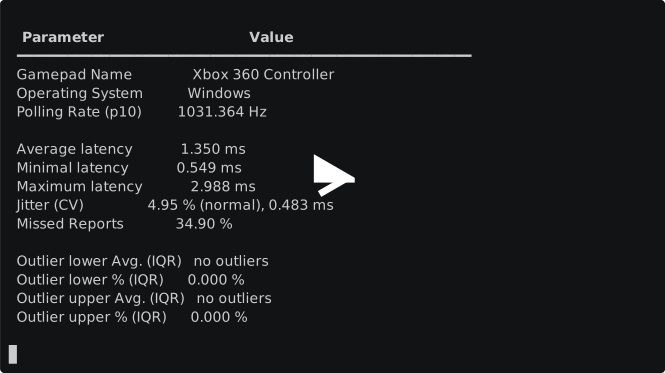
# gamepadla-plus test
100%|████████████████████████████████████████████████████████████ | 00.97 ms


  Parameter                  Value
 ━━━━━━━━━━━━━━━━━━━━━━━━━━━━━━━━━━━━━━━━━━━━━━━━━━━━━━
  Gamepad Name               Xbox 360 Controller
  Operating System           Windows
  Polling Rate (p10)         1051.635 Hz

  Average latency            1.001 ms
  Minimal latency            0.879 ms
  Maximum latency            1.127 ms
  Jitter (CV)                4.31 % (normal), 0.043 ms
  Missed Reports             5.80 %

  Outlier lower Avg. (IQR)   0.657 ms
  Outlier lower % (IQR)      9.600 %
  Outlier upper Avg. (IQR)   1.922 ms
  Outlier upper % (IQR)      10.900 %
Options
Test Right Stick
gamepadla-plus test --stick right
Write Result to JSON File
gamepadla-plus test --out data.json
Upload Result to <gamepadla.com>
gamepadla-plus test --upload
Disclaimer
Gamepadla+ measures the delay between successive changes in the position of the analog stick on the gamepad, rather than the traditional input latency, which measures the time between pressing a button on the gamepad and a response in a program or game.
This method of measurement can be affected by various factors, including the quality of the gamepad, the speed of the computer's processor, the speed of event processing in the Pygame library, and so on.
Therefore, although Gamepadla+ can give a general idea of the "response" of a gamepad, it cannot accurately measure input latency in the traditional sense. The results obtained from Gamepadla+ should be used as a guide, not as an exact measurement of input latency.
Contributors
- 2024-2026 Adam McKellar
- 2022-2024 John Punch

Notable Mentions
Gamepadla+ or gamepadla-plus is a hard fork of Gamepadla (known as Polling now).
The testing is based on the method of Christian P.: https://github.com/chrizonix/XInputTest.
Misc.
Result Upload Functionality to gamepadla.com
The upload functionality to gamepadla.com is compatible with Polling v1.3.1.4.
License
Licensed under MIT.
Contributing
Please have a look at DEVELOPMENT.md.
1 maintainer

Metadata
1 maintainer
Release files for gamepadla-plus 1.9.0
For a detailed explanation of source distributions (sdists) and built distributions (wheels), please see the package formats documentation.
Source distribution (sdist)
| File | Size | Uploaded | |
|---|---|---|---|
| gamepadla_plus-1.9.0.tar.gz | 17.8 kB | Details |
Built distribution (wheel)
| File | Interpreter | ABI | Platform | Reset |
|---|---|---|---|---|
| gamepadla_plus-1.9.0-py3-none-any.whl | Python 3 | none | any | Details |
Total release size: 35.6 kB
Release files / gamepadla_plus-1.9.0.tar.gz
| Download URL | gamepadla_plus-1.9.0.tar.gz |
|---|---|
| Size | 17.8 kB |
| Tags | Source |
|
SHA-256 checksum How to use checksums |
2e9989629738aebb7747f4cc77b90af5698c3b6f7e478a139f1589292487d53c
|
|
BLAKE2b-256 checksum How to use checksums |
d0caf0040e1062839209a2bd41cfd558e76abe294f4ff6518f517550b3eca9ed
|
| Upload date | |
|
Uploaded using Trusted Publishing? What is trusted publishing? |
Yes |
| Uploaded via |
uv/0.12.9 {"installer":{"name":"uv","version":"0.12.9","subcommand":["publish"]},"python":null,"implementation":{"name":null,"version":null},"distro":{"name":"Ubuntu","version":"24.04","id":"noble","libc":null},"system":{"name":null,"release":null},"cpu":null,"openssl_version":null,"setuptools_version":null,"rustc_version":null,"ci":true}
|
Provenance
Provenance describes where a file came from. On PyPI, provenance is shared via attestations, which provide a verifiable record of the build or publishing details. View details, limitations and caveats.


PyPI Publish Attestation
PyPI verified that this artifact, at this checksum, originated from the publisher listed below.
Signed by GitHub Actions, verified by PyPI on Sep 3, 2026.
Transparency logRelease files / gamepadla_plus-1.9.0-py3-none-any.whl
| Download URL | gamepadla_plus-1.9.0-py3-none-any.whl |
|---|---|
| Size | 17.8 kB |
| Tags | Python 3 |
|
SHA-256 checksum How to use checksums |
db422537e3953a37791edb05c090b38489ccedf892dab8557b5733dd387d0937
|
|
BLAKE2b-256 checksum How to use checksums |
229630c8c29728f863b3ac04a035ac4a46c040fb75e1fead96973e8d3ee44596
|
| Upload date | |
|
Uploaded using Trusted Publishing? What is trusted publishing? |
Yes |
| Uploaded via |
uv/0.12.9 {"installer":{"name":"uv","version":"0.12.9","subcommand":["publish"]},"python":null,"implementation":{"name":null,"version":null},"distro":{"name":"Ubuntu","version":"24.04","id":"noble","libc":null},"system":{"name":null,"release":null},"cpu":null,"openssl_version":null,"setuptools_version":null,"rustc_version":null,"ci":true}
|
Provenance
Provenance describes where a file came from. On PyPI, provenance is shared via attestations, which provide a verifiable record of the build or publishing details. View details, limitations and caveats.
PyPI Publish Attestation
PyPI verified that this artifact, at this checksum, originated from the publisher listed below.
Signed by GitHub Actions, verified by PyPI on Sep 3, 2026.
Transparency log













