
Game inventory




English | Español
Scan the folders where your games are installed, cross the disk size with the main-story hours and build an Excel workbook with the GB per hour ratio, a deletion plan, the history and the wishlist. The console and the workbook are available in English and Spanish.
What it does
- Scans the drives and folders configured in
inventory/config.pyand measures every game on disk. - Fills missing hours from the network (Deku Deals, twoaveragegamers and an estimate from Steam reviews), the Metascore and, when there is no Metascore, the share of positive Steam reviews.
- Purges from
hours.jsonthe keys of games that are no longer installed, only when every drive is present. - Builds the Excel workbook with up to six sheets: Games, Space, Summary, Plan, History and Wishlist.
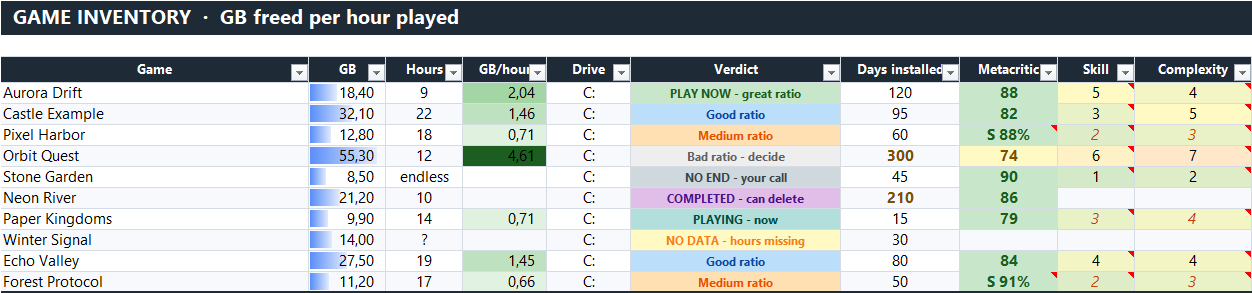
Example workbook with fictional games. The personal paths column is not shown.
Requirements
- Python 3.12 or newer.
openpyxl(seerequirements.txt).- Network access is optional:
--offlineskips every request. - The default libraries are Windows paths;
data/config.jsonadapts them to any system.
Limitations
- Hours are main-story estimates from third-party pages (Deku Deals, twoaveragegamers and Steam reviews). Those pages can change, rate-limit or block requests, and title matching can miss a game or pick another edition.
- With
--offlinethere are no requests at all, so missing hours, Metascores and Steam percentages stay empty. The rest of the workbook is still built. - Metascore and the Steam percentage use different scales and are never mixed into one number.
- It does not measure real playtime, achievements, save files, DLC owned separately, cloud libraries that are not installed, or games outside the configured folders.
- Folder size is the size on disk, not the download size. Compression, sparse files and hard links can make them differ.
- The verdicts are a suggestion based on GB per hour and the quartiles of the current list, not a recommendation.
- The default libraries are Windows paths; other systems need
data/config.json. - Some workbook dates are formulas, so Excel or LibreOffice has to recalculate after opening.
- Network access is best effort: there is a request budget and stored data, but no guarantee that a source answers.
- It never uninstalls or deletes a game. The purge only removes stale keys from
hours.json, after a backup.
Tests
py -m venv .venv
.venv\Scripts\activate
py -m pip install -e ".[dev]"
py -m unittest discover -s tests
Run from the repository root. Without openpyxl, three test modules fail at import with ModuleNotFoundError: No module named 'openpyxl'; that is a missing dependency, not a failing test. pip install -e . or pip install -r requirements.txt installs it. Reproduced on 2026-11-23: a clean venv reported 3 import errors from the missing dependency, and after installing requirements.txt the same command ran 259 tests with OK.
Install as a package
The distribution is gamesize, because PyPI rejected game-inventory as too
similar to an existing project. The command is still game-inventory and the
import package is still inventory.
pip install gamesize
game-inventory --lang es
From the repository, py -m pip install . works the same. If the package is
already installed, running the script from the repository with py -m pip
install -e . gives the editable version.
The direct script and module commands below also work without installing. When installed, data/ is read from the current folder unless GAME_INVENTORY_DATA points to another one.
Or as an isolated command with pipx:
pipx install gamesize
game-inventory --version
Usage
cd C:\Dev\game-inventory
py -m pip install -r requirements.txt
py generate_inventory.py
Or as a module, from the same folder:
py -m inventory
Or double-click start.cmd. It saves the output to data/last_run.log and keeps the window open when there is an error.
Options:
| Option | What it does |
|---|---|
--lang en|es |
Output language for the console and the workbook. Default: en. |
--offline, --sin-red |
Do not use the network. |
--keep, --conservar |
Do not purge uninstalled game keys. |
--force-purge, --forzar-purga |
Allow purging more than half of the keys at once. |
--dry-run, --simular |
Scan and show the summary without writing anything. |
--top N |
Show the N best GB/h picks that are not completed or playing (0 disables it). |
--report PATH, --informe PATH |
Write a Markdown summary after the run. It cannot be inside data/ or use the workbook path. |
--open, --abrir |
Open the saved workbook with the default application. |
--check-data, --validar |
Validate the JSON data files, stale metadata keys, invalid metadata values, repeated wishlist titles and the history, then exit. |
--strict, --estricto |
With --check-data, exit with code 1 when warnings are found. |
--output PATH, --salida PATH |
Write the Excel workbook to another path. |
--version |
Show the installed version. |
The workbook is written by default to %USERPROFILE%\Desktop\Juegos\Inventario juegos GB por hora.xlsx and keeps a .bak.xlsx copy of the previous run. The Spanish file name is kept so the existing workbook is updated in place. Close the workbook before running, otherwise the script stops before scanning anything.
Exit codes: 0 success, 1 aborted or invalid data, 130 cancelled with Ctrl+C.
GAME_INVENTORY_LANG=es changes the default language; --lang still wins.
Data
All personal data lives in data/, which is not versioned. The script creates the folder when it does not exist.
| File | Content |
|---|---|
data/hours.json |
Main-story hours by normalized key. null = no end. The _metacritic, _steam, _dificultad and _notas blocks keep the notes. |
data/wishlist.json |
Wishlist titles with hours, notes, Metacritic, Steam and difficulty. |
data/playing.json |
Keys of the games you are playing now. |
data/completed.json |
Keys of the games you finished but still have installed. |
data/history.csv |
One row per run day. It feeds the History sheet. |
data/config.json |
Optional. Overrides the libraries, loose paths, exclusions and output path. |
The source notes inside the JSON files keep the language they were written in.
Robustness
-
A syntax error in a JSON file aborts the run, shows the line and column, and writes nothing.
-
Hours that are not positive numbers,
nullor"?"are treated as no data and reported. -
JSON, history and the workbook are written to a temporary file and renamed, so a mid-write failure leaves no corrupt file.
-
The purge keeps
hours.json.bakand refuses to remove more than half of the keys without--force-purge. -
If the history cannot be read or has broken rows, the original is kept as
history.csv.corrupto. -
If the workbook is open, the script stops before scanning.
-
Only one run can be active at a time, enforced by a lock in
data/. -
BOM-prefixed JSON is accepted and broken history rows are skipped with a warning.
-
--dry-runscans and prints the summary but writes no workbook, history or JSON.
Troubleshooting
| Symptom | What to do |
|---|---|
ABORTED: the Excel file is open |
Close the workbook and run again. Nothing has been scanned. |
ABORTED: another inventory run is in progress |
Wait for the other run. The lock lives in data/. |
is not valid JSON (line ..., column ...) |
Fix that line or restore a backup of the file. |
Warning: cannot read history.csv |
The original is kept as history.csv.corrupto and the run writes a clean one. |
| A game is missing | Add its folder to libraries or loose_paths in data/config.json. |
| Every game shows NO DATA | hours.json is missing or its keys do not match the folder names. Run --check-data. |
Structure
generate_inventory.py      entry point
pyproject.toml             package metadata and console script
CHANGELOG.md               English changelog
CONTRIBUTING.md            English contributing guide
SECURITY.md                English security policy
docs/
  DATA.md                  data formats and backups
  ARCHITECTURE.md          flow, modules and guarantees
  EXAMPLES.md              console, workbook and data folder examples
  FAQ.md                   common questions
  BENCHMARKS.md            measured scan and workbook times
  PUBLISHING.md            build, PyPI and trusted publishing
tools/
  check_all.py             runs pyflakes, link and translation checks
  check_dist.py            checks the wheel and sdist contents
  check_release.py         checks a release tag against the changelogs
  check_links.py           checks relative links in the docs
inventory/
  config.py                drives, paths and network settings
  data.py                  JSON: loading, formatting and safe writing
  scan.py                  size, days installed and workbook lock
  cell_format.py           cells: Metacritic, Steam and difficulty
  excel.py                 sheets, styles, charts and comparisons
  network.py               network autocomplete
  i18n.py                  English and Spanish strings
  cli.py                   options, orchestration and console summary
tests/                     unit and end-to-end tests
start.cmd                  Windows launcher
Documentation
README.es.md is the Spanish version. The personal notes with sources and decisions live in data/NOTES.md, which is not versioned.
- Changelog / Registro de cambios
- Contributing / Contribuir
- Data formats / Formatos de datos
- Architecture / Arquitectura
- Examples / Ejemplos
- FAQ / Preguntas frecuentes
- Benchmarks / Rendimiento
- Publishing / Publicación
- Security / Seguridad
License
MIT. See LICENSE.
1 maintainer

Metadata
1 maintainer
Release files for gamesize 1.0.1
For a detailed explanation of source distributions (sdists) and built distributions (wheels), please see the package formats documentation.
Source distribution (sdist)
| File | Size | Uploaded | Provenance | Actions |
|---|---|---|---|---|
| gamesize-1.0.1.tar.gz | 135.9 kB | Without provenance | Details for gamesize-1.0.1.tar.gz |
Built distribution (wheel)
| File | Interpreter | ABI | Platform | Actions Reset |
|---|---|---|---|---|
| gamesize-1.0.1-py3-none-any.whl | Python 3 | none | any | Details for gamesize-1.0.1-py3-none-any.whl |
Total release size: 189.8 kB
Release files / gamesize-1.0.1.tar.gz
| Download URL | gamesize-1.0.1.tar.gz |
|---|---|
| Size | 135.9 kB |
| Tags | Source |
|
SHA-256 checksum How to use checksums |
71cdb5b9e6d92f121009678eb8a100eb7fc382e14a0876c5184fc73c9d987601
|
|
BLAKE2b-256 checksum How to use checksums |
e1eaae18cddcb6ccb6e001f951def9ab46cd7ee62e84a40b79eb967d767d92be
|
| Upload date | |
|
Uploaded using Trusted Publishing? What is trusted publishing? |
No |
| Uploaded via |
twine/7.0.0 CPython/3.12.10
|
Release files / gamesize-1.0.1-py3-none-any.whl
| Download URL | gamesize-1.0.1-py3-none-any.whl |
|---|---|
| Size | 53.9 kB |
| Tags | Python 3 |
|
SHA-256 checksum How to use checksums |
b8ad47927adbddaae8dea2b37252ee6ea8bb52d1ab589c0c56a0cbc4d95753aa
|
|
BLAKE2b-256 checksum How to use checksums |
5cedfa199354b3abb3a65c90f604b0a2e4e0b17a5882595c387ff982acbe5990
|
| Upload date | |
|
Uploaded using Trusted Publishing? What is trusted publishing? |
No |
| Uploaded via |
twine/7.0.0 CPython/3.12.10
|
Security for gamesize 1.0.1
Provenance
Provenance describes where a file came from. On PyPI, provenance is shared via attestations, which provide a verifiable record of the build or publishing details. View details, limitations and caveats.
No provenance found
None of the files in this release were uploaded with provenance metadata.
A note on package security
PyPI is a repository for distributing packages, not a service for auditing them. While third-party security researchers and our staff do their best to detect and remove malicious packages, PyPI cannot guarantee the quality, security or suitability of any given package.
To learn more about protecting yourself from malicious actors, visit our package security documentation.














