

An open file format for parametric simulation studies,
with libraries for Python, MATLAB, Julia, C++ and C.

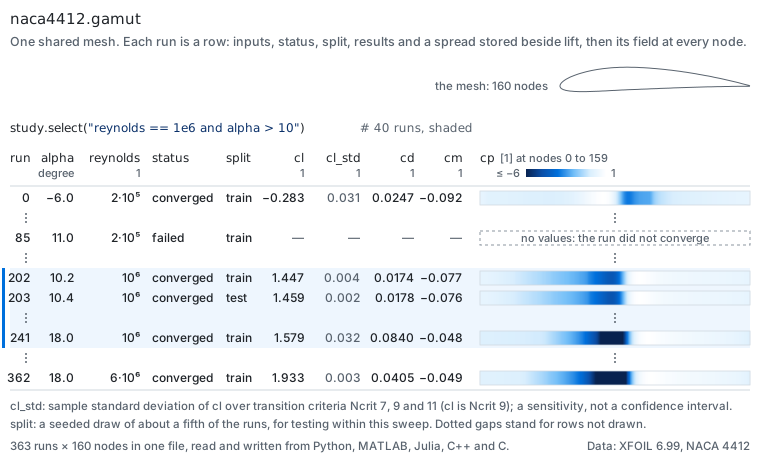
Gamut is a file format for parametric simulation studies: the hundreds or thousands of CFD or FEA runs behind a design sweep, an aerodynamic database or a surrogate model. One file holds the run table, each run's inputs, results and status, and, when the runs have a mesh, the mesh and every field on it, all with units. Python, MATLAB, Julia and C++ read and write it with the same calls. A model fitted to the runs is saved the same way, as plain numbers with no code, and evaluated on new inputs. Files are HDF5 laid out as netCDF-4, so h5py, xarray and the netCDF tools open them too, and a published specification says what every array in them means.
Example
A sweep of a wing's angle of attack: six runs written, a seventh added
later, and the lift of the runs that converged read back, as a model
fitted to the study would read it. solve stands for your solver; the
complete programs are in examples/.
Python
with gamut.create("sweep.gamut", writer="example sweep",
                   parameters={"alpha": {"units": "degree", "role": "condition"}},
                   labels={"status": {"role": "status", "categories": ["converged", "failed"]}},
                   scalars={"cl": "1"}) as study:
    for alpha in range(0, 11, 2):
        study.add_run({"alpha": alpha, "status": "converged", "cl": solve(alpha)})

with gamut.open("sweep.gamut", mode="a") as study:
    study.add_run({"alpha": 12, "status": "failed"})

with gamut.open("sweep.gamut") as study:
    cl = study.get_scalar("cl", rows=study.select("status == converged"))
MATLAB
study = gamut.create('sweep.gamut', 'writer', 'example sweep', ...
    'parameters', struct('alpha', struct('units', 'degree', 'role', 'condition')), ...
    'labels', struct('status', struct('role', 'status', 'categories', {{'converged', 'failed'}})), ...
    'scalars', struct('cl', '1'));
for alpha = 0:2:10
    study.addRun(struct('alpha', alpha, 'status', 'converged', 'cl', solve(alpha)));
end
study.close();

study = gamut.open('sweep.gamut', 'mode', 'a');
study.addRun(struct('alpha', 12, 'status', 'failed'));
study.close();

study = gamut.open('sweep.gamut');
cl = study.getScalar('cl', 'rows', study.select('status == converged'));
study.close();
Julia
Gamut.create("sweep.gamut"; writer="example sweep",
              parameters=Dict("alpha" => (units="degree", role="condition")),
              labels=Dict("status" => (role="status", categories=["converged", "failed"])),
              scalars=Dict("cl" => "1")) do study
    for alpha in 0.0:2.0:10.0
        Gamut.add_run!(study, Dict("alpha" => alpha, "status" => "converged", "cl" => solve(alpha)))
    end
end

Gamut.open("sweep.gamut"; mode="a") do study
    Gamut.add_run!(study, Dict("alpha" => 12.0, "status" => "failed"))
end

cl = Gamut.open("sweep.gamut") do study
    Gamut.get_scalar(study, "cl"; rows=Gamut.select(study, "status == converged"))
end
C++
auto study = gamut::create("sweep.gamut", "example sweep");
study.declare_parameter("alpha", "condition", "degree");
study.declare_label("status", "status", {"converged", "failed"});
study.declare_scalar("cl", "1");
for (double alpha = 0.0; alpha <= 10.0; alpha += 2.0)
  study.add_run({{"alpha", alpha}, {"status", "converged"}, {"cl", solve(alpha)}});
study.close();

study = gamut::open("sweep.gamut", "a");
study.add_run({{"alpha", 12.0}, {"status", "failed"}});
study.close();

study = gamut::open("sweep.gamut");
const std::vector<double> cl = study.get_scalar("cl", study.select("status == converged"));
All four print the same line:
lift of the runs that converged: 0.00 0.22 0.44 0.66 0.88 1.10
Every name is declared once, with its units and role, and each run then
gives its values; the failed run has no lift, so it is stored as missing.
select returns the positions of the rows it picks, counted from 0 in
Python and C++ and from 1 in MATLAB and Julia.
With a mesh
When every run has the same mesh, the file stores the mesh once and each field as one block of runs × nodes, so one run, one region of every run or one node across all of them is a single read. The declaration adds the mesh, its coordinates and its zones, and the fields:
with gamut.create("cylinder.gamut", writer="example sweep", mesh="shared", per="fixed",
                   coordinates={"units": "m", "axes": 2},
                   parameters={"gamma": {"units": "m2 s-1", "role": "design"}},
                   mesh_labels={"surface": {"at": "node", "categories": ["field", "wall"]}},
                   fields={"cp": {"units": "1", "at": "node"}}) as study:
    study.set_mesh(points, cells, labels={"surface": surface})
Each run then brings its fields, study.add_run({"gamma": gamma}, fields={"cp": cp}), and study.get_field("cp") returns runs × nodes
(one mesh).
A model in a file
A model fitted to the sweep is saved in the same format: a file with no
runs, whose parameter keeps the range of angles the model was fitted on
and whose result names the model that computes it. Here a quadratic is
fitted in Python to the angles and lifts of the runs that converged,
alpha and cl, and saved:
with gamut.create_model("lift_model.gamut", writer="example fit", trained_on=[sweep_id],
                         parameters={"alpha": {"units": "degree", "lower": 0.0, "upper": 10.0}},
                         scalars={"cl": {"units": "1", "model": "fit", "output": "cl"}}) as model:
    model.add_model("fit", Polynomial(np.polyfit(alpha, cl, 2)), inputs=["alpha"])
MATLAB evaluates the file with no Python involved:
gamut.registerModelType('Polynomial');
answer = gamut.evaluate('lift_model.gamut', struct('alpha', [2.2; 7.9]));
lift = answer.getScalar('cl');
answer.close();
the model's lift at 2.2 and 7.9 degrees: 0.24 0.87
The file holds the quadratic's three coefficients, not code. Polynomial
is the model's type: a class of a few lines in each language that saves
the coefficients and computes with them. trained_on records the sweep's
file_id. The answer is an ordinary study file of two runs, and
gamut.evaluate in Python gives the same
(models).
The guide starts from these three and goes on to families of shapes on one mesh, a mesh per run, time series and uncertainty, a page each.
What you can do with it
| Use one file everywhere | Python, MATLAB, Julia, C++ and C call one core, so a query returns the same values in each, and each reads what another wrote. |
| Read only what you need | Choose runs by condition (mach > 0.7 and status == converged) and nodes by zone. On a shared mesh, one region of every run or one node across thousands of runs is a single read, and Python can convert values to the units you ask for (reading parts). |
| Train models on it | Each field on a shared mesh is one block of runs × nodes (or cells). Labels record status, fidelity or solver, a split says which rows are for training and which for testing, and a file can name the group a fair test must hold out whole (families). Standard deviations, quantiles and derivatives are stored beside the results they describe (run tables, uncertainty). |
| Share fitted models | A model is a file in the same format with no runs and no code inside: its numbers, the units and fitted range of its inputs, and the study it came from when given. A model type of your own is a short class registered in Python or MATLAB; the built-in nearest-run model evaluates in every language. Evaluating gives an ordinary study (models). |
| Hold tables, families and time series | A table of runs with no mesh, one mesh for every run, one geometry per member of a family of shapes on one topology, a mesh per run, or transient runs with a row per saved step (families, time series). |
| Check what you receive | Writers require units on parameters, results, constants and coordinates, and gamut validate checks the 35 numbered rules of the specification. A corpus of 70 valid, broken and hostile files runs in CI through the Python, MATLAB and Julia libraries and the C interface under them, and readers check sizes before allocating memory and never follow links (files from outside). |
Performance
Gamut stores the study's meaning alongside compressed arrays: inputs, units, run status and geometry relationships, with the same study interface across languages. It builds on HDF5/netCDF-4; the benchmarks measure the cost of those conventions and operations alongside native simulation formats and direct storage access.
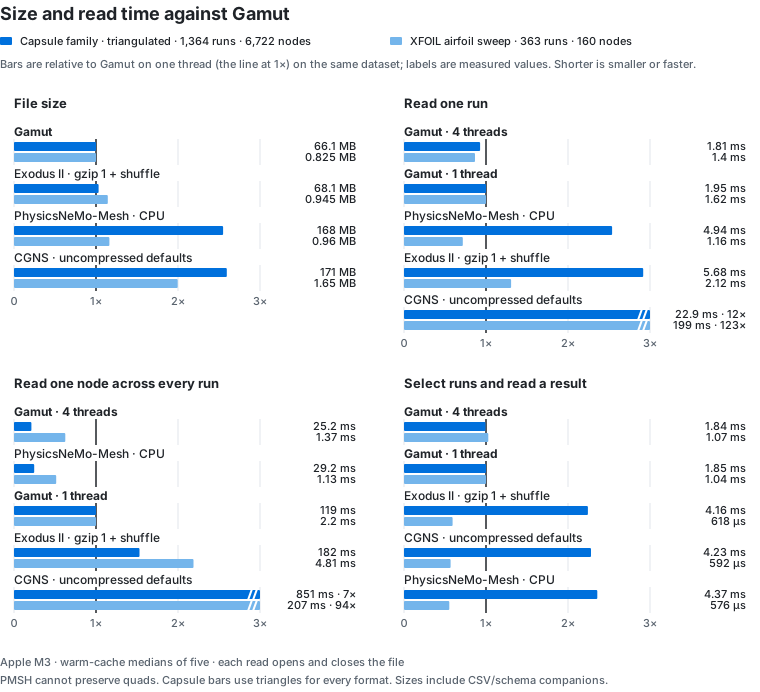
Gamut preserves the capsule's quadrilateral cells directly. PhysicsNeMo-Mesh requires simplices, so its capsule case needs conversion to triangles. The chart uses that same converted mesh for every format; the original quad results remain on the benchmarks page.
On the triangulated capsule family, Gamut and compressed Exodus occupy about the same space. Gamut is smaller and reads one run faster than PMSH; four decompression threads also make the reads across all runs competitive. PMSH writes faster. On the smaller airfoil sweep, PMSH reads faster, while Gamut is smaller. Direct h5py reads of the same Gamut arrays show similar bulk decoding time, with less fixed overhead for small reads. The benchmarks include the full timings, settings, payload checks and workloads where another approach is faster, plus the earlier VTK, VTKHDF, Zarr and NumPy comparisons.
The four-language example above shows the same write, append and read returning the same values. The reading-parts example selects converged runs and reads a named surface region in specified units. The format supplies the study conventions and operations that a custom array layout leaves each producer to maintain.
Apple M3, 8 GB; warm-cache medians of five, each opening and closing the file. Native copies include the run-table/schema companions; the condition query reads those companions for Exodus, CGNS and PMSH. Exodus uses gzip level 1 and shuffle; CGNS uses native uncompressed defaults; PMSH uses CPU memory mapping. Triangulation retains nodal values without a solver rerun. Full method, versions and source commits are on the benchmarks page.
Install
| Language | Install |
|---|---|
| Python 3.10 or later | pip install gamut-format |
| MATLAB R2023b or later | open Gamut.mltbx from the latest release |
| Julia 1.9 or later | Pkg.add(url="https://github.com/bijective-systems-org/gamut", subdir="julia", rev="v1.2.0") |
| C++ and C | CMake build and install, then find_package(gamut); include gamut/gamut.hpp (C++17) or gamut/gamut.h (C) |
The Python wheels and the MATLAB toolbox carry the core with HDF5 linked
in, for macOS, Linux and Windows, and need no compiler. Julia, C and C++
use the same core: each release's gamut-core-<version>-<platform>
archive, the wheel's (gamut.library_path() prints where it is), or one
built with CMake.
Installing has the details for each language.
Documentation
The guide has one short page per concept, each
running one script from examples/. The
specification defines the format for anyone writing another
implementation, and how it compares sets Gamut
beside VTK, CGNS, Exodus, netCDF-CF and Zarr.
The format is versioned, and every file names its version (gamut/1).
Within version 1 a change only adds, and a reader skips what it does not
know, so a file written today stays readable; a reader refuses a later
major version by name (versions).
Before version 1 the format was called mestra. Its files (mestra/0) are
refused with their version named; its 0.1 releases stay on PyPI under that
name.
License
Apache 2.0. Made by Bijective Systems. If you use Gamut in published work, please cite it (CITATION.cff).
1 maintainer

Metadata
1 maintainer
Release files for gamut-format 1.2.0
For a detailed explanation of source distributions (sdists) and built distributions (wheels), please see the package formats documentation.
Source distribution (sdist)
| File | Size | Uploaded | Provenance | |
|---|---|---|---|---|
| gamut_format-1.2.0.tar.gz | 259.6 kB | With provenance | Details |
Built distributions (wheels)
| File | Reset | |||
|---|---|---|---|---|
| gamut_format-1.2.0-py3-none-win_amd64.whl | Python 3 | none | Windows x86-64 | Details |
| gamut_format-1.2.0-py3-none-manylinux_2_28_x86_64.whl | Python 3 | none | Linux glibc 2.28+ x86-64 | Details |
| gamut_format-1.2.0-py3-none-macosx_11_0_x86_64.whl | Python 3 | none | macOS 11.0+ x86-64 | Details |
| gamut_format-1.2.0-py3-none-macosx_11_0_arm64.whl | Python 3 | none | macOS 11.0+ ARM64 | Details |
Total release size: 7.8 MB
Release files / gamut_format-1.2.0.tar.gz
| Download URL | gamut_format-1.2.0.tar.gz |
|---|---|
| Size | 259.6 kB |
| Tags | Source |
|
SHA-256 checksum How to use checksums |
a6a3d5a759d3d910c1f78dcad721ff11227bca589317e0479c78687407177efc
|
|
BLAKE2b-256 checksum How to use checksums |
bec42eb4b43a790c25c600f784469bdfa28889ef8517cacd14de37378d83de13
|
| Upload date | |
|
Uploaded using Trusted Publishing? What is trusted publishing? |
Yes |
| Uploaded via |
twine/7.0.0 CPython/3.13.14
|
Provenance
Provenance describes where a file came from. On PyPI, provenance is shared via attestations, which provide a verifiable record of the build or publishing details. View details, limitations and caveats.


PyPI Publish Attestation
PyPI verified that this artifact, at this checksum, originated from the publisher listed below.
Signed by GitHub Actions, verified by PyPI on Oct 24, 2026.
Transparency logRelease files / gamut_format-1.2.0-py3-none-win_amd64.whl
| Download URL | gamut_format-1.2.0-py3-none-win_amd64.whl |
|---|---|
| Size | 1.7 MB |
| Tags | Python 3 Windows x86-64 |
|
SHA-256 checksum How to use checksums |
78b0b7e6f09a118c0eca78ef3c8558f2faffff421a72549852fb0b96fbedf8e6
|
|
BLAKE2b-256 checksum How to use checksums |
64be13e09c01cb2f0c4ca32c9920c422539396c3b16da00a7dfa03bb7781ab33
|
| Upload date | |
|
Uploaded using Trusted Publishing? What is trusted publishing? |
Yes |
| Uploaded via |
twine/7.0.0 CPython/3.13.14
|
Provenance
Provenance describes where a file came from. On PyPI, provenance is shared via attestations, which provide a verifiable record of the build or publishing details. View details, limitations and caveats.
PyPI Publish Attestation
PyPI verified that this artifact, at this checksum, originated from the publisher listed below.
Signed by GitHub Actions, verified by PyPI on Oct 24, 2026.
Transparency logRelease files / gamut_format-1.2.0-py3-none-manylinux_2_28_x86_64.whl
| Download URL | gamut_format-1.2.0-py3-none-manylinux_2_28_x86_64.whl |
|---|---|
| Size | 2.3 MB |
| Tags | Linux glibc 2.28+ x86-64 Python 3 |
|
SHA-256 checksum How to use checksums |
4722623ccf3f6590ff1c03be539b25deaa5fd918ac1d431819f896d82920353c
|
|
BLAKE2b-256 checksum How to use checksums |
4ecfab08a845b774a25ebd94c69a838b6e824f4432d57b9b34ee8267f02f578e
|
| Upload date | |
|
Uploaded using Trusted Publishing? What is trusted publishing? |
Yes |
| Uploaded via |
twine/7.0.0 CPython/3.13.14
|
Provenance
Provenance describes where a file came from. On PyPI, provenance is shared via attestations, which provide a verifiable record of the build or publishing details. View details, limitations and caveats.
PyPI Publish Attestation
PyPI verified that this artifact, at this checksum, originated from the publisher listed below.
Signed by GitHub Actions, verified by PyPI on Oct 24, 2026.
Transparency logRelease files / gamut_format-1.2.0-py3-none-macosx_11_0_x86_64.whl
| Download URL | gamut_format-1.2.0-py3-none-macosx_11_0_x86_64.whl |
|---|---|
| Size | 1.9 MB |
| Tags | Python 3 macOS 11.0+ x86-64 |
|
SHA-256 checksum How to use checksums |
8330a84e8bb1cdf8d5d6c0c93d63d5362093ff75a4ac6991b3950438bd551631
|
|
BLAKE2b-256 checksum How to use checksums |
8d989d79067e60ca76157c92b97fa2544be4ba1e15d11939ac70d9ecdfcc51dc
|
| Upload date | |
|
Uploaded using Trusted Publishing? What is trusted publishing? |
Yes |
| Uploaded via |
twine/7.0.0 CPython/3.13.14
|
Provenance
Provenance describes where a file came from. On PyPI, provenance is shared via attestations, which provide a verifiable record of the build or publishing details. View details, limitations and caveats.
PyPI Publish Attestation
PyPI verified that this artifact, at this checksum, originated from the publisher listed below.
Signed by GitHub Actions, verified by PyPI on Oct 24, 2026.
Transparency logRelease files / gamut_format-1.2.0-py3-none-macosx_11_0_arm64.whl
| Download URL | gamut_format-1.2.0-py3-none-macosx_11_0_arm64.whl |
|---|---|
| Size | 1.6 MB |
| Tags | Python 3 macOS 11.0+ ARM64 |
|
SHA-256 checksum How to use checksums |
c2f0699afe28fcaeead510c30bb102713eda0a4783ccee90d475e017b13e5681
|
|
BLAKE2b-256 checksum How to use checksums |
c61b681dce5c2e65dc034bb9545c0379bf4efa3af2c672e6236fd7479569931d
|
| Upload date | |
|
Uploaded using Trusted Publishing? What is trusted publishing? |
Yes |
| Uploaded via |
twine/7.0.0 CPython/3.13.14
|
Provenance
Provenance describes where a file came from. On PyPI, provenance is shared via attestations, which provide a verifiable record of the build or publishing details. View details, limitations and caveats.
PyPI Publish Attestation
PyPI verified that this artifact, at this checksum, originated from the publisher listed below.
Signed by GitHub Actions, verified by PyPI on Oct 24, 2026.
Transparency logSecurity for gamut-format 1.2.0
Provenance
Provenance describes where a file came from. On PyPI, provenance is shared via attestations, which provide a verifiable record of the build or publishing details. View details, limitations and caveats.
Full provenance
All 5 files in this release have been uploaded with provenance metadata.
Attestation for gamut_format-1.2.0.tar.gz
PyPI Publish Attestation
PyPI verified that this artifact, at this checksum, originated from the publisher listed below.
Signed by GitHub Actions, verified by PyPI on Oct 24, 2026.
Transparency logA note on package security
PyPI is a repository for distributing packages, not a service for auditing them. While third-party security researchers and our staff do their best to detect and remove malicious packages, PyPI cannot guarantee the quality, security or suitability of any given package.
To learn more about protecting yourself from malicious actors, visit our package security documentation.














