
ganban
git-based Kanban TUI
What is this?
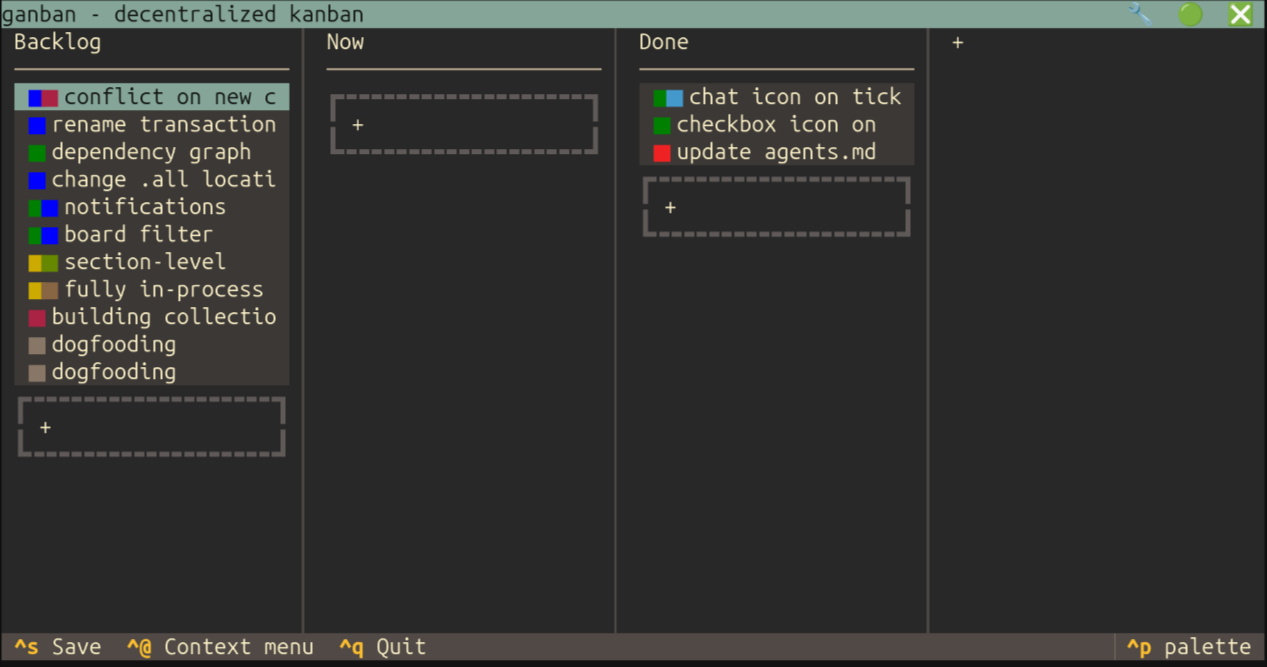
ganban is a Kanban board that lives in git. The data sits in an orphan branch,
so web UIs shouldn't offer to merge it (but they do). In ganban, our tasks
stay with the code and we don't need to rely on external services and API keys.
It's all just files in dirs.
The board's columns are in directories named id.slug like 1.backlog. They're
ordered alphanumerically so the TUI has the same order as ls -l. The app will
renumber them for you if you move columns around, or if you used letters or
something other than numbers as an id.
Cards in a column are symlinks to Markdown docs in the ./.all dir, which holds
the actual data. These links are ordered in the same way as cards. Keeping them
in .all gives them stable IDs so you can link to them like you would in a
commit message. You don't need to remember ln's weird syntax though because
ganban will round up stray files and replace them with a link.
The first # heading in a document will override the title of a card. Other
# headings or ## subheadings becomes a section, and the TUI can choose a
custom editor for sections with special names. This is how comments work, and
how task lists will work in future.
You can add metadata like labels, a due date, assigned - or anything else
that you like - using front-matter. A full JSON/YAML editor is provided for any
custom stuff, and in future it'll be possible to add plugins for new ways to
access and edit this data. Metadata works on columns too, you just edit the
index.md file in their dir, which you can use to override the column's style.
And the board also has a title and settings in its front-matter, which is how
we link committers with multiple emails to one identity, or give yourself a 🧔
emoji as your avatar.
When running as a service, ganban will sync from remotes that the repo has,
periodically pushing to upstream and resolving any conflicts the best it can.
This creates a kind of mesh network for your board, syncing in the background
without the need for 3rd party services.
Ganban doesn't force you to use its TUI, there's a web UI if you prefer that
sort of thing. If you're a bot or a script or UIs just aren't for you, then you
can use the CLI instead; see ganban --help. If you don't want any kind of
interface then bring your own text editor and commit directly to git.
It can sync in the background with ganban sync -d, or, if the daemons haunt
you, just omit the -d for a one-time sync.
Data Model
Cards
Canonical card files live in .all/ with 3-digit numeric IDs:
.all/
  001.md
  002.md
  003.md
Card format:
---
whatever: put your metadata here
---
# Title

Main description goes here, displayed in the body. You can link to other cards
by ID like #1

## Notes

Subsequent sections become sidebar panels in the TUI.

## Comments

- [name](mailto:user@email): comments go here like this
Columns
Directories with 1-digit numeric prefix for ordering:
1.backlog/
2.in-progress/
3.done/
Board Layout
Cards appear in columns as symlinks with 2-digit position prefix:
1.backlog/
  01.fix-login-bug.md -> ../.all/001.md
  02.add-feature.md -> ../.all/003.md
2.in-progress/
  01.refactor-api.md -> ../.all/002.md
- Symlink name = position + slug (derived from card title)
- Moving card between columns = delete + create symlink
- Reordering within column = rename symlinks
- Archiving = just delete the symlink, card stays in
.all/ - Orphaned cards (in
.all/but not linked) accessible via TUI
Numbering
Default digits: 3 for .all/, 1 for columns, 2 for symlinks.
Git Integration
Reading/Writing Without Checkout
Operates on the ganban branch without checking it out, using git plumbing:
git show ganban:pathto readgit hash-object,git mktree,git commit-treeto write- Or GitPython equivalents
Multi-Remote Sync
- One upstream (push target)
- Optional peer remotes (extra fetch sources)
- Fetch all remotes periodically
- On detecting changes: commit local, rebase, push upstream
- Changes propagate opportunistically through whoever can reach upstream
Philosophy
- Permissive: don't be prescriptive, let users mess with files
- Resilient: handle broken states gracefully, offer to fix
- Minimal: derive what you can (titles, order), front-matter is opt-in
- Portable: works with any markdown renderer, any git host, any editor
1 maintainer

Download files
Download the file for your platform. If you're not sure which to choose, learn more about installing packages.
Source Distribution
Built Distribution
Filter files by name, interpreter, ABI, and platform.
If you're not sure about the file name format, learn more about wheel file names.
Copy a direct link to the current filters
File details
Details for the file ganban-0.6.0.tar.gz.
File metadata
- Download URL: ganban-0.6.0.tar.gz
- Upload date:
- Size: 96.1 kB
- Tags: Source
- Uploaded using Trusted Publishing? No
- Uploaded via: twine/7.0.0 CPython/3.14.4
File hashes
| Algorithm | Hash digest | |
|---|---|---|
| SHA256 |
33863d1233dcfa05333f3ceacf6224bd45990014dca76f747b587a47ae642094
|
|
| MD5 |
b060d372a2b4c64bed244de896a8979a
|
|
| BLAKE2b-256 |
936d7b67991033231d8b059091a0977856533838e84844441d7213132faeb2f5
|
File details
Details for the file ganban-0.6.0-py3-none-any.whl.
File metadata
- Download URL: ganban-0.6.0-py3-none-any.whl
- Upload date:
- Size: 124.7 kB
- Tags: Python 3
- Uploaded using Trusted Publishing? No
- Uploaded via: twine/7.0.0 CPython/3.14.4
File hashes
| Algorithm | Hash digest | |
|---|---|---|
| SHA256 |
849f301ae0eec6bb87dddd3069ecaa25807f443e971dd886fbc4d576a9a34968
|
|
| MD5 |
9768cb7e0833e3993bc38ad3c8e96573
|
|
| BLAKE2b-256 |
5c6ead7e9eda8580416f2cd1bb2b6073f24ced2541cfd9233ea16bef0f623004
|







