
ganttuml






JSON in, Gantt out. You describe developers and their ordered tasks and milestones in one JSON file. ganttuml turns that file into a rendered PlantUML Gantt chart (PNG + SVG).
- One Python file. The tool uses only the standard library. It has zero dependencies.
- Runs locally. Your plan data stays on your machine. The tool never contacts a server.
- Tested. The test suite has 100% coverage. CI enforces that gate on each push.
- General purpose. No Jira is required. An optional per-item Jira link becomes a clickable hyperlink in the SVG.
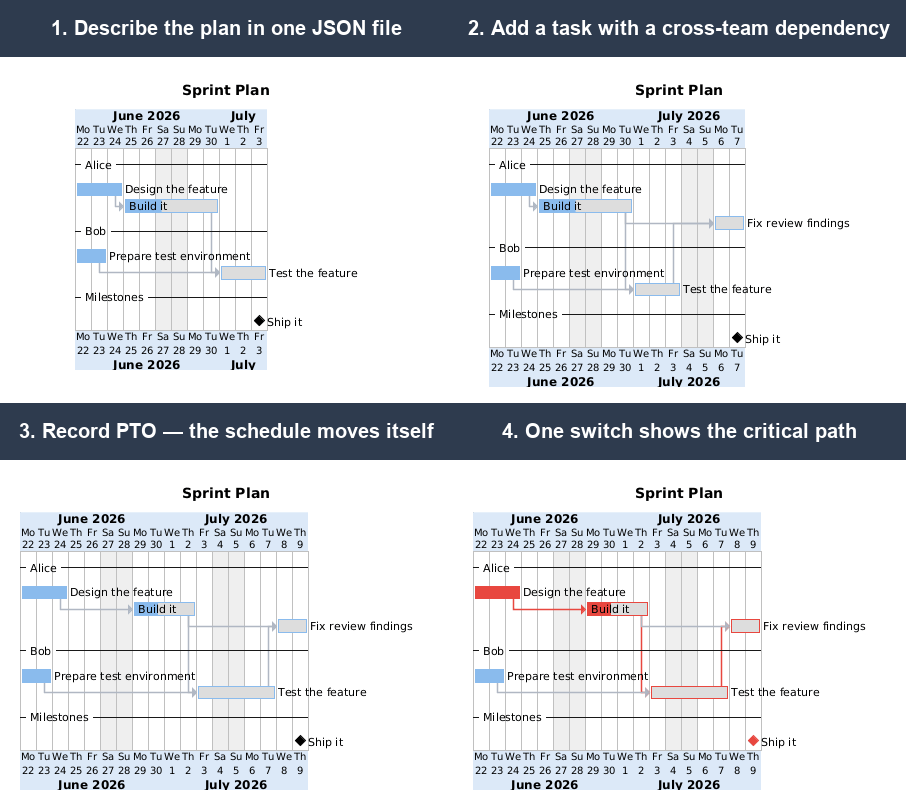
▶ Open the advanced example live — the public PlantUML server renders the bundled example in your browser. You install nothing. This link is the one place where a server appears. The tool itself runs offline.
New here? Read HOWTO.md for step-by-step recipes: add a developer, a task, a milestone, PTO, a holiday, a working Saturday, or a Jira link. This file is the reference and the schema.
Requirements
- Python 3.7+ —
ganttuml.pyuses only the standard library. No pip installs are necessary. - Docker — necessary only to render PNG/SVG with the
plantuml/plantumlimage. The.pumlgeneration and the schedule report need only Python. - OS —
ganttuml.pyruns where Python runs: Linux, macOS, and Windows. The render scripts (render.sh,example*.sh) are Bash scripts. Run them on Linux, macOS, or WSL on Windows. As an alternative, run thedocker run … plantuml/plantumlcommand fromrender.shmanually.
Usage
Install from PyPI (optional): pip install ganttuml provides the tool as the ganttuml
command. A repo clone works the same without installation.
ganttuml.py generates the .puml file and prints the schedule. It does not render images.
The shell scripts render PNG and SVG. They run the plantuml/plantuml docker directly
(ganttuml.py never starts docker).
python3 ganttuml.py --input my.json # validate + write output/<output>.puml + print schedule (no render)
./render.sh my.json                 # generate + render PNG & SVG via the plantuml docker
./example.sh                        # thin wrapper -> render.sh example.json (minimal starter)
./example-advanced.sh               # thin wrapper -> render.sh example-advanced.json (every feature)
render.sh <source.json>is the reusable entry point for generate + render. The per-project*.shfiles are one-line wrappers around it.- Bare
python3 ganttuml.py(or bareganttuml) defaults to--input example.json. - A relative
--inputpath resolves against your current directory. When the file is not there but exists next toganttuml.py(the repo), that copy is used — so the bundled examples work from any directory. - The output filename comes from
project.output. All artifacts go to theoutput/subdirectory of your current directory: the.puml, plus.png/.svg/.cmapxafter a render.
Claude Code skill
The repo ships a Claude Code skill at
.claude/skills/ganttuml/. Clone the repo and open it in Claude Code. Then request plan
changes in plain language, for example "add a task for Bob after the API work". The skill
teaches Claude the edit, validate, and report loop, and points it at these docs. Type
/ganttuml to invoke the skill explicitly.
How scheduling works
-
Developers are lanes. Each developer's
itemsrun in the listed order. Each task auto-links after the previous task in that lane. One developer does one task at a time. -
Dependencies.
depends_onadds cross-task and cross-developer links byid. A task keeps BOTH its auto-link and its dependencies. PlantUML starts the task after whichever link ends latest. A developer is never double-booked. -
Start floor. A task's optional
startdate is one more lower bound. The task begins on the latest of three dates: itsstartdate, its dependencies, and its lane predecessor. ganttuml emits it as[id] starts <date>, and PlantUML max-combines that statement with the->arrows. Astartfloor can hold a task back. It can never pull a task earlier. -
Appearance (MS-Project theme). All bars use one uniform blue (
#8ABBED). There are no per-lane or per-item colors — the tool ignores anycolorfield. The critical path is the zero-slack chain that drives the finish date. ganttuml computes it overdepends_onplus the lane auto-links and thestartfloors (resource-constrained). Setproject.show_critical: true(defaultfalse) to draw that chain in red (#E8473F): its bars, milestone diamonds, and link arrows. When on, the schedule report also tags those items[critical]. Tune the colors withproject.bar_color/critical_color(see Top-level keys). -
Calendar (all-open model). Weekends (Sat/Sun) and holidays are always non-working. ganttuml leaves PlantUML's calendar fully open. It emits closures as per-developer off-days (
{dev} is off on <date>). The grey day shading (<date> is colored in) is cosmetic only and does NOT affect scheduling.requires N dayscounts only that developer's open days. This model lets one developer work a normally-closed day:pto(per developer) — that developer is off on those dates.works_on(per developer) — that developer works those normally-closed dates (weekend or holiday). Nobody else does, and the day stays grey.
PlantUML has no per-resource "open" directive. Per-developer availability must therefore use off-days.
-
PlantUML does all the scheduling.
ganttuml.pyemits definitions grouped by developer (the rows). It then emits every->/happens atstatement in dependency (topological) order. Each arrow's source is then already declared. Each milestone'shappens atsnapshots an already-positioned target. PlantUML's evaluation rules require this order (see the PlantUML Gantt docs). The order also lets a milestone be both a dependency and a dependency source.ganttuml.pycomputes the same schedule in Python for one purpose only: to print per-item dates plus the makespan, and to flag a milestone on a closed day.
JSON schema
{
  "project": {
    "title": "Q3 Feature Delivery",
    "start": "2026-06-22",            // YYYY-MM-DD
    "output": "example.puml",
    "weekend_color": "#EFEFEF",        // optional; shade for greyed weekend/holiday columns
    "jira_base_url": "https://your-company.atlassian.net",   // optional; for per-item `jira` links
    "holidays": [
      {"date": "2026-07-03", "label": "Independence Day", "show_marker": true},
      {"date": "2026-06-19", "label": "Juneteenth", "enabled": false}  // disabled -> treated as a normal working day
    ]
  },
  "developers": [
    {
      "name": "Alice", "pto": ["2026-06-25"], "works_on": ["2026-06-28"],
      "items": [
        {"type": "task", "id": "api_schema", "name": "Design API schema", "days": 3, "done": 100, "jira": "PROJ-101"},
        {"type": "task", "id": "api_impl", "name": "Implement API", "days": 4, "done": 50},
        {"type": "milestone", "id": "api_done", "name": "API frozen", "depends_on": "api_impl"}
      ]
    }
  ],
  "global_milestones": [
    {"type": "milestone", "id": "release", "name": "v1.0 Release", "depends_on": "qa_run"}
  ],
  "groups": [
    {"name": "Phase v1.0", "tasks": ["api_schema", "api_impl"]}   // optional summary bars
  ]
}
Top-level keys
project — settings and calendar:
start(YYYY-MM-DD) — the calendar origin. This is the only required key in the file.title— optional. A centered chart title.output— the.pumlfilename. It must be a plain name without directories. The file always goes underoutput/. Defaultexample.puml.version— optional free string. It appears in a bottom-centre footer asVersion <x> | Generated <today>. The date is the generation date, and the footer always stamps it. Setshow_footer: falseto drop the footer.show_today(defaulttrue) — draw a band on today's column.today_color(default#4F9BFF40, a translucent blue) sets its color. The last two hex digits are the alpha (opacity). A lower value is more transparent.weekend_color(default#EFEFEF) — the shade for the greyed weekend and holiday columns.undone_color(default#DDDDDD) — the fill for the remaining (undone) part of a% donebar. PlantUML hardcodes the bar border to 1px. Visibility therefore comes from this fill, not from a thicker outline.- Theme colors, all optional:
bar_color(default#8ABBED— the uniform MS-Project blue for every non-critical bar),critical_color(default#E8473F— the red for critical-path bars, diamonds, and links),arrow_color(default#B0B7C3— non-critical link arrows),header_color(default#DCE9F8— the timeline header band), andgroup_color(default#3B3B3B— the outline of the hollow phase bars, where afill/borderpair gives a tinted bar). show_critical(defaultfalse) — opt in to the red critical-path marking.jira_base_url— the base URL for per-itemjirakeys.holidays[]— each entry is{date, label, show_marker?, enabled?}.enabled: falsekeeps the holiday documented but treats it as a normal working day. Weekends (Sat/Sun) are always non-working.
developers — an ordered list. The order is the top-to-bottom lane order. Each
developer has:
name— non-empty and unique.pto— optional. Dates when this developer is off.works_on— optional. Dates when this developer works despite a weekend or holiday.items— the tasks and milestones, in lane order.- A
colorfield is accepted but ignored. Bars use the uniform theme (see "Appearance" above).
global_milestones — a separate, project-level milestone array. No developer owns these
milestones. Use it for release gates and roll-ups, for example "RC1 complete". The fields
equal the in-lane milestone fields. These milestones render in the trailing "Milestones"
lane with no resource. Put a cross-team marker that depends_on many tasks here.
groups — optional MS-Project-style phases. Each group is {name, tasks}: a unique
name and a non-empty list of item ids. The ids may span developers. An id belongs to at most
one group. A group renders as a hollow summary bar with diamond end-caps in a leading
"Phases" band. The bar spans from the first start to the last end of its members. The bold
group name is centered in the bar. Groups are purely cosmetic. They never affect scheduling,
links, or the critical path. (PlantUML has no native summary tasks. ganttuml draws the band
from the computed schedule.) project.group_color (default #3B3B3B) sets the outline
color. A fill/border pair such as #DEEBF7/#2E75B6 gives a tinted bar instead of a hollow
one.
Item fields
task — type: "task", plus:
id— unique across the file.name— the bar label.days— an integer >= 1. The duration in working days.done— required. An integer percent 0–100. That fraction of the bar fills in the theme color. The remainder fills withundone_color(default light gray).depends_on— optional. One id or a list of ids.start(YYYY-MM-DD) — optional floor: the task starts no earlier than this date. A later dependency or lane predecessor still wins. Task-only — milestones useon.jira— optional issue key.url— optional full link, which overridesjira.- The bar color is automatic: theme blue, or red on the critical path. A
colorfield is ignored.
milestone — type: "milestone", id, name, and exactly one of:
on— an absoluteYYYY-MM-DDdate.depends_on— one id or a list. The milestone sits at the latest end of those items (via repeatedhappens at).
Optional: jira, url. Diamonds are black, or red on the critical path (a color field is
ignored). A milestone lives inside a developer's items or in global_milestones. A
depends_on milestone renders in the trailing "Milestones" lane without a resource.
Jira / URL links
An item with url links to that address verbatim. An item with jira links to
{base}/browse/{jira} when project.jira_base_url is set. ganttuml emits the link as
links to [[...]]. The link is clickable in the SVG. PlantUML also writes a .cmapx image
map for the PNG.
Validation
ganttuml.py fails fast on any invalid input and exits non-zero. Nothing is silently
ignored. Each of these is an error:
- an unknown key at any level — this catches typos such as
depends_om(keys that start with_are comments, e.g."_comment": "...") - a field of the wrong type, for example a
ptothat is not a list, a holiday that is not an object, or a non-stringtitle - a duplicate id, an unknown or self-referencing
depends_onid, or a cyclic dependency - an unparseable date
- a missing or empty item
nameor developername, or a duplicate developer name - a bad
type, ordays < 1 - a task without
done, adonethat is not an integer 0–100, ordoneon a milestone - a milestone without exactly one of
on/depends_on - a
works_ondate that is not actually a closed day (a no-op is almost always a typo) - a date listed in both
works_onandpto - a non-milestone entry in
global_milestones - a duplicate holiday date, a holiday without
date, orshow_markerwithout alabel - a group that names an unknown id, an id in two groups, or a duplicate group name
- an item id that starts with
__group_(reserved for the emitted phase bars) - a
project.outputthat is not a plain filename - a calendar so over-constrained that no working day exists within 10 years
The schedule report also flags any milestone that lands on a closed day.
Examples
-
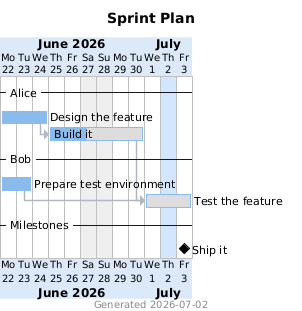
example.json— a minimal starter: two developers, a dependency, a milestone. Copy this file to begin your own chart. Its render: -
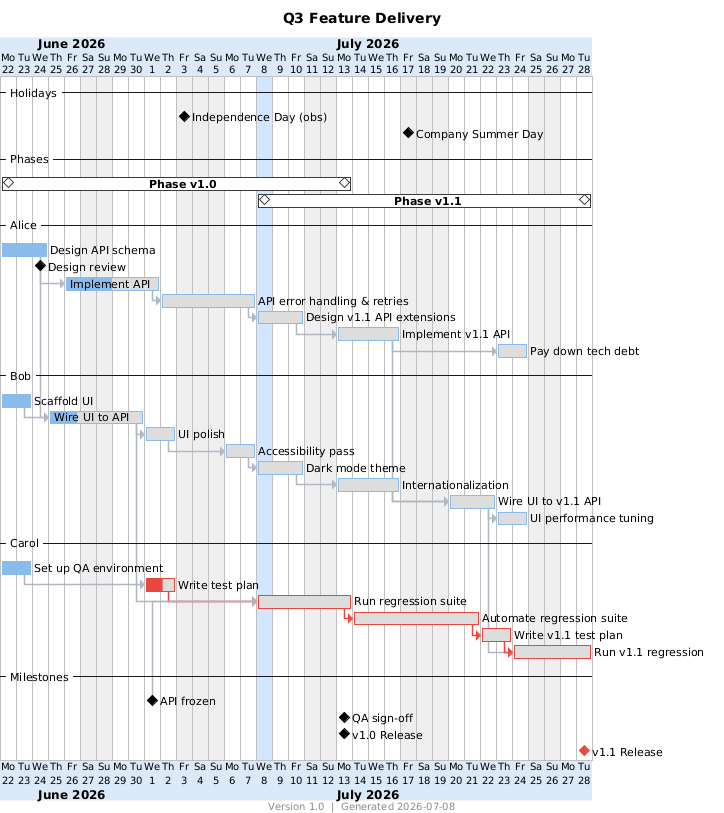
example-advanced.json— exercises every feature exceptshow_footer: false. It contains:- both milestone modes (
onanddepends_on, single and list) jira+urllinks (one item carries both —urlwins)- an ignored
colorfield, PTO, andworks_on - a disabled holiday and a
startfloor - phase groups and the critical path
- every appearance option, set explicitly
Its render (see also the live link at the top of this file):
- both milestone modes (
Development
The tool itself has no runtime dependencies. The test suite uses pytest (dev-only):
pip install pytest pytest-cov
pytest                                              # run the tests
pytest --cov=ganttuml --cov-report=term-missing    # with the 100% coverage gate
- Coverage is enforced at 100% (configured in
pyproject.toml). The same file holds the ruff lint settings (line length 100). - CI (GitHub Actions,
.github/workflows/ci.yml) runs ruff and the test suite with the coverage gate on every push and pull request, on Python 3.10 and 3.12. - A published GitHub release triggers
.github/workflows/publish.yml. That workflow builds the package and uploads it to PyPI via trusted publishing (no stored tokens). - Tested with: Ubuntu 22.04 LTS, Python 3.10, pytest 8, and
plantuml/plantuml:1.2026.6.render.shpins this image by tag and digest, so renders are reproducible. To upgrade, or to switch tolatest, edit theplantuml_imagevariable at the top ofrender.sh(instructions inline).
Architecture
ganttuml.py is a single file organized as a one-way pipeline: load → validate →
schedule → emit → report. The parsed JSON flows through the pipeline as plain dicts. The
code never mutates it. Each stage is a pure function over that data. Calendar —
per-developer availability (weekends, holidays, pto, works_on) — is the one stateful
concept and the one class. The emitter writes the .puml statements in two phases:
definitions first, then dependency-ordered positioning. PlantUML evaluates its input
sequentially, so the emission order itself carries the scheduling semantics. The runtime
uses only the Python standard library.
License
MIT — see LICENSE.
1 maintainer

Download files
Download the file for your platform. If you're not sure which to choose, learn more about installing packages.
Source Distribution
Built Distribution
Filter files by name, interpreter, ABI, and platform.
If you're not sure about the file name format, learn more about wheel file names.
Copy a direct link to the current filters
File details
Details for the file ganttuml-1.0.0.tar.gz.
File metadata
- Download URL: ganttuml-1.0.0.tar.gz
- Upload date:
- Size: 24.9 kB
- Tags: Source
- Uploaded using Trusted Publishing? Yes
- Uploaded via:
twine/7.0.0 CPython/3.13.14
File hashes
| Algorithm | Hash digest | |
|---|---|---|
| SHA256 |
8699cab7f9741403b7da4087840b0c24c103586fefc8c47df38768ad4327ec2d
|
|
| MD5 |
3974fbd1b7fc9dd777f33257df285f2b
|
|
| BLAKE2b-256 |
81b8d936fcc49e6acb2c62db3689a675d548714dc1849c03596a410f3c1399df
|
Provenance
The following attestation bundles were made for ganttuml-1.0.0.tar.gz:
Publisher:
publish.yml on meet-brad-ch/ganttuml
-
Statement:
-
Statement type:
https://in-toto.io/Statement/v1 -
Predicate type:
https://docs.pypi.org/attestations/publish/v1 -
Subject name:
ganttuml-1.0.0.tar.gz -
Subject digest:
8699cab7f9741403b7da4087840b0c24c103586fefc8c47df38768ad4327ec2d - Sigstore transparency entry: 2665754781
- Sigstore integration time:
-
Permalink:
meet-brad-ch/ganttuml@6c97689d6e65fd4d1547838e5151105bf435ae39 -
Branch / Tag:
refs/tags/v1.0.0 - Owner: https://github.com/meet-brad-ch
-
Access:
public
-
Token Issuer:
https://token.actions.githubusercontent.com -
Runner Environment:
github-hosted -
Publication workflow:
publish.yml@6c97689d6e65fd4d1547838e5151105bf435ae39 -
Trigger Event:
release
-
Statement type:
File details
Details for the file ganttuml-1.0.0-py3-none-any.whl.
File metadata
- Download URL: ganttuml-1.0.0-py3-none-any.whl
- Upload date:
- Size: 24.4 kB
- Tags: Python 3
- Uploaded using Trusted Publishing? Yes
- Uploaded via:
twine/7.0.0 CPython/3.13.14
File hashes
| Algorithm | Hash digest | |
|---|---|---|
| SHA256 |
208f145934c6d21798bff234b87e503d195f05dfe4a9d5431586d996e7a0e18d
|
|
| MD5 |
90b722d0364bdacbf0a647b5cc15dc8d
|
|
| BLAKE2b-256 |
8495617d5d1150b097bcc114bc0cd86ed9a4710c308f5ba87725bc0cfa0ee2e9
|
Provenance
The following attestation bundles were made for ganttuml-1.0.0-py3-none-any.whl:
Publisher:
publish.yml on meet-brad-ch/ganttuml
-
Statement:
-
Statement type:
https://in-toto.io/Statement/v1 -
Predicate type:
https://docs.pypi.org/attestations/publish/v1 -
Subject name:
ganttuml-1.0.0-py3-none-any.whl -
Subject digest:
208f145934c6d21798bff234b87e503d195f05dfe4a9d5431586d996e7a0e18d - Sigstore transparency entry: 2665754813
- Sigstore integration time:
-
Permalink:
meet-brad-ch/ganttuml@6c97689d6e65fd4d1547838e5151105bf435ae39 -
Branch / Tag:
refs/tags/v1.0.0 - Owner: https://github.com/meet-brad-ch
-
Access:
public
-
Token Issuer:
https://token.actions.githubusercontent.com -
Runner Environment:
github-hosted -
Publication workflow:
publish.yml@6c97689d6e65fd4d1547838e5151105bf435ae39 -
Trigger Event:
release
-
Statement type:













