
Garmin → Intervals.icu Bridge
Garmin started filtering the FIT files it sends to Intervals.icu. This puts the data back — and syncs a lot more.
TL;DR — Since late September 2026 Garmin strips its own metrics (Stamina, Recovery Time, VO₂max, Performance Condition, Training Effect, Sweat Loss …) from the FIT files it sends to Intervals.icu. This tool fetches the original file from Garmin Connect and adds the missing data to the activity the official sync already created — no duplicates, nothing deleted, training load untouched. It also syncs the daily wellness data the official sync misses (night SpO₂, respiration, sleeping HR, Body Battery, HRV details, sleep stages, stress, readiness, logged nutrition and total burn, endurance & hill scores, race predictions, fitness age …), backfills the past, and comes with 19 charts for all of it in Intervals' chart library. Runs on Linux (systemd timers), in a container, or on Windows with one command (guide).
An officially imported run after the bridge: Training Effect, VO₂max, Performance Condition, Recovery Time, Stamina at start/end, Sweat Loss — all stripped by Garmin, all back.

A custom stream (grade-adjusted speed) written into the same activity, aligned by timestamp.

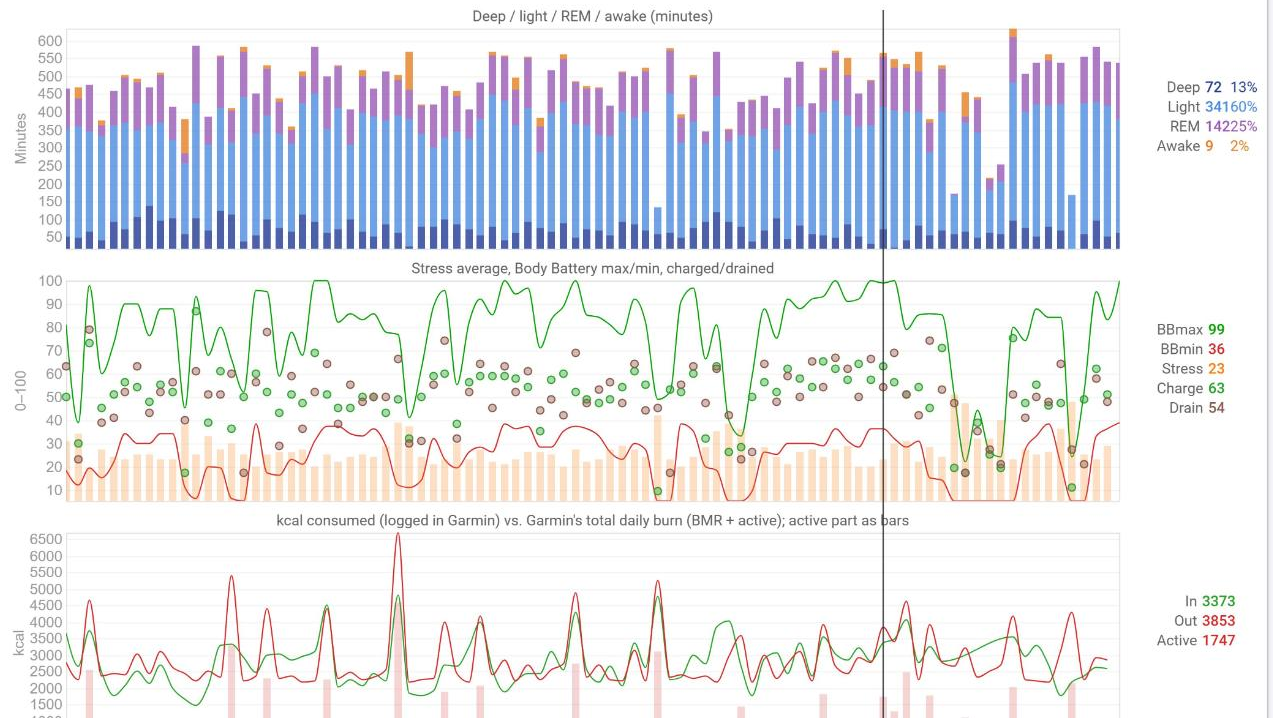
Three of the nineteen charts from the chart library: sleep stages, stress & Body Battery, intake vs. total burn.
Since the end of September 2026 the file Garmin hands to partners is not the file your device recorded. (Garmin first switched the filter on in March 2026, rolled it back after a week of protest, and switched it back on half a year later.) The recording survives (power, heart rate, GPS, cadence, developer fields); Garmin's own metrics do not. Open the same activity in Intervals.icu and in Garmin Connect and you will miss Performance Condition, Stamina, Recovery Time, VO₂max, Training Effect and Sweat Loss. The original file you can download from Garmin Connect still has them.
This bridge is a small self-hosted service that:
- fetches the original FIT through Garmin Connect's private API, byte-identical to the browser export;
- finds the activity the official sync already created in Intervals.icu — the sync stays on, nothing is duplicated, deleted or recomputed;
- adds exactly what Garmin stripped, into the custom fields and streams you have configured (Stamina curve, Recovery Time, VO₂max, Performance Condition, Sweat Loss, Training Effect …);
- fills the daily wellness values the official sync does not deliver: night SpO₂, respiration, sleeping heart rate, Body Battery, HRV details, sleep stages, stress, readiness, floors, scale data — and your logged nutrition (kcal, carbs, protein, fat);
- can backfill the past (on the reference account SpO₂ had silently stopped arriving in mid-2025);
- reacts within about a minute of the official import, with Garmin contacted only when there is something new.
Everything is a dry run until you say --apply. Values that exist are never
overwritten unless they demonstrably came from a filtered file.
What gets synced
| Activities (enrich mode) | Daily wellness | |
|---|---|---|
| Source | Original FIT from Garmin Connect | Garmin's daily endpoints (23 of them) |
| Target | Your Intervals custom activity fields and custom streams, defined by you, read from your own definitions | Native Intervals wellness fields first, private Garmin… custom fields for the rest |
| Examples | Stamina / Potential Stamina streams, Recovery Time, VO₂max, Performance Condition, Sweat Loss, Aerobic/Anaerobic Effect, Stamina at start/end, EPOC, Training Load, grade-adjusted speed | SpO₂, respiration, sleeping HR, resting HR, HRV (+5-min high, 7-day avg), sleep seconds/score/stages, Body Battery max/min/charged/drained, training readiness, recovery time, acute load, stress, intensity minutes, floors, steps, hydration, sweat loss, weight, body fat, kcal consumed, total and active burn, carbohydrates, protein, fat (g and kcal), endurance & hill scores, fitness age, race predictions, VO₂max (run/bike) |
| Rule | Only what the partner copy lacks; aligned by timestamp; idempotent | Only empty values; locked days skipped; today's running totals wait until tomorrow |
| Archive | Original + partner copy of every activity | Raw JSON of every endpoint, every day |
Version 0.2.0. Verified end to end on one account (fenix 8, Edge 1040); the first live writes and the evidence are recorded in docs/PLAN.md.
How it works
- Original FIT.
garminconnectdownloads the activity's original export; the ZIP is unpacked in memory, the FIT is CRC-checked with Garmin's official FIT SDK and archived unchanged. - Match. The Intervals activity is found by
external_id(the official sync stores the Garmin activity ID) or, failing that, by source, start time (±120 s) and duration (±5 %). Anything ambiguous is left alone. - Gap. The file Intervals received (
GET /activity/{id}/file) is decoded next to the original. What only the original carries is the gap: whole message types, record fields (stream candidates), session fields (scalar candidates), developer fields, and Garmin-internal numeric IDs. - Write back. Your own custom items say what to write and from where.
Intervals fills custom activity fields and custom streams from the FIT
itself, and every definition names its source (
fit_session_field: "140.9",fit_record_field: "stance_time", or a one-line script readingm.f_138), plus an optional first-import conversion. The bridge reuses those definitions verbatim: same fields, same source, same units, nothing Garmin-specific hard-coded. Scalars go throughPUT /activity/{id}, streams throughPUT /activity/{id}/streams, aligned to the activity'stimestream by timestamp. - Never overwrite real data. An existing value is replaced only when
its FIT source is present in the original and absent from the partner
copy; then it cannot have come from data (Intervals stores
0for a stripped source). A second run writes nothing.
Garmin does not filter every activity. The gap is measured per activity and never assumed.
Quick start
Python 3.12 or newer.
python3 -m venv .venv && . .venv/bin/activate
pip install -e '.[dev]'
pytest -q                                   # synthetic tests, no accounts needed

export INTERVALS_API_KEY=...                # Intervals → Settings → Developer
export INTERVALS_ATHLETE_ID=0               # 0 = the key's owner
export BRIDGE_DATA_DIR=./data               # FITs, raw JSON, SQLite, tokens

garmin-intervals-bridge login               # once, interactive, MFA supported; stores tokens only
garmin-intervals-bridge probe               # newest original FIT, archived; no Intervals access
garmin-intervals-bridge gap --activity-id <garmin id>      # what did Garmin strip? read-only
garmin-intervals-bridge enrich --activity-id <garmin id>   # dry run: the exact plan
garmin-intervals-bridge enrich --activity-id <garmin id> --apply
Then let it run on its own:
garmin-intervals-bridge watch --apply       # one cheap Intervals poll; Garmin only on new activities
garmin-intervals-bridge sync --apply        # full run over the last days, activities + wellness
Everything is a dry run until --apply is given. The plan printed by a dry
run is exactly what --apply would send.
Commands
| Command | What it does |
|---|---|
login |
Interactive Garmin sign-in (email, password, MFA). Only session tokens are stored. |
probe [--activity-id] |
Download and archive one original FIT. |
gap --activity-id |
Original vs. the copy Intervals holds; lists everything only the original carries. |
compare-fit A B |
Same comparison for two local files (e.g. against a manual browser export). |
enrich --activity-id [--apply] [--refresh-own-streams] |
Plan or perform the enrichment of one activity. |
watch [--apply] |
Poll Intervals once (~450 bytes); enrich activities seen for the first time. |
sync [--scope all|activities|wellness] [--mode enrich|upload] [--apply] |
Scheduled run over the last days. |
backfill --scope wellness|activities --from DATE [--to DATE] [--apply] |
Paced, resumable run over the past. |
setup-fields [--apply] |
Create the private custom wellness fields the mapping uses. |
setup-charts [--apply] |
Create (and later complete) private fitness charts for the synced values. |
status |
Pending uploads and failed activities with their retry time. |
health |
Daily digest: probes both services and reports errors that would otherwise stay silent (dead timers, endpoints failing for days, fields Garmin stopped delivering, activities failing repeatedly). Exit 2 only when a human is needed. |
Modes
enrich (default). The official Garmin import stays on. Each imported activity is completed with what its file lacks. This is the mode for everyone who wants to keep Intervals' own import, training load and workout pairing.
upload (--mode upload). The v0.1 behaviour for accounts that switched
the official activity import off: originals are posted as new activities,
guarded by a persistent pending state so a timed-out upload is never
replayed blindly, and blocked when an activity already exists nearby.
Intervals de-duplicates uploads by file hash, so with the official import
on this mode would create duplicates. Use it only with the import off.
Wellness
Garmin's daily endpoints (sleep, HRV, stress, Body Battery, readiness, respiration, SpO₂, hydration, scale, nutrition, intensity minutes, scores, predictions, fitness age, lactate threshold, …) are fetched per day; every raw response is archived as JSON. Values are written to Intervals only where the day has nothing yet, locked days are skipped, and running totals of the current day wait for tomorrow.
Native Intervals fields filled when empty: restingHR, hrv, sleepSecs,
sleepScore, readiness, vo2max, steps, floorsClimbed,
hydrationVolume, spO2, respiration, avgSleepingHR, weight,
bodyFat, and from logged food kcalConsumed, carbohydrates, protein,
fatTotal. Everything else goes to private custom fields named Garmin…,
listed in docs/FIELD_MAPPING.md.
BRIDGE_WELLNESS_PROFILE=recommended (default) leaves out a handful of
duplicates and goals; all keeps every code.
Backfill the past when the official sync has gaps (on the reference account SpO₂ stopped arriving in mid-2025):
garmin-intervals-bridge backfill --scope wellness --from 2025-01-01            # dry run
garmin-intervals-bridge backfill --scope wellness --from 2025-01-01 --pause 3 --apply
A backfill uses the twelve per-day measurement endpoints by default
(--endpoints all for every endpoint), pauses between days, and skips days
already fetched, so it can be interrupted and resumed.
Charts
The bridge's nineteen fitness charts are published in Intervals' chart library: Fitness page → a tab → custom charts → search for Garmin Bridge and tick what you want: readiness & recovery, sleep stages, sleep score & sleeping HR, SpO₂ & respiration, stress & Body Battery, HRV detail, nutrition intake vs. burn, macro energy, energy balance per week and month with weight, endurance & hill scores, VO₂max & fitness age, race predictions, intensity minutes & sweat loss, hydration, steps, body composition, skin temperature. Each is built from the fields the bridge writes, with one axis per unit and values that hold until the next measurement carried across the days in between.
Prefer your own copies? setup-charts --apply creates the same charts as
private items in your account, only with the fields that already exist,
and completes them later as fields appear (for example after a backfill
with every endpoint). Charts you made yourself are never touched, even with
the same name. Intervals' API cannot place a chart on a Fitness tab; that
last click is yours either way.
Running it
systemd (recommended, no container): an unprivileged service user, a
one-minute watch timer and a 30-minute full run, secrets in an
EnvironmentFile, hardened units. See deploy/README.md.
Windows, macOS or any PC without systemd: pip install garmin-intervals-bridge
(it is on PyPI), then garmin-intervals-bridge run --apply
keeps polling Intervals every minute, does a full run every 30 minutes and
a health probe once a day, all in one process. A step-by-step guide for
non-technical users is in docs/WINDOWS.md.
Upload mode: when the official import is off
Garmin's partner terms now bar Intervals from passing Garmin-sourced data on
through its own API, and Intervals has said it will probably have to block
that. Data you upload yourself is not affected. The bridge's upload mode
is built for exactly this: switch the official Garmin import off in
Intervals, and the bridge uploads the original, unfiltered FIT of every
new activity as your own file (source: UPLOAD, external_id: garmin:<id>).
Intervals then computes everything from the complete file itself: Stamina
streams, Recovery Time, VO₂max, Performance Condition, Training Effect,
Sweat Loss and your other custom items appear without any enrichment, and no
icu_intervals_edited flag is set. Wellness works the same in both modes.
garmin-intervals-bridge sync --scope activities --mode upload --activity-days 2          # dry run
garmin-intervals-bridge sync --scope activities --mode upload --allow-activity-upload --apply
garmin-intervals-bridge run --mode upload --apply       # keeps polling Garmin every 10 minutes
garmin-intervals-bridge backfill --scope activities --mode upload --from 2026-01-01 --apply   # the past, as your uploads
garmin-intervals-bridge backfill --scope activities --from 2026-01-01 --archive-only     # mirror first, upload later
Uploads are de-duplicated against what Intervals already has (external id,
file hash, start time) and never retried blindly: an upload with an unknown
outcome stays pending until you check. Systemd users swap the watch timer
for deploy/systemd/garmin-intervals-bridge-upload.timer (10 minutes) and
keep the 30-minute unit for wellness.
Docker / Podman: a ready-made image is on the GitHub Container Registry,
ghcr.io/futureweb/garmin-intervals-bridge (tags latest and the version,
amd64 and arm64, so it runs on a NAS too). It runs as a non-root user and
takes the same environment variables; without compose:
docker run --rm -it -v $PWD/data:/data -e INTERVALS_API_KEY=... ghcr.io/futureweb/garmin-intervals-bridge login
docker run --rm    -v $PWD/data:/data -e INTERVALS_API_KEY=... ghcr.io/futureweb/garmin-intervals-bridge sync --apply
cp .env.example .env            # fill INTERVALS_API_KEY
mkdir -p data && chown 10001:10001 data
docker compose pull             # ghcr.io/futureweb/garmin-intervals-bridge (amd64 + arm64); or: docker compose build
docker compose run --rm bridge login
docker compose run --rm bridge enrich --activity-id <garmin id>
docker compose run --rm bridge sync --apply
login is the one interactive step: run --rm gives it a terminal, it asks
for your Garmin e-mail, password and MFA code, uses the password once and
keeps only Garmin's session tokens in the mounted data/ volume
(data/tokens), where they refresh themselves for about a year. Every
other command just uses those tokens. If Garmin answers the login with
429, wait an hour and try again.
The compose service is deliberately not an always-on daemon; schedule
docker compose run --rm -T bridge watch --apply from cron or a timer, or
run docker compose run --rm -T bridge run --apply as a long-lived process.
Configuration
Variables can also come from a .env file in the working directory (or the
file named by BRIDGE_ENV_FILE); variables already set always win.
| Variable | Default | Meaning |
|---|---|---|
INTERVALS_API_KEY |
Intervals API key (HTTP Basic, user API_KEY) |
|
INTERVALS_ATHLETE_ID |
0 |
0 addresses the key's owner |
BRIDGE_DATA_DIR |
./data |
Originals, partner copies, raw wellness JSON, SQLite state, lock files |
GARMIN_TOKEN_DIR |
$BRIDGE_DATA_DIR/tokens |
Garmin session tokens (mode 0700) |
BRIDGE_TIMEZONE |
Europe/Vienna |
Your local day boundary |
BRIDGE_ACTIVITY_LOOKBACK_DAYS |
4 |
sync window for activities (1–30) |
BRIDGE_WELLNESS_LOOKBACK_DAYS |
3 |
sync window for wellness (1–30) |
BRIDGE_WELLNESS_REFRESH_HOURS |
4 |
Re-read today this often; yesterday once after midnight and then every second period; older days once after midnight |
BRIDGE_WELLNESS_PROFILE |
recommended |
recommended or all custom fields |
BRIDGE_GARMIN_REQUEST_DELAY |
0.5 |
Seconds between Garmin requests (minimum 0.25) |
BRIDGE_STALE_HOURS |
24 |
health alerts once a service has failed this long |
Known limitations
- Garmin's endpoints are private and undocumented. They can change, rate-limit or block without notice. The mobile login path answers 429 for some clients; the web path with MFA works. Keep request delays.
- Writing streams marks the activity's intervals as edited
(
icu_intervals_edited = true, not resettable through the API). Intervals then no longer regenerates that activity's intervals on re-analysis. Harmless for an imported activity whose laps exist, but permanent. Writing scalar fields does not trigger it. - Only definitions the bridge can read safely are used. Field scripts
of the forms
activity.X / 60,activity.X == 0 ? NaN : activity.X / 36and stream scripts reading onem.f_<n>with constant factors are understood; anything else is listed as unsupported and left alone. - Manual activities (no device file) are skipped. Strava-sourced activities are never touched.
- One Garmin account and one Intervals athlete per data directory.
- Intraday series (stress, heart rate, Body Battery curves) have no place in Intervals' one-value-per-day wellness model; they stay in the raw archive.
Troubleshooting
| Symptom | Meaning |
|---|---|
Garmin login needed |
Run login interactively in the same environment the service uses. |
429 during login |
The mobile login path was refused; the web path usually follows. Do not retry in a loop. |
Another bridge instance is running (wellness) |
A backfill holds that scope's lock; activities keep running. |
outcome: unmatched |
The official import has not created the activity yet; the next run looks again. |
status lists a pending upload |
Upload mode: the request's outcome is unknown. Check Intervals before reset-pending. |
203/EXEC Permission denied under systemd |
SELinux: the virtualenv must not live under a web document root. |
Security and privacy
Read SECURITY.md. In short: no passwords stored, tokens and the API key readable by the service user only, the data directory is personal (routes, health data) and must never be committed or shared, dry run by default, no deletions ever.
Legal note
- The bridge signs in to Garmin Connect with your credentials and reads your data through the same private endpoints the Garmin Connect web app uses. Garmin offers no official API for personal use, and Garmin's Terms of Use prohibit automated access to the site. Using this tool is your decision and your risk; the consequence Garmin's terms provide for is suspension of your Garmin account. No such case is known for any of the long-standing open-source Garmin clients, but there is no guarantee.
- Keep the load modest. The defaults – one download per new activity, a few wellness reads a day, paced backfills – make the bridge behave like a person using the site. Don't shorten the pauses to hammer the API; it would hurt everyone using tools like this one.
- Everything the bridge fetches stays on your machine. Nothing leaves it except what you choose to write into your own Intervals.icu account.
- In the EU, the Data Act (Regulation (EU) 2023/2854) and the GDPR give you a right to the data your device generates; this tool is one way of exercising it for your own use.
- Independent hobby project: not affiliated with, endorsed by or supported by Garmin Ltd. or Intervals.icu. Garmin is a trademark of Garmin Ltd.; names are used only to describe compatibility. MIT licence: provided as is, without warranty of any kind.
Acknowledgements
cyberjunky/python-garminconnect, Garmin's FIT SDK, the Intervals.icu API, and the forum thread that documented the problem.
MIT licensed.
1 maintainer

Metadata
1 maintainer
Release files for garmin-intervals-bridge 0.2.1
For a detailed explanation of source distributions (sdists) and built distributions (wheels), please see the package formats documentation.
Source distribution (sdist)
| File | Size | Uploaded | |
|---|---|---|---|
| garmin_intervals_bridge-0.2.1.tar.gz | 92.6 kB | Details |
Built distribution (wheel)
| File | Interpreter | ABI | Platform | Reset |
|---|---|---|---|---|
| garmin_intervals_bridge-0.2.1-py3-none-any.whl | Python 3 | none | any | Details |
Total release size: 160.7 kB
Release files / garmin_intervals_bridge-0.2.1.tar.gz
| Download URL | garmin_intervals_bridge-0.2.1.tar.gz |
|---|---|
| Size | 92.6 kB |
| Tags | Source |
|
SHA-256 checksum How to use checksums |
a9b0606ec70a5dc4523c69d53eebc86ca0feabe7eb45bbd6834aff8a75442786
|
|
BLAKE2b-256 checksum How to use checksums |
1943947131c2d6c8ed412df6d4fb96252e8ea47b6f420eeda6b2db7e115a8355
|
| Upload date | |
|
Uploaded using Trusted Publishing? What is trusted publishing? |
Yes |
| Uploaded via |
twine/7.0.0 CPython/3.13.14
|
Provenance
Provenance describes where a file came from. On PyPI, provenance is shared via attestations, which provide a verifiable record of the build or publishing details. View details, limitations and caveats.


PyPI Publish Attestation
PyPI verified that this artifact, at this checksum, originated from the publisher listed below.
Signed by GitHub Actions, verified by PyPI on Oct 9, 2026.
Transparency logRelease files / garmin_intervals_bridge-0.2.1-py3-none-any.whl
| Download URL | garmin_intervals_bridge-0.2.1-py3-none-any.whl |
|---|---|
| Size | 68.2 kB |
| Tags | Python 3 |
|
SHA-256 checksum How to use checksums |
0ded8c96c6c7cfe29480c6f45bddee6f3b891a3cc85c6679255f2f30f41cad7c
|
|
BLAKE2b-256 checksum How to use checksums |
f6df501f3bb4ce2716dffbeec462b60944c33ece3979761839d39323142324bf
|
| Upload date | |
|
Uploaded using Trusted Publishing? What is trusted publishing? |
Yes |
| Uploaded via |
twine/7.0.0 CPython/3.13.14
|
Provenance
Provenance describes where a file came from. On PyPI, provenance is shared via attestations, which provide a verifiable record of the build or publishing details. View details, limitations and caveats.
PyPI Publish Attestation
PyPI verified that this artifact, at this checksum, originated from the publisher listed below.
Signed by GitHub Actions, verified by PyPI on Oct 9, 2026.
Transparency log













