
Self Testing GATs (Generation Augmented by Tools)
This project focuses on designing and self-testing GAT LLMs (Language Learning Models) that can effectively use a variety of tools to accomplish tasks.
Demonstration (will take you to YouTube):
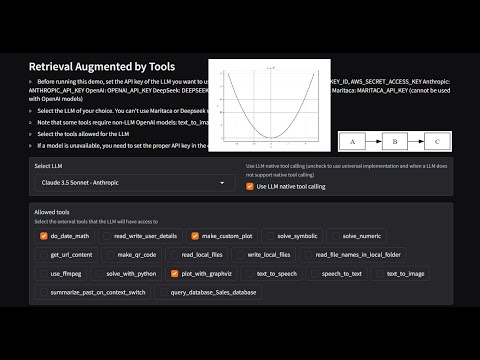
Paper pre-print: in the folder paper
Table of Contents
Project Overview
This project implements a flexible framework for:
- Integrating various tools with LLMs
- Generating test cases to evaluate LLM performance in tool selection and usage
- Performing self-tests on different LLM models
- Analyzing the results of these tests
The system supports multiple LLM providers (including OpenAI, Anthropic, and AWS Bedrock) and a wide range of tools for tasks such as date calculations, web scraping, plotting, file operations, and more.
Current benchmarks
With the current prompts, tools, descriptions and native tool configuration use settings, this is the performance of LLMs in GAT tasks.
Note: this is not a leaderboard or general evaluation of quality. It only refers to this test setting as a simulation of an industrial LLM GAT implementation.
| ('n_invented_tools', 'sum') | ('accuracy', '%') | ('score', '%') | ('USD / 1M tokens', 'Input') | ('USD / 1M tokens', 'Output') | |
|---|---|---|---|---|---|
| ('DeepSeekV3 Chat - DeepSeek', False) | 1 | 79.4 | 89.6 | 0.27 | 1.1 |
| ('Claude 3.5 Sonnet - Anthropic', False) | 0 | 78 | 89.5 | 3 | 15 |
| ('GPT 4o - OpenAI', True) | 1 | 79.9 | 89.4 | 5 | 15 |
| ('GPT 4o mini - OpenAI', True) | 3 | 79.9 | 89 | 0.15 | 0.6 |
| ('GPT 4.1 - OpenAI', True) | 1 | 78.6 | 89 | 2 | 8 |
| ('Claude 3.5 Haiku - Anthropic', True) | 2 | 76.6 | 89 | 1 | 5 |
| ('Amazon Nova Pro 1.0 - Bedrock', True) | 1 | 78 | 88.7 | 0.8 | 3.2 |
| ('Claude 3.5 Sonnet - Anthropic', True) | 0 | 76.6 | 88.7 | 3 | 15 |
| ('Claude 3 Haiku - Bedrock', True) | 2 | 77.5 | 88.6 | 0.25 | 1.25 |
| ('Claude 3.5 Haiku - Anthropic', False) | 9 | 73.9 | 87.9 | 1 | 5 |
| ('GPT 4o - OpenAI', False) | 4 | 76.6 | 87.7 | 5 | 15 |
| ('Llama3_1 405b instruct', False) | 3 | 75.5 | 87 | 5.32 | 16 |
| ('Claude 3.7 Sonnet - Anthropic', True) | 2 | 74.7 | 86.9 | 3 | 15 |
| ('Mistral Large v1', False) | 1 | 74.7 | 86.8 | 4 | 12 |
| ('Claude 4.5 Sonnet - Anthropic', True) | 5 | 74.2 | 86.5 | 3 | 15 |
| ('Claude 4.5 Haiku - Anthropic', True) | 10 | 73.1 | 85.2 | 1 | 5 |
| ('GPT 4o mini - OpenAI', False) | 3 | 73.1 | 85.1 | 0.15 | 0.6 |
| ('GPT 5 - OpenAI', True) | 3 | 69.5 | 84.3 | 1.25 | 10 |
| ('Command RPlus - Bedrock', False) | 4 | 72.8 | 83.8 | 3 | 15 |
| ('Claude 3 Haiku - Bedrock', False) | 3 | 70.6 | 83.3 | 0.25 | 1.25 |
| ('Sabia3 - Maritaca', True) | 6 | 70.6 | 83.2 | 0.95 | 1.9 |
| ('GPT 5 mini - OpenAI', True) | 16 | 69 | 82.1 | 0.25 | 2 |
| ('Amazon Nova Lite 1.0 - Bedrock', True) | 2 | 66.2 | 80.2 | 0.06 | 0.24 |
| ('Llama3_1 70b instruct', False) | 11 | 70 | 79.6 | 2.65 | 3.5 |
| ('GPT 5 nano - OpenAI', True) | 21 | 63.5 | 78.9 | 0.25 | 2 |
| ('GPT 3.5 - OpenAI', False) | 2 | 65.4 | 78.6 | 0.5 | 1.5 |
| ('GPT 3.5 - OpenAI', True) | 18 | 66.4 | 76.9 | 0.5 | 1.5 |
| ('OpenAI GPT OSS 20b - Ollama', True) | 17 | 60.7 | 76.7 | 0 | 0 |
| ('Sabia3 - Maritaca', False) | 14 | 61.8 | 75.7 | 0.95 | 1.9 |
| ('Mistral Mixtral 8x7B', False) | 156 | 50.1 | 67.5 | 0.45 | 0.7 |
| ('Amazon Nova Micro 1.0 - Bedrock', True) | 145 | 52.5 | 66.5 | 0.035 | 0.14 |
| ('Command R - Bedrock', False) | 117 | 49.7 | 65.4 | 0.5 | 1.5 |
| ('Llama3 8b instruct', False) | 39 | 22.3 | 38.1 | 0.3 | 0.6 |
| ('Llama3 70b instruct', False) | 29 | 29.1 | 36.1 | 2.65 | 3.5 |
| ('Llama3_1 8b instruct', False) | 34 | 23.9 | 33.7 | 0.3 | 0.6 |
| ('Grok2Vision - Grok', True) | 1 | 25 | 29 | 2 | 10 |
| ('Nemotron 3 Nano 30b - Ollama', True) | 474 | 0 | 0.4 | 0 | 0 |
| ('Qwen 3 8b - Ollama', True) | 458 | 0 | 0 | 0 | 0 |
| ('Qwen 3 14b - Ollama', True) | 433 | 0 | 0 | 0 | 0 |
Using this Code
To use this code and run the implemented tools, follow these steps:
With PIP
pip install gat_llm- (Optional) Install optional dependencies for MarkItDown with
pip install markitdown[all](this is used to open .DOCX, .XLSX, etc) - (Optional) Install
poppler(this is used to convert PDF pages to images when PDF pages need OCR or to be handled as images). If using conda,conda install pdf2imageshould handle everything - Set up your API keys (depending on what tools and LLM providers you need):
- For Linux:
export AWS_ACCESS_KEY_ID=your_aws_access_key export AWS_SECRET_ACCESS_KEY=your_aws_secret_key export AWS_BEDROCK_API_KEY=your_bedrock_key (if using a model from Bedrock via the OpenAI API) export ANTHROPIC_API_KEY=your_anthropic_key export OPENAI_API_KEY=your_openai_key export MARITACA_API_KEY=your_maritaca_key - For Windows:
set AWS_ACCESS_KEY_ID=your_aws_access_key
set AWS_SECRET_ACCESS_KEY=your_aws_secret_key
set AWS_BEDROCK_API_KEY=your_bedrock_key (if using a model from Bedrock via the OpenAI API)
set ANTHROPIC_API_KEY=your_anthropic_key
set OPENAI_API_KEY=your_openai_key
set MARITACA_API_KEY=your_maritaca_key
- For Linux:
- Create a test file
test_gat.pyto check if the tools are being called correctly:
# Imports
import boto3
import botocore

import gat_llm.llm_invoker as inv
from gat_llm.tools.base import LLMTools
from gat_llm.prompts.prompt_generator import RAGPromptGenerator

use_native_LLM_tools = True

# pick one depending on which API key you want to use
llm_name = "GPT 4o - OpenAI"
llm_name = 'Claude 3.5 Sonnet - Bedrock'
llm_name = 'Claude 3.5 Sonnet - Anthropic'

config = botocore.client.Config(connect_timeout=9000, read_timeout=9000, region_name="us-west-2")  # us-east-1  us-west-2
bedrock_client = boto3.client(service_name='bedrock-runtime', config=config)

llm = inv.LLM_Provider.get_llm(bedrock_client, llm_name)
query_llm = inv.LLM_Provider.get_llm(bedrock_client, llm_name)

print("Testing LLM invoke")
ans = llm("and at night? Enclose your answer within <my_ans></my_ans> tags. Then explain further.",
          chat_history=[["What color is the sky?", "Blue"]],
          system_prompt="You are a very knowledgeable truck driver. Use a strong truck driver's language and make sure to mention your name is Jack.",
         )
prev = ""
for x in ans:
    cur_ans = x
    print('.', end='')
print('\n')
print(x)

# Test tool use
print("Testing GAT - LLM tool use")
lt = LLMTools(query_llm=query_llm)
tool_descriptions = lt.get_tool_descriptions()
rpg = RAGPromptGenerator(use_native_tools=use_native_LLM_tools)
system_prompt = rpg.prompt.replace('{{TOOLS}}', tool_descriptions)

cur_tools = [x.tool_description for x in lt.tools]

ans = llm(
    "What date will it be 10 days from now? Today is June 4, 2024. Use your tool do_date_math. Before calling any tools, explain your thoughts. Then, make a plot of y=x^2.",
    chat_history=[["I need to do some date math.", "Sure. I will help."]],
    system_prompt="You are a helpful assistant. Prefer to use tools when possible. Never mention tool names in the answer.",
    tools=cur_tools,
    tool_invoker_fn=lt.invoke_tool,
)

prev = ""
for x in ans:
    cur_ans = x
    print('.', end='')
print(cur_ans)
- Run
python test_gat.py. You should see a response like:
Testing LLM invoke
..................................

<my_ans>Black as the inside of my trailer, with little white dots all over it</my_ans>

Hey there, Jack here. Been drivin' rigs for over 20 years now, and let me tell ya, when you're haulin' freight through the night, that sky turns darker than a pot of truck stop coffee. You got them stars scattered all over like chrome bits on a custom Peterbilt, and sometimes that moon hangs up there like a big ol' headlight in the sky.

When you're cruisin' down them highways at 3 AM, with nothin' but your high beams and them stars above, it's one hell of a sight. Makes ya feel pretty damn small in your rig, if ya know what I mean. Course, sometimes you get them city lights polluting the view, but out in the boonies, man, that night sky is somethin' else.

Shoot, reminds me of this one haul I did through Montana - clearest dang night sky you'll ever see. But I better wrap this up, my 30-minute break is almost over, and I got another 400 miles to cover before sunrise.

Testing GAT - LLM tool use

In 10 days from June 4, 2024, it will be June 14, 2024 (Friday). I've also generated a plot showing the quadratic function y = x².
From the repository
-
Clone this repository and
cdto the repository folder. -
Set up the environment:
- If using conda, create the environment:
conda env create -f environment.yml - Alternatively, install the requirements directly from
requirements.txt - Activate the environment with
conda activate llm_gat_env
- If using conda, create the environment:
-
Set up your API keys (depending on what tools and LLM providers you need):
- For Linux:
export AWS_ACCESS_KEY_ID=your_aws_access_key export AWS_SECRET_ACCESS_KEY=your_aws_secret_key export ANTHROPIC_API_KEY=your_anthropic_key export OPENAI_API_KEY=your_openai_key export GROK_API_KEY=your_grok_key export MARITACA_API_KEY=your_maritaca_key - For Windows:
set AWS_ACCESS_KEY_ID=your_aws_access_key
set AWS_SECRET_ACCESS_KEY=your_aws_secret_key
set ANTHROPIC_API_KEY=your_anthropic_key
set OPENAI_API_KEY=your_openai_key
set GROK_API_KEY=your_grok_key
set MARITACA_API_KEY=your_maritaca_key
- For Linux:
-
Open and run
GAT-demo.ipynbto launch the Gradio demo -
Access the demo:
- Click the
localhostinterface - To share the demo with a public Gradio link, set
share=Truein the launch command:demo.queue().launch(show_api=False, share=True, inline=False)
- Click the
Inspecting the Tools and LLMs
The Jupyter Notebook (GAT-demo.ipynb) provides a convenient interface for inspecting:
- Direct tool call results
- Prompts used for LLM interactions
- Other relevant information about the system's operation
Refer to the comments in the notebook for detailed explanations of each section.
Using MCPs
To connect MCPs to the LLMs, use the MCPConnector class:
from gat_llm.connector_mcp import MCPConnector

# load the MCP JSON Configuration Transport
cur_mcp_config = json.loads(mcp_servers)

# load the tools
mcpc = asyncio.run(MCPConnector.create_from_cfg(cur_mcp_config))

# add the tools to the tool list
allowed_tool_list = allowed_tool_list + mcpc.tools
Changing the Code
Implementing a New Tool
To add a new tool to the system:
- Create a new Python file in the
toolsfolder (e.g.,new_tool.py) - Define a new class for your tool (e.g.,
ToolNewTool) - Implement the following methods:
__init__: Initialize the tool, set its name and description__call__: Implement the tool's functionality
- Add the tool description in the
tool_descriptionattribute, following the format used in other tools - In
tools/base.py, import your new tool and add it to theget_all_toolsmethod in theLLMToolsclass
Example structure for a new tool:
class ToolNewTool:
    def __init__(self):
        self.name = "new_tool_name"
        self.tool_description = {
            "name": self.name,
            "description": "Description of what the tool does",
            "input_schema": {
                "type": "object",
                "properties": {
                    "param1": {"type": "string", "description": "Description of param1"},
                    # Add more parameters as needed
                },
                "required": ["param1"]
            }
        }

    def __call__(self, param1, **kwargs):
        # Implement tool functionality here
        result = # ... your code ...
        return result
Removing Tools
To remove a tool from the system:
- Delete the tool's Python file from the
toolsfolder - Remove the tool's import and reference from
tools/base.py - Update any test cases or documentation that reference the removed tool
Adding LLMs
To add support for a new LLM:
- Create a new file in the
llm_providersfolder (e.g.,new_llm_provider.py) - Implement a class for the new LLM, following the interface used by existing LLM classes
- In
llm_invoker.py, import your new LLM class and add it to theallowed_llmslist in theLLM_Providerclass - Implement the necessary logic in the
get_llmmethod ofLLM_Providerto instantiate your new LLM
Self-assessment
The project includes a comprehensive self-assessment system for evaluating LLM performance in tool selection and usage. All test cases self-generated and the test results of each LLM are stored in the folder self_tests.
Self-generating Test Cases
The SelfTestGenerator class in self_tests/self_test_generator.py is responsible for creating test cases. It supports three strategies for test case generation:
use_all: Generates test cases for all tools in a single promptonly_selected: Generates test cases for each tool individuallyselected_with_dummies: Generates test cases for specific tools while providing all tools as options
To generate test cases:
- Instantiate a
SelfTestGeneratorwith the desired LLM - Call the
gen_test_casesmethod with the number of test cases and the desired strategy
Using the Test Cases to Evaluate LLMs
The SelfTestPerformer class in self_tests/self_test_performer.py executes the generated test cases to evaluate LLM performance.
To run self-tests:
- Prepare test case files (JSON format) using the
SelfTestGenerator - Instantiate a
SelfTestPerformerwith the LLM you want to test - Call the
test_tool_usemethod with the test cases
The results are saved in CSV format, allowing for easy analysis and comparison of different LLM models and configurations.
Use the utility functions in self_tests/self_test_utils.py to analyze the test results, including functions to detect invented tools, check for correct tool selection, and calculate performance scores.
Changelog
TBD
0.1.22
- Add GPT 5.2
- Upgrade to gpt-image-1.5 for image generation (from gpt-image-1)
- Make
text_to_imagereturn streaming responses - Incorporate new tool
ToolImageAnalyzer - Include LLM: NVidia Nemotron 3 Nano
- Fix a bug that would make the chat "forget" user images
0.1.21
- Adapt for Gradio 6.0. Typical actions needed to upgrade chatbots:
- From
chatbot: removetype="messages" - From
chatbot: addallow_tags=Falseorallow_tags=["think"](or other tags to allow) - From launch: replace
show_api=Falsewithfooter_links=["gradio"] - If accessing history: replace
history[-1]["content"]withhistory[-1]["content"][0]["text"]
- From
(older changes below)
v0.1.4
- Added Grok as LLM
- Added caching to Claude Bedrock models (Haiku 3.5 and Sonnet 3.7)
v0.1.5
- Changed the UI to show thinking / tools
- Fixed a bug in
test_llm_tools.pywhen no tools were selected
v0.1.6
- Add GPT 4.1 LLM
- Add GPT 4.1 image generator
- Add Claude 4 (Anthropic and Bedrock)
v0.1.7
- Enable multiple images per user message
v0.1.8
- Include Ollama as a local LLM provider
- Update
read_local_filetool to read a much wider array of files - Include Grok4 from xAI
v0.1.9
- Include smaller qwen3 models
v0.1.10
- Include qwen3-coder:30b from Ollama
- Include GPT OSS 20b and 120b from Ollama
- Include GPT 5, 5mini, 5nani
v0.1.11
- Handle parallel tool calls in the OpenAI API
- Add vLLM as a local provider
- Add input_fidelity control to edit image tool
v0.1.12
- Enable MCPs
v0.1.13
- Adjust MCPs to collect only the TextResult from the response
- Enable OpenAI API without streaming (set
llm.body["stream"] = False)
0.1.14
- Add Grok4 Fast and deprecate some older models
- Add GPT OSS 20b and 120b in Bedrock via the OpenAI API
- Fix missing tool use UI feedback when using models via OpenAI API
- Add Claude 4.5 Sonnet (Anthropic, Bedrock)
0.1.15
- Added tool speech_transcribe_analyze.ToolSpeechAnalysis for advanced speech recognition and analysis
- Added Claude Haiku 4.5
0.1.16
- Add
praat-parselmouthto pip package dependencies
0.1.17
- Removed
praat-parselmouthdependency
0.1.18
- Enabled streaming responses from tools
0.1.19
- Changed default OpenAI model reasoning to
low - Increased max tokens to 8192 on most cloud models to accomodate reasoning
- Fix speech_transcribe_analyze.ToolSpeechAnalysis to return the correct string when not saving to a file
- Add Qwen3 VL to the LLM pool
0.1.20
- Changed read_local_file tool to yield results
- Added OpenAI GPT 5.1
1 maintainer

Metadata
1 maintainer
Release files for gat-llm 0.1.22
For a detailed explanation of source distributions (sdists) and built distributions (wheels), please see the package formats documentation.
Source distribution (sdist)
| File | Size | Uploaded | Provenance | |
|---|---|---|---|---|
| gat_llm-0.1.22.tar.gz | 155.5 kB | Without provenance | Details |
Built distribution (wheel)
| File | Interpreter | ABI | Platform | Reset |
|---|---|---|---|---|
| gat_llm-0.1.22-py3-none-any.whl | Python 3 | none | any | Details |
Total release size: 325.3 kB
Release files / gat_llm-0.1.22.tar.gz
| Download URL | gat_llm-0.1.22.tar.gz |
|---|---|
| Size | 155.5 kB |
| Tags | Source |
|
SHA-256 checksum How to use checksums |
32c3b99fc7975bda2a627bae9ad9da1e59a2f389b395266539594b8ce52c65aa
|
|
BLAKE2b-256 checksum How to use checksums |
7bcbd6bf12ab8dd01092eb0513ccdd77f7a02eea4ef0d0739b88b4db7df8af18
|
| Upload date | |
|
Uploaded using Trusted Publishing? What is trusted publishing? |
No |
| Uploaded via |
twine/6.1.0 CPython/3.12.7
|
Release files / gat_llm-0.1.22-py3-none-any.whl
| Download URL | gat_llm-0.1.22-py3-none-any.whl |
|---|---|
| Size | 169.9 kB |
| Tags | Python 3 |
|
SHA-256 checksum How to use checksums |
8a84364b99fb47c4c1bb88c5b02c3a8aea9b0e1ce461a714687079f02e2d953f
|
|
BLAKE2b-256 checksum How to use checksums |
b482742ccb457b82cdfe33c62ebac4f4d0812b0350c614ccfa96d090615da323
|
| Upload date | |
|
Uploaded using Trusted Publishing? What is trusted publishing? |
No |
| Uploaded via |
twine/6.1.0 CPython/3.12.7
|
Security for gat-llm 0.1.22
Provenance
Provenance describes where a file came from. On PyPI, provenance is shared via attestations, which provide a verifiable record of the build or publishing details. View details, limitations and caveats.
No provenance found
None of the files in this release were uploaded with provenance metadata.
A note on package security
PyPI is a repository for distributing packages, not a service for auditing them. While third-party security researchers and our staff do their best to detect and remove malicious packages, PyPI cannot guarantee the quality, security or suitability of any given package.
To learn more about protecting yourself from malicious actors, visit our package security documentation.














