
A Django application for configuring gateway settings with a web-based interface

Project description
Django Gateway Interface
Overview
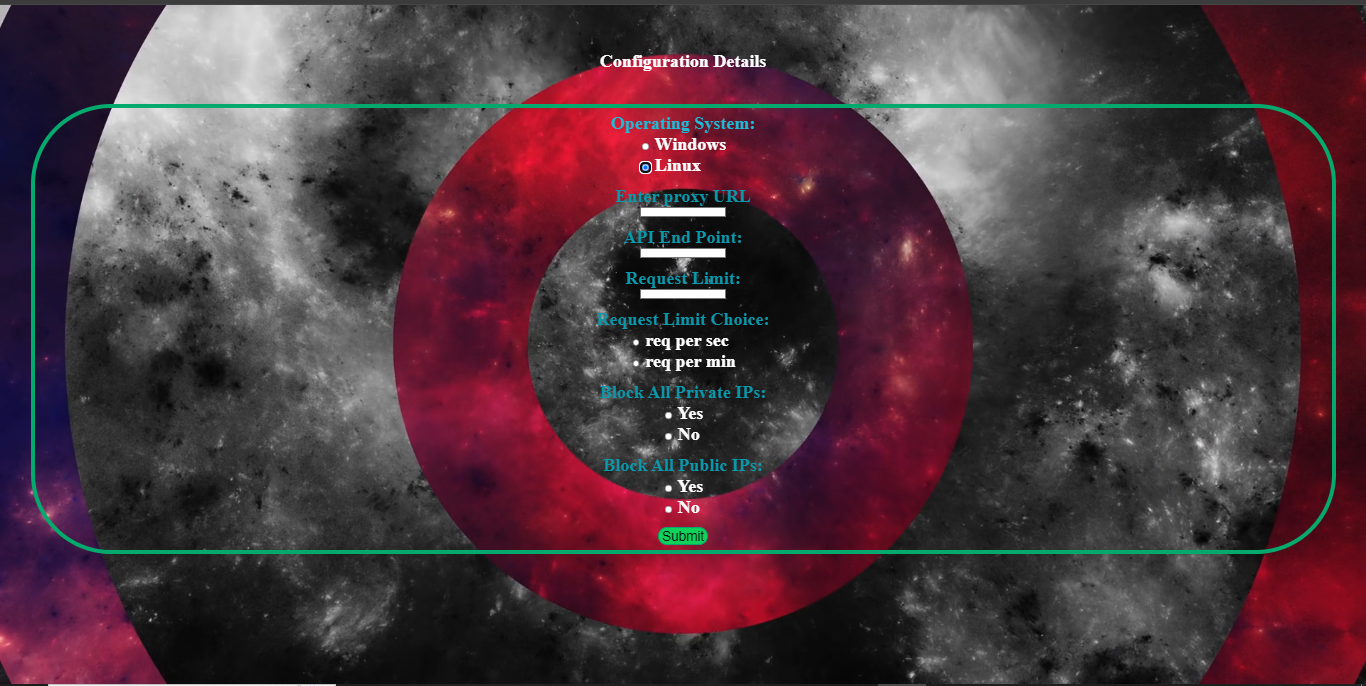
Django Gateway Interface is a Django application designed to provide a user-friendly web interface for configuring Nginx settings for set request limit and IP block. This package enables users to easily manage gateway configurations, specifically to set request limits and block IP addresses at any endpoint for security purposes. It supports both Windows and Linux environments, allowing for seamless integration and efficient configuration management based on user input. Make sure Selected Operating System is same as your working environment
Features
- User-friendly interface for gateway configuration.
- Integration with Nginx to apply and manage configurations.
- Easy installation via PyPI.
- Support Windows and Linux even in WSL
Installation
You can install the Django Gateway Interface package from PyPI using pip. Make sure you have Python 3.8 or higher and Django 3.0 or higher installed.
pip install gateapp
Once verify it using and version should be 2.1.5
pip show gateapp
Requirement
- Make sure your django app is running on http://127.0.0.1:8000, needed some modification in setting.py for template and css and follow configuration
Configuration
Add to Installed Apps: Add 'gateapp' to your INSTALLED_APPS in your Django settings.py:
import os
INSTALLED_APPS = [
    ...
    'gateapp',
    ...
]
TEMPLATES = [
    {
        ...
        'DIRS': [os.path.join(BASE_DIR, 'templates')],

        ...
    },
]
# Optionally include additional static file directories
STATIC_URL = '/static/'
STATICFILES_DIRS = [
    os.path.join(BASE_DIR, 'static'),

]
Database Migrations: Run the following command to apply database migrations for the Django app:
python manage.py migrate
Static Files: Collect static files for the Django app:
python manage.py collectstatic
URL Configuration: Include the URLs for the Gateway Interface in your Django project urls.py:
from django.urls import path, include
urlpatterns = [
    # Other URL patterns
    path('configure/', include('gateapp.urls'))
]
Nginx Configuration: Configure Nginx to serve your Django application. Here’s a basic Nginx configuration example for windows:
server {
    listen 80;
    server_name yourdomain.com;

    location / {
        proxy_pass http://127.0.0.1:8000;
        proxy_set_header Host $host;
        proxy_set_header X-Real-IP $remote_addr;
        proxy_set_header X-Forwarded-For $proxy_add_x_forwarded_for;
        proxy_set_header X-Forwarded-Proto $scheme;
    }

    location /static/ {
        alias /path/to/your/static/files/;
    }

    location /media/ {
        alias /path/to/your/media/files/;
    }
}
Replace yourdomain.com and file paths with your specific details.
Usage
Run the Django Development Server: Start the Django development server to test your installation:
python manage.py runserver
Access the Interface: Open your web browser and navigate to http://localhost:8000/configure to access the Gateway Interface.
Configure Gateway Settings:
Use the web interface to fill in and submit configuration details for the gateway.
Contributing
Contributions are welcome! To contribute to the Django Gateway Interface:
Fork the repository on GitHub Create a new branch for your changes. Make your changes and test them. Submit a pull request with a clear description of your changes.
License
This project is licensed under the MIT License - see the LICENSE file for details.
Thank you for using Django Gateway Interface! If you encounter any issues or have suggestions, please feel free to open an issue on GitHub or contact us directly.
Release history Release notifications | RSS feed

Download files
Download the file for your platform. If you're not sure which to choose, learn more about installing packages.
Source Distribution
Built Distribution
Filter files by name, interpreter, ABI, and platform.
If you're not sure about the file name format, learn more about wheel file names.
Copy a direct link to the current filters
File details
Details for the file gateapp_hp-2.1.5.tar.gz.
File metadata
- Download URL: gateapp_hp-2.1.5.tar.gz
- Upload date:
- Size: 14.2 MB
- Tags: Source
- Uploaded using Trusted Publishing? No
- Uploaded via: twine/6.2.0 CPython/3.14.5
File hashes
| Algorithm | Hash digest | |
|---|---|---|
| SHA256 |
8cc175839a5fe7f79e192df3ff25308687580ea607a3ea41a49e7aff03b4b697
|
|
| MD5 |
829cb35c1d443f7f4cc22c6255bc77db
|
|
| BLAKE2b-256 |
f99c3dc7d66dec210aef77d45ce52401533983d4d6450c9233c5982e60d8bc2f
|
File details
Details for the file gateapp_hp-2.1.5-py3-none-any.whl.
File metadata
- Download URL: gateapp_hp-2.1.5-py3-none-any.whl
- Upload date:
- Size: 14.2 MB
- Tags: Python 3
- Uploaded using Trusted Publishing? No
- Uploaded via: twine/6.2.0 CPython/3.14.5
File hashes
| Algorithm | Hash digest | |
|---|---|---|
| SHA256 |
517a4ddb7cfa79827595b1169fd7d580588b1bdc243793795fbea2ebd8aef29b
|
|
| MD5 |
77b829f0443baf5f0673a36b4d882e0f
|
|
| BLAKE2b-256 |
0f72e93552b29db8a1a273f7659723fff5bcb308236af2a7825c72c617dc3702
|






