
gboost_module
Gradient Boosting Modules for pytorch
Introduction
Gradient Boosting Machines only require gradients and, for modern packages, hessians to train. Pytorch (and other neural network packages) calculates gradients and hessians. GBMs can therefore be fit as the first layer in neural networks using Pytorch. This package provides access to XGBoost and LightGBM as Pytorch Modules to do exactly this.
CatBoost is supported in an experimental capacity since the current gboost_module integration with CatBoost is not as performant as the other GBDT packages.
Install
pip install gboost_module
Troubleshooting
- Currently, the biggest difference between training using
gboost_modulevs basictorch, is thatgboost_module, like basic usage ofxgboostandlightgbm, requires the entire dataset to be fed in. Cached predictions allow these packages to train quickly, and caching cannot happen if input batches change with each training/boosting round. Some additional info is provided in #12.
Basic training of a GBM for comparison to existing packages
import time

import lightgbm as lgb
import numpy as np
import xgboost as xgb
import torch

from gboost_module import lgbmodule, xgbmodule

# Generate Dataset
np.random.seed(100)
n = 1000
input_dim = 20
output_dim = 1
X = np.random.random([n, input_dim])
B = np.random.random([input_dim, output_dim])
Y = X.dot(B) + np.random.random([n, output_dim])

iters = 100
t0 = time.time()

# XGBoost training for comparison
xbst = xgb.train(
    params={'objective': 'reg:squarederror', 'base_score': 0.0},
    dtrain=xgb.DMatrix(X, label=Y),
    num_boost_round=iters
)
t1 = time.time()

# LightGBM training for comparison
lbst = lgb.train(
    params={'verbose':-1},
    train_set=lgb.Dataset(X, label=Y.flatten(), init_score=[0 for i in range(n)]),
    num_boost_round=iters
)
t2 = time.time()

# XGBModule training
xnet = xgbmodule.XGBModule(n, input_dim, output_dim, params={})
xmse = torch.nn.MSELoss()

for i in range(iters):
    xnet.zero_grad()
    xpred = xnet(X)

    loss = 1/2 * xmse(xpred, torch.Tensor(Y))  # xgboost uses 1/2 (Y - P)^2
    loss.backward(create_graph=True)

    xnet.gb_step(X)
t3 = time.time()

# LGBModule training
lnet = lgbmodule.LGBModule(n, input_dim, output_dim, params={})
lmse = torch.nn.MSELoss()
for i in range(iters):
    lnet.zero_grad()
    lpred = lnet(X)

    loss = lmse(lpred, torch.Tensor(Y))
    loss.backward(create_graph=True)

    lnet.gb_step(X)
t4 = time.time()


print(np.max(np.abs(xbst.predict(xgb.DMatrix(X)) - xnet(X).detach().numpy().flatten())))  # 9.537e-07
print(np.max(np.abs(lbst.predict(X) - lnet(X).detach().numpy().flatten())))  # 2.479e-07
print(f'xgboost time: {t1 - t0}')   # 0.089
print(f'lightgbm time: {t2 - t1}')  # 0.084
print(f'xgbmodule time: {t3 - t2}') # 0.166
print(f'lgbmodule time: {t4 - t3}') # 0.123
Training XGBoost and LightGBM together
import time

import numpy as np
import torch

from gboost_module import lgbmodule, xgbmodule


# Create new module that jointly trains multi-output xgboost and lightgbm models
# the outputs of these gbm models is then combined by a linear layer
class GBPlus(torch.nn.Module):
    def __init__(self, input_dim, intermediate_dim, output_dim):
        super(GBPlus, self).__init__()

        self.xgb = xgbmodule.XGBModule(n, input_dim, intermediate_dim, {'eta': 0.1})
        self.lgb = lgbmodule.LGBModule(n, input_dim, intermediate_dim, {'eta': 0.1})
        self.linear = torch.nn.Linear(intermediate_dim, output_dim)

    def forward(self, input_array):
        xpreds = self.xgb(input_array)
        lpreds = self.lgb(input_array)
        preds = self.linear(xpreds + lpreds)
        return preds

    def gb_step(self, input_array):
        self.xgb.gb_step(input_array)
        self.lgb.gb_step(input_array)

# Generate Dataset
np.random.seed(100)
n = 1000
input_dim = 10
output_dim = 1
X = np.random.random([n, input_dim])
B = np.random.random([input_dim, output_dim])
Y = X.dot(B) + np.random.random([n, output_dim])

intermediate_dim = 10
gbp = GBPlus(input_dim, intermediate_dim, output_dim)
mse = torch.nn.MSELoss()
optimizer = torch.optim.Adam(gbp.parameters(), lr=0.005)

t0 = time.time()
losses = []
for i in range(100):
    optimizer.zero_grad()
    preds = gbp(X)

    loss = mse(preds, torch.Tensor(Y))
    loss.backward(create_graph=True)  # create_graph=True required for any gboost_module
    losses.append(loss.detach().numpy().copy())

    gbp.gb_step(X)  # required to update the gbms
    optimizer.step()
t1 = time.time()
print(t1 - t0)  # 5.821
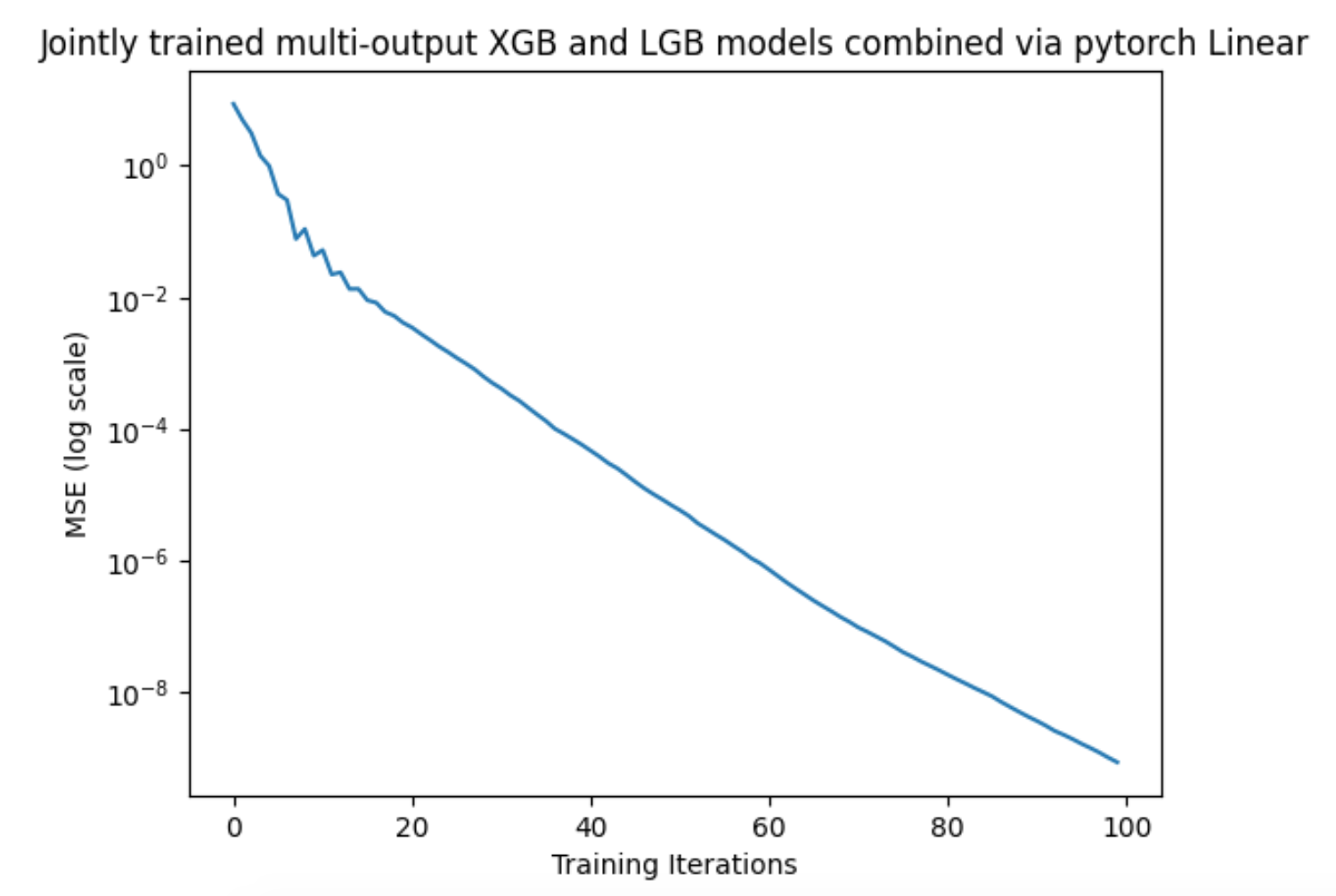
1 maintainer

Metadata
1 maintainer
Release files for gboost-module 0.1.4
For a detailed explanation of source distributions (sdists) and built distributions (wheels), please see the package formats documentation.
Source distribution (sdist)
| File | Size | Uploaded | Provenance | Actions |
|---|---|---|---|---|
| gboost_module-0.1.4.tar.gz | 11.9 kB | Without provenance | Details for gboost_module-0.1.4.tar.gz |
Built distribution (wheel)
| File | Interpreter | ABI | Platform | Actions Reset |
|---|---|---|---|---|
| gboost_module-0.1.4-py3-none-any.whl | Python 3 | none | any | Details for gboost_module-0.1.4-py3-none-any.whl |
Total release size: 27.4 kB
Release files / gboost_module-0.1.4.tar.gz
| Download URL | gboost_module-0.1.4.tar.gz |
|---|---|
| Size | 11.9 kB |
| Tags | Source |
|
SHA-256 checksum How to use checksums |
5567dfe86f6c25f2c528df087636dbd33be95d9e3848065bd8d22bd6e3473fb9
|
|
BLAKE2b-256 checksum How to use checksums |
a9e3b25cf956141294af08acef02bfeed18d58f2dc0e134255332d09e091fca0
|
| Upload date | |
|
Uploaded using Trusted Publishing? What is trusted publishing? |
No |
| Uploaded via |
twine/5.1.1 CPython/3.9.20
|
Release files / gboost_module-0.1.4-py3-none-any.whl
| Download URL | gboost_module-0.1.4-py3-none-any.whl |
|---|---|
| Size | 15.5 kB |
| Tags | Python 3 |
|
SHA-256 checksum How to use checksums |
22f2fc9e26e4d8736f8b3c9c1c675cd26216e8401f7adce3840dfbf8db50c7c8
|
|
BLAKE2b-256 checksum How to use checksums |
410bf6a0c54fcc6dbc4268a2bff5e168e5220cbde7369b5f8be0605a3d040c10
|
| Upload date | |
|
Uploaded using Trusted Publishing? What is trusted publishing? |
No |
| Uploaded via |
twine/5.1.1 CPython/3.9.20
|
Security for gboost-module 0.1.4
Provenance
Provenance describes where a file came from. On PyPI, provenance is shared via attestations, which provide a verifiable record of the build or publishing details. View details, limitations and caveats.
No provenance found
None of the files in this release were uploaded with provenance metadata.
A note on package security
PyPI is a repository for distributing packages, not a service for auditing them. While third-party security researchers and our staff do their best to detect and remove malicious packages, PyPI cannot guarantee the quality, security or suitability of any given package.
To learn more about protecting yourself from malicious actors, visit our package security documentation.














