
A Gentoo Build Publisher plugin to dump & restore builds

Project description
gbp-archive
A Gentoo Build Publisher plugin to dump & restore builds.
Description
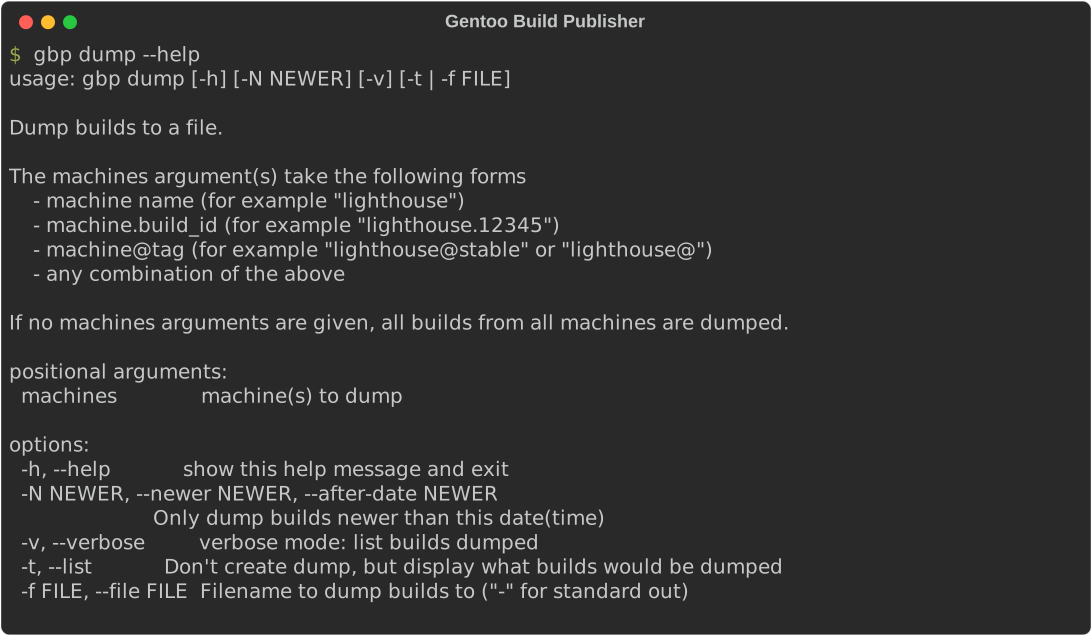
The gbp-archive package provides two subcommands for gbpcli: dump and
restore. These subcommands are "server-only" meaning they are only available
from the GBP server instance. The dump subcommand can dump all the builds
on the instance, just a particular machine or machines, or a particular build
or builds, or any combination of those.
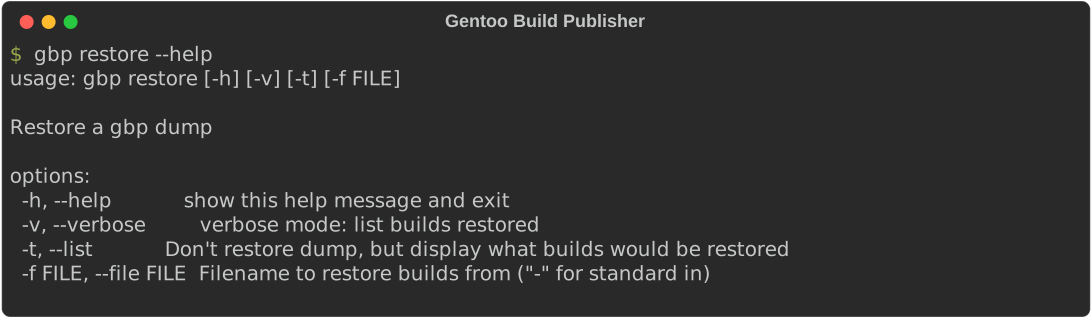
Then restoring is as simple as running gbp restore:
Installation
This assumes you already have a working Gentoo Build Publisher installation. If not refer to the GBP Install Guide first.
Install the gbp-archive package onto the GBP instance.
cd /home/gbp
sudo -u gbp -H ./bin/pip install gbp-archive
There is no need to restart any services after installation.
Process
Dump
How the dump process works is a tar archive is created. Inside that tar archive are 3 items:
Metadata
The first item is a JSON file containing metadata for the dump. Currently the metadata are:
- The version number of the dump file
- A timestamp for when the dump was created
- The hostname of the GBP instance that created the dump
- The list of builds included in the dump
Records
The second item is a file which includes all the "records" for the dumped
builds. This is the build metadata stored the GBP database. This information
is serialized into JSON and stored in a single file, records.json.
Storage
The third item is another tar archive consisting of the "storage" for the
dumped builds. By storage I mean all of the repos, binpkgs, and configuration
for builds. All of them are stored in an inner tar archive called
storage.tar. The reason for the single archive and not one archive per build
is to preserve the multiple hard links which span across builds (for a given
machine). They would not be preserved across multiple archives.
Restore
For the restore process, we open the outer tar archive and then the
records.json file is deserialized and loaded into the instance's database.
Then we extract the contents of storage.tar to the root of the instance's
storage root. Currently the restore process is all-or-nothing. But in the
future I will add the ability to filter out what builds get restored.
Release history Release notifications | RSS feed


Download files
Download the file for your platform. If you're not sure which to choose, learn more about installing packages.
Source Distribution
Built Distribution
Filter files by name, interpreter, ABI, and platform.
If you're not sure about the file name format, learn more about wheel file names.
Copy a direct link to the current filters
File details
Details for the file gbp_archive-1.1.0.tar.gz.
File metadata
- Download URL: gbp_archive-1.1.0.tar.gz
- Upload date:
- Size: 13.1 kB
- Tags: Source
- Uploaded using Trusted Publishing? No
- Uploaded via: twine/6.1.0 CPython/3.13.5
File hashes
| Algorithm | Hash digest | |
|---|---|---|
| SHA256 |
e3c5f763936288ef1d9baf2a6efe2bfa5ddf632dc188f655c6ded8dfec5679f9
|
|
| MD5 |
46c23f53015911d47300d4b333e7fd03
|
|
| BLAKE2b-256 |
b7565ab204cb5bc569544754f876ff4595e27a40e79ef1f99014037454c3e2f9
|
File details
Details for the file gbp_archive-1.1.0-py3-none-any.whl.
File metadata
- Download URL: gbp_archive-1.1.0-py3-none-any.whl
- Upload date:
- Size: 10.9 kB
- Tags: Python 3
- Uploaded using Trusted Publishing? No
- Uploaded via: twine/6.1.0 CPython/3.13.5
File hashes
| Algorithm | Hash digest | |
|---|---|---|
| SHA256 |
052a25897750103e54c1b119d92089ffb0fd26a82e66864d4e8d134897e05e9c
|
|
| MD5 |
c974a558ea05fa2c99f3cc96589b6e6a
|
|
| BLAKE2b-256 |
e0fd07921ff6858b23a054009359721a01d71e116e65f3ca7a303182c6ed6fae
|






