gbp-fl
A pfl-inspired plugin for Gentoo Build Publisher.
Gentoo's binary packages (binpkgs) are all collected into Gentoo Build Publisher "builds". The gbp-fl tool is both a plugin for Gentoo Build Publisher and a CLI tool.
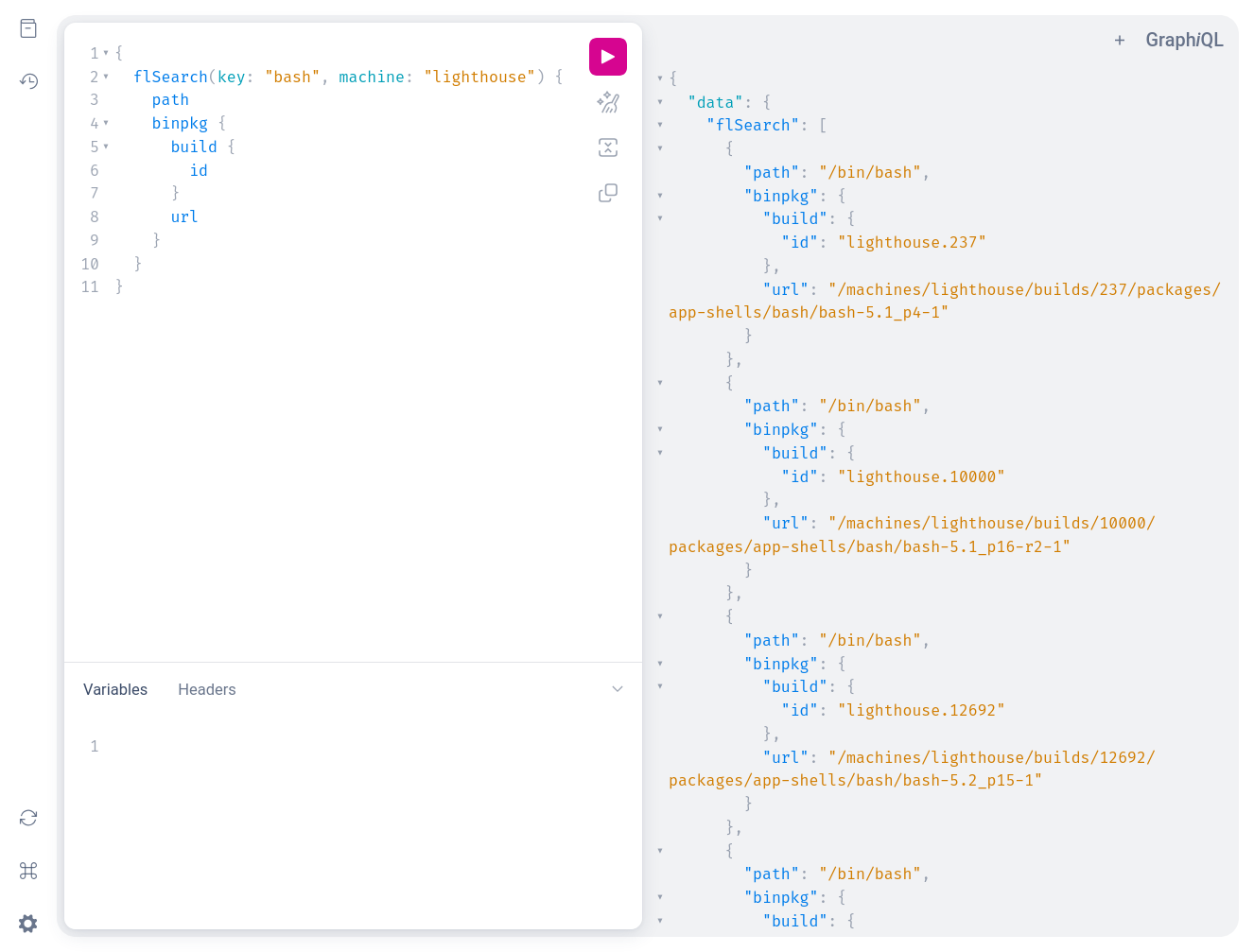
As a plugin for Gentoo Build Publisher, when builds are pushed to GBP, gbp-fl indexes the files for all the packages in the build. It also provides a convenient web API for querying the index.
As a CLI tool, gbp-fl provides a plugin for gbpcli that adds the ability to search the index from the command line. It queries the web API for doing so. With the latest versions of Gentoo Build Publisher, it also provides the ability to fetch the binpkgs directly from the GBP server.
Rationale
I'm not sure that this is useful, but it was fun to work on. However it might be nice to learn about what kinds of packages belong on different systems and how they compare, for example. Or one might want to fetch a file from a package on one machine to use on another. Who knows.
Installation
Note: That this plugin uses the Python tar implementation to inspect binpkg files. The default compression format used by Gentoo's binpkgs is zstandard. However Python versions older than 3.14 do not support the zstandard compression format. Therefore if using Python <= 3.14 it is required to use a non-default compression format compatible with your version of Python, for example in
/etc/portage/make.conf:
BINPKG_COMPRESS=xz
Server Plugin
To use gbp-fl you must first install the plugin on the GBP server. This assumes you already have a working Gentoo Build Publisher installation. If not, refer to the GBP Install Guide first.
Install the gbp-fl package into the GBP instance:
cd /home/gbp
sudo -u gbp -H ./bin/pip install gbp-fl[server]
Restart the GBP web app and task workers.
systemctl restart gentoo-build-publisher-wsgi.service
systemctl restart gentoo-build-publisher-worker.service
Client Plugin
To use the gbp-fl command-line interface requires the gbpcli tool. The recommended way to install it on non-servers is via pipx:
pipx install gbpcli
Then add gbp-fl to the gbpcli environment:
pipx inject gbpcli gbp-fl
Usage
From the server, files from builds will automatically get indexed when they are pulled. Builds that are purged from GBP are also automatically removed from the files index. In addition the GraphQL API is automatically provided through the web interface.
From the command-line interface, the fl subcommand is automatically made
available after installation.
search
To search for files, for example.
$ gbp fl search <keyword>
This command will display any filenames that matching the keyword for all the
builds that are hosted on the Gentoo Build Publisher instance. To restrict the
search to an particular screen name, use the -m argument.
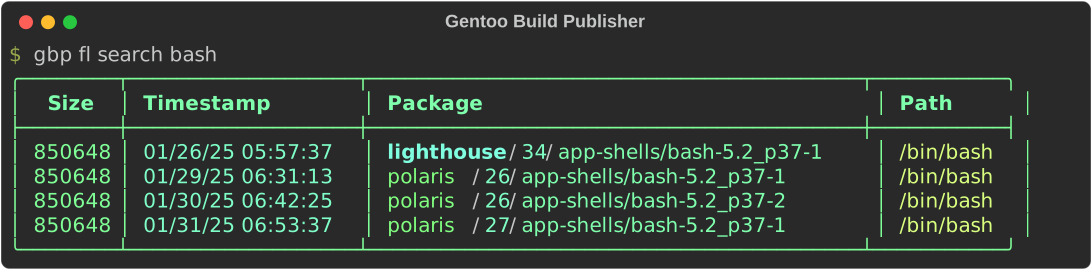
The search command displays the machine, build, package and path of the files that are a match. In addition the file size and timestamp are displayed.
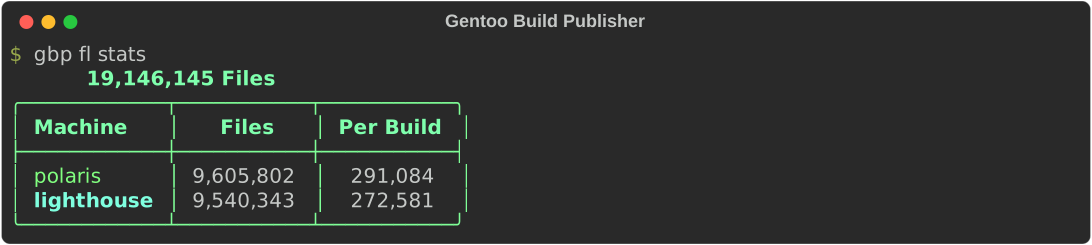
stats
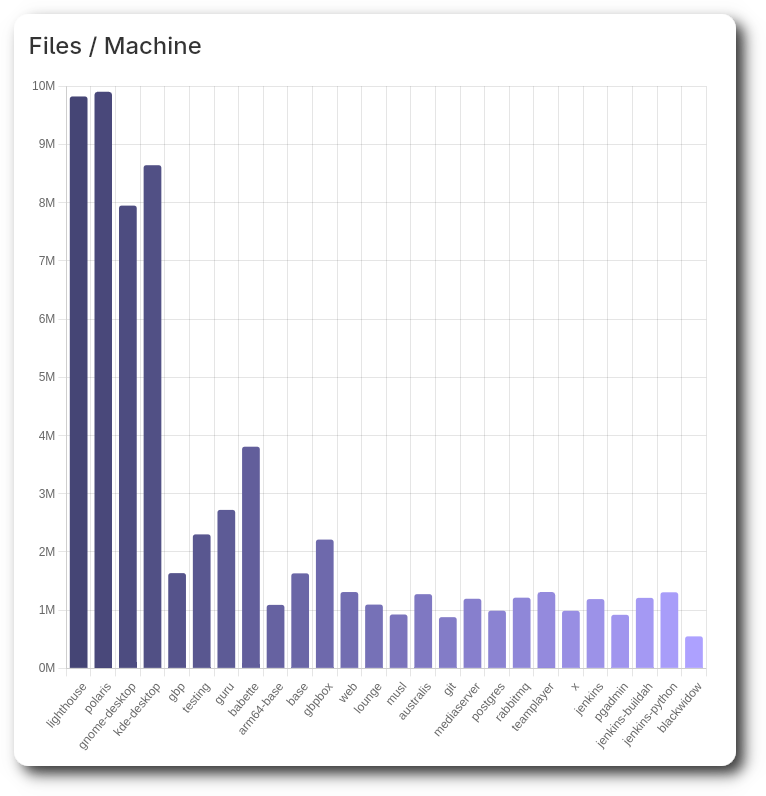
File statistics for all your builds can be displayed with the stats
subcommand:
ls
The ls command is used to list the contents of a specific binpkg in a
specific build. For example to list the contents of the app-arch/tar-1.35-1
binpkg in the build lighthouse.34:
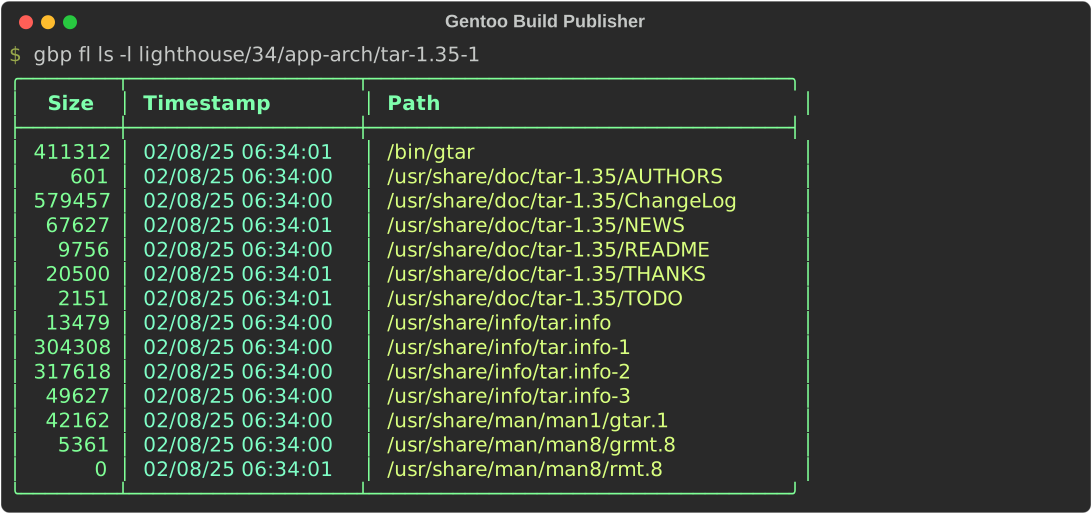
Without the -l flag the files are displayed as a simple list of files (akin
to /bin/ls -1).
fetch
The binpkg files can even be downloaded to the local machine using the fetch
command:
$ gbp fl fetch <pkgspec>

Architecture
gbp-fl us both a plugin for Gentoo Build Publisher (server) and gbpcli (client), much like gbp-ps.
There are 5 main components to gbp-fl:
-
The database layer where file metadata are indexes. There is an abstract interface for this with different backends able to support the interface. Currently there are Django ORM and memory (for testing) interfaces. In the future other interfaces may be added (perhaps OpenSearch?).
-
The signal handling layer plugs into Gentoo Pubild Publisher's
postpullandpostdeletesignals to index (and un-index) the builds as they come and go. -
The GraphQL layer plugs into Gentoo Build Publisher's GraphQL subsystem. This registers a few types and queries specific to gbp-fl and provides their respective resolvers.
-
The CLI layer plugs into the gbpcli command-line interface to add the
flsubcommand (and gbp-fl's own sub-subcommands) then it accesses the GraphQL interface on the server to make queries based on the commands. -
The Django layer plugs into the Gentoo Build Publisher Django templates to provide additional UI elements to the dashboard and machine details pages.
1 maintainer

Metadata
1 maintainer
Release files for gbp-fl 1.3.0
For a detailed explanation of source distributions (sdists) and built distributions (wheels), please see the package formats documentation.
Source distribution (sdist)
| File | Size | Uploaded | Provenance | Actions |
|---|---|---|---|---|
| gbp_fl-1.3.0.tar.gz | 80.8 kB | Without provenance | Details for gbp_fl-1.3.0.tar.gz |
Built distribution (wheel)
| File | Interpreter | ABI | Platform | Actions Reset |
|---|---|---|---|---|
| gbp_fl-1.3.0-py3-none-any.whl | Python 3 | none | any | Details for gbp_fl-1.3.0-py3-none-any.whl |
Total release size: 116.5 kB
Release files / gbp_fl-1.3.0.tar.gz
| Download URL | gbp_fl-1.3.0.tar.gz |
|---|---|
| Size | 80.8 kB |
| Tags | Source |
|
SHA-256 checksum How to use checksums |
b10f3ed84bb08376df8fa7662a60670690a9d09750440bcab6befe22d34bccfb
|
|
BLAKE2b-256 checksum How to use checksums |
816c0f3968cf4b588171ff803db498847c4474799b0b2fedac924c3627d3155a
|
| Upload date | |
|
Uploaded using Trusted Publishing? What is trusted publishing? |
No |
| Uploaded via |
twine/7.0.0 CPython/3.14.7
|
Release files / gbp_fl-1.3.0-py3-none-any.whl
| Download URL | gbp_fl-1.3.0-py3-none-any.whl |
|---|---|
| Size | 35.7 kB |
| Tags | Python 3 |
|
SHA-256 checksum How to use checksums |
531a3c5a1f6c20218197c3f7c51e7c9fdf405feb73873ca912b84c5ec9fd4371
|
|
BLAKE2b-256 checksum How to use checksums |
160196ab1d31cdb190ab68891509af2ca3474d91e1f46fcbf8faeb40112b9ef1
|
| Upload date | |
|
Uploaded using Trusted Publishing? What is trusted publishing? |
No |
| Uploaded via |
twine/7.0.0 CPython/3.14.7
|
Security for gbp-fl 1.3.0
Provenance
Provenance describes where a file came from. On PyPI, provenance is shared via attestations, which provide a verifiable record of the build or publishing details. View details, limitations and caveats.
No provenance found
None of the files in this release were uploaded with provenance metadata.
A note on package security
PyPI is a repository for distributing packages, not a service for auditing them. While third-party security researchers and our staff do their best to detect and remove malicious packages, PyPI cannot guarantee the quality, security or suitability of any given package.
To learn more about protecting yourself from malicious actors, visit our package security documentation.