
Get notifications for GBP events

Project description
gbp-notifications
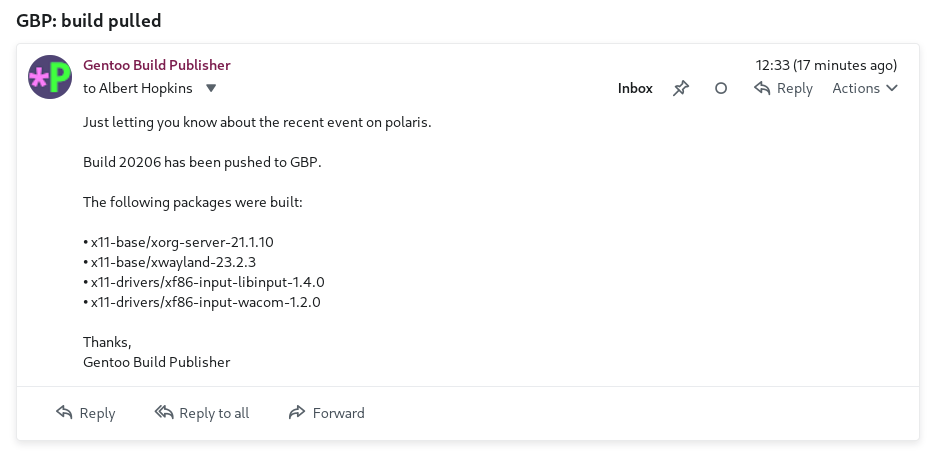
gbp-notifications is a plugin for Gentoo Build Publisher that can send notifications when various events occur in a GBP instance. This is to scratch my personal itch where i want to receive emails when certain machines have new builds pulled.
Installation
This assumes you already have a working Gentoo Build Publisher installation. If not refer to the GBP Install Guide first.
Install the gbp-notifications package onto the GBP instance.
cd /home/gbp
sudo -u gbp -H ./bin/pip install gbp-notifications
Restart your web app.
systemctl restart gentoo-build-publisher-wsgi.service
Configuration
Environment variables
Like Gentoo Build Publisher itself, gbp-notifications relies on environment
variables for configuration. It looks at variables with a GBP_NOTIFICATIONS_
prefix. For example to set up a recipient to receive email notifications when
a build for the machine "babette" gets pulled:
# /etc/gentoo-build-publisher.conf

GBP_NOTIFICATIONS_RECIPIENTS="albert:email=marduk@host.invalid"
GBP_NOTIFICATIONS_SUBSCRIPTIONS="babette.build_pulled=albert"

GBP_NOTIFICATIONS_EMAIL_FROM="marduk@host.invalid"
GBP_NOTIFICATIONS_EMAIL_SMTP_HOST"=smtp.email.invalid"
GBP_NOTIFICATIONS_EMAIL_SMTP_USERNAME="marduk@host.invalid"
GBP_NOTIFICATIONS_EMAIL_SMTP_PASSWORD="supersecret"
The first two lines are setting up recipients and subscriptions. There is a
single recipient named albert that has an email address. The second line
sets up subscriptions. There is one subscription: when the machine "babette"
receives a build_pulled event the the recipient with the name "albert"
will be notified. Since "albert" has one notification method defined (email)
that recipient will be notified via email.
The wildcard is supported for machines and events, on subscriptions. So
*.build_pulled=albert means "send a notification to albert when any machine receives
a build_pulled event" and babette.*=albert means "send a notification to albert
when any event is receive for the machine babette. The double-wildcard, *.*=albert
does what you'd think. Notifications are only sent once per recipient (per notification
method).
The last lines are settings for the email notification method. gbp-notifications has support for multiple notification methods but currently only email is implemented.
Config file for Recipients and Subscriptions
Alternatively you can use a toml-formatted config file for recipients and
subscriptions. For that instead define the GBP_NOTIFICATIONS_CONFIG_FILE
environment variable that points to the path of the config file, e.g.
GBP_NOTIFICATIONS_CONFIG_FILE="/etc/gbp-subscribers.toml"
Then in your config file, the above configuration would look like this:
[recipients]
albert = {email = "marduk@host.invalid"}

[subscriptions]
babette = {build_pulled = ["albert"]}
A more sophisticated example might be:
[recipients]
# Albert and Bob are recipients with email addresses.
albert = {email = "marduk@host.invalid"}
bob = {email = "bob@host.invalid"}

[subscriptions]
# Both Albert and Bob want to be notified when builds for babette are pulled
babette = {build_pulled = ["albert", "bob"]}

# For lighthouse Albert only wants to be notified when builds are pulled. Bob only wants
# To be notified when builds are published.
lighthouse = {build_pulled = ["albert"], build_published = ["bob"]}
Webhook method
In addition to email, gbp-notifications supports web hooks. For example, consider the environment variables:
GBP_NOTIFICATIONS_RECIPIENTS="marduk:webhook=http://host.invalid/webhook|X-Pre-Shared-Key=1234",
GBP_NOTIFICATIONS_SUBSCRIPTIONS="*.build_pulled=marduk"
The subscriber "marduk" is subscribed the build_pulled event for all
machines. The recipient for marduk has a "webhook". The configuration for the
web hook has values that are delimited with "|". The first item will be the
URL of the webhook and any remainint items will be HTTP headers used when
requesting the URL. Note that header definitions are to be given in form
name=value and not name: value.
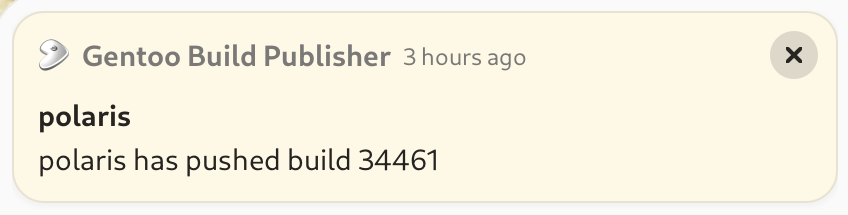
Webhooks might be used, for example, to automatically update machines whenever a new build is published. Or perhaps a desktop notification:


Download files
Download the file for your platform. If you're not sure which to choose, learn more about installing packages.
Source Distribution
Built Distribution
Filter files by name, interpreter, ABI, and platform.
If you're not sure about the file name format, learn more about wheel file names.
Copy a direct link to the current filters
File details
Details for the file gbp_notifications-1.1.1.tar.gz.
File metadata
- Download URL: gbp_notifications-1.1.1.tar.gz
- Upload date:
- Size: 28.1 kB
- Tags: Source
- Uploaded using Trusted Publishing? No
- Uploaded via: twine/6.1.0 CPython/3.12.9
File hashes
| Algorithm | Hash digest | |
|---|---|---|
| SHA256 |
baca6ca6f7ff26c349ac5a5c70982a8b0a37d3753141cdaa1290a1f25a554839
|
|
| MD5 |
1e94548f5615a168470b50365f2c5280
|
|
| BLAKE2b-256 |
80da27f47daabc5af1bf324bba1fc238e76bd66dfbc45103b347b574ffb13665
|
File details
Details for the file gbp_notifications-1.1.1-py3-none-any.whl.
File metadata
- Download URL: gbp_notifications-1.1.1-py3-none-any.whl
- Upload date:
- Size: 26.0 kB
- Tags: Python 3
- Uploaded using Trusted Publishing? No
- Uploaded via: twine/6.1.0 CPython/3.12.9
File hashes
| Algorithm | Hash digest | |
|---|---|---|
| SHA256 |
57a55ae2cdac66ab3d8dfb5693e6956df6c5e942e354a1541b388b8c8f502103
|
|
| MD5 |
7c90d92e8ae0d91597e49db6e0a337e9
|
|
| BLAKE2b-256 |
fa3f30fe20f2bf40356b6847597cf40ad7a2dbf3d059c684bfbbef1d2f52d1ee
|






