
gbp-webhook
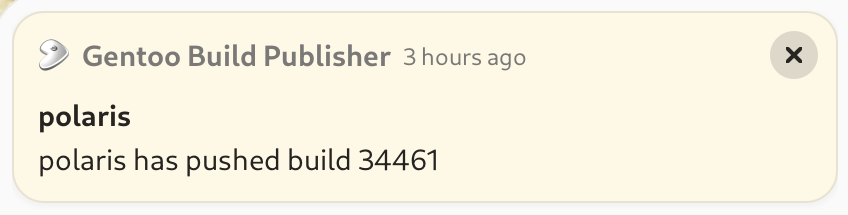
gbp-webhook is a web service that responds to webhook notifications given from the gbp-notifications plugin. It shows a nice desktop notification whenever the machines of your choice pull a build. That's what it does by default, however plugins can be written to respond to any event that gbp-notifications responds to.
Features
- Command-line interface integrates with gbpcli
- Does not require root access to run
- Security
- IP whitelisting
- Pre-shared key
- Optional SSL (TLS) support
- Plugin support to handle gbp-notifications however you like
Installation
These instructions assume you already have gbpcli, the command-line interface for Gentoo Build Publisher, installed on your desktop.
If you've installed gbpcli via pip install --user:
pip install --user gbp-webhook
If you've installed gbpcli via pipx:
pipx inject gbpcli gbp-webhook
Usage
Set the pre-shared key with an environment variable
GBP_WEBHOOK_PRE_SHARED_KEY=our_little_secret
export GBP_WEBHOOK_PRE_SHARED_KEY
Run the server
gbp webhook serve --port 5000 --allow 10.10.10.23
The --port argument is the port you wish the webhook to listen on. It is
optional and defaults to 5000.
The --allow argument is an IP or IP/mask that is allowed to send requests to
the webhook server. Multiple IPs can be passed. All other IPs are forbidden
so if no --allow flags are passed then the server will refuse all requests.
gbp-webhook uses nginx as a front-end. You do not need to
be root to start nginx or run nginx as a system service, however you do need
to tell gbp-webhook where the nginx executable resides if it is anywhere other
than /usr/sbin/nginx. This is done with the --nginx argument. For example:
gbp webhook serve --port 5000 --nginx ~/.local/bin/nginx
Ok so now the service is running on your desktop system, but you need to configure the server. This is where gbp-notifications comes in. Refer to the gbp-notifications installation instructions, then configure it to talk to your gbp-webhook server. Here's an exampl TOML config:
[recipients]
laptop = { webhook = "http://10.10.10.100:5000/webhook|X-Pre-Shared-Key=our_little_secret" }

[subscriptions]
"*" = {postpull = ["laptop"]}
If you use the TOML config you won't need to restart the GBP service to read the config. However if you are using environment variables configuration you will.
Now when a build is pulled, gbp-notifications will send an HTTP request to the webhook service on your laptop, which will in turn display a desktop notification.
Systemd Integration
gbp-webhook can be run manually from the command line as outlined above. However it's nicer if it is able to automatically start in the background when you log into your desktop environment. For this gbp-webhook is able to install a systemd unit file for you:
gbp webhook install --port 5000 --nginx ~/.local/bin/nginx
This installs a gbp-webhook.service unit in ~/.local/share/systemd/user.
It also installs a config file in ~/.config/gbp-webhook.conf. You can then
enable and start the service with:
systemctl enable --user --now gbp-webhook
Now it will start automatically when you log in. To uninstall the service:
gbp webhook uninstall
Environment Variables
The following variables are read from ~/.config/gbp-webhook.conf:
GBP_WEBHOOK_PRE_SHARED_KEY: as explained above, the pre-shared key exchanged between Gentoo Build Publisher and gbp-webhook.GBP_WEBHOOK_NGINX: If defined, this is the full path to the nginx executable. The default is/usr/sbin/nginx.GBP_WEBHOOK_ARGS: additional arguments to pass togbp-webhook. Rungbp webhook --helpto see the available arguments.
Plugins
gbp-webhook has a plugin mechanism were the webhook can call arbitrary handlers. The following additional plugins are known to exist:
| Plugin | Description |
|---|---|
| playsound | A plugin that plays a sound on build pulled events |
| tts | A text-to-speech plugin to speak the name of a machine or machines when a build is pulled for that machine |
1 maintainer

Download files
Download the file for your platform. If you're not sure which to choose, learn more about installing packages.
Source Distribution
Built Distribution
Filter files by name, interpreter, ABI, and platform.
If you're not sure about the file name format, learn more about wheel file names.
Copy a direct link to the current filters
File details
Details for the file gbp_webhook-2.0.0.tar.gz.
File metadata
- Download URL: gbp_webhook-2.0.0.tar.gz
- Upload date:
- Size: 14.8 kB
- Tags: Source
- Uploaded using Trusted Publishing? No
- Uploaded via:
twine/6.2.0 CPython/3.13.7
File hashes
| Algorithm | Hash digest | |
|---|---|---|
| SHA256 |
c193f3f4abd90843d45ddf83cf812439e1ab23dd4a54108b7a42c5d32ed5cb2d
|
|
| MD5 |
dc0fddf7af72d33e351d39c29e3c4340
|
|
| BLAKE2b-256 |
79115fd4b7b52933e6f9f6a4fd344cecd8949c8b858e82d2be3787d70779f98f
|
File details
Details for the file gbp_webhook-2.0.0-py3-none-any.whl.
File metadata
- Download URL: gbp_webhook-2.0.0-py3-none-any.whl
- Upload date:
- Size: 10.5 kB
- Tags: Python 3
- Uploaded using Trusted Publishing? No
- Uploaded via:
twine/6.2.0 CPython/3.13.7
File hashes
| Algorithm | Hash digest | |
|---|---|---|
| SHA256 |
0eb0d64231da8b197511b2bc76e2a451c89c60e85498098a7093b4288546c6da
|
|
| MD5 |
cdcbc573ce8a384f0d53dcbdda0b07fa
|
|
| BLAKE2b-256 |
eec917098a6477398e1f4fe2fc4c1a1d6c2b17d3ae273cf703fcc9f6b0f8e76d
|














