
Git-like staging, diffing, and version control for Google Calendar

Project description
gcal-vcs
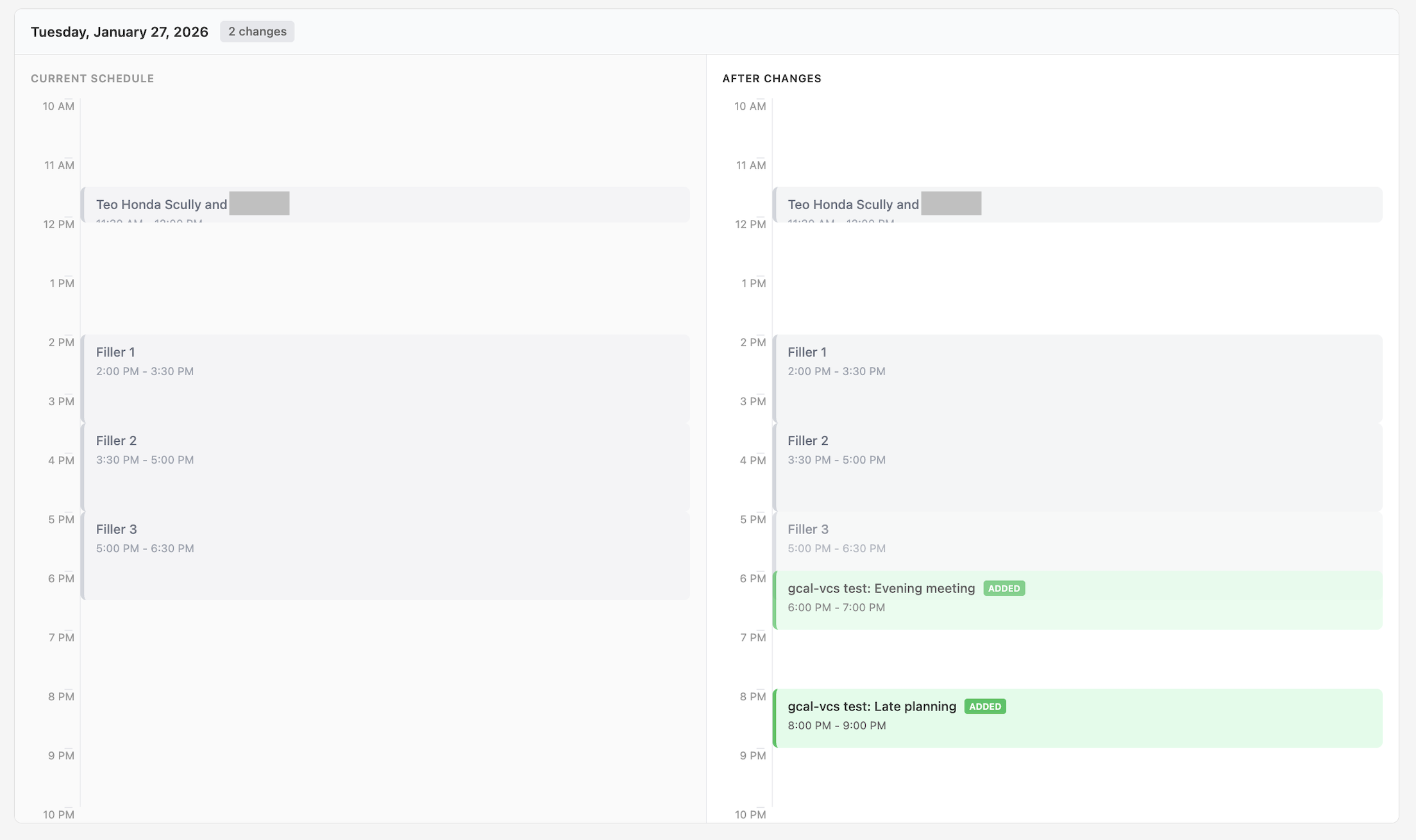
Git-style version control for Google Calendar. Scripts and AI agents are powerful, but giving them direct write access to your schedule is risky. gcal-vcs acts as a safety buffer: stage changes locally, preview the impact with a visual diff, and commit only when you're ready.
The 2-Line Integration
Designed for zero refactoring. You wrap your existing service, and the rest of your code remains identical.
Before
service = build("calendar", "v3", credentials=creds)

# this hits the Google API immediately + no undo
service.events().insert(calendarId="primary", body=event_data).execute()
After
from gcal_vcs import staged

# 1. wrap ur service
service = staged(build("calendar", "v3", credentials=creds))

# 2. use the exact same API (changes are now staged locally)
service.events().insert(calendarId="primary", body=event_data).execute()

service.preview()   # opens visual diff in browser
service.commit()    # applies all changes atomically
Agent-First Workflows
For headless environments or AI agents, gcal-vcs provides programmatic oversight without forcing a browser popup:
# Returns a URL to the diff UI instead of opening a browser
url = service.preview(blocking=False)

# Get a human-readable text summary for LLM validation
print(service.get_text_summary())

# Check changes programmatically
if service.status().total_changes < 10:
    service.commit()
else:
    service.rollback()
CLI & History
Manage your calendar state directly from the terminal.
gcal-vcs log              # list recent commits
gcal-vcs show <id>        # inspect a specific change set
gcal-vcs revert <id>      # undo any previous commit
gcal-vcs ui               # open the history browser
Installation
pip install gcal-vcs
Requirements
- Python 3.9+
- Google Calendar API credentials
Release history Release notifications | RSS feed

Download files
Download the file for your platform. If you're not sure which to choose, learn more about installing packages.
Source Distribution
Built Distribution
Filter files by name, interpreter, ABI, and platform.
If you're not sure about the file name format, learn more about wheel file names.
Copy a direct link to the current filters
File details
Details for the file gcal_vcs-1.0.0.tar.gz.
File metadata
- Download URL: gcal_vcs-1.0.0.tar.gz
- Upload date:
- Size: 30.1 kB
- Tags: Source
- Uploaded using Trusted Publishing? No
- Uploaded via: twine/6.2.0 CPython/3.14.1
File hashes
| Algorithm | Hash digest | |
|---|---|---|
| SHA256 |
0ccac7b7aba0e3e13cea6e7338bf80c0c902bebe93d32cc1a1028671fa11eccf
|
|
| MD5 |
6d5e39cfd6f32ad28f9c8a6bac092a6b
|
|
| BLAKE2b-256 |
7bd2242349174e7e71b26877d2fe9d1722d75ff286143b154d78a4fa54dffcc5
|
File details
Details for the file gcal_vcs-1.0.0-py3-none-any.whl.
File metadata
- Download URL: gcal_vcs-1.0.0-py3-none-any.whl
- Upload date:
- Size: 31.2 kB
- Tags: Python 3
- Uploaded using Trusted Publishing? No
- Uploaded via: twine/6.2.0 CPython/3.14.1
File hashes
| Algorithm | Hash digest | |
|---|---|---|
| SHA256 |
22d5a05793d773ce4b6c6fe02ebb5809ef0534224565dcde6af8915e0dd784c0
|
|
| MD5 |
00d2e9a095373960c2cc2d8a3a25fa61
|
|
| BLAKE2b-256 |
b7771ed54aa0d89b326ecb3245b8a517bb8d84fdc554f44f02a3d8199ce63bef
|






