
Generate C/C++ code coverage reports with gcov
Verified details
These details have been verified by PyPIProject links
GitHub Statistics
Maintainers


Project description
generate GCC code coverage reports
website and documentation • bugtracker • GitHub







Gcovr provides a utility for managing the use of the GNU gcov utility and generating summarized code coverage results. This command is inspired by the Python coverage.py package, which provides a similar utility for Python.
The gcovr command can produce different kinds of coverage reports:
CLI Option |
User Guide |
Description |
|---|---|---|
default, --txt |
compact human-readable summaries |
|
--html |
overview of all files |
|
--html-details |
annotated source files |
|
--html-template-dir |
use custom set of Jinja2 templates |
|
--csv |
CSV report summarizing the coverage of each file |
|
--json |
JSON report with source file structure and coverage |
|
--json-summary |
JSON summary coverage report |
|
--markdown |
Markdown coverage report |
|
--markdown-summary |
Markdown summary coverage report |
|
--clover |
machine readable XML reports in Clover format |
|
--cobertura |
machine readable XML reports in Cobertura format |
|
--coveralls |
machine readable JSON report in Coveralls format |
|
--jacoco |
machine readable XML reports in JaCoCo format |
|
--lcov |
machine readable report in LCOV info format |
|
--sonarqube |
machine readable XML reports in SonarQube format |
Thus, gcovr can be viewed as a command-line alternative to the lcov utility, which runs gcov and generates an HTML-formatted report. The development of gcovr was motivated by the need for text summaries and XML reports.
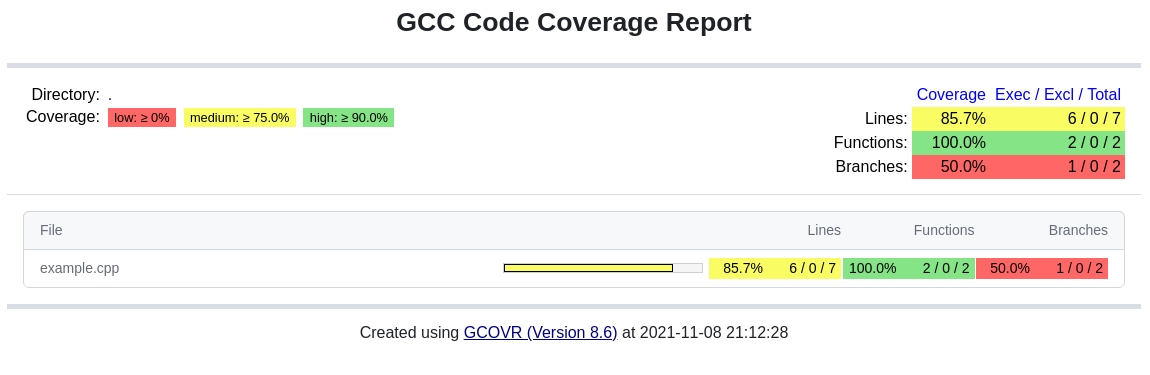
Example HTML summary:
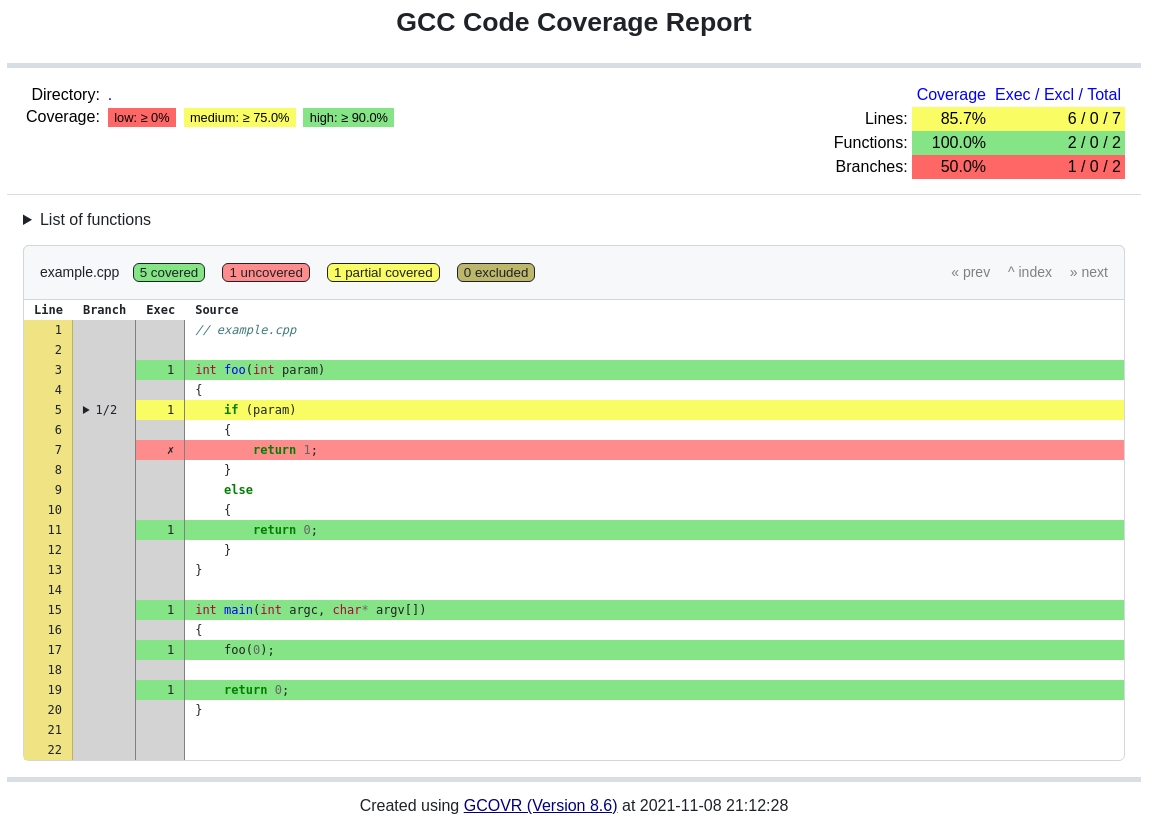
Example HTML details:
Installation
Gcovr is available as a Python package that can be installed via pip.
Install newest stable gcovr release from PyPI:
pip install gcovrInstall development version from GitHub (needs at least version 21.3 of pip):
pip install git+https://github.com/gcovr/gcovr.gitQuickstart
GCC can instrument the executables to emit coverage data. You need to recompile your code with the following flags:
--coverage -g -O0
Next, run your test suite. This will generate raw coverage files.
Finally, invoke gcovr. This will print a tabular report on the console.
gcovr
You can also generate detailed or nested HTML reports:
gcovr --html-details coverage.html
gcovr --html-nested coverage.html
Gcovr will create one HTML report per source file and for --html-nested also per directory next to the coverage.html summary.
You should run gcovr from the build directory. The -r option should point to the root of your project. This only matters if you have a separate build directory. For example:
cd build; gcovr -r ..
For complete documentation, read the manual.
Contributing
If you want to report a bug or contribute to gcovr development, please read our contributing guidelines first: https://gcovr.com/en/latest/contributing.html
License
This software is distributed under the 3-clause BSD License. See https://gcovr.com/en/latest/license.html#license-terms for details. See https://gcovr.com/en/latest/license.html#acknowledgements for the full list of contributors.
Project details
Verified details
These details have been verified by PyPIProject links
GitHub Statistics
Maintainers
Release history Release notifications | RSS feed


Download files
Download the file for your platform. If you're not sure which to choose, learn more about installing packages.
Source Distribution
Built Distribution
Filter files by name, interpreter, ABI, and platform.
If you're not sure about the file name format, learn more about wheel file names.
Copy a direct link to the current filters
File details
Details for the file gcovr-8.6.tar.gz.
File metadata
- Download URL: gcovr-8.6.tar.gz
- Upload date:
- Size: 200.0 kB
- Tags: Source
- Uploaded using Trusted Publishing? Yes
- Uploaded via: twine/6.1.0 CPython/3.12.9
File hashes
| Algorithm | Hash digest | |
|---|---|---|
| SHA256 |
b2e7042abca9321cadbab8a06eb34d19f801b831557b28cdc30a029313de8b9e
|
|
| MD5 |
78e3aafbda016a1808f1cfeb69fdfedd
|
|
| BLAKE2b-256 |
0737b4a87dff166dc0a5002e9d03fcb6ca8eeff048247b011b67f047e31122c9
|
Provenance
The following attestation bundles were made for gcovr-8.6.tar.gz:
Publisher:
CI.yml on gcovr/gcovr
-
Statement:
-
Statement type:
https://in-toto.io/Statement/v1 -
Predicate type:
https://docs.pypi.org/attestations/publish/v1 -
Subject name:
gcovr-8.6.tar.gz -
Subject digest:
b2e7042abca9321cadbab8a06eb34d19f801b831557b28cdc30a029313de8b9e - Sigstore transparency entry: 819824032
- Sigstore integration time:
-
Permalink:
gcovr/gcovr@e01ad73582821b5f90e079482164f8e885121e57 -
Branch / Tag:
refs/heads/main - Owner: https://github.com/gcovr
-
Access:
public
-
Token Issuer:
https://token.actions.githubusercontent.com -
Runner Environment:
github-hosted -
Publication workflow:
CI.yml@e01ad73582821b5f90e079482164f8e885121e57 -
Trigger Event:
push
-
Statement type:
File details
Details for the file gcovr-8.6-py3-none-any.whl.
File metadata
- Download URL: gcovr-8.6-py3-none-any.whl
- Upload date:
- Size: 254.6 kB
- Tags: Python 3
- Uploaded using Trusted Publishing? Yes
- Uploaded via: twine/6.1.0 CPython/3.12.9
File hashes
| Algorithm | Hash digest | |
|---|---|---|
| SHA256 |
dbf9d87c38042752ad6f530aa8210427e22b526611bb7b7bfed0e81977d1f1ef
|
|
| MD5 |
501f989af2613760ca4ebef781e3d417
|
|
| BLAKE2b-256 |
92bef722c843e7875c7cf92cf0e0c1604cddda55a70278c768c6327a78fdba79
|
Provenance
The following attestation bundles were made for gcovr-8.6-py3-none-any.whl:
Publisher:
CI.yml on gcovr/gcovr
-
Statement:
-
Statement type:
https://in-toto.io/Statement/v1 -
Predicate type:
https://docs.pypi.org/attestations/publish/v1 -
Subject name:
gcovr-8.6-py3-none-any.whl -
Subject digest:
dbf9d87c38042752ad6f530aa8210427e22b526611bb7b7bfed0e81977d1f1ef - Sigstore transparency entry: 819824034
- Sigstore integration time:
-
Permalink:
gcovr/gcovr@e01ad73582821b5f90e079482164f8e885121e57 -
Branch / Tag:
refs/heads/main - Owner: https://github.com/gcovr
-
Access:
public
-
Token Issuer:
https://token.actions.githubusercontent.com -
Runner Environment:
github-hosted -
Publication workflow:
CI.yml@e01ad73582821b5f90e079482164f8e885121e57 -
Trigger Event:
push
-
Statement type:






