
List your GCP Org heirachy as a tree in JSON or Text

Project description
gcptree
Like the unix tree command but for GCP Org Heirarchy.
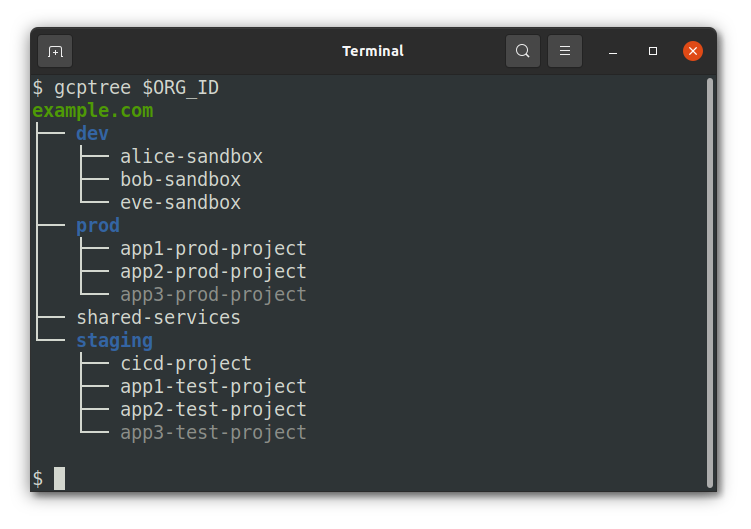
For a note on coloring, the org node is green, folders and blue, and projects that are not ACTIVE are dimmed. These styles won't show up if you redirect output and Windows is supported by virtue of the colorama package.
Installation
pip install gcptree
Usage
First make sure you are authenticated to gcloud and have your application default credentials set using:
gcloud auth login --update-adc
You just need your org id, which you can find in the GCP console under the popup for picking organizations. It should be a long number around 12 digits or so.
gcptree $ORG_ID
The flags are fairly simple and can be seen with the --help flag.
$ gcptree --help
usage: gcptree [-h] [--format FORMAT] [--full-resource] org_id

Print out a GCP org heirarchy

positional arguments:
  org_id           GCP Organization ID

optional arguments:
  -h, --help       show this help message and exit
  --format FORMAT  Output format (json or text)
  --full-resource  API-parsable nodes where org and folder resource names are not resolved, i.e org/123 instead of example.com
Permissions
The minimum role you'll need at the organization level is:
roles/browser
The actual permissions needed (in case you want a custom role) are:
resourcemanager.projects.getresourcemanager.projects.listresourcemanager.folders.getresourcemanager.organizations.get


Download files
Download the file for your platform. If you're not sure which to choose, learn more about installing packages.
Source Distribution
File details
Details for the file gcptree-0.1.4.tar.gz.
File metadata
- Download URL: gcptree-0.1.4.tar.gz
- Upload date:
- Size: 5.6 kB
- Tags: Source
- Uploaded using Trusted Publishing? No
- Uploaded via: twine/3.4.1 importlib_metadata/3.10.1 pkginfo/1.7.0 requests/2.22.0 requests-toolbelt/0.9.1 tqdm/4.60.0 CPython/3.8.5
File hashes
| Algorithm | Hash digest | |
|---|---|---|
| SHA256 |
9c8900f542635cf5284374912681c5255f381b6a04f0d8097735fa20836fcb6e
|
|
| MD5 |
7fc3dca722668e6c43db3747ee33ef7d
|
|
| BLAKE2b-256 |
dc06dd10818da8ecd9124973b325b471a8dfdd9ff0fa723d37f9f4b0f2b202a6
|






