gdalgviz
A Python library to visualise GDAL pipelines.
Installation
Requires graphviz to be installed on the system and available on the system PATH. See the installation instructions for your operating system.
GDAL itself is not required to be installed to use this library, as it only visualises the pipeline, it does not execute it.
On Linux (example installation):
apt update
apt install graphviz --yes
dot -V
apt install pipx --yes
pipx ensurepath
pipx install gdalgviz
# for Docker images
# export PATH="$HOME/.local/bin:$PATH"
gdalgviz --version
gdalgviz --pipeline "gdal vector pipeline ! read in.gpkg ! reproject --dst-crs=EPSG:32632 ! select --fields fid,geom" examples/pipeline.svg
On Windows (assuming pip and Python are on the system PATH):
$GVIZ_PATH = "C:\Program Files\Graphviz\bin"
$env:PATH = "$GVIZ_PATH;$env:PATH"
dot -V
pip install gdalgviz
gdalgviz --version
gdalgviz --pipeline "gdal vector pipeline ! read in.gpkg ! reproject --dst-crs=EPSG:32632 ! select --fields fid,geom" examples/pipeline.svg
Usage
usage: gdalgviz [-h] [--pipeline PIPELINE] [--vertical] [--font FONT] [--header-color HEADER_COLOR] [--version] [--docs-root DOCS_ROOT] [input_path] output_path

Visualize GDAL datasets from the command line

positional arguments:
  input_path            Path to a GDALG pipeline in JSON or text format
  output_path           Path to save the generated diagram (e.g., output.svg)

options:
  -h, --help            show this help message and exit
  --pipeline PIPELINE   Provide a raw GDALG pipeline string instead of a file
  --vertical            Render the diagram top-to-bottom instead of left-to-right
  --font FONT           Font name for diagram nodes (default: Helvetica)
  --header-color HEADER_COLOR
                        Background color for node headers as a hex color code (default: #cfe2ff)
  --version             show program's version number and exit
  --docs-root DOCS_ROOT
                        Root URL for GDAL documentation links(default: https://gdal.org/en/latest/programs)
  --graph-attr KEY=VALUE,...
                        Graphviz graph attributes e.g. --graph-attr bgcolor=transparent,pad=0.8
  --node-attr KEY=VALUE,...
                        Graphviz node attributes e.g. --node-attr fontsize=12,fontname=Courier
Examples
Passing a pipeline as a JSON file (tee.json):
gdalgviz ./examples/tee.json ./examples/tee.svg

Passing a pipeline as a string:
gdalgviz --pipeline "gdal vector pipeline ! read in.gpkg ! reproject --dst-crs=EPSG:32632 ! select --fields fid,geom" examples/pipeline.svg

Using the vertical layout option, with a custom font and header colour:
gdalgviz ./examples/tee.json ./examples/tee-custom.svg --vertical --font "Courier" --header-color "#ffdd99"

Using custom graph and node attributes for a transparent background with custom font sizing:
gdalgviz ./examples/tee.json ./examples/tee-transparent.svg --graph-attr "bgcolor=transparent,pad=0.5" --node-attr "fontsize=12,fontname=Courier New"

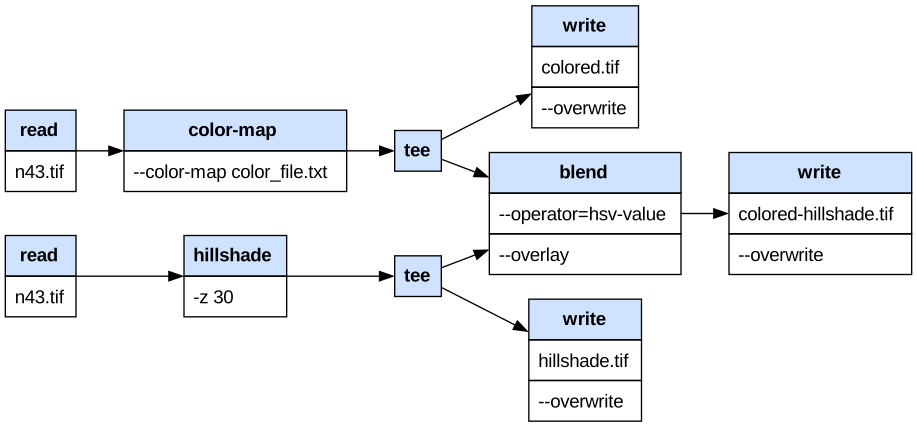
Using all options together with a complex nested pipeline:
gdalgviz \
  --pipeline "gdal raster pipeline \
    ! read n43.tif \
    ! color-map --color-map color_file.txt \
    ! tee [ write colored.tif --overwrite ] \
    ! blend --operator=hsv-value --overlay [ read n43.tif ! hillshade -z 30 ] \
    ! write colored-hillshade.tif --overwrite" \
  examples/custom.svg \
  --vertical \
  --header-color "#ffdd99" \
  --graph-attr "bgcolor=transparent,pad=0.5" \
  --node-attr "fontsize=12,fontname=Verdana"
PowerShell (Windows):
gdalgviz `
  --pipeline "gdal raster pipeline ! read n43.tif ! color-map --color-map color_file.txt ! tee [ write colored.tif --overwrite ] ! blend --operator=hsv-value --overlay [ read n43.tif ! hillshade -z 30 ] ! write colored-hillshade.tif --overwrite" `
  examples/custom.svg `
  --vertical `
  --font "Courier" `
  --header-color "#2d4a6e" `
  --graph-attr "bgcolor=transparent,pad=0.5" `
  --node-attr "fontsize=12,fontname=Verdana"

Features
- Handles both JSON and text input. See JSON Schema for the required JSON structure.
- SVG output supports clickable nodes that link to the corresponding GDAL documentation for each command. See the example.
- Supports nested pipelines. These allow sub-pipelines to be run in parallel and merged later.
- Supports tee - the operation is named "tee" because it splits the stream, like the letter "T": one input, multiple outputs, and allows saving of intermediate results.
- Supports transparent SVG backgrounds via
--graph-attr "bgcolor=transparent". - Full access to Graphviz graph and node attributes via
--graph-attrand--node-attrfor fine-grained control over layout, spacing, and typography.
This library does not execute the GDAL pipeline, it only visualizes it. The actual execution of the pipeline is done by GDAL itself.
To execute pipelines directly in Python you will need GDAL with Python bindings installed:
from osgeo import gdal

gdal.UseExceptions()
with gdal.alg.pipeline(pipeline="read byte.tif ! reproject --dst-crs EPSG:4326 --resampling cubic") as alg:
    ds = alg.Output()
Development
pip install -e .[dev]
black .
ruff check . --fix
# mypy .
pytest tests
gdalgviz ./examples/tee.json ./examples/tee.svg
gdalgviz --pipeline "gdal vector pipeline ! read in.gpkg ! reproject --dst-crs=EPSG:32632 ! select --fields fid,geom" ./examples/pipeline.svg
RoadMap
- Add JSON schema validation
- Add colour coding of the graph depending on if the command is raster, vector etc.
- Add types to the codebase
- Add pipeline command formatting
1 maintainer

Metadata
1 maintainer
Release files for gdalgviz 0.3.0
For a detailed explanation of source distributions (sdists) and built distributions (wheels), please see the package formats documentation.
Source distribution (sdist)
| File | Size | Uploaded | |
|---|---|---|---|
| gdalgviz-0.3.0.tar.gz | 17.8 kB | Details |
Built distribution (wheel)
| File | Interpreter | ABI | Platform | Reset |
|---|---|---|---|---|
| gdalgviz-0.3.0-py3-none-any.whl | Python 3 | none | any | Details |
Total release size: 31.4 kB
Release files / gdalgviz-0.3.0.tar.gz
| Download URL | gdalgviz-0.3.0.tar.gz |
|---|---|
| Size | 17.8 kB |
| Tags | Source |
|
SHA-256 checksum How to use checksums |
1166be6e3f71d5821afa1aef171e5fb5679e6dd249a012f8770d6b527ec3b35d
|
|
BLAKE2b-256 checksum How to use checksums |
80bf987f0087683928455fe0fb11bef4b0bf05712c9990967c57dbf3194bba15
|
| Upload date | |
|
Uploaded using Trusted Publishing? What is trusted publishing? |
Yes |
| Uploaded via |
twine/6.1.0 CPython/3.13.12
|
Provenance
Provenance describes where a file came from. On PyPI, provenance is shared via attestations, which provide a verifiable record of the build or publishing details. View details, limitations and caveats.


PyPI Publish Attestation
PyPI verified that this artifact, at this checksum, originated from the publisher listed below.
Signed by GitHub Actions, verified by PyPI on Jun 10, 2026.
Transparency logRelease files / gdalgviz-0.3.0-py3-none-any.whl
| Download URL | gdalgviz-0.3.0-py3-none-any.whl |
|---|---|
| Size | 13.6 kB |
| Tags | Python 3 |
|
SHA-256 checksum How to use checksums |
25741337e9407ad0c031d8f1d01edef0b9803617ce7cdf07dc8636d67028350d
|
|
BLAKE2b-256 checksum How to use checksums |
e6ff0c85be7865c3889ddba1f9a4122c855091f02158ba38cbfef37b3eb7e112
|
| Upload date | |
|
Uploaded using Trusted Publishing? What is trusted publishing? |
Yes |
| Uploaded via |
twine/6.1.0 CPython/3.13.12
|
Provenance
Provenance describes where a file came from. On PyPI, provenance is shared via attestations, which provide a verifiable record of the build or publishing details. View details, limitations and caveats.
PyPI Publish Attestation
PyPI verified that this artifact, at this checksum, originated from the publisher listed below.
Signed by GitHub Actions, verified by PyPI on Jun 10, 2026.
Transparency log