
Prepare IHP SG13G2 GDSII layout for EM simulation
Version 1.2: all-new, geometry-based algorithms across every tool, replacing the earlier hardcoded heuristics — for significantly cleaner and more general simplification output.
This is a collection of tools to simplify GDSII layout for EM simulation.
Layouts are usually simple and clean in the initial design phase, but simulating a „final“ layout that was already prepared for tape-out with density rules etc. can be a challenge. The picture below shows some typical challenges:
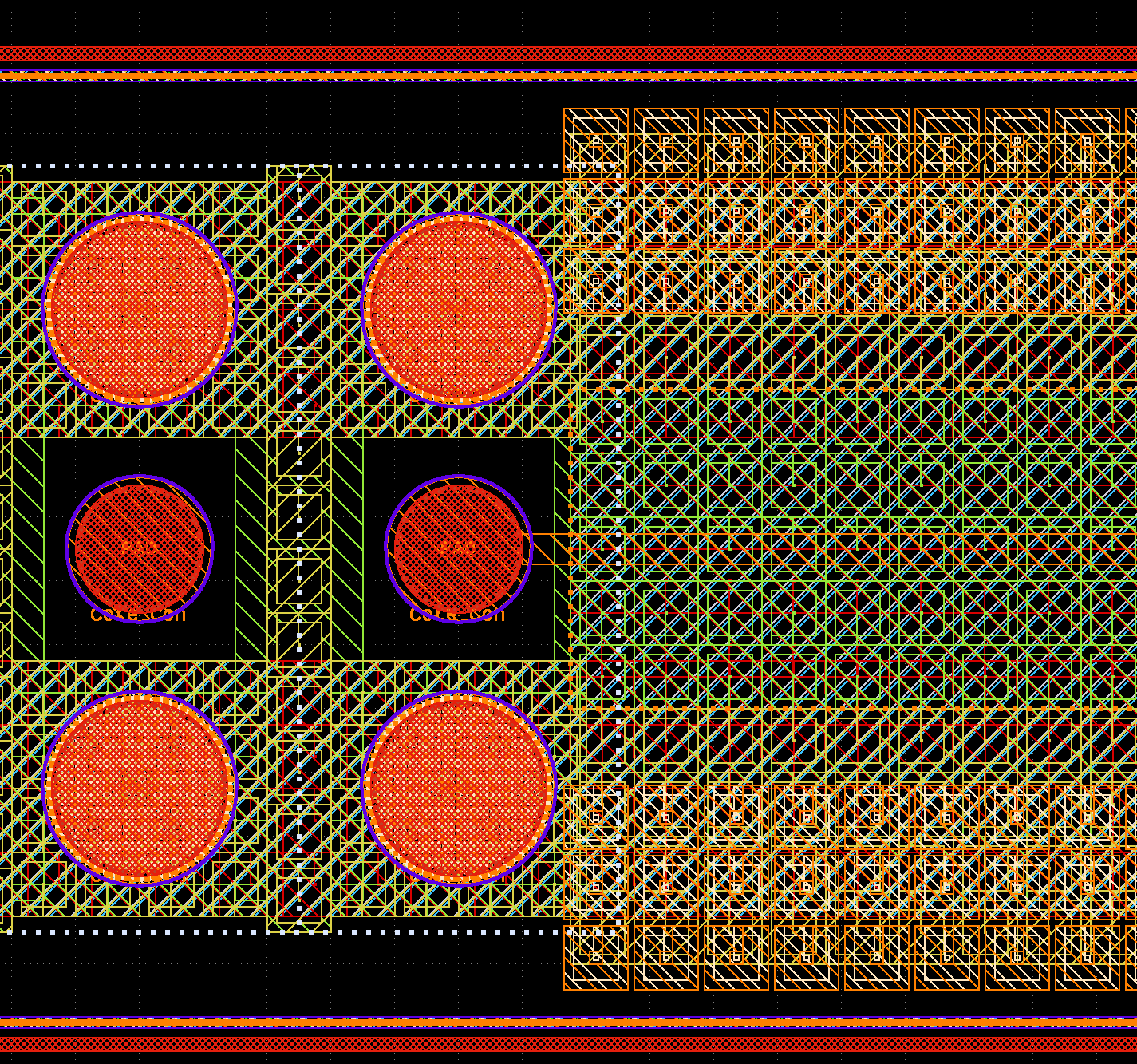
- To fulfill metal density rules, larger areas have been created as an array of squares with hole inside. This hole does not really matter for EM results, but it will lead to additional mesh cells and slow down mesh generation and simulation. For openEMS, the value of refined_cellsize can efficiently be used to skip small detail, but still those edges will slow down the meshing processing. For Palace, such small detail will all be included in mesh and it is absolutely required to remove this.
- On layer TopMetal2 shown as orange boxes on the top right side, and many other layers hidden here, the layout includes unconnected (floating) metal boxes that are used to fulfill density rules. Unlike auto-generated dummy metal fill, this man-made dummy metal fill is on purpose „drawing“ and can’t be skipped by the purpose (data type).
- Especially for pads, there is a massive amount of vias located in via arrays at rather large spacing. We can’t simplify increase the distance for via array merging in the gds2palace or gds2openEMS scripts, because that is a global setting and might also create unintentional short between adjacent via stacks.
- In the case shown here, the pads for copper pillar are round, which is represented in GDSII as a polygon with many vertices, resulting in over-meshing at these polygons, wasting simulation time.
To solve these issues and create a more simulation-friendly layout, a collection of tools is provided here.
gds_removefill
Removes unconnected (floating) man-made dummy metal fill. A shape only counts as removable fill once that same size repeats often enough on a layer, so genuinely isolated design content is left alone.
Optional commandline parameters, and their default value if not given:
output filename(second positional argument) -<input>_cleaned.gds--minsize-1(micron)--maxsize- no upper limit--mincount-20(how many repeats of the same size count as fill)
python gds_removefill.py layout.gds cleaned_layout.gds --minsize 1 --maxsize 40 --mincount 20
gds_simplify
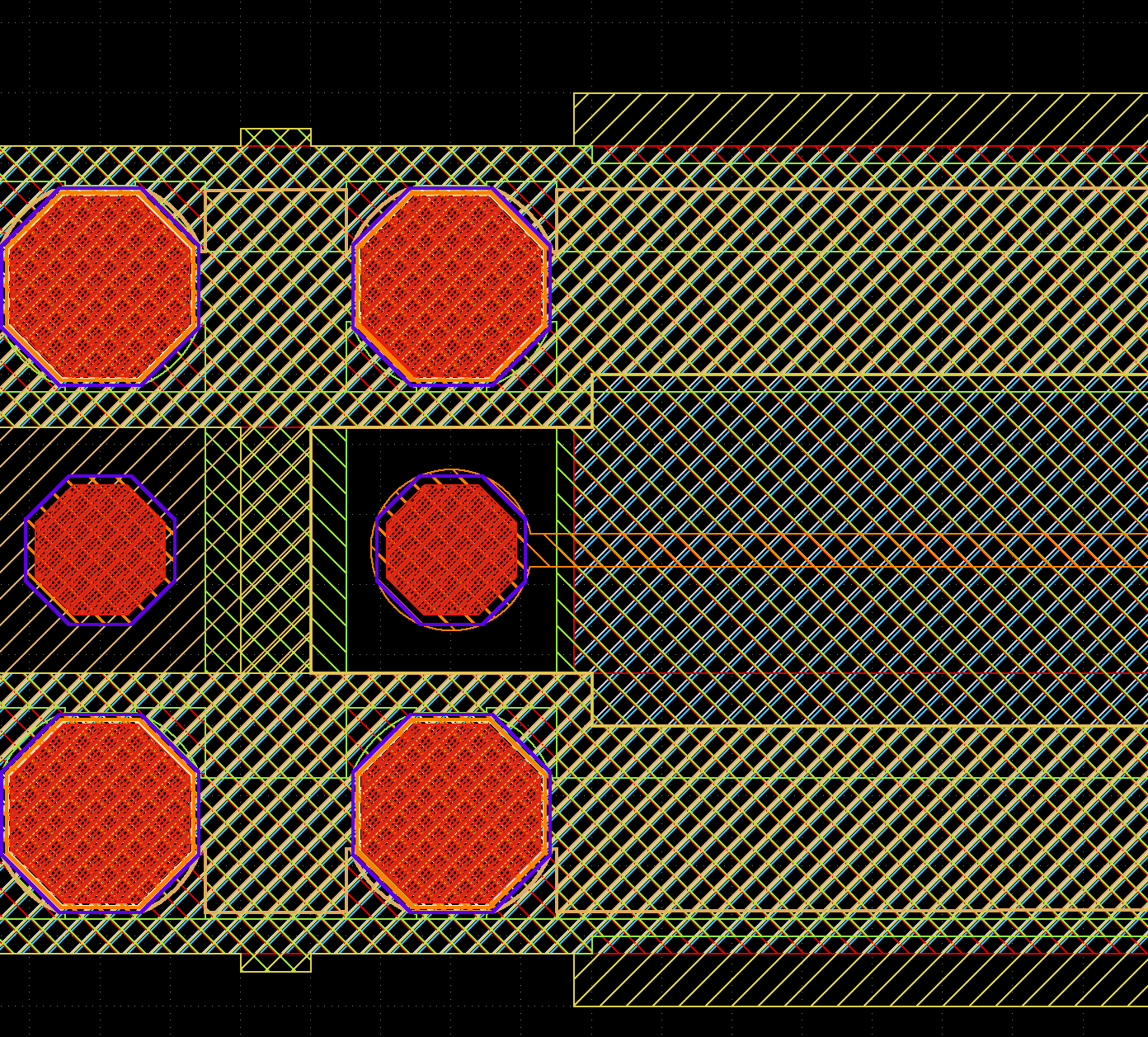
Replaces density-fill cutouts (squares/shapes with a hole punched in them) with solid outlines, replaces circle-like pads with octagons for faster meshing, and detects and removes thin ring/frame structures on the layout periphery such as seal rings. Always processes the full built-in default set of layers.
Optional commandline parameters, and their default value if not given:
--exclude-layers- none (the full built-in default layer set is processed)
python gds_simplify.py layout.gds --exclude-layers 126,134
gds_prepare_for_EM
The all-in-one tool: runs all of the above plus via-array simplification (replacing dense via arrays with a handful of clean shapes) and round-pad-to-octagon conversion, producing a single simulation-ready output file in one pass.
Optional commandline parameters, and their default value if not given:
output filename(second positional argument) -<input>_cleaned.gds--fill-minsize-1(micron)--fill-maxsize- no upper limit--fill-mincount-20(how many repeats of the same size count as fill)--max-hole-area- no upper limit (every real cutout found is filled); set this to leave larger cutouts untouched
python gds_prepare_for_EM.py layout.gds cleaned_layout.gds --fill-minsize 1 --fill-maxsize 40 --fill-mincount 20 --max-hole-area 1
Starting from the example above, the resulting cleaned and simplified GDSII then looks like this:
Installation
There are two ways to use these tools - pick whichever fits your workflow.
Requires Python 3.9+ and these libraries: gdspy, rtree, numpy, shapely (>=2.0).
Run the Python files directly, no installation needed beyond the dependencies:
pip install -r requirements.txt
python gds_prepare_for_EM.py layout.gds
Install as a package, which adds gds_prepare_for_EM, gds_simplify, and gds_removefill as commands on your PATH while the virtual environment is active:
pip install gds_prepare_for_EM
gds_prepare_for_EM layout.gds
(For a local/development install from a clone of this repository, use pip install -e . instead.)
Usage
To run a tool, specify the *.gds filename as commandline parameter; the cleaned file is saved with an appropriate file suffix (or pass a second argument to choose the output filename). Every tool always prints its full list of options and the values used for that particular run, so you can see exactly what a run did after the fact - run with --help to see the options without processing a file, or --version to print the version.
example, either as a direct script or as an installed command:
python gds_prepare_for_EM.py layout.gds
python gds_prepare_for_EM.py layout.gds cleaned_layout.gds

gds_prepare_for_EM layout.gds
gds_prepare_for_EM layout.gds cleaned_layout.gds
License
This project is licensed under the Apache License, Version 2.0 - see LICENSE for the full text.
Technology-specific (IHP SG13G2) hardcoded values
These tools are written against the IHP SG13G2 GDSII layer/purpose numbering. To adapt them to a different PDK, edit the tables below - there is no config file, everything else in each script derives from these tables.
Each of the three tools keeps its own independent copy of the layer/purpose tables - they are not shared or synced. Editing one script's table has no effect on the others; if a layer/purpose number needs to change, it must be changed in each script that defines it.
gds_prepare_for_EM.py
| Item | Values | Purpose |
|---|---|---|
LAYER_NAMES (layer number <-> name) |
1=Activ, 6=Cont, 8=Metal1, 9=Passiv, 10=Metal2, 19=Via1, 29=Via2, 30=Metal3, 36=MIM, 41=Pillar, 49=Via3, 50=Metal4, 66=Via4, 67=Metal5, 125=TopVia1, 126=TopMetal1, 129=Vmim, 133=TopVia2, 134=TopMetal2 |
Defines which GDSII layer numbers are metals/vias and their names; everything else (metal lists, via lists) derives from this |
VIA_ABOVE_BELOW |
Cont: Metal1/Activ, Via1: Metal2/Metal1, Via2: Metal3/Metal2, Via3: Metal4/Metal3, Via4: Metal5/Metal4, Vmim: TopMetal1/MIM, TopVia1: TopMetal1/Metal5, TopVia2: TopMetal2/TopMetal1 | SG13G2's specific via stack topology - which metal sits above/below each via layer, used for via-array merging |
EXTRA_VIA_LIKE_NAMES |
Passiv, Pillar |
Layers that aren't real vias but should still be excluded from floating-fill removal |
exclude_purpose_list (excluded from output entirely) |
28=noqrc, 22=filler, 23=nofill, 21=block |
SG13G2 GDSII purpose/datatype numbers |
| Port-layer convention | layers_list extended with range(201, 250) |
Not an IHP PDK layer range - a pipeline-wide convention (shared with gds2palace_ihp_sg13g2/openems_ihp_sg13g2) for EM port polygons drawn by the user on layers 201-249, above the PDK's own layer numbers, so those are always kept regardless of LAYER_NAMES above |
gds_simplify.py
| Item | Values | Purpose |
|---|---|---|
LAYER_NAMES (layer number <-> name) |
Same full 18-layer table as gds_prepare_for_EM.py above - an independent copy, not shared |
Defines which GDSII layer numbers are metals/vias and their names; metal_layers_list derives from this |
required_purpose_list (only these purposes are processed) |
0=drawing, 35=pillar, 70=copper |
SG13G2 GDSII purpose/datatype numbers |
delete_layers_list (deleted outright, no replacement) |
148, 160 |
SG13G2-specific GDSII layer numbers dropped to reduce file size |
delete_purpose_list (deleted outright, no replacement) |
22=filler, 23=nofill, 29, 2=pin |
SG13G2 GDSII purpose/datatype numbers |
| Port-layer convention | poly_layer > 200 check |
Not an IHP PDK layer range - same pipeline-wide port-layer convention as gds_prepare_for_EM.py above, so those are always kept regardless of LAYER_NAMES above |
gds_removefill.py
| Item | Values | Purpose |
|---|---|---|
LAYER_NAMES (layer number <-> name) |
10-layer subset (via/via-like layers only): 6=Cont, 9=Passiv, 19=Via1, 29=Via2, 41=Pillar, 49=Via3, 66=Via4, 125=TopVia1, 129=Vmim, 133=TopVia2 |
An independent, smaller copy of the same table - defines via_layers_list, the layers excluded from floating-fill removal |
VIA_LAYER_NAMES |
Cont, Via1, Via2, Via3, Via4, Vmim, TopVia1, TopVia2, Pillar, Passiv |
Names from LAYER_NAMES above treated as via/via-like for fill-removal purposes |
gds_geometry_utils.py / tools/gds_diff.py
Neither file contains any PDK-specific values - both work purely on generic polygon geometry (hole/cutout decomposition, circle detection, periphery ring detection, structural diffing) and apply to any GDSII layout.
1 maintainer

Release files for gds-prepare-for-EM 1.2.0
For a detailed explanation of source distributions (sdists) and built distributions (wheels), please see the package formats documentation.
Source distribution (sdist)
| File | Size | Uploaded | |
|---|---|---|---|
| gds_prepare_for_em-1.2.0.tar.gz | 33.8 kB | Details |
Built distribution (wheel)
| File | Interpreter | ABI | Platform | Reset |
|---|---|---|---|---|
| gds_prepare_for_em-1.2.0-py3-none-any.whl | Python 3 | none | any | Details |
Total release size: 69.0 kB
Release files / gds_prepare_for_em-1.2.0.tar.gz
| Download URL | gds_prepare_for_em-1.2.0.tar.gz |
|---|---|
| Size | 33.8 kB |
| Tags | Source |
|
SHA-256 checksum How to use checksums |
a44666715b4d8f3d3437473540d24c276d83bf6875037812f44f62fff4372949
|
|
BLAKE2b-256 checksum How to use checksums |
0adaf28b2713cb78833b69009427845429f36883cabb5c19fc8ec11efc5b69be
|
| Upload date | |
|
Uploaded using Trusted Publishing? What is trusted publishing? |
No |
| Uploaded via |
twine/7.0.0 CPython/3.13.14
|
Release files / gds_prepare_for_em-1.2.0-py3-none-any.whl
| Download URL | gds_prepare_for_em-1.2.0-py3-none-any.whl |
|---|---|
| Size | 35.2 kB |
| Tags | Python 3 |
|
SHA-256 checksum How to use checksums |
b00a3c2a225f3e265004d7ce1cc85ebf553f527be328e8bf57aa47ceaf9d7ea7
|
|
BLAKE2b-256 checksum How to use checksums |
01727f653d26c7a7b287887b2d81a3f60dd472ecb022af2163149612e2caa02f
|
| Upload date | |
|
Uploaded using Trusted Publishing? What is trusted publishing? |
No |
| Uploaded via |
twine/7.0.0 CPython/3.13.14
|














