
python library to generate GDS layouts

Project description
gdsfactory 6.110.0

















gdsfactory: An open source platform for end to-end chip design and validation.
gdsfactory is a python library to design chips (Photonics, Analog, Quantum, MEMs, ...), objects for 3D printing or PCBs.
You can describe your hardware in code (python or YAML), verify it (DRC, simulation, extraction) and validate it (to make sure it meets your specifications after fabrication).
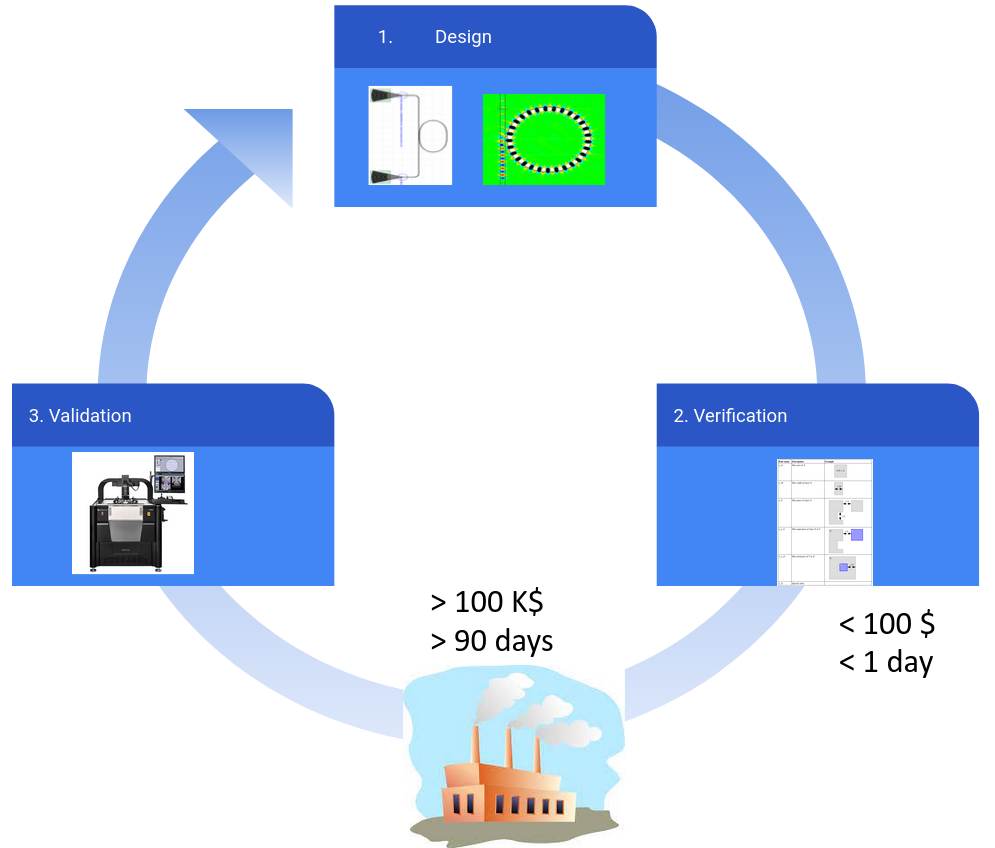
It provides you and end to end design flow to:
- Design (Layout, Simulation, Optimization)
- Define Components using parametric cells functions in python or YAML.
- Test component settings, ports and geometry to avoid unwanted regressions.
- Capture design intent in a schematic.
- Verify (DRC, DFM, LVS)
- Run simulations directly from the layout thanks to the simulation interfaces. No need to draw the geometry more than once.
- Run Component simulations (solve modes, FDTD, EME, TCAD, thermal ...)
- Run Circuit simulations from the Component netlist (Sparameters, Spice ...)
- Build Component models and study Design For Manufacturing.
- Create DRC rule decks in Klayout.
- Ensure complex layouts match their design intent (Layout Versus Schematic).
- Run simulations directly from the layout thanks to the simulation interfaces. No need to draw the geometry more than once.
- Validate
- Define layout and test protocols simultaneously, so when the chips come back you already know how to test and analyze them.
- Model extraction: extract the important parameters for each component.
- Build a data pipeline from raw data, to structured data and dashboards for monitoring your chip performance.
As input, you write python or YAML code.
As output you write a GDSII or OASIS file that you can send to your foundry for fabrication. It also exports component settings (for measurement and data analysis) and netlists (for circuit simulations) in YAML.
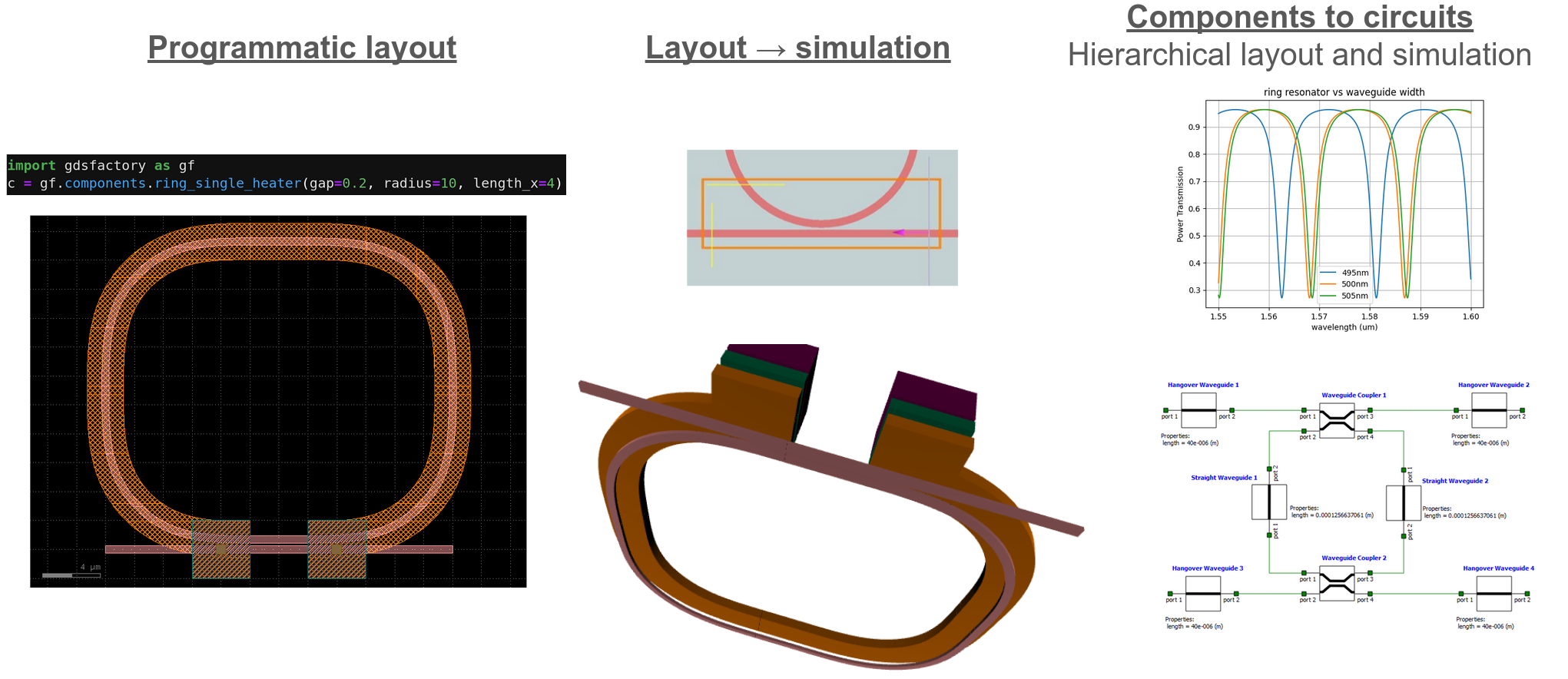
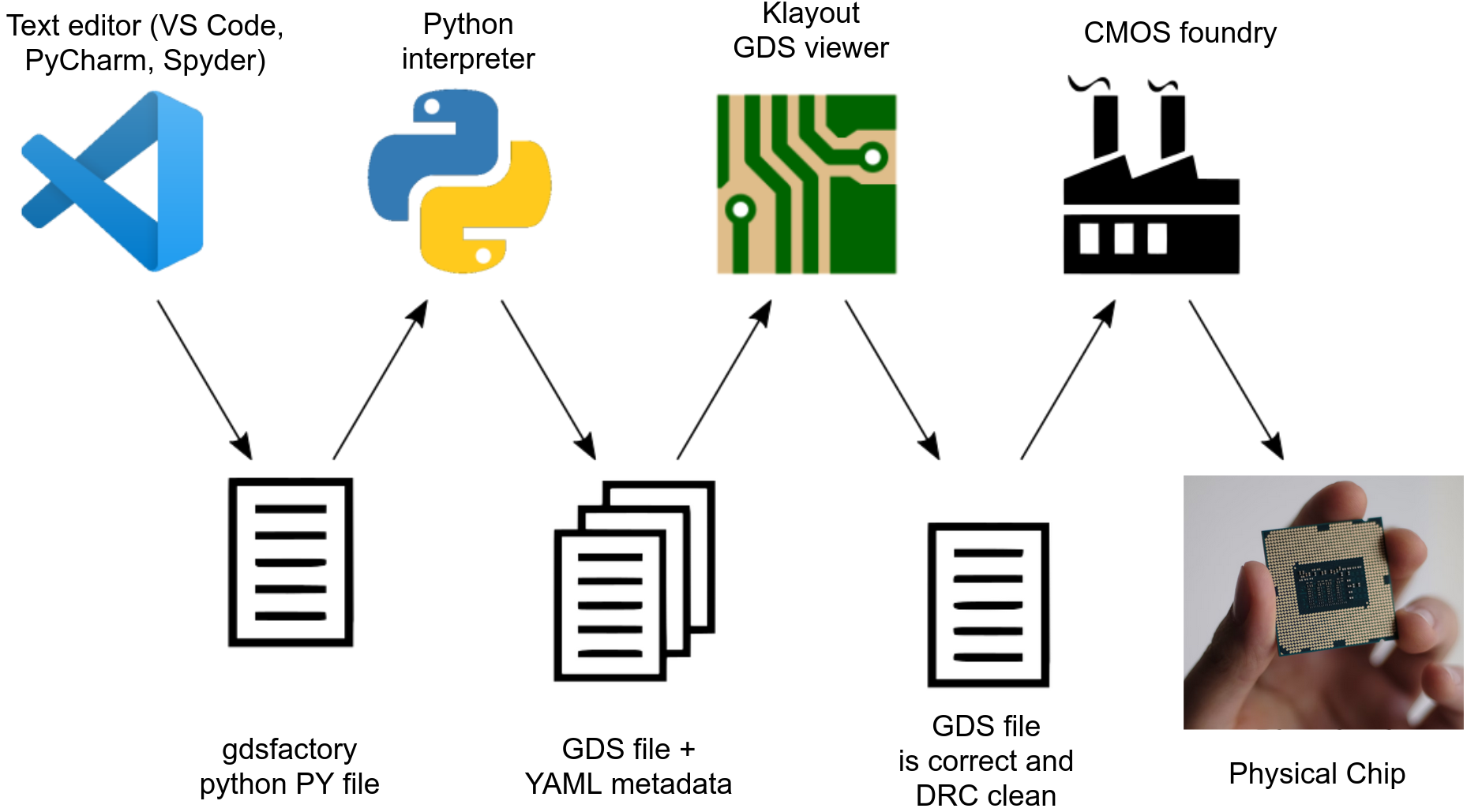
It provides you a common syntax for design (KLayout, gdstk, Ansys Lumerical, tidy3d, MEEP, MPB, DEVSIM, SAX, MEOW ...), verification and validation.
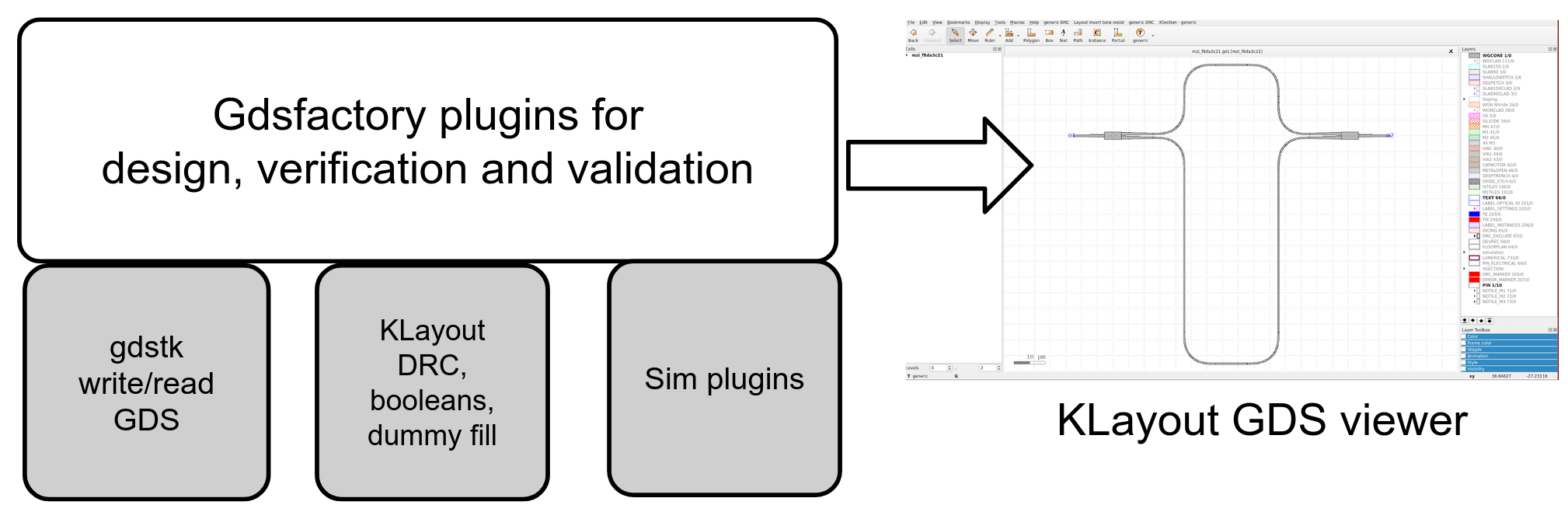
Multiple foundries have gdsfactory PDKs available. Talk to your foundry to access their gdsfactory PDK as some are only provided under NDA:
- AIM photonics PDK
- AMF photonics PDK
- TowerSemi PH18 photonics PDK
- GlobalFoundries 45SPCLO Photonics PDK
- IMEC photonics PDK
- GlobalFoundries 180nm MCU CMOS PDK (open source)
- SiEPIC Ebeam UBC PDK (open source)
- Skywater130 CMOS PDK (open source)
You can also access:
- instructions on how to build your own PDK
- instructions on how to import a PDK from a library of fixed GDS cells
Installation
Use python3.10 or python3.11, as some tools like kfactory are not available for older versions of python. We recommend VSCode as an IDE.
If you don't have python installed on your system you can download anaconda
Once you have python installed, open Anaconda Prompt as Administrator and then install the latest gdsfactory using pip.
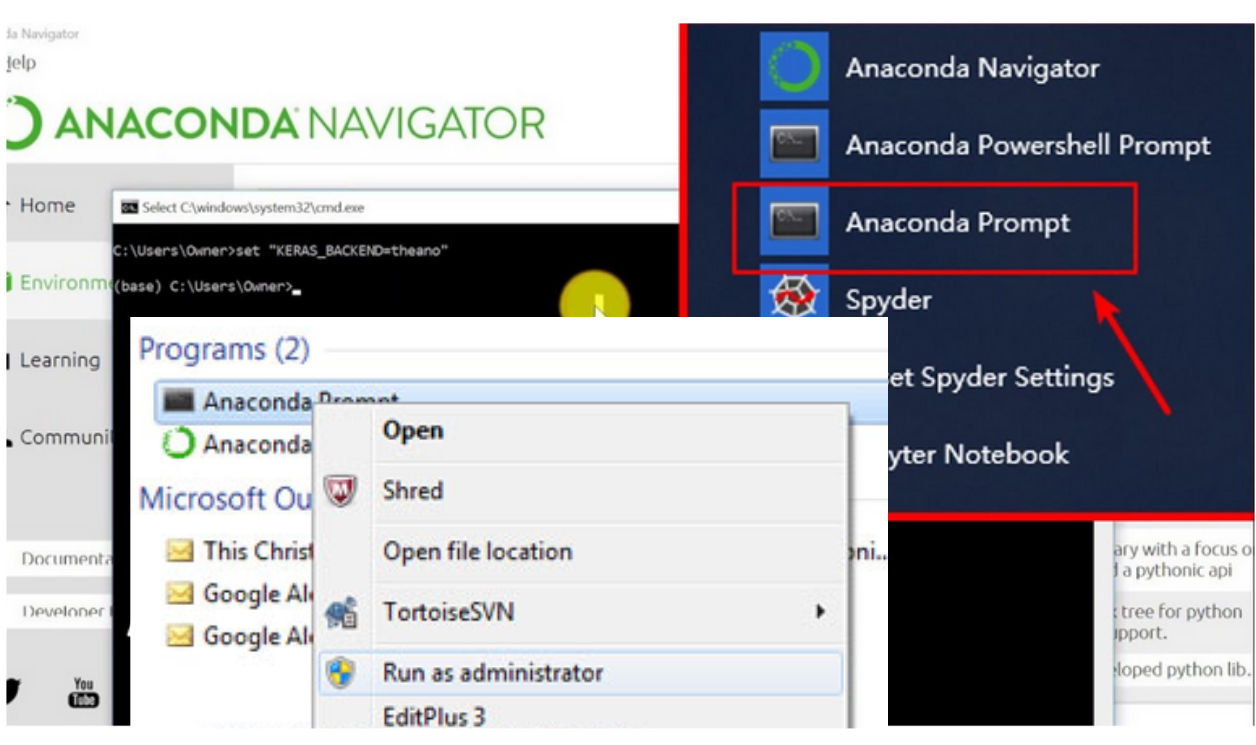
conda install gdstk -y
pip install "gdsfactory[full]" --upgrade
Then you can install Klayout-live klive integration in the klayout GUI Tools --> Manage Packages --> Install New Packages --> Klive as well as the genericpdk layermap Tools --> Manage Packages --> Install New Packages --> gdsfactory and restart klayout.
Update gdsfactory
You can pip install gdsfactory --upgrade
Notice that some PDKs may only work for a specific version of gdsfactory, so make sure you install the correct gdsfactory version specified in the pyproject.toml file. This will automatically happen when you install gdsfactory as one of the PDK dependencies. For example pip install gf180 will install the latest gdsfactory version that has been tested for the GlobalFoundries180 PDK.
This code will tell you which gdsfactory you are using:
import gdsfactory as gf

gf.config.print_version()
Docker container
Alternatively, one may use the pre-built Docker image from hub.docker.com/r/joamatab/gdsfactory or build it yourself with:
docker build -t joamatab/gdsfactory .
For example, VS Code supports development inside a container, see Developing inside a Container for details.
Plugins
You can install all plugins with:
pip install "gdsfactory[full]" --upgrade
Or Install only the plugins you need pip install gdsfactory[plugin1,plugin2] from the available plugins:
cad3D rendering, 3D meshing, klayout.databasefor simulation and measurement database.devsimTCAD device simulator.femwellFinite Element Method Solver (heaters, modes, TCAD, RF waveguides).gmshmesh structures.kfactoryfor fill, dataprep and testing.meowEigen Mode Expansion (EME).rayfor distributed computing and optimization.saxSparameter circuit solver.tidy3dFinite Difference Time Domain (FDTD) simulations on the cloud using GPU.
To install open source FDTD Meep you need to use conda or mamba on MacOS or Linux, so for Windows you need to use the WSL (Windows Subsystem for Linux).
conda install pymeep=*=mpi_mpich_* -y
Plugins
- Optimization
- Meshing
- Device Simulators
- Mode Solvers & Eigenmode Expansion (EME)
- Electromagnetic Wave Solvers using Finite Difference Time Domain (FDTD)
- S-Parameter Circuit Solvers
- Database
Getting started
- Run notebooks on
- See slides
- Read docs
- See announcements on GitHub, google-groups or LinkedIn



Testimonals
"I've used gdsfactory since 2017 for all my chip tapeouts. I love that it is fast, easy to use, and easy to extend. It's the only tool that allows us to have an end-to-end chip design flow (design, verification and validation)."
"I've relied on gdsfactory for several tapeouts over the years. It's the only tool I've found that gives me the flexibility and scalability I need for a variety of projects."
"The best photonics layout tool I've used so far and it is leaps and bounds ahead of any commercial alternatives out there. Feels like gdsfactory is freeing photonics."
"As an academic working on large scale silicon photonics at CMOS foundries I've used gdsfactory to go from nothing to full-reticle layouts rapidly (in a few days). I particularly appreciate the full-system approach to photonics, with my layout being connected to circuit simulators which are then connected to device simulators. Moving from legacy tools such as gdspy and phidl to gdsfactory has sped up my workflow at least an order of magnitude."
"I use gdsfactory for all of my photonic tape-outs. The Python interface makes it easy to version control individual photonic components as well as entire layouts, while integrating seamlessly with KLayout and most standard photonic simulation tools, both open-source and commercial.
Contributors
Thanks to all the contributors that make this awesome project possible!
Release history Release notifications | RSS feed


Download files
Download the file for your platform. If you're not sure which to choose, learn more about installing packages.
Source Distribution
Built Distribution
Filter files by name, interpreter, ABI, and platform.
If you're not sure about the file name format, learn more about wheel file names.
Copy a direct link to the current filters
File details
Details for the file gdsfactory-6.110.0.tar.gz.
File metadata
- Download URL: gdsfactory-6.110.0.tar.gz
- Upload date:
- Size: 980.9 kB
- Tags: Source
- Uploaded using Trusted Publishing? No
- Uploaded via: twine/4.0.2 CPython/3.11.4
File hashes
| Algorithm | Hash digest | |
|---|---|---|
| SHA256 |
e7abc1dca67997c2beb6c431ac27a256b6ca12589e902ba1966f830175636f7f
|
|
| MD5 |
3f04e1d0fe10c72cfc7b29bb13da5fc8
|
|
| BLAKE2b-256 |
9455393588a3920505cbfe730b68b372fdc2fe9f3d4bb102fbe38be1f54cf7d7
|
File details
Details for the file gdsfactory-6.110.0-py3-none-any.whl.
File metadata
- Download URL: gdsfactory-6.110.0-py3-none-any.whl
- Upload date:
- Size: 1.4 MB
- Tags: Python 3
- Uploaded using Trusted Publishing? No
- Uploaded via: twine/4.0.2 CPython/3.11.4
File hashes
| Algorithm | Hash digest | |
|---|---|---|
| SHA256 |
27681e233dfa17499b75759dab66a92e2307a8d756ba6e6a58722be156de98cd
|
|
| MD5 |
38d419f4901bb398835adec405353f50
|
|
| BLAKE2b-256 |
69ed2ee6a7330dd86c7a39f88f8458a9565e66a636100eeb6455ead05c832bf2
|






