
This release is a pre-release and may not be stable for production use.
GEDCOM Privacy Guard
Before you upload a family tree, find the notes that shouldn't go with it: mental illness, addiction, crime, family rumors, ID numbers, phone numbers and your own contact details. It works with a GEDCOM export from any genealogy program (Legacy, RootsMagic, Family Tree Maker, Gramps, Ancestry…).
It flags, you decide. Your review goes in a spreadsheet, and only the changes you approve are written, to a new file. Your original export is never changed, and nothing leaves your computer.
Help wanted: we've tested exports from Legacy only. If you use RootsMagic, Family Tree Maker, Gramps, Ancestry or another program, send a made-up sample or try the 15-minute test.
Install
You need Python 3.10 or later (python.org; on Windows, tick Add python.exe to PATH). Then:
python -m pip install --user pipx
python -m pipx ensurepath
pipx install gedcom-privacy-guard
Open a new terminal afterwards so the command is found.
Use it
-
Export a GEDCOM file from your program (how, for each program).
-
Scan it:
gedcom-privacy-guard scan my-tree.ged
-
Review
review.xlsx. Each row is one hit, with the matched words highlighted and enough about the person (dates, parents, spouses, IDs) to tell relatives of the same name apart. Pick an action in the first column:keep,redact(replace the note),rewrite:your wording, orprivatize(Legacy users only; see legacy.md). -
Write the cleaned copy:
gedcom-privacy-guard redact my-tree.ged --report review.xlsx
Upload
cleaned.ged. If your tree lives on Ancestry, fix the notes there instead; here's why.
Try it first on the sample in this repo, sample_data/sample.ged.
Choose how cautious
--preset open flags only ID numbers and contact details; standard
(the default) adds health, addiction, crime and rumor; cautious adds
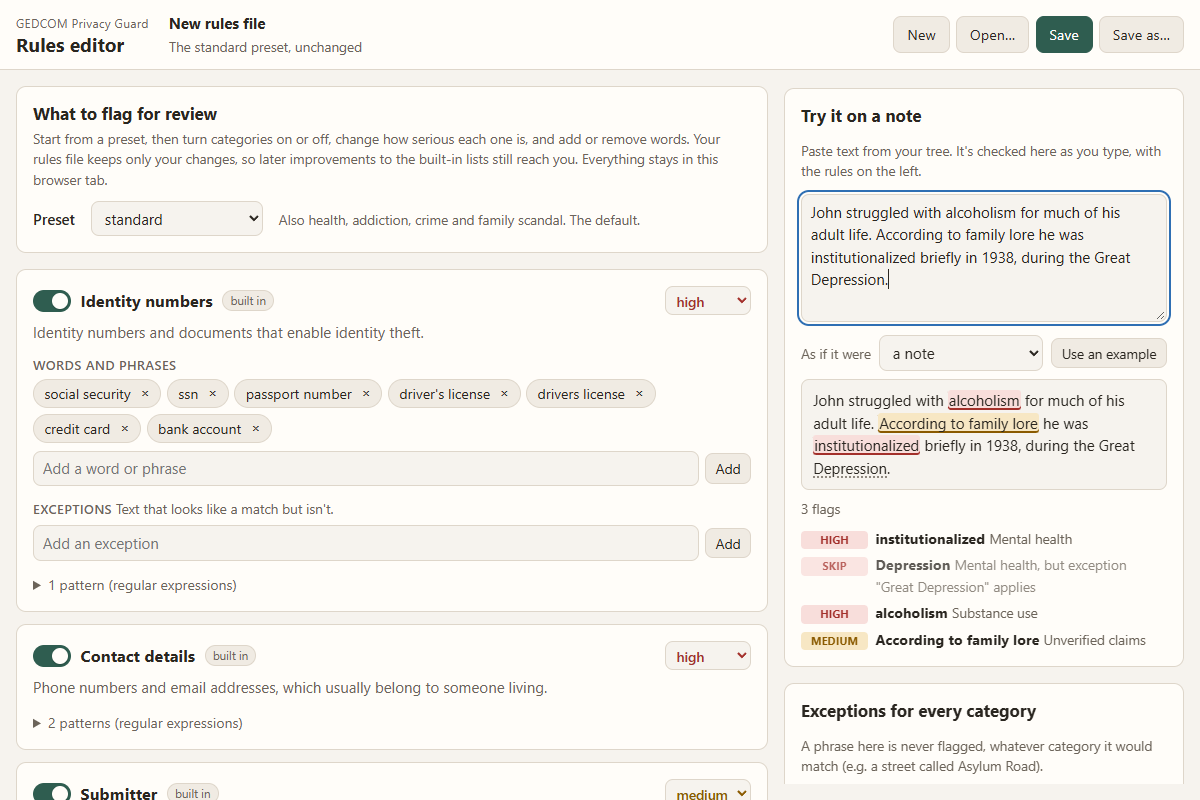
adoption, illness and addresses. To add your own words or switch
categories off, run gedcom-privacy-guard editor, or see
docs/RULES.md.
Why your data is safe
It runs only on your computer. It has no server, no account and no network code, and tests check that on every change by running it with the network blocked. Turn off Wi-Fi and it works the same. More, including where your data can still go.
Limits
- It matches words, not meaning. "She took her own life" isn't flagged; suicide is. Skim your notes yourself too. How it decides.
- It never decides for you. Every hit waits for your choice.
- It doesn't touch names, dates or places. A garbled place came from the program that made the file.
- It doesn't yet check for living people. That's planned.
- A private online tree still shows every note to the people you invite (what a private tree doesn't cover).
More
How it works · Why it's safe · Help wanted · Exporting · Legacy users · Your own rules · Architecture · Roadmap · Contributing · Security
MIT licensed. A Vashon Software project.
1 maintainer

Metadata
1 maintainer
Release files for gedcom-privacy-guard 0.4.0b1
For a detailed explanation of source distributions (sdists) and built distributions (wheels), please see the package formats documentation.
Source distribution (sdist)
| File | Size | Uploaded | Provenance | Actions |
|---|---|---|---|---|
| gedcom_privacy_guard-0.4.0b1.tar.gz | 86.6 kB | With provenance | Details for gedcom_privacy_guard-0.4.0b1.tar.gz |
Built distribution (wheel)
| File | Interpreter | ABI | Platform | Actions Reset |
|---|---|---|---|---|
| gedcom_privacy_guard-0.4.0b1-py3-none-any.whl | Python 3 | none | any | Details for gedcom_privacy_guard-0.4.0b1-py3-none-any.whl |
Total release size: 159.0 kB
Release files / gedcom_privacy_guard-0.4.0b1.tar.gz
| Download URL | gedcom_privacy_guard-0.4.0b1.tar.gz |
|---|---|
| Size | 86.6 kB |
| Tags | Source |
|
SHA-256 checksum How to use checksums |
3865c37077107bff057436e4ea709bfefe0173a94d17d1b432caed82ff4ea97e
|
|
BLAKE2b-256 checksum How to use checksums |
6fd00288e310533e771df4f2b3b848720a50423352cae2a60692d487c6c96a31
|
| Upload date | |
|
Uploaded using Trusted Publishing? What is trusted publishing? |
Yes |
| Uploaded via |
twine/7.0.0 CPython/3.13.14
|
Provenance
Provenance describes where a file came from. On PyPI, provenance is shared via attestations, which provide a verifiable record of the build or publishing details. View details, limitations and caveats.


PyPI Publish Attestation
PyPI verified that this artifact, at this checksum, originated from the publisher listed below.
Signed by GitHub Actions, verified by PyPI on Oct 29, 2026.
Transparency logRelease files / gedcom_privacy_guard-0.4.0b1-py3-none-any.whl
| Download URL | gedcom_privacy_guard-0.4.0b1-py3-none-any.whl |
|---|---|
| Size | 72.4 kB |
| Tags | Python 3 |
|
SHA-256 checksum How to use checksums |
c0bcdfde7449c8f360279af38eae39cb0ef228d3e7cfe9f7460117c7e86c38ff
|
|
BLAKE2b-256 checksum How to use checksums |
8664c99aabbf86ab00342849aacb2713f67b36530dada84e4fef75c6d9f6515c
|
| Upload date | |
|
Uploaded using Trusted Publishing? What is trusted publishing? |
Yes |
| Uploaded via |
twine/7.0.0 CPython/3.13.14
|
Provenance
Provenance describes where a file came from. On PyPI, provenance is shared via attestations, which provide a verifiable record of the build or publishing details. View details, limitations and caveats.
PyPI Publish Attestation
PyPI verified that this artifact, at this checksum, originated from the publisher listed below.
Signed by GitHub Actions, verified by PyPI on Oct 29, 2026.
Transparency logSecurity for gedcom-privacy-guard 0.4.0b1
Provenance
Provenance describes where a file came from. On PyPI, provenance is shared via attestations, which provide a verifiable record of the build or publishing details. View details, limitations and caveats.
Full provenance
All 2 files in this release have been uploaded with provenance metadata.
Attestation for gedcom_privacy_guard-0.4.0b1.tar.gz
PyPI Publish Attestation
PyPI verified that this artifact, at this checksum, originated from the publisher listed below.
Signed by GitHub Actions, verified by PyPI on Oct 29, 2026.
Transparency logA note on package security
PyPI is a repository for distributing packages, not a service for auditing them. While third-party security researchers and our staff do their best to detect and remove malicious packages, PyPI cannot guarantee the quality, security or suitability of any given package.
To learn more about protecting yourself from malicious actors, visit our package security documentation.













