
geefcc Python package





Overview
The geefcc Python package can be used to make forest cover change (fcc) maps from Google Earth Engine (GEE) and download them locally. Forest cover change maps are obtained from two global tree/forest cover change products: Global Forest Change or Tropical Moist Forests. These two products are derived from the Landsat satellite image archive and provide tree/forest cover data at 30 m resolution.
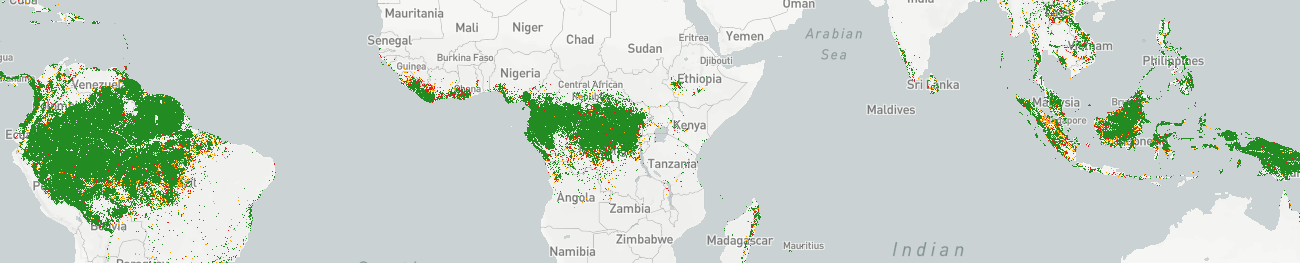
The geefcc package depends on the xee Python package, which allows opening GEE datasets locally without exporting data to GEE assets or Google Drive. The user only has to specify an area of interest (aoi), either with an extent, a polygon vector file, or a country iso code (e.g. PER for Peru), and the years defining the time periods considered for the forest cover change (e.g. 2015, 2025). For the Global Forest Change product, the users also has to specify a tree cover threshold to define the forest (e.g. 75%).
Prerequisites
Access to Google Earth Engine
To use the geefcc Python package, you need a Google account and an access to Earth Engine via a Google Cloud project that’s registered to use Earth Engine. Please follow this link to register for Earth Engine.
You must always initialize GEE before using geefcc functions specifying a Google Cloud project name and Earth Engine high-volume endpoint:
ee.Initialize(
  credentials=credentials,
  project=project,
  opt_url="https://earthengine-highvolume.googleapis.com"
)
GDAL
GDAL must be installed on your system.
To install GDAL on Windows, use the OSGeo4W network installer. OSGeo4W is a binary distribution of a broad set of open source geospatial software for Windows environments (Windows 11 down to 7). Select Express Install and install GDAL. Several Gb of space will be needed on disk to install this programs. This will also install OSGeo4W Shell to execute command lines.
To install GDAL on other systems, use your package manager, for example apt for Debian/Ubuntu Linux distributions.
sudo apt update
sudo apt install gdal-bin libgdal-dev
After installing GDAL, you can test the installation by running gdalinfo --version in the command prompt or terminal, which should display the installed GDAL version.
GADM website
The geefcc package downloads country administrative borders from the GADM website. From time to time, their server is not responding. In case of problem with downloading country borders, check directly on the GADM website that data can be downloaded manually to be sure that the problem is coming from geefcc.
Installation
The easiest way to install the geefcc Python package is via pip in the OSGeo4W Shell for Windows or in a virtual environment for Linux.
For Linux, create and activate a virtual environment before installing geefcc with pip:
cd ~
# Create a directory for virtual environments
mkdir venvs
# Create the virtual environment with venv
python3 -m venv ~/venvs/venv-geefcc
# Activate (start) the virtual environment
source ~/venvs/venv-geefcc/bin/activate
Install Python dependencies and geefcc in the OSGeo4W Shell or in the newly created virtual environment:
# Upgrade pip, setuptools, and wheel
python3 -m pip install --upgrade pip setuptools wheel
# Install numpy
python3 -m pip install numpy
# Install gdal Python bindings (the correct version)
python3 -m pip install gdal==$(gdal-config --version)
# Install geefcc. This will install all other dependencies
python3 -m pip install geefcc
If you want to install the development version of geefcc, replace the last line with:
python3 -m pip install https://github.com/ghislainv/geefcc/archive/master.zipTo deactivate and delete the virtual environment:
deactivate
rm -R ~/venvs/venv-geefcc # Just remove the repository
In case of problem while installing GDAL Python bindings, try the following command:
python3 -m pip install --no-cache-dir --force-reinstall --no-build-isolation gdal==$(gdal-config --version)Contributing
The geefcc Python package is Open Source and released under the GNU GPL version 3 license. Anybody who is interested can contribute to the package development following our Community guidelines. Every contributor must agree to follow the project’s Code of conduct.
1 maintainer

Metadata
1 maintainer
Release files for geefcc 0.2.2
For a detailed explanation of source distributions (sdists) and built distributions (wheels), please see the package formats documentation.
Source distribution (sdist)
| File | Size | Uploaded | |
|---|---|---|---|
| geefcc-0.2.2.tar.gz | 42.1 kB | Details |
Built distribution (wheel)
| File | Interpreter | ABI | Platform | Reset |
|---|---|---|---|---|
| geefcc-0.2.2-py2.py3-none-any.whl | Python 3, Python 2 | none | any | Details |
Total release size: 86.8 kB
Release files / geefcc-0.2.2.tar.gz
| Download URL | geefcc-0.2.2.tar.gz |
|---|---|
| Size | 42.1 kB |
| Tags | Source |
|
SHA-256 checksum How to use checksums |
2514693d423963c1e77b2938264d519f3a0623f5c96746a577e9d5a42f4cc94e
|
|
BLAKE2b-256 checksum How to use checksums |
2871dc2e693651317cd01ab13f9e2212deee921b3ad96ae1f5f87763e9f26429
|
| Upload date | |
|
Uploaded using Trusted Publishing? What is trusted publishing? |
Yes |
| Uploaded via |
twine/7.0.0 CPython/3.13.14
|
Provenance
Provenance describes where a file came from. On PyPI, provenance is shared via attestations, which provide a verifiable record of the build or publishing details. View details, limitations and caveats.


PyPI Publish Attestation
PyPI verified that this artifact, at this checksum, originated from the publisher listed below.
Signed by GitHub Actions, verified by PyPI on Aug 26, 2026.
Transparency logRelease files / geefcc-0.2.2-py2.py3-none-any.whl
| Download URL | geefcc-0.2.2-py2.py3-none-any.whl |
|---|---|
| Size | 44.7 kB |
| Tags | Python 2 Python 3 |
|
SHA-256 checksum How to use checksums |
725254883a392ff766803c52cefcecb4afcb65edf24e176ede4a71eaa9681565
|
|
BLAKE2b-256 checksum How to use checksums |
ec2dd404c8fb9690efdf3d39e00325c11871be82c72b069b790d83102e6da3dd
|
| Upload date | |
|
Uploaded using Trusted Publishing? What is trusted publishing? |
Yes |
| Uploaded via |
twine/7.0.0 CPython/3.13.14
|
Provenance
Provenance describes where a file came from. On PyPI, provenance is shared via attestations, which provide a verifiable record of the build or publishing details. View details, limitations and caveats.
PyPI Publish Attestation
PyPI verified that this artifact, at this checksum, originated from the publisher listed below.
Signed by GitHub Actions, verified by PyPI on Aug 26, 2026.
Transparency log













