
This package integrates with Selenium or Playwright to solve any geetest captcha in one line of code.

Project description
Geetest Captcha Solver API
This project is the SadCaptcha Geetest Captcha Solver API client. The purpose is to make integrating SadCaptcha into your Nodriver, Selenium, Playwright, or Async Playwright app as simple as one line of code. Instructions for integrating with Selenium, Playwright, and Async Playwright are described below in their respective sections. This API also works on mobile devices (Appium, etc.).
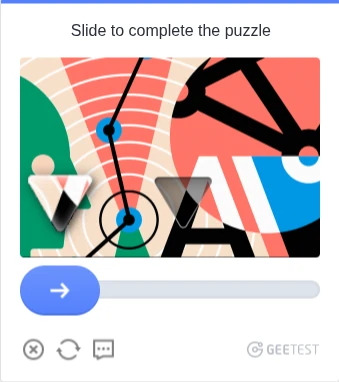
Currently this tool is able to solve the Geetest puzzle captcha. In the long run, other Geetest variations will be made available.
Requirements
- Python >= 3.10
- If using Nodriver - Google chrome installed on system. This is the recommended method.
- If using Selenium - Selenium properly installed and in
PATH - If using Playwright - Playwright must be properly installed with
playwright install - If using mobile - Appium and opencv must be properly installed
- Stealth plugin - You must use the appropriate
stealthplugin for whichever browser automation framework you are using.- For Selenium, you can use undetected-chromedriver
- For Playwright, you can use playwright-stealth
Installation
This project can be installed with pip. Just run the following command:
pip install geetest-captcha-solver
Note for NodeJS users
For users automating in NodeJS or another programming language, the recommended method is to download the chrome extension from the chrome web store, unzip the file, patch the script.js file with your API key, and load it into your browser. This will save you a lot of time implementing the API on your own.
Note on running headless
To run in headless mode, you need to use the launch arg headless=new or headless=chrome as a launch arg.
Instructions to do this are in their own respective sections.
Another option is to use Xvfb with headless=True to spoof a graphical environment.
Nodriver Client (Recommended)
Nodriver is the latest advancement in undetected automation technology, and is the recommended method for using SadCaptcha.
Import the function make_nodriver_solver
This function will create an noddriver instance patched with the geetest Captcha Solver chrome extension.
The extension will automatically detect and solve the captcha in the background, and there is nothing further you need to do.
from geetest_captcha_solver.launcher import make_nodriver_solver

async def main():
    launch_args = ["--headless=chrome"] # If running headless, use this option, or headless=new
    api_key = "YOUR_API_KEY_HERE"
    # NOTE: Keyword arguments passed to make_nodriver_solver() are directly passed to nodriver.start()!
    driver = await make_nodriver_solver(api_key, browser_args=launch_args) # Returns nodriver browser
    # ... [The rest of your code that accesses geetest goes here]
    # Now geetest captchas will be automatically solved!
All keyword arguments passed to make_nodriver_solver() are passed directly to nodriver.start().
Selenium Client
Import the function make_undetected_chromedriver_solver
This function will create an undetected chromedriver instance patched with the geetest Captcha Solver chrome extension.
The extension will automatically detect and solve the captcha in the background, and there is nothing further you need to do.
from geetest_captcha_solver import make_undetected_chromedriver_solver
from selenium_stealth import stealth
from selenium.webdriver import ChromeOptions
import undetected_chromedriver as uc

chrome_options = ChromeOptions()
# chrome_options.add_argument("--headless=chrome") # If running headless, use this option

api_key = "YOUR_API_KEY_HERE"
driver = make_undetected_chromedriver_solver(api_key, options=options) # Returns uc.Chrome instance
stealth(driver) # Add stealth if needed
# ... [The rest of your code that accesses geetest goes here]

# Now geetest captchas will be automatically solved!
You may also pass ChromeOptions to make_undetected_chromedriver_solver(), as well as keyword arguments for uc.Chrome().
Playwright Client
Import the function make_playwright_solver_context
This function will create a playwright BrowserContext instance patched with the geetest Captcha Solver chrome extension.
The extension will automatically detect and solve the captcha in the background, and there is nothing further you need to do.
from geetest_captcha_solver import make_playwright_solver_context
from playwright.sync_api import sync_playwright
from playwright_stealth import stealth_sync, StealthConfig

launch_args = ["--headless=chrome"] # or --headless=new if that doesn't work

api_key = "YOUR_API_KEY_HERE"
with sync_playwright() as p:
    # Keyword arguments are passed to p.chromium.launch_persistent_context()
    # Returns playwright BrowserContext instance
    context = make_playwright_solver_context(p, api_key, args=launch_args)

    # If using playwright_stealth, you need to use this StealthConfig to avoid the white screen:
    page = context.new_page()
    stealth_config = StealthConfig(navigator_languages=False, navigator_vendor=False, navigator_user_agent=False)
    stealth_sync(page, stealth_config)

    # ... [The rest of your code that accesses geetest goes here]

# Now geetest captchas will be automatically solved!
You may also pass keyword args to this function, which will be passed directly to playwright's call to playwright.chromium.launch_persistent_context().
By default, the user data directory is a tempory directory that is deleted at the end of runtime.
Async Playwright Client
Import the function make_async_playwright_solver_context
This function will create an async playwright BrowserContext instance patched with the geetest Captcha Solver chrome extension.
The extension will automatically detect and solve the captcha in the background, and there is nothing further you need to do.
import asyncio
from playwright.async_api import async_playwright
from geetest_captcha_solver import make_async_playwright_solver_context
from playwright_stealth import stealth_ssync, StealthConfig

# Need this arg if running headless
launch_args = ["--headless=chrome"] # or --headless=new if that doesn't work

async def main():
    api_key = "YOUR_API_KEY_HERE"
    async with async_playwright() as p:
        # Keyword arguments are passed to p.chromium.launch_persistent_context()
        # Returns playwright BrowserContext instance
        context = await make_async_playwright_solver_context(p, api_key, args=launch_args)

        # If using playwright_stealth, you need to use this StealthConfig to avoid the white screen:
        page = await context.new_page()
        stealth_config = StealthConfig(navigator_languages=False, navigator_vendor=False, navigator_user_agent=False)
        stealth_async(page, stealth_config)

        # ... [The rest of your code that accesses geetest goes here]

asyncio.run(main())

# Now geetest captchas will be automatically solved!
You may also pass keyword args to this function, which will be passed directly to playwright's call to playwright.chromium.launch_persistent_context().
By default, the user data directory is a tempory directory that is deleted at the end of runtime.
Mobile (Appium)
Currently there is no premade solver for Mobile/appium, but you can implement the API with relative ease.
The idea is that you take a screenshot using the mobile driver, crop the images, and then send the images to the API.
Once you've done that, you can consume the response.
Here is a working example for Puzzle and Rotate captcha.
keep in mind, you will need to adjust the captcha_box and offset_x varaibles according to your particular mobile device.
Puzzle slide
from PIL import Image, ImageDraw
import base64
import requests

# SOLVING PUZZLE CAPTCHA
BASE_URL = 'https://www.sadcaptcha.com/api/v1'
LICENSE_KEY = ''
puzzle_url = f'{BASE_URL}/puzzle?licenseKey={LICENSE_KEY}'

def solve_puzzle():
    # Screenshot of page
    driver.save_screenshot('puzzle.png')
    full_image = Image.open('puzzle.png')

    # Full puzzle image - adjust box to your device
    captcha_box1 = (165, 1175, 303, 1330)
    captcha_image1 = full_image.crop(captcha_box1)

    # Draw circle over left side to occlude the puzzle piece in the main image
    draw = ImageDraw.Draw(captcha_image1)
    draw.ellipse([(0, 0), (captcha_image1.width / 4, captcha_image1.height)], fill="blue", outline="blue")
    captcha_image1.save('puzzle_screenshot.png')

    # Puzzle piece image - adjust box to your device
    captcha_box2 = (300, 945, 1016, 1475)
    captcha_image2 = full_image.crop(captcha_box2)
    captcha_image2.save('puzzle_screenshot1.png')


    with open('puzzle_screenshot.png', 'rb') as f:
        puzzle = base64.b64encode(f.read()).decode()
    with open('puzzle_screenshot1.png', 'rb') as f:
        piece = base64.b64encode(f.read()).decode()

    data = {
        'puzzleImageB64': puzzle,
        'pieceImageB64': piece
    }

    r = requests.post(puzzle_url, json=data)

    slide_x_proportion = r.json().get('slideXProportion')

    offset_x = 46 + (46 * float(slide_x_proportion))

    driver.swipe(start_x=55, start_y=530, end_x=55 + int(offset_x), end_y=530, duration=1000)
    time.sleep(3)
The number 46 in my equation comes from the distance between the captcha image and the side of the screen, which is why you add it to the value offset_x. start_x is supposed to be the center of the puzzle piece. Similarly, 530 is supposed to be the center of the puzzle piece as well.
Rotate
# SOLVING ROTATE CAPTCHA
BASE_URL = 'https://www.sadcaptcha.com/api/v1'
LICENSE_KEY = ''
rotate_url = f'{BASE_URL}/rotate?licenseKey={LICENSE_KEY}'

def solve_rotate():
    driver.save_screenshot('full_screenshot.png')

    full_image = Image.open('full_screenshot.png')

    captcha_box1 = (415, 1055, 755, 1395)
    captcha_image1 = full_image.crop(captcha_box1)

    mask = Image.new('L', captcha_image1.size, 0)
    draw = ImageDraw.Draw(mask)
    circle_bbox = (0, 0, captcha_image1.size[0], captcha_image1.size[1])
    draw.ellipse(circle_bbox, fill=255)

    captcha_image1.putalpha(mask)
    captcha_image1.save('captcha_image_circular.png')

    captcha_box2 = (318, 958, 852, 1492)
    captcha_image2 = full_image.crop(captcha_box2)

    mask2 = Image.new('L', captcha_image2.size, 0)
    draw = ImageDraw.Draw(mask2)
    draw.ellipse((captcha_box1[0] - captcha_box2[0], captcha_box1[1] - captcha_box2[1],
                  captcha_box1[2] - captcha_box2[0], captcha_box1[3] - captcha_box2[1]), fill=255)

    captcha_image_with_hole = captcha_image2.copy()
    captcha_image_with_hole.paste((0, 0, 0, 0), (0, 0), mask2)
    captcha_image_with_hole.save('captcha_image_with_hole.png')

    # inner and outer images should be cropped to the edges of the circle, without whitespace on the edges
    with open('captcha_image_with_hole.png', 'rb') as f:
        outer = base64.b64encode(f.read()).decode('utf-8')
    with open('captcha_image_circular.png', 'rb') as f:
        inner = base64.b64encode(f.read()).decode('utf-8')

    data = {
        'outerImageB64': outer,
        'innerImageB64': inner
    }

    r = requests.post(rotate_url, json=data)
    r.raise_for_status()
    response = r.json()
    angle = response.get('angle', 0)

    # calculate where the button needs to be dragged to
    # 55 is the width of the slide button
    # 286 in the example is the width of the entire bar.
    # These values may vary based on your device!
    slide_button_width = 55
    slide_bar_width = 286
    result = ((slide_bar_width - slide_button_width) * angle) / 360
    start_x = 55
    start_y = 530
    offset_x = result

    driver.swipe(start_x, start_y, start_x + int(offset_x), start_y, duration=1000)
API Client
If you are not using Selenium or Playwright, you can still import and use the API client to help you make calls to SadCaptcha
from geetest_captcha_solver import ApiClient

api_key = "YOUR_API_KEY_HERE"
client = ApiClient(api_key)

# Rotate
res = client.rotate("base64 encoded outer", "base64 encoded inner")

# Puzzle
res = client.puzzle("base64 encoded puzzle", "base64 encoded piece")

# Shapes
res = client.shapes("base64 encoded shapes image")

# Icon (Video upload)
res = client.icon("Which of these objects... ?", base64 encoded icon image")
Troubleshooting
Captcha solved but still says Verification failed?
This common problem is due to your browser settings.
If using Selenium, you must use undetected_chromedriver with the default settings.
If you are using Playwright, you must use the playwright_stealth package with the default settings.
Do not change the user agent, or modify any other browser characteristics as this is easily detected and flagged as suspicious behavior.
Contact
To contact us, make an accout and reach out through the contact form or message us on Telegram.
- Homepage: https://www.sadcaptcha.com/
- Telegram @toughdata
The SadCaptcha Team
Release history Release notifications | RSS feed

Download files
Download the file for your platform. If you're not sure which to choose, learn more about installing packages.
Source Distribution
Built Distribution
Filter files by name, interpreter, ABI, and platform.
If you're not sure about the file name format, learn more about wheel file names.
Copy a direct link to the current filters
File details
Details for the file geetest_captcha_solver-0.0.1.tar.gz.
File metadata
- Download URL: geetest_captcha_solver-0.0.1.tar.gz
- Upload date:
- Size: 30.1 kB
- Tags: Source
- Uploaded using Trusted Publishing? No
- Uploaded via: twine/6.1.0 CPython/3.12.10
File hashes
| Algorithm | Hash digest | |
|---|---|---|
| SHA256 |
c336e3f68d06f91fe21c4088efb0ed8dab11d167e6f1fd515c2bd63ec6944a54
|
|
| MD5 |
f2c5ccfeb4e10b6330969292def4d077
|
|
| BLAKE2b-256 |
a1b3fa87eac60adebb830b8344cf61a118b7cc76fe889a9099428a5c59d1baf1
|
File details
Details for the file geetest_captcha_solver-0.0.1-py3-none-any.whl.
File metadata
- Download URL: geetest_captcha_solver-0.0.1-py3-none-any.whl
- Upload date:
- Size: 36.4 kB
- Tags: Python 3
- Uploaded using Trusted Publishing? No
- Uploaded via: twine/6.1.0 CPython/3.12.10
File hashes
| Algorithm | Hash digest | |
|---|---|---|
| SHA256 |
5355df7eddab8fea9f7d4e62e3385d057b4a8f00df7e4ec32f1a7466aed9c2b0
|
|
| MD5 |
f5dab5d9fa309ae32619ecaf52126f31
|
|
| BLAKE2b-256 |
113f61f26539125d503185bc6a14f5d3f694822e5dd6be90a94262f9a28cd40d
|






